






iPad Repair in The Fix in Walmart Laurel
Cracked screen or battery draining too fast? At The Fix in Laurel, MD, we provide fast and reliable iPad repairs. From screen replacements to charging issues, our technicians use high-quality parts and offer free diagnostics so you know exactly what’s needed.

Professional iPad Repair Services
- Screen Repair & Replacement
- Battery Replacement
- Water Damage Repair
- Charging Port Repair
- Camera Repair
- Speaker & Microphone Repair
- iOS Troubleshooting & Recovery
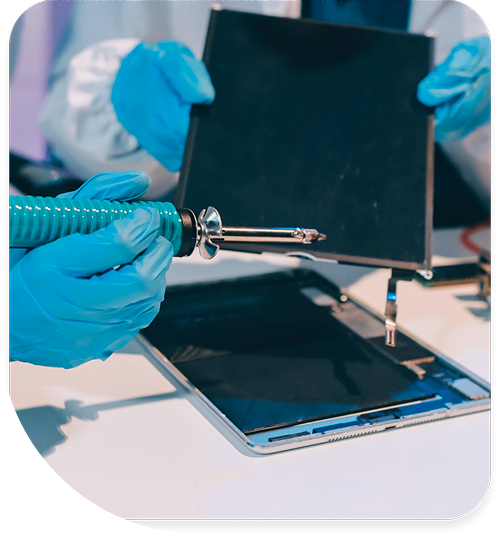
Professional iPad Repair Services In The Fix in Walmart Laurel
The Laurel Effect on iPad: A Field Technician's Report
The iPad occupies a unique position in portable device ecosystems. It's durable enough for professional use yet delicate enough to reveal hidden damage through careful inspection. Laurel's geographic position—nestled in the mid-Atlantic's humidity belt between Baltimore and Washington—creates a distinctive damage signature on iPad hardware. The 85–90 percent relative humidity peaks during summer months, combined with frequent transit through airport environments like nearby BWI, expose iPads to corrosion patterns that don't appear in drier climates. Fort Meade's federal workforce and University of Maryland's student population both rely heavily on iPad devices, and Laurel repair technicians encounter a consistent failure taxonomy.
When customers search for iPad in Laurel, MD repair assistance, they often present devices that appear superficially intact but hide substrate-level damage. The iPad's aluminum body and Gorilla Glass screen protect external surfaces, yet internal components experience accelerated degradation from mid-Atlantic humidity. Digitizer force-adhesive layer separation from edge impact combines with Smart Connector pin oxidation. LCD backlight MOSFET gate oxide failure. Battery cycle count interacts with calendar degradation modes in ways that differ substantially from specifications developed in controlled laboratory environments. Understanding these Laurel-specific failure patterns enables technicians to diagnose root causes accurately.
The Intake Brief
The intake process begins with visual inspection of the device exterior. Technicians examine the aluminum body for corrosion patterns—characteristic green or white oxidation on the frame edges and connector areas. Laurel's humidity creates these oxidation patterns even when the iPad shows no history of liquid damage. The Smart Connector, located on the bottom edge of the iPad, reveals oxidation on its contact pins when the device has spent months in Laurel's high-humidity environment. The home button area shows discoloration around the gasket where moisture has penetrated and oxidized internal contact surfaces. Customers often assume these patterns indicate internal liquid damage, but in many Laurel cases, the oxidation results from atmospheric moisture exposure rather than acute immersion. The distinction matters because repair approaches differ substantially.
The diagnostic conversation continues with functional testing. Does the display respond to touch input across the entire surface? Are there dead zones, particularly at the edges or corners? Is the display visual perfect, or are there light leaks at the bezels? Does the audio play from both speakers or only one? Can the device charge through the Lightning or USB-C connector? Does the device respond to button presses consistently? Each of these tests provides information about which subsystems are affected. Laurel technicians ask specific questions about the device history: Has the iPad been used primarily indoors in climate-controlled environments, or does the owner transport it frequently between indoor and outdoor spaces? Has it spent time in backpacks or bags without protection? Were there recent exposure events—heavy rain, beach sand, or extended vehicle storage in summer heat? These context clues point toward humidity, corrosion, or thermal stress as primary failure drivers.
What the Teardown Reveals
The teardown reveals the internal landscape where Laurel's environmental stress manifests most clearly. Once the screen assembly is removed, technicians examine the digitizer force-adhesive layer—the material binding the glass digitizer to the LCD backlight. This adhesive experiences stress from edge impacts, which are inevitable with portable devices. Corner drops are particularly problematic; the impact energy concentrates at the edge of the device, causing the adhesive to delaminate. Laurel's older neighborhoods and the Russett community's residential streets create numerous opportunities for corner impact events: dropped devices on hardwood floors, gravel surfaces, or pavement. As the adhesive layer separates, the digitizer loses contact with the LCD, causing dead zones where touch input fails to register. The screen appears intact; the separation is completely invisible externally, yet functionally critical.
The LCD backlight subsystem reveals moisture intrusion patterns. The backlight MOSFET gate oxide—the insulating layer controlling electron flow within the transistor—degrades when moisture reaches the component. Laurel's humidity environment, combined with manufacturing residue flux and ionic contaminants on the circuit board, accelerates this degradation. The degradation manifests as display brightness fluctuation, color shift, or complete backlight failure. Some iPad failures display the phenomenon where the device functions perfectly with an external display connected but shows no image on the internal LCD—the backlight MOSFET has failed while the LCD panel itself remains functional. Technicians performing a teardown immediately focus on backlight circuit diagnostics, testing transistor continuity, gate oxide leakage, and supply voltage delivery.
The battery compartment reveals calendar degradation patterns distinct from cycle degradation. An iPad used heavily for two years in a dry climate shows battery degradation primarily from use cycles—chemical stress from repeated charge and discharge. An iPad stored for one year in a climate-controlled Laurel home with moderate use patterns shows unexpected degradation from calendar aging—chemical changes occurring simply due to time and environmental humidity exposure. The battery cell's internal impedance rises, measured in milliohms, reducing peak current output and changing voltage delivery characteristics. Technicians measuring ESR (equivalent series resistance) on Laurel-recovered iPads often observe impedance values matching 24–30 month use cycles despite only 12–18 months of actual device use. This discrepancy indicates calendar degradation from humidity and temperature cycling is as significant as actual use cycles in Laurel's environment.
The Repair Record
The repair record for Laurel iPads reveals consistent repair priorities. First, addressing digitizer delamination or replacement restores touch functionality. Second, backlight circuit diagnosis and MOSFET replacement restores display visibility. Third, Smart Connector pin oxidation removal or connector replacement restores docking and accessory connectivity. Fourth, battery replacement addresses calendar and cycle degradation simultaneously. Fifth, addressing corrosion on the aluminum frame and port connectors through careful cleaning and oxidation removal restores charging and audio connectivity. Each repair addresses a specific environmental stress pattern tied to Laurel's mid-Atlantic location and humid climate.
The Laurel effect on iPad hardware is real, measurable, and consistent. Technicians working in this geographic region observe failure patterns that differ from national averages, primarily driven by humidity exposure, temperature cycling, and the accumulated environmental stress created by transit between climates. The Fix in Walmart Laurel maintains diagnostic equipment and replacement components specifically selected for these environmental realities. Humidity meters, moisture-measuring impedance analyzers, and specialized backlight circuit testers enable technicians to diagnose root causes rather than guessing at remedies. This diagnostic precision transforms vague symptoms—device not working—into specific repair work with clear outcomes and predictable timelines.
Field Notes
Why does my iPad screen show dead zones where touch doesn't work?
Dead zones typically indicate digitizer force-adhesive layer separation from edge impact stress. The adhesive binding the touch-sensitive glass digitizer to the LCD panel has delaminated in patches, causing those areas to lose electrical connection with the digitizer controller. This is particularly common in Laurel given frequent environmental cycling between temperature extremes and humidity variations. The screen appears visually intact because the glass hasn't cracked, but the internal adhesive bond has failed. Repair involves either re-adhering the digitizer using specialized heat and pressure techniques or replacing the digitizer assembly entirely.
Why does my iPad battery drain quickly despite light use?
Quick battery drain despite light use indicates elevated internal impedance (ESR) in the battery cells. In Laurel, this often results from calendar degradation—chemical changes in the battery occurring from time and environmental humidity exposure rather than from actual charging cycles alone. The battery appears to hold charge during initial testing but cannot deliver peak current under load, causing voltage to drop quickly when the processor demands power. Battery cell impedance testing reveals whether the degradation is primarily from cycle aging or calendar aging. Replacement with a fresh battery restores full energy delivery capacity and resolves the symptom.
What causes iPad screens to flicker or show color shifts?
Screen flickering or color shifting typically indicates LCD backlight MOSFET gate oxide degradation or similar backlight circuit component failure. Laurel's humidity environment accelerates gate oxide aging. The transistor controlling backlight LED current fails, causing brightness fluctuations or color inconsistency. Unlike digitizer dead zones, this failure is visible immediately—the entire display shows the symptom uniformly. Backlight circuit diagnostics with specialized test equipment reveal whether the MOSFET has failed or other backlight components require replacement. This is a board-level repair requiring careful component-level diagnostics.
Other Locations Near By You
The Fix in Clarksburg Premium Outlets
22705 Clarksburg Rd, Clarksburg, MD 20871, USA
The Fix in Walmart Frederick
7400 Guilford Dr, Frederick, MD 21704, United States
The Fix in Westfield Wheaton
11160 Veirs Mill Rd, Wheaton, MD 20902
The Fix in Walmart Landover Hills
6210 Annapolis Rd, Landover Hills, MD 20784, United States
The Fix in The Mall in Columbia
10300 Little Patuxent Pkwy #1708, Columbia, MD 21044, United States
The Fix in Towson Town Center
825 Dulaney Valley Rd, Towson, MD 21204, United States
The Fix in Westfield Montgomery
7101 Democracy Blvd #212B, Bethesda, MD 20817, United States
Your local repair experts for every device
From iPhones to gaming laptops, The Fix in Laurel, MD is your one-stop shop for device repair. Quick turnarounds, affordable prices, and local experts you can trust

Phone Cases
Protect your device in style! At The Fix in Laurel, MD, we offer a wide selection of durable phone cases for all major brands—sleek designs that keep your phone safe and looking great.

Nintendo Switch Repair
Cracked Nintendo Switch screen? We repair Switch devices in Laurel, MD quickly and affordably. Fast, easy, and always with high-quality parts.

MacBook Repair
For broken screens, battery replacements, or other issues, The Fix in Laurel, MD provides quick MacBook repairs with premium parts.

PlayStation Repair
Is your PlayStation giving you trouble? At The Fix in Laurel, MD, we handle PlayStation repairs with care and quality parts—no long waits, no hassle.

Google Repair
Need your Google Pixel fixed? At The Fix in Laurel, MD, we repair cracked screens, charging issues, and more—always using high-quality parts for lasting results.

Tablet Repair
Whether your tablet screen is cracked or the battery won’t hold a charge, The Fix in Laurel, MD provides fast, affordable tablet repairs with free diagnostics.

Computer Repair
Need PC or desktop service in Laurel, MD? We provide free diagnostics and affordable repairs, always with high-quality parts.

Game Console Repair
From Nintendo Switch® to PlayStation and Xbox, The Fix in Laurel, MD repairs all major game consoles. Fast service and dependable results.

Laptop Repair
Got a broken laptop? The Fix In Laurel, MD, our team repairs most laptop brands and models using high-quality replacement parts.

Cell Phone Repair
We repair all major phone brands in Laurel, MD. iPhone, Samsung, Google, and more—get your phone fixed fast.

iPhone Repair
Cracked screen? Battery draining too fast? Our team in Laurel, MD repairs iPhones with precision and high-quality parts to make your device feel new again.

Samsung Repair
Whether it’s a Galaxy screen replacement or a charging issue, The Fix in Laurel, MD offers fast and reliable Samsung repairs.

Xbox Repair
Xbox not working properly? Our team in Laurel, MD offers quick, reliable Xbox repairs with free diagnostics and high-quality replacement parts.


Trusted repair solution for mobile phones, tablets, gaming consoles, and computer systems. We provide fast, reliable, and affordable repair services to get your devices back in perfect working condition.
The Fix is an independent repair service provider and is not affiliated with, sponsored by, or endorsed by Apple Inc., Samsung Electronics, Google LLC, or any other device manufacturer. We use high-quality compatible replacement parts unless explicitly stated. All trademarks are property of their respective owners.


© Copyright The Fix Solutions All rights reserved 2026.
Design by Deepcoder