






Laptop Repair in The Fix in Walmart Laurel
Broken laptop slowing you down? At The Fix in Laurel, MD, we repair all major laptop brands and models. From cracked screens to battery issues, our technicians provide fast, affordable service with free diagnostics and high-quality parts.

Professional Laptop Repair Services
- Screen Repair & Replacement
- Battery Replacement
- Water Damage Repair
- Keyboard & Trackpad Repair
- Charging Port Repair
- Overheating & Fan Repair
- Hard Drive / SSD Replacement & Data Recovery
- Software Troubleshooting & Recovery
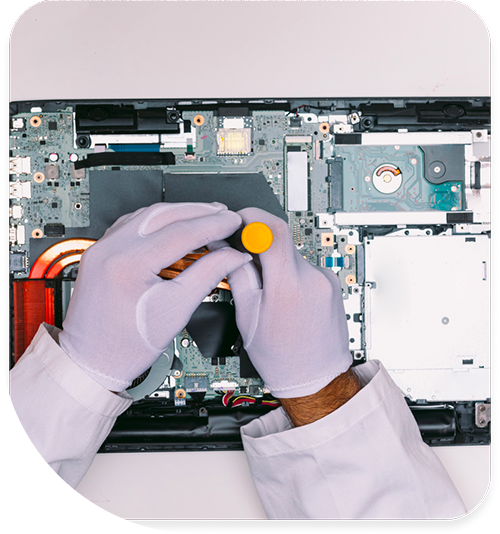
Professional Laptop Repair Services In The Fix in Walmart Laurel
Before Laurel's Summer Makes It Worse: Laptop Repair
Every laptop carries an invisible damage clock. From the moment thermal stress begins, component failure cascades in a predictable sequence. Laurel's position between Baltimore and Washington along the I-95 corridor creates a unique thermal environment: intense summer heat peaks at 95 degrees Fahrenheit, humidity climbs to 85–90 percent relative humidity, and the contrast with aggressive air conditioning in homes and offices creates rapid temperature cycling stress. Fort Meade's federal workforce brings thousands of laptops into this environment daily, and contractors traveling between Baltimore, Washington, and points north experience continuous thermal shock. Understanding this damage sequence is essential for preventing cascading failures.
When you seek Laptop repair in Laurel, MD repair services, you're confronting a device that may already be partway through its damage sequence. The sequence begins with thermal interface compound degradation—the silicone oil component separating from the matrix when sustained temperatures exceed 70 degrees Celsius. Within weeks, this creates thermal throttling, reduced performance, and eventual shutdown. If left unaddressed, the compound drying accelerates hinge torque failure, exposing the LCD flex cable to stress fractures at the hinge assembly point. The damage clock is ticking.
The Damage Clock
The damage clock starts the moment thermal interface compound begins separating at the GPU or CPU junction. Laurel's summer conditions reliably push sustained operating temperatures into the 65–75 degree Celsius range, particularly in laptops positioned on fabric surfaces, bed quilts, or blankets that block airflow beneath the device. Users typically notice performance degradation first: games stutter, applications freeze, rendering slows dramatically. They interpret this as software failure and consider replacement. In reality, the processor is throttling its clock frequency to stay within thermal safety margins. The compound still adheres to the dies, but the oil phase separation has created micro-air gaps between the die and heatspreader, reducing thermal conductivity by 40–60 percent. This phase is reversible if addressed immediately.
Continued operation without intervention moves the device into the secondary damage phase. As thermal throttling persists week after week, the GPU thermal pad compression gap widens. Constant thermal cycling—heating to 70 degrees Celsius during use, cooling to ambient during idle periods—creates mechanical fatigue in the thermal pad material. The pad compresses slightly with each cycle, creating a widening gap between the GPU and heatsink. Simultaneously, the dried compound begins flaking from the CPU junction, accelerating thermal degradation. Users report increasingly severe throttling, complete application crashes, and automatic shutdown episodes. The damage clock has advanced significantly. At this stage, intervention is more complex than simple compound replacement; the thermal pads may require remeasurement and adjustment to restore base design spacing.
The Cascade
The cascade accelerates when hinge torque failure begins. Dried thermal interface compound increases internal heat propagation to the hinge assembly and display connector areas, raising localized temperatures. Simultaneously, normal laptop use involves repeated opening and closing of the display—a mechanical stress that accumulates across years of operation. The hinge experiences micro-fractures in its stress-bearing support structure. Once hinge failure initiates, the display begins exerting abnormal torque on the LCD flex cable at the connection point, creating bending stress at angles beyond the cable's design tolerance. The cable develops micro-fractures at the ZIF connector interface. Intermittent display flickering occurs, then complete display death. Users assume the display has failed and prepare to pay a fraction of replacement cost–400 for a replacement screen.
Keyboard membrane ribbon delamination occurs in parallel with the hinge failure cascade. The thermal environment inside the laptop—now elevated due to compound degradation—exceeds the design specifications for keyboard ribbon adhesion. The polyimide ribbon membrane begins separating from its mounting substrate, particularly at the ZIF connector where mechanical stress from repeated key actuation concentrates. Keyboard failures follow: keys become intermittently unresponsive, entire sections stop working, or random characters appear during normal typing. This symptom typically manifests in Laurel during the high-humidity summer months when the internal environment reaches its most stressed state. Users attribute keyboard failure to dust contamination and schedule replacement, not recognizing that thermal stress is driving the ribbon delamination.
The DC barrel jack solder fatigue cascade develops from repeated thermal cycling stress on the jack's solder connections to the motherboard. The jack experiences micro-stress from insertion angles that deviate slightly from 90 degrees—inevitable given normal user handling patterns. Thermal cycling from heating and cooling creates solder joint fatigue at the connection points. Visible symptoms include intermittent charging loss, the need to hold the charging connector at precise angles to maintain contact, and eventual complete charging failure. Users believe the charger has failed or the jack has broken and requires motherboard-level repair. In many cases, the jack connections have simply fatigued from thermal stress combined with mechanical insertion stress.
The Intervention Window
The intervention window is narrowest at the earliest damage phase. If users seek repair service the moment they notice thermal throttling and performance degradation, technicians can apply fresh thermal interface compound, verify heatsink contact, and restore thermal performance within hours. The compound reapplication closes the damage clock's advance. However, if weeks pass with continued throttling operation, the secondary damage phase has already begun: hinge micro-fractures have initiated, thermal pads have compressed, and keyboard ribbon delamination has started. Intervention at this stage requires addressing multiple cascading failures simultaneously. By the time display flickering or complete keyboard failure appears, the repair scope has expanded significantly. Laurel residents benefit from understanding this timeline because it converts a routine maintenance service into an emergency hardware replacement if they delay seeking repair.
The critical insight is recognizing that laptop failure rarely results from a single component suddenly ceasing to function. Instead, failure cascades follow predictable thermal stress patterns specific to Laurel's climate environment. Summer heat combined with humidity creates conditions that accelerate every failure mode simultaneously. The Fix in Walmart Laurel applies thermal imaging and performance monitoring to detect early-stage thermal stress before it cascades into multiple failures. This preventive approach catches devices during the narrow intervention window when simple thermal maintenance restores full functionality, preventing the exponential cost escalation that occurs when cascading failures compound.
Field Notes
How can I tell if my laptop is throttling due to thermal stress?
Performance degradation that occurs consistently during sustained use but improves after the laptop cools down indicates thermal throttling. Open system monitoring software and observe CPU or GPU frequency under load—if the frequency drops significantly compared to baseline specifications, throttling is occurring. Also, listen for the fan running at maximum speed continuously; this is a sign the thermal management system is in overdrive. Laurel's summer conditions make this particularly noticeable in afternoon hours when ambient heat peaks. Users should seek thermal diagnostics immediately if they observe frequency drops or sustained maximum fan operation.
Why is my keyboard developing dead keys one section at a time?
Sequential keyboard failure typically indicates ribbon membrane delamination progressing across the keyboard matrix. The adhesive holding the polyimide ribbon fails in patches due to thermal stress, causing entire sections to lose electrical connection. This is particularly common in Laurel during high-humidity summer months when internal laptop temperatures and humidity combine to stress the ribbon adhesive. Unlike dust contamination, which affects random individual keys, delamination creates zone-based failure patterns. Addressing this requires keyboard replacement, ideally before the delamination spreads across the entire keyboard.
What causes intermittent display flickering on laptops?
Intermittent flickering typically stems from LCD flex cable stress fractures at the hinge assembly connection point, caused by hinge torque failure combined with thermal cycling stress. The cable experiences micro-fractures that cause intermittent electrical discontinuity—the display flickers when the cable flexes to a certain angle. This is particularly common in Laurel after months of thermal stress during the high-humidity season. Unlike static display failures, intermittent flickering often resolves temporarily after the laptop cools. However, continued operation advances the micro-fractures toward complete failure. Users should seek display and hinge diagnostics immediately upon noticing intermittent flickering.
Other Locations Near By You
The Fix in Clarksburg Premium Outlets
22705 Clarksburg Rd, Clarksburg, MD 20871, USA
The Fix in Walmart Frederick
7400 Guilford Dr, Frederick, MD 21704, United States
The Fix in Westfield Wheaton
11160 Veirs Mill Rd, Wheaton, MD 20902
The Fix in Walmart Landover Hills
6210 Annapolis Rd, Landover Hills, MD 20784, United States
The Fix in The Mall in Columbia
10300 Little Patuxent Pkwy #1708, Columbia, MD 21044, United States
The Fix in Towson Town Center
825 Dulaney Valley Rd, Towson, MD 21204, United States
The Fix in Westfield Montgomery
7101 Democracy Blvd #212B, Bethesda, MD 20817, United States
Your local repair experts for every device
From iPhones to gaming laptops, The Fix in Laurel, MD is your one-stop shop for device repair. Quick turnarounds, affordable prices, and local experts you can trust

Phone Cases
Protect your device in style! At The Fix in Laurel, MD, we offer a wide selection of durable phone cases for all major brands—sleek designs that keep your phone safe and looking great.

Nintendo Switch Repair
Cracked Nintendo Switch screen? We repair Switch devices in Laurel, MD quickly and affordably. Fast, easy, and always with high-quality parts.

MacBook Repair
For broken screens, battery replacements, or other issues, The Fix in Laurel, MD provides quick MacBook repairs with premium parts.

PlayStation Repair
Is your PlayStation giving you trouble? At The Fix in Laurel, MD, we handle PlayStation repairs with care and quality parts—no long waits, no hassle.

Google Repair
Need your Google Pixel fixed? At The Fix in Laurel, MD, we repair cracked screens, charging issues, and more—always using high-quality parts for lasting results.

Tablet Repair
Whether your tablet screen is cracked or the battery won’t hold a charge, The Fix in Laurel, MD provides fast, affordable tablet repairs with free diagnostics.

Computer Repair
Need PC or desktop service in Laurel, MD? We provide free diagnostics and affordable repairs, always with high-quality parts.

Game Console Repair
From Nintendo Switch® to PlayStation and Xbox, The Fix in Laurel, MD repairs all major game consoles. Fast service and dependable results.

iPad Repair
Need your iPad fixed? At The Fix in Laurel, MD, we repair cracked screens, charging issues, and more—always using high-quality parts for lasting results.

Cell Phone Repair
We repair all major phone brands in Laurel, MD. iPhone, Samsung, Google, and more—get your phone fixed fast.

iPhone Repair
Cracked screen? Battery draining too fast? Our team in Laurel, MD repairs iPhones with precision and high-quality parts to make your device feel new again.

Samsung Repair
Whether it’s a Galaxy screen replacement or a charging issue, The Fix in Laurel, MD offers fast and reliable Samsung repairs.

Xbox Repair
Xbox not working properly? Our team in Laurel, MD offers quick, reliable Xbox repairs with free diagnostics and high-quality replacement parts.


Trusted repair solution for mobile phones, tablets, gaming consoles, and computer systems. We provide fast, reliable, and affordable repair services to get your devices back in perfect working condition.
The Fix is an independent repair service provider and is not affiliated with, sponsored by, or endorsed by Apple Inc., Samsung Electronics, Google LLC, or any other device manufacturer. We use high-quality compatible replacement parts unless explicitly stated. All trademarks are property of their respective owners.


© Copyright The Fix Solutions All rights reserved 2026.
Design by Deepcoder