






Google Repair in The Fix in Paramus Park
Is your Pixel giving you trouble? At The Fix in Paramus, NJ, we handle Google repairs fast and hassle-free. From cracked screens to battery replacements, we use high-quality parts and provide free diagnostics so you know exactly what’s wrong before any repair begins.

Professional Google Repair Services
- Screen Repair & Replacement
- Battery Replacement
- Water Damage Repair
- Camera Repair
- Charging Port Repair
- Speaker & Microphone Repair
- Software Troubleshooting & Recovery
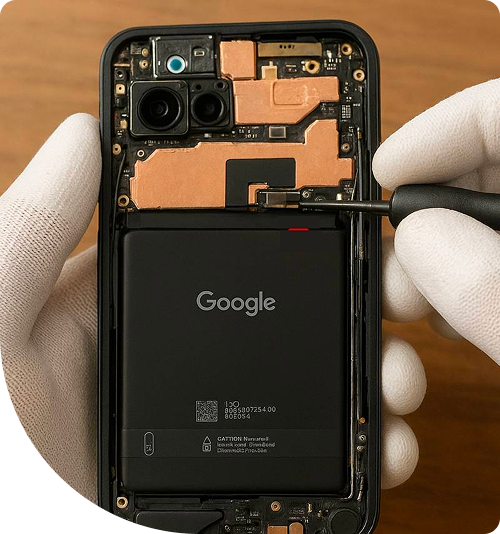
Professional Google Repair Services In The Fix in Paramus Park
Need Google Repair in Paramus, NJ 07652?
You reach for your Pixel during lunch break at a Route 17 restaurant, only to discover the screen remains black despite the phone clearly powering on—you hear notification sounds and feel haptic feedback, but the display shows nothing. Or perhaps your camera app launches successfully, but photos appear with strange artifacts or the lens won't focus no matter how many times you tap the screen. These failures stem from specific hardware issues within Google's Pixel architecture: OLED panel failures, camera module defects, or charging port damage. When you need expert Google Repair in Paramus, NJ, understanding which component actually failed prevents unnecessary repairs and helps you make informed decisions about your device's service needs.
Google Pixel devices distinguish themselves through custom Tensor chip architecture, computational photography algorithms, and pure Android integration. However, this engineering sophistication creates repair challenges—the under-display fingerprint sensor requires precise calibration after screen replacement, the camera bar's unique design makes lens damage common, and the Tensor chip's heat output demands effective thermal management. At 700 Paramus Park, Paramus, NJ 07652, we approach Pixel repair as specialized electronics work, utilizing Google's diagnostic protocols and component-level troubleshooting to identify exact failure points.
Why does the screen stay black despite the phone functioning?
The "Black Screen of Death" on Pixel devices presents a confusing scenario: your phone rings for incoming calls, you feel vibration from notifications, and pressing volume buttons produces sounds—yet the display remains completely dark. This symptom indicates OLED panel failure rather than broader system crashes. The digitizer (touch layer) and phone's logic board function correctly; only the display element that generates visible light has failed.
OLED displays consist of organic compounds that emit light when electrical current passes through them. Unlike LCD panels with separate backlights, each OLED pixel generates its own illumination. These organic materials degrade over time through a process called "luminance decay." Extended screen-on time, maximum brightness usage while navigating Garden State Parkway, or manufacturing defects accelerate this degradation. Eventually, the organic layers stop producing light entirely despite receiving correct electrical signals from the display controller.
Physical trauma also causes OLED failures. The Pixel's display assembly includes multiple layers: protective glass, touch digitizer, OLED matrix, and controller flex cables. A drop that doesn't crack the external glass can still fracture the OLED layer internally, causing complete blackout or partial failures like vertical lines or color distortion. The impact shockwave travels through the layers, potentially cracking the brittle OLED substrate without visible external damage.
Repair requires complete display assembly replacement. The OLED panel, digitizer, and glass fuse together as one unit during manufacturing. Attempting to separate these layers destroys the OLED's delicate structure. We source display assemblies that match your Pixel's specific model and generation, ensuring compatibility with the under-display fingerprint sensor. Post-installation, we perform calibration using specialized software that maps the new display's optical characteristics to the fingerprint sensor, restoring biometric security functionality.
What causes the optical fingerprint sensor to stop working?
Pixel phones employ ultrasonic or optical fingerprint sensors embedded beneath the display glass. These sensors illuminate your fingerprint with specific light wavelengths, capturing the reflected pattern to verify identity. After screen replacement or display damage, fingerprint recognition often fails completely—the sensor cannot detect your finger or repeatedly rejects valid prints. This occurs because the new display glass has different optical properties than the one originally calibrated to the sensor.
The sensor requires precise light transmission through the display layers. Manufacturing variations in glass thickness, anti-reflective coatings, and adhesive layers alter how light passes through the screen. When you place your finger on a replacement display, the sensor receives a distorted fingerprint image due to these optical differences. Without recalibration, the sensor either sees nothing or captures unusable data that doesn't match stored fingerprint templates.
Calibration requires proprietary tools and software that map the new display's optical characteristics. We use specialized calibration devices that generate test patterns, measure the sensor's response through the replacement screen, and adjust sensitivity parameters accordingly. This process ensures the sensor receives clear fingerprint images through the new glass, restoring the security and convenience of biometric unlocking for users commuting through Bergen County or working near New Bridge Medical Center.
Physical sensor damage presents a more serious challenge. Drops or pressure on the screen can crack the sensor's protective layer or damage the CMOS imaging array beneath. If the sensor hardware itself failed, screen replacement won't restore functionality—the sensor module requires separate replacement, which involves logic board disassembly and component-level repair.
How does the camera bar design affect lens damage?
Google's distinctive camera bar creates a protruding ridge across the Pixel's back surface. This design houses advanced camera modules—the primary wide sensor, ultrawide lens, telephoto optics, and laser autofocus systems—but the elevation makes the lenses vulnerable to impact damage. Setting your phone on rough surfaces near Paramus Park, sliding it across tables, or drops onto pavement can shatter the external lens glass even when the phone's body remains intact.
The camera bar uses sapphire crystal lens covers prized for scratch resistance, but sapphire's hardness makes it brittle under impact. A concentrated force—like landing on a small stone—can fracture the crystal despite its scratch immunity. Cracked lens glass creates several problems: reduced image clarity from light diffraction, lens flare in bright conditions from internal reflections, and potential debris entry that scratches the camera module's actual optical elements.
Beyond external lens glass, the camera modules contain precision optics with Optical Image Stabilization (OIS). OIS systems use electromagnetic actuators to physically move lens elements, counteracting hand shake during capture. Drops can damage these actuators or knock lens elements out of alignment. You'll notice this as inability to focus, blurry photos even in good light, or grinding noises when launching the camera app as damaged OIS motors attempt to initialize.
We assess camera damage by testing each lens module independently. If only the external lens glass cracked while the module remains functional, we can replace just the glass cover—carefully removing the damaged crystal and installing replacement sapphire or glass elements. For damaged modules showing focus failures or OIS issues, complete module replacement restores photographic quality. We verify repairs by testing autofocus speed, image stabilization effectiveness, and capturing sample photos under various lighting conditions around Ridgewood before returning your device.
Why won't the USB-C port charge reliably anymore?
The USB-C port on Pixel devices handles charging, data transfer, and audio output for wired headphones. Port failures manifest progressively: first requiring specific cable angles to charge, then intermittent charging recognition, finally complete failure where no cable registers. These symptoms indicate physical port damage or internal debris accumulation rather than battery or charging circuit problems.
USB-C ports contain 24 pins arranged in two rows—12 on top and bottom—with each pin serving specific functions. The power delivery pins negotiate charging current with your charger, while data pins handle file transfers and DisplayPort video output. Compacted lint and pocket debris gradually fills the port cavity, preventing cables from fully inserting. This reduces electrical contact, causing intermittent charging and slow data transfers.
More severe damage occurs from forcing cables at angles or tripping over charging cables. The port's thin metal housing can bend inward, or the pins themselves can break or bend out of position. Unlike older USB-A ports, USB-C's reversible design means damage to either pin row disables functionality. The port also connects to a modular daughterboard in most Pixel models, which simplifies replacement compared to devices with soldered ports.
We diagnose port issues by microscope inspection for debris, bent pins, or housing damage. For debris-related problems, ultrasonic cleaning removes compacted material without damaging pins. Bent pins can sometimes be carefully straightened under magnification, though success depends on the severity of deformation. For ports with broken pins or housing damage, we replace the entire USB-C daughterboard—this modular component also includes the primary microphone and antenna connectors, so replacement restores multiple functions simultaneously.
What happens when the Tensor chip overheats during use?
Google's custom Tensor processors deliver impressive computational photography and machine learning capabilities but generate substantial heat during intensive tasks. Image processing, video recording, or extended navigation sessions through Route 4 traffic push the chip to maximum performance states, producing thermal energy that must dissipate effectively or risk throttling and damage.
Pixel phones use graphite thermal sheets and vapor chamber cooling in higher-end models to spread heat across the device's surface area. These thermal management systems work initially, but degradation occurs through normal use. The graphite sheets can compress from repeated heating cycles, reducing their thermal conductivity. If you frequently use your Pixel in hot environments—like car dashboards during summer in New Jersey—the additional ambient heat overwhelms the cooling system's capacity.
Thermal throttling manifests as performance degradation: camera app lag when switching between lenses, slower photo processing, or the phone feeling uncomfortably hot near the camera bar. In extreme cases, the device displays overheating warnings and temporarily disables the camera or other power-intensive features to protect the processor from thermal damage.
We address thermal issues through systematic testing and cooling system inspection. Thermal imaging cameras reveal hotspot locations during stress testing, identifying whether heat concentrates at the Tensor chip or spreads evenly across the frame. If thermal compound between the chip and heatsink has dried out, we clean and reapply high-performance thermal interface material. We also verify that graphite sheets maintain proper contact and haven't compressed excessively. Post-repair thermal testing confirms the cooling system maintains the Tensor chip within safe operating temperatures during sustained workloads.
Why does wireless charging fail after back glass damage?
Wireless charging systems require precise alignment between the charging pad's transmitter coil and the receiver coil inside your Pixel. The magnetic field passing through the back glass induces current in the receiver coil, which converts to DC power for the battery. Back glass damage disrupts this charging system even when cracks seem minor or purely cosmetic.
Cracked glass can create air gaps between the glass surface and the internal wireless charging coil. These gaps increase the distance between transmitter and receiver, reducing charging efficiency or preventing charging initiation entirely. Electromagnetic fields weaken rapidly with distance—even a millimeter gap from glass delamination significantly degrades power transfer. Additionally, shattered glass can shift position, allowing metal fragments or debris to accumulate between the glass and charging coil. These foreign materials can block magnetic fields or create eddy currents that convert charging energy into waste heat.
Back glass replacement on Pixels requires careful work. The glass adheres to the frame with strong adhesive requiring controlled heat application to soften. Excessive heat damages internal components, while insufficient heat makes glass removal impossible without cracking adjacent panels. We use precision heating equipment and specialized tools to separate damaged glass, clean adhesive residue, and install replacement glass that restores both structural integrity and wireless charging functionality.
Accessing Professional Diagnostics Locally
Device failures demand accurate diagnosis before repairs begin. Guessing at problems leads to unnecessary part replacements and continued frustration. Our Paramus Park location provides comprehensive diagnostic services—we test individual components, measure electrical characteristics, and identify exact failure points rather than assuming solutions based solely on symptoms. Stop by 700 Paramus Park, Paramus, NJ 07652, where we'll explain your Pixel's specific issue and discuss repair options with complete technical transparency.
Frequently Asked Questions
Q: Will my Pixel's under-display fingerprint sensor work after screen replacement in Paramus, NJ?
A: Yes, but only with proper calibration. We use specialized calibration equipment that maps the new display's characteristics to the sensor, restoring fingerprint recognition accuracy. Without this calibration step, the sensor either won't detect your finger or will reject valid prints repeatedly.
Q: My Pixel gets very hot when using the camera near Garden State Plaza—is this normal?
A: Some warmth during intensive camera use is normal as the Tensor chip processes computational photography algorithms. However, excessive heat that makes the phone uncomfortable to hold, triggers warning messages, or causes camera app slowdowns indicates thermal management issues. Degraded thermal interface material or compressed graphite sheets reduce cooling efficiency. We can test thermal performance and service the cooling system to restore normal operating temperatures.
Q: Can you replace just the camera bar glass without replacing the entire camera module?
A: Yes, in most cases. If the camera modules themselves function correctly—producing clear focused images without artifacts—we can replace only the external sapphire lens covers. This involves carefully removing broken glass, cleaning the module surfaces, and installing replacement lens elements. However, if the impact damaged the camera module's OIS mechanism or optics, complete module replacement becomes necessary to restore full photographic quality.
Other Locations Near By You
The Fix in American Dream in East Rutherford
1 American Dream Wy, East Rutherford, NJ 07073
The Fix in Bridgewater Commons
400 Commons Way, Bridgewater Township, NJ 08807, United States
The Fix in The Mills at Jersey Gardens
651 Kapkowski Rd Elizabeth, NJ 07201
The Fix in Walmart Vineland
1070 W Landis Ave, Vineland, NJ 08360, United States
The Fix in Walmart Riverdale
48 NJ-23, Riverdale, NJ 07457
The Fix Kiosk in Bridgewater Commons
400 Commons Way Suite 7504, Bridgewater, NJ 08807, USA
The Fix in Deptford Mall
1750 Depford Center Road, Deptford, NJ
The Fix in Hoboken
131 Washington St, Hoboken NJ 07030
Your local repair experts for every device
From iPhones to gaming laptops, The Fix in Paramus, NJ is your one-stop shop for device repair. Quick turnarounds, affordable prices, and local experts you can trust

Phone Cases
Protect your device in style! At The Fix in Paramus, NJ, we offer a wide selection of durable phone cases for all major brands—sleek designs that keep your phone safe and looking great.

Nintendo Switch Repair
Cracked Nintendo Switch screen? We repair Switch devices in Paramus, NJ quickly and affordably. Fast, easy, and always with high-quality parts.

MacBook Repair
For broken screens, battery replacements, or other issues, The Fix in Paramus, NJ provides quick MacBook repairs with premium parts.

PlayStation Repair
Is your PlayStation giving you trouble? At The Fix in Paramus, NJ, we handle PlayStation repairs with care and quality parts—no long waits, no hassle.

Tablet Repair
Whether your tablet screen is cracked or the battery won’t hold a charge, The Fix in Paramus, NJ provides fast, affordable tablet repairs with free diagnostics.

Computer Repair
Need PC or desktop service in Paramus, NJ? We provide free diagnostics and affordable repairs, always with high-quality parts.

Game Console Repair
From Nintendo Switch® to PlayStation and Xbox, The Fix in Paramus, NJ repairs all major game consoles. Fast service and dependable results.

Laptop Repair
Got a broken laptop? The Fix In Paramus, NJ, our team repairs most laptop brands and models using high-quality replacement parts.

iPad Repair
Need your iPad fixed? At The Fix in Paramus, NJ, we repair cracked screens, charging issues, and more—always using high-quality parts for lasting results.

Cell Phone Repair
We repair all major phone brands in Paramus, NJ. iPhone, Samsung, Google, and more—get your phone fixed fast.

iPhone Repair
Cracked screen? Battery draining too fast? Our team in Paramus, NJ repairs iPhones with precision and high-quality parts to make your device feel new again.

Samsung Repair
Whether it’s a Galaxy screen replacement or a charging issue, The Fix in Paramus, NJ offers fast and reliable Samsung repairs.

Xbox Repair
Xbox not working properly? Our team in Paramus, NJ offers quick, reliable Xbox repairs with free diagnostics and high-quality replacement parts.


Trusted repair solution for mobile phones, tablets, gaming consoles, and computer systems. We provide fast, reliable, and affordable repair services to get your devices back in perfect working condition.
The Fix is an independent repair service provider and is not affiliated with, sponsored by, or endorsed by Apple Inc., Samsung Electronics, Google LLC, or any other device manufacturer. We use high-quality compatible replacement parts unless explicitly stated. All trademarks are property of their respective owners.


© Copyright The Fix Solutions All rights reserved 2026.
Design by Deepcoder