






Nintendo Switch Repair in The Fix in Paramus Park
Is your Nintendo Switch not working properly? At The Fix in Paramus, NJ, we repair screens, batteries, and more—always with free diagnostics and high-quality parts. Whether it’s a cracked screen or Joy-Con issue, our team gets you back to gaming fast.

Professional Nintendo Switch Repair Services
- Joy-Con Drift & Controller Repair
- Screen Repair & Replacement
- Battery Replacement
- Charging Port Repair
- Water Damage Repair
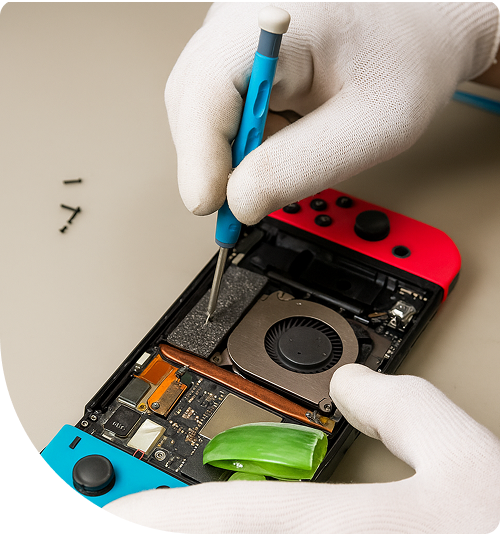
Professional Nintendo Switch Repair Services In The Fix in Paramus Park
Need Nintendo Switch Repair in Paramus, NJ 07652?
Picture this: you're settling in for a gaming session after navigating evening traffic on Route 17, only to discover your Joy-Con drifting uncontrollably, making precision platforming impossible. Or perhaps you've planned a family gaming night near Van Saun County Park, but your console refuses to power on despite being plugged in overnight. These frustrations signal specific hardware failures within Nintendo's portable gaming system—problems that stem from mechanical wear, power delivery faults, or thermal stress rather than software glitches. When you need expert Nintendo Switch Repair in Paramus, NJ, understanding what actually failed inside your console helps you make informed decisions about repair versus replacement.
Gaming hardware operates under demanding conditions—rapid temperature fluctuations when docking and undocking, mechanical stress on joystick components during intense gameplay, and electrical strain on charging circuits. At 700 Paramus Park, Paramus, NJ 07652, we approach Switch repairs as precision electronics work, utilizing diagnostic equipment to identify exact failure points rather than guessing based on symptoms alone.
What causes the analog stick to register false inputs?
Joy-Con drift represents the most widespread mechanical failure in Nintendo Switch controllers. The symptom appears as involuntary character movement or camera rotation when you're not touching the analog stick. This isn't a calibration error or firmware bug—it's physical degradation of the potentiometer mechanism that translates stick position into electrical signals.
Inside each analog stick assembly sits a potentiometer with graphite contact pads arranged in an X-Y grid. Metal wipers slide across these pads as you move the stick, varying electrical resistance to indicate position. During normal gameplay—especially in competitive scenarios or action titles requiring rapid stick movements—these wipers generate friction against the graphite surface. Over hundreds of hours, microscopic graphite particles erode from the pads, contaminating the sensor chamber.
This conductive debris creates false resistance readings. The console's processor interprets these erratic signals as intentional stick movement, causing your character to drift even when the stick returns to center position. Compressed air or contact cleaner provides only temporary relief by temporarily displacing the particles. Permanent correction requires complete analog stick module replacement, installing components with improved wear resistance and tighter manufacturing tolerances that reduce particle generation during normal use.
Why won't your Switch charge or recognize the dock?
Power delivery failures manifest in several ways: the console charges slowly, doesn't charge at all, or fails to output video when docked. These symptoms often trace to the M92T36 power management integrated circuit on the motherboard. This chip negotiates USB Power Delivery protocols, managing voltage conversion from the USB-C port to the battery and system components.
The M92T36 IC operates under significant electrical stress, particularly when users employ third-party chargers lacking proper PD negotiation. Voltage spikes or incorrect power delivery handshakes can damage the chip's internal MOSFETs or control logic. When this occurs, the Switch may draw zero current from chargers, display intermittent charging behavior, or power cycle repeatedly without reaching the boot screen.
Diagnosis requires measuring voltage rails on the motherboard using precision multimeters. We check the 15V input line, the 5V conversion rail, and the battery management voltage to isolate whether the failure exists in the power management IC, the USB-C port itself, or downstream voltage regulators. If the M92T36 has failed, repair involves microsoldering with hot air rework stations operating at precisely controlled temperatures to remove the damaged chip and install a replacement without disturbing adjacent surface-mount components on the densely packed logic board.
How does thermal throttling affect gaming performance near Bergen County?
The Nintendo Switch employs the Tegra X1 system-on-chip—a powerful ARM processor that generates substantial heat during graphically intensive games. To manage this thermal output, Nintendo designed an active cooling system consisting of a copper vapor chamber heat spreader, aluminum heat sink fins, and a centrifugal fan. The critical interface in this system is the thermal compound layer between the processor die and the vapor chamber.
Manufacturing thermal paste degrades predictably over time. The compound contains volatile carriers that slowly evaporate through thermal cycling, leaving behind dried residue with poor thermal conductivity. As thermal transfer efficiency drops, the processor reaches its thermal junction maximum temperature faster during gameplay. To prevent silicon damage, the system firmware initiates thermal throttling—automatically reducing clock speeds to lower heat generation.
You'll notice this as frame rate drops during demanding sequences, longer load times, or the fan running at maximum speed continuously. In severe cases, the console displays overheating warnings and forces shutdown. We address this through complete thermal system service: disassembling the console, removing hardened thermal compound, cleaning the heat sink and vapor chamber surfaces with isopropyl alcohol, and applying high-performance thermal paste—typically ceramic or metal-oxide formulations with thermal conductivity ratings exceeding 8 W/mK. This restores proper heat transfer, allowing the processor to maintain boost clocks without triggering thermal protection.
What happens when game cards won't read properly?
The game card slot contains a spring-loaded reader mechanism with 12 gold contact pins that must align precisely with corresponding pads on the game cartridge. "The game card could not be read" errors typically indicate mechanical failure of this reader assembly rather than cartridge defects. Physical trauma—forcing a cartridge in at an angle or inserting foreign objects—can bend these delicate pins out of alignment.
Even slight deformation prevents proper electrical contact. The Switch attempts to read the cartridge's authentication chip and game data multiple times before displaying the error message. Unlike cleaning dust from the slot, bent pin repair requires component replacement. The game card reader exists as a modular daughterboard in most Switch models, connected to the main logic board via flex cable or connector.
Replacement involves removing the rear housing, detaching the electromagnetic shielding, and carefully desoldering or unplugging the damaged reader assembly. The new reader must seat perfectly flush with the chassis opening to ensure smooth cartridge insertion. We test the replacement by attempting to read multiple game cards, verifying that the console recognizes cartridges immediately upon insertion and maintains stable data transfer during gameplay without read errors or unexpected ejections.
Can liquid damage be reversed on gaming consoles?
Liquid exposure creates time-critical emergencies for electronic devices. Whether from spilled beverages near Garden State Plaza or humidity infiltration during storage, moisture introduces conductive paths between components that should remain electrically isolated. This causes short circuits that can destroy chips, corrode solder joints, or create permanent electrical pathways through dendrite formation.
The critical factor is response time. Liquid begins corroding copper traces and component leads within hours of exposure, accelerating when the device remains powered. If your Switch contacted liquid, power it off immediately and do not attempt charging or powering on—electricity flowing through contaminated circuits accelerates corrosion through electrolysis.
Professional liquid damage remediation starts with complete disassembly and ultrasonic cleaning. We immerse affected circuit boards in specialized cleaning solutions that dissolve corrosion products and ionic contaminants without damaging electronic components. Under microscope inspection, we identify corroded traces, oxidized solder joints, and damaged ICs. Microsoldering techniques repair broken circuit pathways using fine-gauge jumper wires, and we replace components showing corrosion damage or electrical shorts. Success rates depend on liquid type (pure water versus sugary sodas), exposure duration, and whether the console was powered during contamination.
Why does the USB-C port become loose or unresponsive?
The Switch's USB-C port experiences significant mechanical stress—it serves charging, data transfer, and video output functions, requiring frequent cable insertion and removal. The port consists of two rows of fine pins surrounded by a metal housing, all soldered to the motherboard through connections smaller than a millimeter. Physical stress from cable insertion, particularly at angles, gradually fatigues these solder joints.
Port damage manifests progressively: first requiring specific cable angles to charge, then intermittent charging recognition, and eventually complete failure. The port's data pins carry HDMI video signals to the dock—damage to these specific pins prevents TV mode output while charging may continue functioning. This selective failure pattern helps diagnose whether the issue affects only the power pins or includes the video signal paths.
Replacement qualifies as advanced-level repair work. The port sits flush against the motherboard with 24 pins—12 signal pins on top and bottom rows, plus four mechanical anchor points. We use hot air rework and precise temperature control to melt the solder holding all connections simultaneously, extract the damaged port, clean the motherboard pads, and solder a replacement port with proper pin alignment. Post-repair testing verifies charging negotiation, data transfer functionality, and video output to docked mode to confirm all 24 connections function correctly.
Why choose local repair over manufacturer service?
Shipping your console to a regional repair center means surrendering your device for 2-3 weeks, plus shipping time and the risk of transit damage. At our Paramus location, you speak directly with the technician who will diagnose and repair your Switch. We can explain the difference between a failing fan bearing and thermal paste degradation while you wait, providing transparent information about what your console actually needs.
For Bergen County residents balancing work and family schedules, our location at Paramus Park offers convenience beyond just proximity. Drop off your console during a shopping trip, and we'll contact you when diagnostics are complete with a clear explanation of the failure mode and repair options. Most common repairs—Joy-Con replacements, fan service, or charging port work—complete within 24-48 hours, returning your gaming system to peak performance far faster than distant service centers.
Restoring Your Gaming Experience
Hardware failures shouldn't end your gaming adventures or force premature console replacement. Drift, charging issues, and thermal problems represent specific component failures with proven repair solutions. Bring your Switch to 700 Paramus Park, Paramus, NJ 07652, and we'll diagnose the exact fault preventing your console from performing as Nintendo designed it.
Frequently Asked Questions
Q: Will repairing my Switch void any remaining protection plans?
A: Third-party repairs technically end manufacturer service eligibility, though this rarely matters since Nintendo's limited coverage only lasts 12 months from purchase and excludes accidental damage. We provide transparent information about failure causes so you can make informed decisions about repair versus pursuing manufacturer replacement if you're still within that period.
Q: My Switch is slightly bent from docked heat exposure—is this fixable in Paramus, NJ?
A: Chassis warping from thermal stress is common in early Switch models due to heat accumulation in the dock. While slight bending is often cosmetic, severe warping can unseat the motherboard or crack the display. We can transfer internal components into a replacement housing shell, restoring structural integrity and proper component alignment. This "reshelling" process takes 2-3 hours and eliminates concerns about progressive warping.
Q: Can you recover game progress if my Switch won't power on near Route 4?
A: Game save data resides on the console's NAND flash memory chip, separate from the power management system. If your Switch failed due to power circuit issues but the motherboard remains intact, we can often repair the fault and boot the system normally, preserving all save data. However, if the motherboard suffered catastrophic damage, data recovery requires advanced chip-off techniques with specialized equipment to read the NAND directly.
Other Locations Near By You
The Fix in American Dream in East Rutherford
1 American Dream Wy, East Rutherford, NJ 07073
The Fix in Bridgewater Commons
400 Commons Way, Bridgewater Township, NJ 08807, United States
The Fix in The Mills at Jersey Gardens
651 Kapkowski Rd Elizabeth, NJ 07201
The Fix in Walmart Vineland
1070 W Landis Ave, Vineland, NJ 08360, United States
The Fix in Walmart Riverdale
48 NJ-23, Riverdale, NJ 07457
The Fix Kiosk in Bridgewater Commons
400 Commons Way Suite 7504, Bridgewater, NJ 08807, USA
The Fix in Deptford Mall
1750 Depford Center Road, Deptford, NJ
The Fix in Hoboken
131 Washington St, Hoboken NJ 07030
Your local repair experts for every device
From iPhones to gaming laptops, The Fix in Paramus, NJ is your one-stop shop for device repair. Quick turnarounds, affordable prices, and local experts you can trust

Phone Cases
Protect your device in style! At The Fix in Paramus, NJ, we offer a wide selection of durable phone cases for all major brands—sleek designs that keep your phone safe and looking great.

MacBook Repair
For broken screens, battery replacements, or other issues, The Fix in Paramus, NJ provides quick MacBook repairs with premium parts.

PlayStation Repair
Is your PlayStation giving you trouble? At The Fix in Paramus, NJ, we handle PlayStation repairs with care and quality parts—no long waits, no hassle.

Google Repair
Need your Google Pixel fixed? At The Fix in Paramus, NJ, we repair cracked screens, charging issues, and more—always using high-quality parts for lasting results.

Tablet Repair
Whether your tablet screen is cracked or the battery won’t hold a charge, The Fix in Paramus, NJ provides fast, affordable tablet repairs with free diagnostics.

Computer Repair
Need PC or desktop service in Paramus, NJ? We provide free diagnostics and affordable repairs, always with high-quality parts.

Game Console Repair
From Nintendo Switch® to PlayStation and Xbox, The Fix in Paramus, NJ repairs all major game consoles. Fast service and dependable results.

Laptop Repair
Got a broken laptop? The Fix In Paramus, NJ, our team repairs most laptop brands and models using high-quality replacement parts.

iPad Repair
Need your iPad fixed? At The Fix in Paramus, NJ, we repair cracked screens, charging issues, and more—always using high-quality parts for lasting results.

Cell Phone Repair
We repair all major phone brands in Paramus, NJ. iPhone, Samsung, Google, and more—get your phone fixed fast.

iPhone Repair
Cracked screen? Battery draining too fast? Our team in Paramus, NJ repairs iPhones with precision and high-quality parts to make your device feel new again.

Samsung Repair
Whether it’s a Galaxy screen replacement or a charging issue, The Fix in Paramus, NJ offers fast and reliable Samsung repairs.

Xbox Repair
Xbox not working properly? Our team in Paramus, NJ offers quick, reliable Xbox repairs with free diagnostics and high-quality replacement parts.


Trusted repair solution for mobile phones, tablets, gaming consoles, and computer systems. We provide fast, reliable, and affordable repair services to get your devices back in perfect working condition.
The Fix is an independent repair service provider and is not affiliated with, sponsored by, or endorsed by Apple Inc., Samsung Electronics, Google LLC, or any other device manufacturer. We use high-quality compatible replacement parts unless explicitly stated. All trademarks are property of their respective owners.


© Copyright The Fix Solutions All rights reserved 2026.
Design by Deepcoder