






Game Console Repair in The Fix in Paramus Park
Having trouble with your game console? At The Fix in Paramus, NJ, we repair all major consoles—including Nintendo Switch, PlayStation, and Xbox. Whether it’s a broken screen, overheating console, or controller drift, our technicians provide fast repairs with free diagnostics and high-quality parts.

Professional Game Console Repair Services
- Nintendo Switch Repair
- PlayStation Repair
- Xbox Repair
- Controller & Stick Drift Repair
- HDMI Port Repair & Replacement
- Overheating & Fan Repair
- Disc Drive Repair
- Power Supply Repair
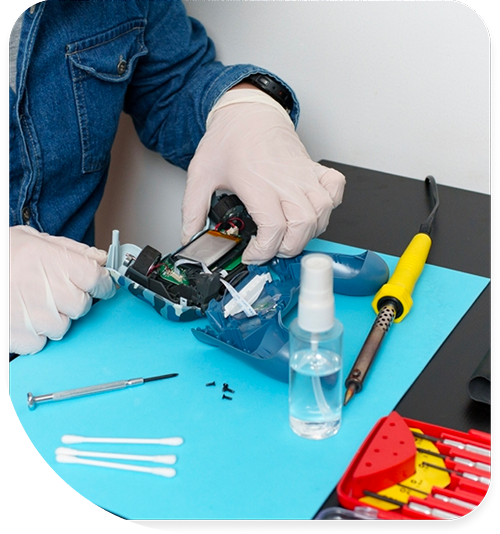
Professional Game Console Repair Services In The Fix in Paramus Park
Need Game Console Repair in Paramus, NJ 07652?
Saturday evening arrives after a productive week, and you power on your console near Van Saun Park for much-anticipated gameplay—only to encounter a spinning loading screen that never resolves, or worse, complete silence as the power button press yields no response. Perhaps your console boots successfully but displays graphical glitches, texture pop-in, or crashes mid-session during online matches with friends across Bergen County. These failures span multiple console generations and manufacturers—PlayStation, Xbox, Nintendo Switch—but share common failure modes: thermal management breakdowns, optical drive degradation, storage media corruption, or HDMI signal pathway damage. When you need expert Game Console Repair in Paramus, NJ, identifying which specific subsystem failed determines whether you're facing straightforward cleaning or complex motherboard repair.
Gaming consoles represent specialized computers optimized for consistent performance in compact enclosures. This optimization creates thermal challenges—powerful APUs generating desktop-grade heat must cool passively or through small fans in restricted airflow spaces. Optical drives endure thousands of insertion cycles. HDMI ports suffer repeated cable stress. At 700 Paramus Park, Paramus, NJ 07652, we approach console repair as platform-specific troubleshooting, utilizing diagnostic modes, thermal imaging, and component testing to isolate failures across PlayStation, Xbox, and Switch architectures.
Why do consoles overheat and shut down during gameplay?
Thermal shutdowns represent protective responses when internal temperatures exceed safe limits. Console APUs—the processors handling both computation and graphics—generate substantial heat under gaming loads. The cooling system must dissipate this thermal energy effectively or the processor reaches junction temperature limits triggering emergency shutdown to prevent permanent silicon damage.
The thermal management chain includes multiple potential failure points. Thermal paste between the APU and heatsink transfers heat from the chip to the aluminum or copper fins. Over years of operation—particularly in warm New Jersey summers or poorly ventilated entertainment centers near Route 4—this paste dries out, losing thermal conductivity. What began as efficient heat transfer becomes an insulating barrier, trapping heat at the processor while the heatsink remains relatively cool.
Fan degradation compounds thermal issues. Console fans operate continuously during gaming sessions, accumulating hundreds of hours annually. Bearing wear increases friction and noise while reducing rotational speed. Dust accumulation on fan blades creates imbalance and further reduces airflow. Eventually the fan struggles to move sufficient air through the heatsink, even operating at maximum RPM. You hear this as progressively louder fan noise before thermal shutdowns begin.
Heatsink blockage represents the most common thermal failure. Dust drawn through intake vents accumulates on heatsink fins, forming felted mats that prevent air circulation. The fan spins at full speed but pushes air against an impermeable dust barrier. We've extracted heatsinks completely caked with dust—zero airflow reached the fins despite the fan running continuously. Thermal cameras reveal hotspots on the APU while surrounding areas remain cool, confirming blocked thermal transfer rather than inadequate cooling capacity.
Comprehensive thermal service involves complete disassembly. We remove the heatsink assembly, clean away degraded thermal paste using isopropyl alcohol, and inspect the actual paste condition—dried compounds appear cracked and powdery rather than smooth and viscous. We apply fresh thermal compound in proper quantity—too much acts as insulator while too little creates air gaps. The heatsink receives ultrasonic cleaning to remove compacted dust from fin arrays. Fan bearings get inspection for wear, with replacement if excessive play or noise indicates imminent failure.
What causes optical drives to fail reading game discs?
Optical drive problems manifest as "Disc Read Error" messages, extremely slow loading times, or complete failure to recognize inserted media. These symptoms stem from laser degradation, mechanical misalignment, or electronic control failures. The drive contains precision components operating within tight tolerances—laser focus must align within micrometers, spindle motors must maintain exact rotational speeds, and the sled mechanism must position the optical pickup accurately along the disc radius.
The laser diode represents the primary wear component. These semiconductor lasers emit specific wavelengths—650nm for DVD, 405nm for Blu-ray—at precise power levels. Over thousands of read operations near Garden State Plaza or Ridgewood gaming sessions, laser output gradually decreases. The drive's automatic gain control increases current to maintain read capability, but eventually maximum current cannot compensate for diode degradation. Read attempts fail, particularly on dual-layer discs requiring higher laser power to penetrate to the second data layer.
Mechanical failures involve the sled assembly that moves the optical pickup across the disc surface. This assembly rides on rails using a worm gear or belt drive mechanism. Lubrication dries over time, increasing friction and wearing the drive components. We've seen belt drives stretched or cracked, preventing sled movement entirely. Gear teeth wear or skip, causing erratic positioning where the pickup cannot maintain track alignment as the disc spins.
Drive electronics include motor drivers, laser control circuits, and the controller chip managing the entire system. These components fail through electrical stress or heat exposure. Capacitors on the drive's PCB age similarly to those in power supplies, losing capacitance and increasing failure risk. We diagnose electronic versus mechanical failures by observing drive behavior during operation—motors that won't spin indicate electronic problems, while mechanical grinding suggests physical component wear.
Console manufacturers implement drive pairing—the optical drive's controller chip stores encryption keys matched to the specific console motherboard. This security measure prevents drive swapping to bypass disc authentication. Simple drive replacement results in error messages even with functional hardware. Repair requires either fixing the existing drive mechanism or performing chip-level transfers to maintain the cryptographic pairing between components.
Why do storage drives cause loading problems and crashes?
Console storage—whether mechanical HDD or solid-state SSD—holds game installations, system software, and save data. Drive failures produce varied symptoms: excessively long load times, texture streaming issues where graphics pop in slowly, game crashes during level loads, or inability to boot the console entirely. These symptoms trace to failing storage media unable to reliably read or write data.
Mechanical hard drives contain spinning platters coated with magnetic material. Read/write heads float nanometers above the platter surface, detecting magnetic field variations representing stored data. Physical shock—moving the console while drives spin, drops, or impacts near Paramus Park—can cause head crashes where the heads contact the platter, scratching the magnetic surface. These damaged areas become unreadable, appearing as "bad sectors" in drive diagnostics.
Even without physical trauma, platters develop bad sectors through magnetic media degradation. As drives age beyond five years of service, magnetic domains become unstable. Data stored in affected areas corrupts or becomes unreadable. The drive's internal controller detects bad sectors during read attempts and remaps them to spare sectors reserved for this purpose. When the spare sector pool depletes, data loss and system instability begin.
SSDs fail differently. NAND flash memory endures limited program-erase cycles—typically 3,000-10,000 cycles depending on the memory grade. Gaming involves substantial writes: game installations, updates, save files, and system logs. Heavy users accumulate write cycles faster than anticipated, exhausting the drive's endurance rating prematurely. As NAND cells wear out, they require higher voltages to program reliably. Eventually cells cannot hold charge, causing data retention failures.
We diagnose storage issues using built-in console diagnostics that test drive functionality. SMART data reveals drive health metrics: reallocated sector counts, pending sector remaps, and error rates. Drives showing significant sector reallocation or reporting hardware errors require replacement before complete failure destroys save data or prevents system boot. For consoles supporting SSD upgrades, we recommend solid-state storage that eliminates mechanical failure modes and dramatically improves load times.
What happens when HDMI ports lose video signal?
HDMI connectivity issues present as "No Signal" on TVs despite the console clearly powering on—you hear game audio, feel controller vibration, but see no video output. This selective failure indicates problems specifically in the HDMI signal chain rather than broader system crashes. The pathway from the console's graphics processor to your TV involves multiple failure points: the APU's video output pins, HDMI encoder chips, the physical HDMI port, and the cable itself.
Physical port damage occurs frequently. HDMI cables get plugged and unplugged repeatedly, bumped by furniture near Route 17 entertainment centers, or yanked accidentally when moving consoles. These forces stress the port's solder joints connecting it to the motherboard. The port contains 19 pins in precise alignment—damage to specific pins breaks video signals, audio channels, or the HDCP (copy protection) handshake that prevents TVs from displaying output.
The HDMI port itself can suffer internal damage. Forcing cables at angles bends internal pins out of alignment, preventing contact with cable pins. Corrosion from humidity exposure—common in basements or areas near New Bridge Medical Center with poor ventilation—oxidizes pins, increasing contact resistance until signals cannot pass reliably. Foreign objects or debris in the port create similar contact failures.
Beyond the physical port, HDMI Retimer or encoder chips amplify and condition video signals before transmission. These integrated circuits fail from electrostatic discharge when hot-swapping HDMI cables or power surges through connected devices. Retimer failure manifests as complete video loss even with a physically intact port—the signals never reach the port pins because the chip cannot process them.
We diagnose HDMI issues systematically. First, we test with confirmed functional cables and displays to eliminate external variables. We inspect the port for visible damage, bent pins, or debris. Using specialized HDMI test equipment, we verify signal presence at the port pins—this determines whether the failure exists in the port hardware or upstream in the video signal generation. For confirmed port damage, replacement requires precision microsoldering to remove the damaged connector and install a replacement without lifting the delicate PCB pads. If the retimer chip failed, component-level motherboard repair becomes necessary.
Why do power supply failures prevent console startup?
Consoles that show no response to power button presses—no LED, no sound, complete silence—typically suffer power supply failures rather than motherboard damage. The PSU converts AC line voltage into regulated DC voltages the console requires: typically 12V for drives and fans, 5V for USB and auxiliary circuits, and custom voltages for the APU and memory. PSU failure prevents any power reaching internal components.
Power supplies fail through predictable component degradation. Electrolytic capacitors age through heat exposure and electrical stress, particularly capacitors on the high-voltage primary side handling rectified AC input. As capacitors lose capacitance, voltage ripple increases and regulation degrades. Eventually capacitors fail completely—sometimes spectacularly with audible pops and visible bulging—preventing the PSU from functioning.
Transformer failures occur in switch-mode power supplies through insulation breakdown or winding failures. These faults typically blow internal fuses as a protective measure. The fuse prevents further damage but renders the PSU non-functional until replaced. Simply replacing blown fuses without identifying the underlying fault often results in immediate re-failure when power applies.
MOSFETs in the switching circuit fail from electrical stress or thermal runaway. These transistors switch thousands of times per second to convert voltages efficiently. Over years of operation, repeated thermal cycling degrades the semiconductor junctions until the MOSFET shorts or opens, disabling the PSU. We test by measuring MOSFETs with specialized equipment that checks for shorts, opens, or excessive leakage current indicating partial failure.
For integrated PSUs inside consoles, we test voltage rails at the motherboard connection. This determines whether the PSU outputs correct voltages or failed entirely. For external power bricks common on Xbox consoles, testing occurs separately from the console itself, verifying the brick delivers proper voltage and sufficient current under load before suspecting motherboard issues.
Resolving Console Hardware Problems Efficiently
Console failures require accurate component identification before repair begins. Thermal issues need cleaning and thermal paste replacement, not new motherboards. Optical drive problems may need mechanical adjustment rather than complete drive swaps. HDMI and power issues demand different repair approaches despite similar initial symptoms. Bring your console to 700 Paramus Park, Paramus, NJ 07652, where we'll diagnose the specific failed component through systematic testing and explain repair options with technical transparency.
Frequently Asked Questions
Q: Will cleaning fix my console's overheating problems near Garden State Parkway?
A: Internal cleaning resolves most thermal issues caused by dust blockage in heatsink fins or fan degradation. However, if thermal paste between the APU and heatsink completely dried out, cleaning alone won't restore thermal transfer—fresh thermal compound application becomes necessary. We assess both cleanliness and thermal paste condition during service to ensure complete thermal system restoration.
Q: Can you repair a disc drive that makes grinding noises in Paramus, NJ?
A: Grinding noises indicate mechanical component wear—typically gear damage, dried lubrication, or belt problems. We disassemble the drive mechanism, inspect for worn components, and replace damaged gears or belts as needed. For drives with laser failures rather than mechanical issues, laser assembly replacement restores read capability. We diagnose the specific failure mode before determining the appropriate repair approach.
Q: My console turns on but shows no video output—is the HDMI port broken?
A: Possibly, but we test systematically before concluding port damage. We verify with different cables and displays, inspect the port for physical damage, and use signal testers to confirm whether video signals reach the port pins. If signals exist but the port appears damaged, replacement resolves the issue. If no signals reach the port, the failure exists upstream in the HDMI encoder chip or APU, requiring more complex motherboard-level repair.
Other Locations Near By You
The Fix in American Dream in East Rutherford
1 American Dream Wy, East Rutherford, NJ 07073
The Fix in Bridgewater Commons
400 Commons Way, Bridgewater Township, NJ 08807, United States
The Fix in The Mills at Jersey Gardens
651 Kapkowski Rd Elizabeth, NJ 07201
The Fix in Walmart Vineland
1070 W Landis Ave, Vineland, NJ 08360, United States
The Fix in Walmart Riverdale
48 NJ-23, Riverdale, NJ 07457
The Fix Kiosk in Bridgewater Commons
400 Commons Way Suite 7504, Bridgewater, NJ 08807, USA
The Fix in Deptford Mall
1750 Depford Center Road, Deptford, NJ
The Fix in Hoboken
131 Washington St, Hoboken NJ 07030
Your local repair experts for every device
From iPhones to gaming laptops, The Fix in Paramus, NJ is your one-stop shop for device repair. Quick turnarounds, affordable prices, and local experts you can trust

Phone Cases
Protect your device in style! At The Fix in Paramus, NJ, we offer a wide selection of durable phone cases for all major brands—sleek designs that keep your phone safe and looking great.

Nintendo Switch Repair
Cracked Nintendo Switch screen? We repair Switch devices in Paramus, NJ quickly and affordably. Fast, easy, and always with high-quality parts.

MacBook Repair
For broken screens, battery replacements, or other issues, The Fix in Paramus, NJ provides quick MacBook repairs with premium parts.

PlayStation Repair
Is your PlayStation giving you trouble? At The Fix in Paramus, NJ, we handle PlayStation repairs with care and quality parts—no long waits, no hassle.

Google Repair
Need your Google Pixel fixed? At The Fix in Paramus, NJ, we repair cracked screens, charging issues, and more—always using high-quality parts for lasting results.

Tablet Repair
Whether your tablet screen is cracked or the battery won’t hold a charge, The Fix in Paramus, NJ provides fast, affordable tablet repairs with free diagnostics.

Computer Repair
Need PC or desktop service in Paramus, NJ? We provide free diagnostics and affordable repairs, always with high-quality parts.

Laptop Repair
Got a broken laptop? The Fix In Paramus, NJ, our team repairs most laptop brands and models using high-quality replacement parts.

iPad Repair
Need your iPad fixed? At The Fix in Paramus, NJ, we repair cracked screens, charging issues, and more—always using high-quality parts for lasting results.

Cell Phone Repair
We repair all major phone brands in Paramus, NJ. iPhone, Samsung, Google, and more—get your phone fixed fast.

iPhone Repair
Cracked screen? Battery draining too fast? Our team in Paramus, NJ repairs iPhones with precision and high-quality parts to make your device feel new again.

Samsung Repair
Whether it’s a Galaxy screen replacement or a charging issue, The Fix in Paramus, NJ offers fast and reliable Samsung repairs.

Xbox Repair
Xbox not working properly? Our team in Paramus, NJ offers quick, reliable Xbox repairs with free diagnostics and high-quality replacement parts.


Trusted repair solution for mobile phones, tablets, gaming consoles, and computer systems. We provide fast, reliable, and affordable repair services to get your devices back in perfect working condition.
The Fix is an independent repair service provider and is not affiliated with, sponsored by, or endorsed by Apple Inc., Samsung Electronics, Google LLC, or any other device manufacturer. We use high-quality compatible replacement parts unless explicitly stated. All trademarks are property of their respective owners.


© Copyright The Fix Solutions All rights reserved 2026.
Design by Deepcoder