






Google Repair in The Fix in Moonachie
Is your Pixel giving you trouble? At The Fix in Moonachie, New Jersey, we handle Google repairs fast and hassle-free. From cracked screens to battery replacements, we use high-quality parts and provide free diagnostics so you know exactly what’s wrong before any repair begins.

Professional Google Repair Services
- Screen Repair & Replacement
- Battery Replacement
- Water Damage Repair
- Camera Repair
- Charging Port Repair
- Speaker & Microphone Repair
- Software Troubleshooting & Recovery
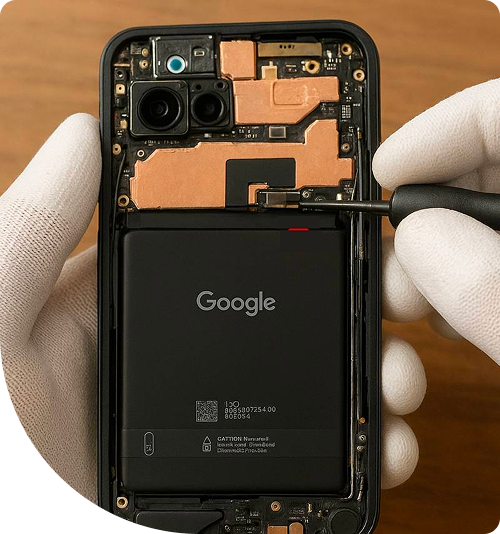
Professional Google Repair Services In The Fix in Moonachie
Critical Warning Signs: When You Need Immediate Google Repair in Teterboro, NJ
In the fast-paced environment of Teterboro, electronics are often pushed to their limits. Between the intense coordination required at the airport, the logistics management in the industrial parks, and the daily commute along the notoriously busy Route 46, smartphones are essential tools that rarely get a break. Consequently, users often ignore subtle changes in their device's physical shape or thermal behavior, assuming they can "deal with it later."
However, specific hardware failures operate on a strict timeline. Ignoring them does not just risk the device's functionality; it can pose physical risks to the user and lead to catastrophic data loss. Recognizing the urgent indicators that necessitate professional Google Repair in Teterboro, NJ, is critical for safety. At The FIX, located at 600 Hollister Rd in Teterboro Landing, technicians frequently see devices that could have been saved with a simple component swap but were rendered unfixable because the owner waited too long.
The "Spicy Pillow" Phenomenon: Battery Swelling
The most urgent hardware emergency is battery swelling. Lithium-ion batteries function through controlled chemical reactions between the cathode and anode. However, when the electrolyte inside the battery degrades—due to age, physical impact, or manufacturing defects—it begins to release flammable gas as a byproduct. In a sealed "pouch cell" battery design, this gas remains trapped, causing the battery to bloat like a balloon.
This is not merely a cosmetic issue; it is a pressurized containment vessel failing. In Teterboro, where ambient temperatures in vehicles parked at the landing or in non-climate-controlled warehouses can easily exceed safe operating limits, this chemical degradation accelerates. If a device casing appears warped, or if the back panel is physically separating from the frame, this is an immediate fire safety risk. Continued charging of a swollen battery generates heat and adds more gas to the cell, increasing the internal pressure. If the containment pouch ruptures, the lithium reacts with oxygen, potentially leading to thermal runaway. Immediate removal and replacement of the battery is the only safe course of action.
The Screen Lift: A Symptom of Internal Pressure
Often, a user will notice that their screen seems to be "popping out" of the frame. They might assume the adhesive is simply failing due to age. In the vast majority of cases, this is incorrect. The adhesive used in modern smartphones is industrial-grade and rarely fails spontaneously. Instead, the screen is being pushed out from the inside by a swelling battery.
This creates a secondary urgency: the display panel itself. Modern OLED screens are incredibly thin and brittle. As the battery expands, it exerts hydraulic-like pressure against the back of the display panel. If this pressure continues, the display will eventually fracture from the inside out, or the delicate flex cables connecting the screen to the motherboard will tear. Addressing the battery issue immediately often saves the screen. Waiting even a few days can turn a standard battery maintenance job into a much more expensive battery-plus-screen repair.
The Heat Spike: Charging Port Dangers
Another time-sensitive warning sign is extreme heat generation during charging. While some warmth is normal during rapid charging, the connector should never be too hot to touch. If a distinct "burning plastic" smell is detected, or if the cable tip becomes discolored and melted, this indicates a short circuit within the charging port assembly.
In the industrial 07608 area, this is often caused by conductive debris (metal shavings or fine dust) bridging the pins inside the USB-C port, or by liquid damage that has not dried correctly. Continuing to force power through a shorted port risks damaging the Power Management Integrated Circuit (PMIC) on the main logic board. Once the PMIC is compromised, the device may never turn on again, and data recovery becomes significantly more difficult. Discontinuing use of the charger and seeking immediate diagnostics is essential to prevent board-level failure.
The "Boot Loop" and Data Corruption
Software stability is often a reflection of hardware health. A classic sign of failing hardware is the "boot loop"—where the device shows the "G" logo, attempts to load, crashes, and restarts endlessly. While this can sometimes be a software glitch, it frequently indicates a hardware component that is failing to report "ready" status during the boot sequence.
This can be caused by a power button that is mechanically stuck in the "pressed" position, or a battery that can no longer supply the peak voltage required for the processor to initialize. The urgency here relates to data. If the boot loop is caused by failing memory storage (NAND flash degradation), the window to recover photos and files is closing rapidly. Repeatedly forcing the device to restart can corrupt the file system permanently. Professional intervention is required to stabilize the power delivery or disconnect faulty peripherals to allow for a successful boot and data backup.
Water Damage: The Corrosion Clock
The most misunderstood timeline in electronics involves liquid exposure. Many users drop their phone in water, dry it off with a towel, and are relieved when it turns on. They assume they "got lucky." This is a dangerous misconception.
Water damage is not an event; it is a process. When liquid enters the device, it brings minerals that conduct electricity. As long as the battery is connected, current flows through these minerals, causing electrolysis. This eats away at the copper traces on the motherboard, turning them into green dust (copper oxide). This corrosion can take hours or days to sever a critical connection.
The "rice method" wastes valuable time. Rice cannot extract moisture from inside a sealed glass sandwich. The only way to stop the corrosion clock is to open the device, disconnect the power source immediately, and perform a chemical cleaning of the logic board. Every hour that passes with a battery connected to a wet board decreases the likelihood of a successful repair.
Regional Environmental Factors
Residents and workers in Teterboro face specific environmental challenges. The transition from air-conditioned offices to humid outdoor heat creates condensation risks for devices that are already compromised. If a device has a cracked back glass, humidity can easily enter the device and trigger the liquid damage sensors or start corrosion, even without a direct splash. Sealing these breaches is not just about looks; it is about re-establishing the device's environmental seal to protect the sensitive internal components from the local climate.
Critical Safety Q&A
Q: If my battery is swollen, can I just press the screen back down to close the gap? A: Absolutely not. Applying external pressure to a swollen battery is extremely dangerous. You are effectively compressing a pressurized bag of volatile gas. Pressing down can puncture the separator layers inside the cell, causing an internal short circuit and immediate ignition. If the screen is lifting, handle the device gently, do not charge it, and bring it to a professional immediately for safe disassembly.
Q: My phone got wet yesterday but everything works fine today. Do I still need to have it checked? A: Yes, and urgently. The fact that it works now means the short circuits haven't hit a critical line yet. However, the corrosion process is active. It is common for water-damaged devices to work for 24-48 hours and then die suddenly as a trace corrodes through. Professional cleaning now can prevent that future death; waiting until it stops working often means the damage is permanent.
Q: Why does my phone shut off when I take a photo, even if the battery says 40%? A: This is a sign of "voltage collapse," a critical battery failure. Taking a photo or launching a game requires a sudden spike in power (amperage). An aged or failing battery may have high "internal resistance," meaning it cannot deliver that power quickly enough. The voltage drops below the system's cutoff point, and the phone crashes to protect itself. This indicates the battery is at the end of its chemical life and needs immediate replacement to restore reliability.
Your local repair experts for every device
From iPhones to gaming laptops, The Fix in Moonachie, New Jersey is your one-stop shop for device repair. Quick turnarounds, affordable prices, and local experts you can trust

Phone Cases
Protect your device in style! At The Fix in Moonachie, New Jersey, we offer a wide selection of durable phone cases for all major brands—sleek designs that keep your phone safe and looking great.

Nintendo Switch Repair
Cracked Nintendo Switch screen? We repair Switch devices in Moonachie, New Jersey quickly and affordably. Fast, easy, and always with high-quality parts.

MacBook Repair
For broken screens, battery replacements, or other issues, The Fix in Moonachie, New Jersey provides quick MacBook repairs with premium parts.

PlayStation Repair
Is your PlayStation giving you trouble? At The Fix in Moonachie, New Jersey, we handle PlayStation repairs with care and quality parts—no long waits, no hassle.

Tablet Repair
Whether your tablet screen is cracked or the battery won’t hold a charge, The Fix in Moonachie, New Jersey provides fast, affordable tablet repairs with free diagnostics.

Computer Repair
Need PC or desktop service in Moonachie, New Jersey? We provide free diagnostics and affordable repairs, always with high-quality parts.

Game Console Repair
From Nintendo Switch® to PlayStation and Xbox, The Fix in Moonachie, New Jersey repairs all major game consoles. Fast service and dependable results.

Laptop Repair
Got a broken laptop? The Fix In Moonachie, New Jersey, our team repairs most laptop brands and models using high-quality replacement parts.

iPad Repair
Need your iPad fixed? At The Fix in Moonachie, New Jersey, we repair cracked screens, charging issues, and more—always using high-quality parts for lasting results.

Cell Phone Repair
We repair all major phone brands in Moonachie, New Jersey. iPhone, Samsung, Google, and more—get your phone fixed fast.

iPhone Repair
Cracked screen? Battery draining too fast? Our team in Moonachie, New Jersey repairs iPhones with precision and high-quality parts to make your device feel new again.

Samsung Repair
Whether it’s a Galaxy screen replacement or a charging issue, The Fix in Moonachie, New Jersey offers fast and reliable Samsung repairs.

Xbox Repair
Xbox not working properly? Our team in Moonachie, New Jersey offers quick, reliable Xbox repairs with free diagnostics and high-quality replacement parts.


Trusted repair solution for mobile phones, tablets, gaming consoles, and computer systems. We provide fast, reliable, and affordable repair services to get your devices back in perfect working condition.
The Fix is an independent repair service provider and is not affiliated with, sponsored by, or endorsed by Apple Inc., Samsung Electronics, Google LLC, or any other device manufacturer. We use high-quality compatible replacement parts unless explicitly stated. All trademarks are property of their respective owners.


© Copyright The Fix Solutions All rights reserved 2026.
Design by Deepcoder