






iPad Repair in The Fix in Moonachie
Cracked screen or battery draining too fast? At The Fix in Moonachie, New Jersey, we provide fast and reliable iPad repairs. From screen replacements to charging issues, our technicians use high-quality parts and offer free diagnostics so you know exactly what’s needed.

Professional iPad Repair Services
- Screen Repair & Replacement
- Battery Replacement
- Water Damage Repair
- Charging Port Repair
- Camera Repair
- Speaker & Microphone Repair
- iOS Troubleshooting & Recovery
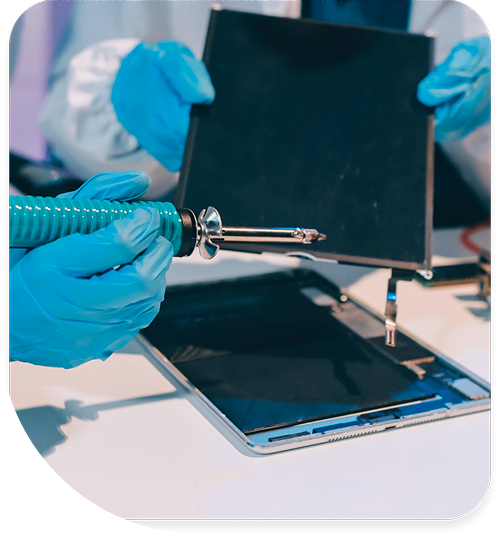
Professional iPad Repair Services In The Fix in Moonachie
Glass Shards and Lithium Risks: The Urgency of iPad Repair in Teterboro, NJ
In Teterboro, the tablet has transcended its role as a mere entertainment device. It is a critical instrument: the Electronic Flight Bag (EFB) for pilots departing Teterboro Airport, the inventory scanner for logistics managers in the surrounding industrial parks, and the digital pacifier for children during shopping trips at Teterboro Landing. Because of this high-traffic usage in demanding environments, these devices are prone to specific types of physical damage. Often, users dismiss a cracked screen or a bent frame as "cosmetic" annoyances that can be ignored.
However, a compromised chassis or a shattered display is rarely just a surface-level issue. These physical failures introduce immediate safety risks and technical "ticking clocks" that can lead to permanent data loss. Recognizing when a damaged device transitions from "usable" to "hazardous" is vital. For residents and professionals seeking iPad Repair in Teterboro, NJ, the motivation should not just be aesthetics, but safety and data preservation. At The FIX, located at 600 Hollister Rd within Teterboro Landing, we frequently see devices that have crossed the line from simple repair to catastrophic failure because the warning signs were ignored for too long.
The Hidden Danger of Micro-Shards
The most common damage is a shattered front glass (digitizer). Users often apply clear packing tape over the cracks and continue using the device. While this offers a temporary shield, it does not stop the microscopic shedding of glass.
Modern tablet glass is chemically hardened to resist scratches. When it fractures, it creates razor-sharp edges. As the device is flexed during normal use—tapped, swiped, or held—these cracks propagate, releasing invisible micro-shards. These shards can embed themselves in fingertips or, more alarmingly, fall onto faces while reading in bed. For households with children or professional environments like a cockpit where foreign object debris (FOD) is a hazard, a cracked screen is a laceration risk. Immediate glass replacement is the only way to eliminate this physical threat. The repair process involves carefully separating the damaged glass from the LCD (or replacing the fused assembly) and cleaning the frame of all microscopic debris.
The "Ghost Touch" Data Wipe Threat
There is a specific technical failure associated with cracked digitizers that poses a severe threat to data: "Ghost Touch." This occurs when the damaged capacitive layer of the screen begins to register false inputs. The tablet "thinks" someone is touching the screen when they are not.
The urgency here is extreme. If the device suffers from ghost touch while it is locked, it may randomly tap numbers on the passcode screen. After too many incorrect attempts, the security protocol triggers. First, it disables the device for one minute, then five, then an hour. Eventually, the security chip will permanently lock the device, displaying the dreaded "iPad Unavailable" or "Connect to iTunes" message. At this stage, the only way to unlock the device is to factory reset it, erasing all photos, documents, and app data.
If a device begins opening apps on its own or typing gibberish, it must be powered down immediately. Leaving it on risks a permanent lockout. Bringing it in for screen repair before this security lockout triggers is the only way to save the data without a backup.
Battery Swelling: The Pressure Cooker
Tablets house massive lithium-ion batteries—often three to four times the size of a smartphone battery. When these cells degrade due to age or suffer impact damage, they can generate significant amounts of gas. This is known as battery swelling.
In the New Jersey climate, particularly if a device is left in a vehicle at Teterboro Landing during summer or near a warehouse loading dock, this reaction accelerates. The warning signs are subtle at first: a slight discoloration on the LCD (pressure spots), the screen lifting from the frame on one side, or the device feeling "spongy" when pressed.
This is a fire safety issue. The swelling battery is a pressurized container of volatile chemicals. As it expands, it crushes the internal components against the metal casing and pushes the glass screen outward until it shatters from the inside. Continuing to charge a swollen battery is dangerous. It requires immediate professional isolation and replacement. Technicians use specialized non-conductive tools to safely extract the volatile battery and replace it with a stable, high-capacity unit, preventing the risk of thermal runaway.
The Charging Port and Logic Board Cascade
Another time-sensitive failure involves the charging port. When a charging cable has to be wiggled to work, it indicates a loose or damaged connection. Users often force the cable in or prop it up at angles to maintain a charge.
This physical stress does more than just damage the port; it can cause electrical arcing. This unstable voltage can spike the "Tristar" (or Hydra on newer models) chip on the logic board. This chip is responsible for negotiating power intake. Once this chip is fried due to a bad port, the device will show a "fake charging" symbol but never actually gain battery percentage, or it will discharge rapidly even when turned off.
Addressing a loose charging port immediately is a low-cost repair. Ignoring it until the logic board chip fails transforms the repair into a complex microsoldering job that is significantly more expensive and time-consuming.
Structural Integrity: The Bent Frame
Tablets are thin sheets of aluminum and glass. When dropped on a corner on the hard concrete floors common in Teterboro's commercial spaces, the soft aluminum frame often deforms, curling inward or bending along the chassis. Many users ignore the bend if the screen didn't break.
However, a bent frame places the glass under constant tension. It is a pre-loaded spring waiting to snap. Even a minor bump can cause a pristine screen to shatter spontaneously if the frame is applying torque to it. Furthermore, a bent frame can pinch the battery (leading to swelling) or disconnect the Wi-Fi antennas running along the edge.
During the repair process, simply slapping a new screen onto a bent frame is a recipe for failure. The new glass will lift or crack within days. Professional repair involves "gooling"—using specialized vices and clamps to reshape the aluminum chassis back to its factory geometry. This ensures that the new components sit flush and are not under structural stress.
Critical Safety Q&A
Q: Can I use my tablet while the screen is cracked if I put a screen protector on it? A: A screen protector is a temporary safety measure, not a fix. It may hold the large pieces of glass together, preventing deep cuts, but it does not stop the "ghost touch" issues that can lead to data loss. Additionally, the pressure of applying a screen protector can sometimes drive existing glass shards deeper into the underlying LCD, causing permanent display damage (black ink spots). It is a band-aid that should only be used while en route to a repair shop.
Q: Why does my tablet shut off at 30% battery? A: This is a critical sign of battery chemical failure. The battery's internal resistance has become so high that it cannot deliver the voltage required to run the processor during peak tasks. When the voltage dips below the system's threshold, the device cuts power instantly to protect hardware. This indicates the battery is at the end of its lifespan and could soon fail to turn on entirely or begin swelling.
Q: Is it safe to repair a device that has a bent frame? A: Yes, but only if the repair includes frame straightening. If a technician installs a new glass panel into a curved housing, the glass will eventually detach or break due to the tension. We assess the severity of the bend. In extreme cases where the metal is kinked or cracked, a full housing replacement may be necessary to ensure the structural integrity of the device and the safety of the battery inside.
Your local repair experts for every device
From iPhones to gaming laptops, The Fix in Moonachie, New Jersey is your one-stop shop for device repair. Quick turnarounds, affordable prices, and local experts you can trust

Phone Cases
Protect your device in style! At The Fix in Moonachie, New Jersey, we offer a wide selection of durable phone cases for all major brands—sleek designs that keep your phone safe and looking great.

Nintendo Switch Repair
Cracked Nintendo Switch screen? We repair Switch devices in Moonachie, New Jersey quickly and affordably. Fast, easy, and always with high-quality parts.

MacBook Repair
For broken screens, battery replacements, or other issues, The Fix in Moonachie, New Jersey provides quick MacBook repairs with premium parts.

PlayStation Repair
Is your PlayStation giving you trouble? At The Fix in Moonachie, New Jersey, we handle PlayStation repairs with care and quality parts—no long waits, no hassle.

Google Repair
Need your Google Pixel fixed? At The Fix in Moonachie, New Jersey, we repair cracked screens, charging issues, and more—always using high-quality parts for lasting results.

Tablet Repair
Whether your tablet screen is cracked or the battery won’t hold a charge, The Fix in Moonachie, New Jersey provides fast, affordable tablet repairs with free diagnostics.

Computer Repair
Need PC or desktop service in Moonachie, New Jersey? We provide free diagnostics and affordable repairs, always with high-quality parts.

Game Console Repair
From Nintendo Switch® to PlayStation and Xbox, The Fix in Moonachie, New Jersey repairs all major game consoles. Fast service and dependable results.

Laptop Repair
Got a broken laptop? The Fix In Moonachie, New Jersey, our team repairs most laptop brands and models using high-quality replacement parts.

Cell Phone Repair
We repair all major phone brands in Moonachie, New Jersey. iPhone, Samsung, Google, and more—get your phone fixed fast.

iPhone Repair
Cracked screen? Battery draining too fast? Our team in Moonachie, New Jersey repairs iPhones with precision and high-quality parts to make your device feel new again.

Samsung Repair
Whether it’s a Galaxy screen replacement or a charging issue, The Fix in Moonachie, New Jersey offers fast and reliable Samsung repairs.

Xbox Repair
Xbox not working properly? Our team in Moonachie, New Jersey offers quick, reliable Xbox repairs with free diagnostics and high-quality replacement parts.


Trusted repair solution for mobile phones, tablets, gaming consoles, and computer systems. We provide fast, reliable, and affordable repair services to get your devices back in perfect working condition.
The Fix is an independent repair service provider and is not affiliated with, sponsored by, or endorsed by Apple Inc., Samsung Electronics, Google LLC, or any other device manufacturer. We use high-quality compatible replacement parts unless explicitly stated. All trademarks are property of their respective owners.


© Copyright The Fix Solutions All rights reserved 2026.
Design by Deepcoder