






Nintendo Switch Repair in The Fix in Queens Center
Is your Nintendo Switch not working properly? At The Fix in New York, NY, we repair screens, batteries, and more—always with free diagnostics and high-quality parts. Whether it’s a cracked screen or Joy-Con issue, our team gets you back to gaming fast.

Professional Nintendo Switch Repair Services
- Joy-Con Drift & Controller Repair
- Screen Repair & Replacement
- Battery Replacement
- Charging Port Repair
- Water Damage Repair
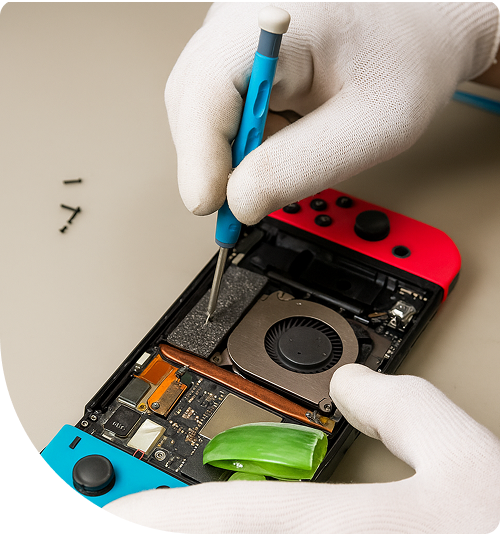
Professional Nintendo Switch Repair Services In The Fix in Queens Center
Need Nintendo Switch Repair in Queens, NY 11373?
Your Switch suddenly refuses to dock during a gaming session near Elmhurst, forcing you to play exclusively in handheld mode as the console won't recognize the dock connection. Or perhaps both Joy-Cons drift uncontrollably, making precise gameplay impossible during sessions at home near Queens Boulevard. Nintendo Switch consoles combine portable and home gaming but suffer specific hardware vulnerabilities—Joy-Con analog stick degradation, overheating from blocked vents, cracked screens from drops, and charging port failures from repeated cable connections. When you need professional Nintendo Switch Repair in Queens, NY, understanding whether you're dealing with Joy-Con potentiometer wear, power management chip failures, or USB-C port damage determines repair approach and whether your game saves remain accessible.
Nintendo's hybrid design packs substantial processing power into portable form factors, creating thermal challenges and mechanical stress points. The Tegra X1 processor generates significant heat requiring active cooling, Joy-Cons endure constant button presses and stick movement, and the USB-C port handles both charging and docking connections. At 90-15 Queens Blvd, Queens, NY 11373, we approach Switch repair as platform-specific troubleshooting, addressing Joy-Con drift through component replacement, resolving thermal shutdowns via cooling system service, and repairing charging ports without motherboard damage.
Why do Joy-Cons develop stick drift?
Joy-Con drift occurs when analog sticks register movement without input, causing characters to walk automatically or camera angles to shift during gameplay near Jackson Heights. The issue stems from potentiometer wear inside the analog stick assembly. These components use graphite contacts sliding across resistive material to detect stick position. Over thousands of gaming hours, the graphite wears away and debris accumulates, creating inconsistent electrical readings the Switch interprets as stick movement.
The Joy-Con's compact design exacerbates the problem. Nintendo uses smaller potentiometers than traditional controllers to fit the portable form factor. These miniature components wear faster under equivalent use. Dust infiltration through the rubber skirt surrounding the stick base accelerates degradation, particularly in dusty environments or during gaming sessions with food nearby.
We repair drift through complete analog stick replacement. The Joy-Con housing opens carefully to access the stick module mounted on a small circuit board. We desolder the failed component and install a replacement stick, then calibrate it through the Switch's system settings. This restoration eliminates drift completely, returning precise control for gaming sessions throughout Queens neighborhoods.
What causes the Switch to overheat and shut down?
Thermal shutdowns occur when the Tegra X1 processor exceeds safe temperature limits. The Switch detects overheating and powers off to prevent permanent chip damage. This happens most frequently during demanding games in docked mode, where the processor runs at higher clock speeds generating more heat. If cooling system efficiency degrades, temperatures spike rapidly during gameplay near Forest Hills.
The primary culprit is dust accumulation in the cooling fan and heatsink. The Switch inhales air through intake vents, carrying dust particles that settle on fan blades and heatsink fins. Over months of use, this dust forms barriers preventing airflow through the cooling system. The fan spins at maximum speed but cannot move sufficient air across the heatsink, causing thermal buildup.
Thermal paste degradation compounds the problem. The paste between the processor and heatsink transfers heat from the chip to the aluminum fins. Over years of thermal cycling, this paste dries into chalky residue losing thermal conductivity. Heat cannot escape the processor efficiently even with clean fans and heatsinks.
We address overheating through complete cooling system service. This involves disassembling the Switch, removing the heatsink assembly, cleaning dust from fan blades and heatsink fins, and replacing degraded thermal paste with fresh compound. Post-service testing confirms the console maintains safe temperatures during extended gaming sessions.
How does the M92T36 chip cause charging failures?
The M92T36 power management chip regulates charging and USB-C functionality. When this component fails, the Switch won't charge, cannot detect the dock, or shows incorrect battery percentages. The chip manages power delivery negotiations between chargers and the console, and damage here prevents proper charging communication.
M92T36 failures often result from power surges, using incompatible chargers, or short circuits from liquid damage. The chip sits on the motherboard near the USB-C port, making it vulnerable to electrical stress transmitted through charging cables. Once damaged, the chip cannot properly regulate voltage or communicate with power sources.
Diagnosis involves testing charging behavior with confirmed functional chargers and docks. If multiple known-good accessories fail to charge the Switch or establish dock connections, M92T36 failure becomes likely. Voltage measurements at specific test points confirm whether the chip outputs correct power to the battery and other components.
Repair requires component-level microsoldering. We use hot air rework stations to desolder the failed M92T36 chip, clean the motherboard pads, and install a replacement chip with proper alignment verified under microscope magnification. Post-repair testing confirms charging functionality and dock recognition before returning the console.
Why do Switch screens crack more easily than phones?
Switch screens use plastic rather than glass, making them scratch-resistant but more susceptible to pressure cracks. The display sits close to the front surface with minimal protective gap. Drops near Grand Central Parkway or pressure from objects in bags create stress that cracks the plastic display panel internally, causing black spots or lines across the screen.
The digitizer—the touch-sensitive layer—integrates with the LCD panel in the Switch. Unlike phones with separate digitizer glass, Switch screens fuse these layers. Any damage typically requires complete display assembly replacement rather than individual component repairs. The integrated design reduces thickness but increases repair complexity.
Screen replacement involves careful disassembly. The Switch uses adhesive securing the display to the frame, and removing it without damaging internal components requires controlled heat and proper prying techniques. After removing the damaged screen, we install a replacement display, reconnect the digitizer and LCD cables, and test touch responsiveness across all screen regions.
What happens when game card slots fail to read cartridges?
Game card reader failures manifest as error messages stating the console cannot read game cards, or games not appearing when cartridges insert. The problem typically involves bent pins inside the card slot, debris preventing proper contact, or electronic failures in the reader's controller chip.
The game card slot contains spring-loaded pins that contact pads on cartridges. Physical damage from forcing cards incorrectly or foreign objects entering the slot can bend these delicate pins. Even slight misalignment prevents electrical contact between cartridge and console. Dust and debris accumulating in the slot create similar contact problems without physical damage.
We inspect card slots under microscope magnification, identifying bent pins or debris. For bent pins, careful straightening using precision tools restores proper alignment. Compressed air and isopropyl alcohol cleaning removes debris without damaging pins. If the card reader's electronic components failed, slot replacement becomes necessary—a more complex repair involving motherboard work.
Maintaining Switch Gaming Functionality
Nintendo Switch failures—Joy-Con drift, overheating shutdowns, charging problems, screen damage, or card reader issues—represent specific component problems with proven repair solutions. Drift needs stick replacement, thermal issues require cooling service, and charging failures often trace to the M92T36 chip. Visit us at 90-15 Queens Blvd, Queens, NY 11373, where we'll diagnose your Switch's exact issue and restore full gaming functionality.
Frequently Asked Questions
Q: Will I lose my game saves during Switch repair in Queens, NY?
A: Game saves store on the console's internal memory, not on game cards. We don't access or modify save data during hardware repairs like Joy-Con replacement, screen fixes, or charging port service. However, if the motherboard sustained severe damage requiring replacement, save data recovery becomes extremely difficult as Nintendo encrypts saves to specific console hardware.
Q: Can you fix Joy-Con drift without replacing the entire controller near Queens Boulevard?
A: Yes, we replace only the failed analog stick component rather than the entire Joy-Con. This targeted repair addresses the drift source—the worn potentiometer—while preserving all other functional components. The process takes less time than full controller replacement and restores precise stick control for gaming throughout Elmhurst and surrounding areas.
Q: My Switch gets hot during docked gaming at home—is this normal or does it need repair?
A: Some warmth is normal during demanding games in docked mode, as the processor runs at higher performance. However, if the console shuts down with overheating errors, feels excessively hot to touch, or the fan runs constantly at maximum speed, the cooling system likely needs service. Dust accumulation and dried thermal paste cause these symptoms, requiring internal cleaning and maintenance.
Other Locations Near By You
The Fix in Green Acres Mall
2034 Green Acres Mall Valley Stream, NY 11581
The Fix in Kings Plaza
5100 Kings Plaza Ste 2213, Brooklyn, NY 11234, United States
Your local repair experts for every device
From iPhones to gaming laptops, The Fix in New York, NY is your one-stop shop for device repair. Quick turnarounds, affordable prices, and local experts you can trust

Phone Cases
Protect your device in style! At The Fix in New York, NY, we offer a wide selection of durable phone cases for all major brands—sleek designs that keep your phone safe and looking great.

MacBook Repair
For broken screens, battery replacements, or other issues, The Fix in New York, NY provides quick MacBook repairs with premium parts.

PlayStation Repair
Is your PlayStation giving you trouble? At The Fix in New York, NY, we handle PlayStation repairs with care and quality parts—no long waits, no hassle.

Google Repair
Need your Google Pixel fixed? At The Fix in New York, NY, we repair cracked screens, charging issues, and more—always using high-quality parts for lasting results.

Tablet Repair
Whether your tablet screen is cracked or the battery won’t hold a charge, The Fix in New York, NY provides fast, affordable tablet repairs with free diagnostics.

Computer Repair
Need PC or desktop service in New York, NY? We provide free diagnostics and affordable repairs, always with high-quality parts.

Game Console Repair
From Nintendo Switch® to PlayStation and Xbox, The Fix in New York, NY repairs all major game consoles. Fast service and dependable results.

Laptop Repair
Got a broken laptop? The Fix In New York, NY, our team repairs most laptop brands and models using high-quality replacement parts.

iPad Repair
Need your iPad fixed? At The Fix in New York, NY, we repair cracked screens, charging issues, and more—always using high-quality parts for lasting results.

Cell Phone Repair
We repair all major phone brands in New York, NY. iPhone, Samsung, Google, and more—get your phone fixed fast.

iPhone Repair
Cracked screen? Battery draining too fast? Our team in New York, NY repairs iPhones with precision and high-quality parts to make your device feel new again.

Samsung Repair
Whether it’s a Galaxy screen replacement or a charging issue, The Fix in New York, NY offers fast and reliable Samsung repairs.

Xbox Repair
Xbox not working properly? Our team in New York, NY offers quick, reliable Xbox repairs with free diagnostics and high-quality replacement parts.


Trusted repair solution for mobile phones, tablets, gaming consoles, and computer systems. We provide fast, reliable, and affordable repair services to get your devices back in perfect working condition.
The Fix is an independent repair service provider and is not affiliated with, sponsored by, or endorsed by Apple Inc., Samsung Electronics, Google LLC, or any other device manufacturer. We use high-quality compatible replacement parts unless explicitly stated. All trademarks are property of their respective owners.


© Copyright The Fix Solutions All rights reserved 2026.
Design by Deepcoder