






Google Repair in The Fix in Queens Center
Is your Pixel giving you trouble? At The Fix in New York, NY, we handle Google repairs fast and hassle-free. From cracked screens to battery replacements, we use high-quality parts and provide free diagnostics so you know exactly what’s wrong before any repair begins.

Professional Google Repair Services
- Screen Repair & Replacement
- Battery Replacement
- Water Damage Repair
- Camera Repair
- Charging Port Repair
- Speaker & Microphone Repair
- Software Troubleshooting & Recovery
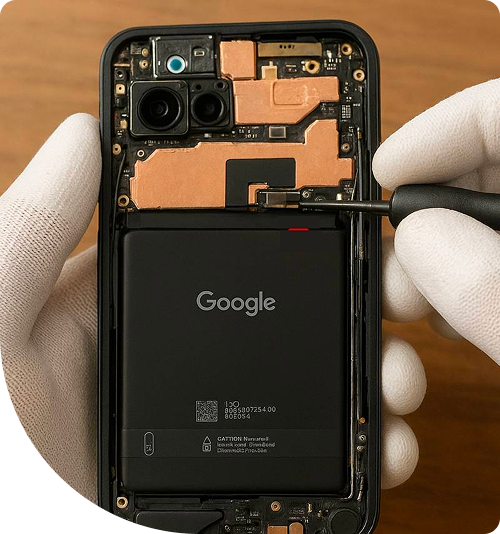
Professional Google Repair Services In The Fix in Queens Center
Need Google Pixel Repair in Queens, NY 11373?
Your Pixel suddenly displays a completely black screen during a video call near Forest Hills despite the phone clearly being powered on—you feel vibrations from notifications and hear alarm sounds. Or perhaps the fingerprint sensor stops recognizing your prints after months of reliable unlocking, forcing you to enter PINs constantly during commutes along Queens Boulevard. Google Pixel phones integrate custom Tensor processors with advanced camera systems and optical fingerprint sensors, creating repair scenarios where display failures affect biometric security, camera bar damage compromises computational photography, and charging port issues prevent both power delivery and data transfer. When you need expert Google Pixel Repair in Queens, NY, understanding whether you're dealing with OLED panel failures, fingerprint calibration issues, USB-C port damage, or motherboard faults determines repair approach and data accessibility.
Google designs Pixels prioritizing AI-powered features through Tensor chips, integrating optical fingerprint sensors beneath displays, and housing complex camera arrays in distinctive camera bars. At 90-15 Queens Blvd, Queens, NY 11373, we approach Pixel repair using proper diagnostic tools, component-level troubleshooting, and procedures maintaining biometric functionality.
Why does the screen stay black despite the phone being powered?
The Black Screen of Death occurs when Pixels clearly operate—you hear sounds, feel vibrations, receive calls—but displays remain completely dark. This indicates OLED panel failures or display connector issues rather than complete system crashes. OLED technology uses organic compounds generating light when electrical current applies. These materials degrade through age, thermal stress, or physical trauma.
Impact damage from drops near Jackson Heights can fracture OLED substrates without cracking external glass. The organic layers separate internally, preventing light emission while the digitizer continues functioning. You might still interact through memorized touch locations despite seeing nothing. Alternatively, the display connector on the motherboard can develop poor contact from drop impacts, interrupting signal transmission.
We diagnose by testing display output systematically. Strong light shined on the "black" screen sometimes reveals faint images, indicating backlight failure in LCD models or complete OLED failure in newer Pixels. For confirmed OLED damage, complete display assembly replacement becomes necessary—the technology cannot repair at individual pixel levels. We source displays matching your Pixel model and generation, then transfer fingerprint sensors carefully to maintain biometric functionality.
What causes optical fingerprint sensors to stop working?
Optical fingerprint sensors beneath Pixel displays use light to map fingerprint ridges. The sensor illuminates your finger with bright light, captures the reflection pattern with a camera, and matches it against stored templates. Sensor failures manifest as consistent rejection of correct fingers, slow recognition requiring multiple attempts, or complete inability to detect fingerprints near Roosevelt Avenue workplaces.
Screen protectors represent the most common culprit. Thick protectors or those with textured surfaces diffuse the sensor's light, preventing clear fingerprint capture. Even compatible protectors can shift slightly over time, misaligning with the sensor cutout and degrading performance. We recommend removing protectors temporarily to test if recognition improves.
Display replacement without proper sensor calibration causes similar issues. The optical sensor requires specific alignment and focus distance to the display surface. Installing screens with slightly different thickness or using improper adhesive affects light transmission paths. We recalibrate sensors after display replacements, adjusting sensitivity parameters ensuring reliable fingerprint recognition.
Hardware sensor failures require display assembly replacement since sensors integrate into the screen. We test with known-working displays confirming whether sensors themselves failed or calibration issues exist. This diagnosis prevents unnecessary component replacement when software calibration solves the problem.
How does the camera bar affect repair procedures?
Pixel's distinctive camera bar houses multiple lenses, sensors, and processing components in a raised glass section across the phone's back. This design creates unique repair considerations—the protruding bar concentrates impact forces during drops, making camera glass more vulnerable than flush designs. Cracked camera glass affects image quality through light scatter and lens flare.
The camera bar integrates with the back glass as a single assembly. Unlike phones with individual lens covers, Pixel camera glass cannot replace separately. Back glass replacement requires removing the entire rear panel including the camera bar section, then transferring internal components to replacement glass.
Camera module damage from impacts requires careful diagnosis. The Pixel houses wide, ultrawide, and telephoto lenses plus laser autofocus sensors. We test each camera individually, checking focus accuracy, image stabilization, and color reproduction. Failed modules need replacement while preserving other functional cameras—we don't replace entire camera assemblies when only one lens suffered damage.
Computational photography features depend on proper calibration. Google's image processing algorithms expect specific camera characteristics. After hardware replacement, we verify that HDR processing, Night Sight, and portrait mode function correctly, ensuring the Tensor chip communicates properly with new camera hardware.
Why do USB-C ports fail on Pixel phones?
USB-C charging and data ports experience significant mechanical stress from daily cable connections near Elmhurst households. The 24-pin connector handles charging negotiation, USB data transfer, and display output—any pin damage disrupts these functions. Common failures include slow charging, intermittent connection requiring specific cable angles, or complete inability to charge.
Debris accumulation prevents proper insertion. Pixels carried in pockets accumulate lint compressing into port cavities. This debris prevents cables from fully inserting, reducing pin contact and causing charging problems. We inspect ports under microscope magnification, using non-conductive tools to extract compacted material without damaging delicate pins.
Physical pin damage occurs from forcing cables incorrectly or using damaged cables with bent pins. Even one damaged pin can disable specific functions—charging might work while data transfer fails, or vice versa depending which pins suffered damage. For ports with bent pins, we carefully straighten them using precision tools. If pins broke or the port separated from the motherboard, complete port replacement via microsoldering becomes necessary.
Water damage accelerates port corrosion. Despite Pixel's water resistance ratings, prolonged exposure or submersion can infiltrate ports. The ionic content in water corrodes copper pins, creating green oxidation products that destroy electrical connections. Early intervention through ultrasonic cleaning prevents permanent damage, but neglected water damage may require port replacement.
What causes overheating during normal use?
Pixels generating excessive heat during routine tasks like browsing or calls indicate thermal management problems or processor issues. The Tensor chip produces significant heat under load, requiring effective cooling. When thermal systems degrade, the phone becomes uncomfortably hot and battery drains rapidly from thermal throttling near Long Island Expressway commutes.
Thermal paste between the Tensor chip and heat spreader degrades over time. This compound transfers heat from the processor to the phone's aluminum frame, which acts as a heatsink. Dried paste loses thermal conductivity, trapping heat at the chip. We access the Tensor processor through complete disassembly, remove dried compound, and apply fresh thermal paste restoring heat transfer efficiency.
Software issues sometimes mimic hardware failures. Background apps consuming excessive CPU resources generate heat through processor activity rather than cooling failures. We verify actual thermal problems versus software issues through controlled testing, ensuring hardware repair is necessary before disassembly.
Motherboard-level failures like voltage regulator problems can cause overheating. If power delivery circuits malfunction, they may supply incorrect voltages forcing the Tensor chip to work inefficiently and generate excess heat. These failures require component-level diagnosis identifying failed voltage regulators or power management chips.
Professional Pixel Diagnostics
Google Pixel failures—black screens, fingerprint issues, camera damage, charging problems, or overheating—require accurate component identification. OLED failures need replacement, fingerprint sensors require calibration, camera bar damage demands careful module testing, and charging ports need debris versus hardware diagnosis. Visit us at 90-15 Queens Blvd, Queens, NY 11373, where we'll systematically identify your Pixel's specific failure and explain repair options.
Frequently Asked Questions
Q: Will screen replacement disable my fingerprint sensor in Queens, NY?
A: We carefully transfer the optical fingerprint sensor from your damaged screen to the replacement display, maintaining biometric functionality. After installation, we recalibrate the sensor ensuring reliable fingerprint recognition. The sensor pairs to your motherboard's security chip, so transferring it preserves unlocking capability without requiring re-enrollment of fingerprints.
Q: Can you replace just the camera glass if it's cracked near Queens Boulevard?
A: Pixel camera glass integrates with the entire back glass assembly including the camera bar. We cannot replace just the lens covers—the complete rear panel requires replacement. We then transfer your functional camera modules, NFC coil, and wireless charging components to the new back glass, preserving all features while restoring the camera bar's protective lens.
Q: My Pixel charges slowly even with the original charger—what causes this?
A: Slow charging typically indicates USB-C port debris preventing full cable insertion or corroded pins increasing electrical resistance. We inspect the port microscopically, clean compacted lint, and test charging current flow. If cleaning doesn't restore fast charging speeds, internal port damage may require replacement. Sometimes cable damage causes slow charging—we test with multiple confirmed functional cables before diagnosing port hardware issues.
Other Locations Near By You
The Fix in Green Acres Mall
2034 Green Acres Mall Valley Stream, NY 11581
The Fix in Kings Plaza
5100 Kings Plaza Ste 2213, Brooklyn, NY 11234, United States
Your local repair experts for every device
From iPhones to gaming laptops, The Fix in New York, NY is your one-stop shop for device repair. Quick turnarounds, affordable prices, and local experts you can trust

Phone Cases
Protect your device in style! At The Fix in New York, NY, we offer a wide selection of durable phone cases for all major brands—sleek designs that keep your phone safe and looking great.

Nintendo Switch Repair
Cracked Nintendo Switch screen? We repair Switch devices in New York, NY quickly and affordably. Fast, easy, and always with high-quality parts.

MacBook Repair
For broken screens, battery replacements, or other issues, The Fix in New York, NY provides quick MacBook repairs with premium parts.

PlayStation Repair
Is your PlayStation giving you trouble? At The Fix in New York, NY, we handle PlayStation repairs with care and quality parts—no long waits, no hassle.

Tablet Repair
Whether your tablet screen is cracked or the battery won’t hold a charge, The Fix in New York, NY provides fast, affordable tablet repairs with free diagnostics.

Computer Repair
Need PC or desktop service in New York, NY? We provide free diagnostics and affordable repairs, always with high-quality parts.

Game Console Repair
From Nintendo Switch® to PlayStation and Xbox, The Fix in New York, NY repairs all major game consoles. Fast service and dependable results.

Laptop Repair
Got a broken laptop? The Fix In New York, NY, our team repairs most laptop brands and models using high-quality replacement parts.

iPad Repair
Need your iPad fixed? At The Fix in New York, NY, we repair cracked screens, charging issues, and more—always using high-quality parts for lasting results.

Cell Phone Repair
We repair all major phone brands in New York, NY. iPhone, Samsung, Google, and more—get your phone fixed fast.

iPhone Repair
Cracked screen? Battery draining too fast? Our team in New York, NY repairs iPhones with precision and high-quality parts to make your device feel new again.

Samsung Repair
Whether it’s a Galaxy screen replacement or a charging issue, The Fix in New York, NY offers fast and reliable Samsung repairs.

Xbox Repair
Xbox not working properly? Our team in New York, NY offers quick, reliable Xbox repairs with free diagnostics and high-quality replacement parts.


Trusted repair solution for mobile phones, tablets, gaming consoles, and computer systems. We provide fast, reliable, and affordable repair services to get your devices back in perfect working condition.
The Fix is an independent repair service provider and is not affiliated with, sponsored by, or endorsed by Apple Inc., Samsung Electronics, Google LLC, or any other device manufacturer. We use high-quality compatible replacement parts unless explicitly stated. All trademarks are property of their respective owners.


© Copyright The Fix Solutions All rights reserved 2026.
Design by Deepcoder