






iPad Repair in The Fix in Queens Center
Cracked screen or battery draining too fast? At The Fix in New York, NY, we provide fast and reliable iPad repairs. From screen replacements to charging issues, our technicians use high-quality parts and offer free diagnostics so you know exactly what’s needed.

Professional iPad Repair Services
- Screen Repair & Replacement
- Battery Replacement
- Water Damage Repair
- Charging Port Repair
- Camera Repair
- Speaker & Microphone Repair
- iOS Troubleshooting & Recovery
Professional iPad Repair Services In The Fix in Queens Center
Need iPad Repair in Queens, NY 11373?
You're reviewing project documents during a meeting near Roosevelt Avenue when your iPad's screen suddenly stops responding to touch input along the right edge, forcing you to rotate the device awkwardly to access controls. Or perhaps you notice the device no longer sits flush on your desk—a slight bulge has developed beneath the display, indicating something inside has expanded dangerously. iPads serve critical roles in professional and educational environments throughout Queens, functioning as portable workstations, digital notepads, and creative tools. When hardware failures compromise these functions and you need expert iPad Repair in Queens, NY, understanding whether you're dealing with digitizer damage, battery swelling, charging port corrosion, or logic board faults determines both repair approach and data preservation strategies.
Apple designs iPads with remarkable component integration—display assemblies fuse multiple layers with optically clear adhesive, batteries adhere with industrial-strength strips, and logic boards pack components with extraordinary density. At 90-15 Queens Blvd, Queens, NY 11373, we approach iPad repair as precision device work, utilizing controlled heating systems, component-level diagnostics, and proper adhesive resealing to restore functionality without compromising structural integrity.
Why does the touchscreen develop dead zones or phantom touches?
Touch functionality failures manifest in two primary ways: dead zones where screens ignore touch input, or phantom touches where iPads register inputs without physical contact. Both symptoms indicate digitizer damage—the transparent capacitive sensor layer detecting finger position. The digitizer consists of microscopic transparent conductors arranged in horizontal and vertical traces forming grids. Your finger's capacitance creates electrical field disturbances at intersection points, which touch controllers interpret as coordinate data.
Physical impact—dropping iPads on pavement near Jackson Heights or applying excessive pressure during transport—fractures these traces. Vertical trace breaks create dead columns where no touches register along screen regions. Multiple fractures produce irregular dead zones with unpredictable boundaries. Phantom touches occur when digitizers develop short circuits between traces that should remain electrically isolated through LCD fluid leaking from pressure damage creating conductive paths.
iPad display architecture complicates repair significantly. Older non-Retina iPads featured separate digitizer glass and LCD panels with air gaps between layers, allowing digitizer-only replacement if LCDs remained functional. Modern iPads utilize laminated displays where digitizers, LCDs, and protective glass fuse into one assembly using optically clear adhesive. Any layer damage requires complete assembly replacement—attempting separation destroys LCDs' delicate structure.
We source display assemblies matching your iPad's generation and model, ensuring compatibility with features like Apple Pencil sensitivity and True Tone color adjustment. Post-installation requires Home button transfer on models with Touch ID—this component cryptographically pairs to logic boards' Secure Enclave for biometric security. We carefully extract Home button assemblies from damaged screens and install them in replacement displays, preserving fingerprint functionality.
What causes battery swelling and why is it urgent?
Battery swelling represents critical safety issues demanding immediate attention. If your iPad no longer sits flat on surfaces, shows visible bulging beneath displays, or has screen separation from frames, swollen batteries inside are pushing components outward. This condition results from lithium-polymer battery degradation where internal gas generation inflates cell pouches like balloons.
Lithium-ion chemistry degrades through normal charge cycles and calendar aging. Electrolyte—lithium salt dissolved in organic solvents—decomposes through repeated charging, particularly under thermal stress. Decomposition products include gases accumulating within sealed battery pouches. As pressure builds, flexible pouches expand, exerting force on surrounding components.
The danger extends beyond cosmetic issues. Expanding batteries stress display assemblies, potentially cracking glass from internal pressure or delaminating digitizers from LCDs. Continued swelling may rupture battery pouches, exposing reactive lithium compounds to air and moisture. While catastrophic thermal events remain relatively rare, swollen batteries represent fire hazards worsening over time near Forest Hills households.
Several factors accelerate swelling: exposure to heat during Queens summers in vehicles, using incompatible chargers delivering incorrect voltage, physical damage compromising battery integrity, or simply exceeding batteries' designed service life. Heavy users accumulating charge cycles through continuous streaming reach failure thresholds faster than casual users.
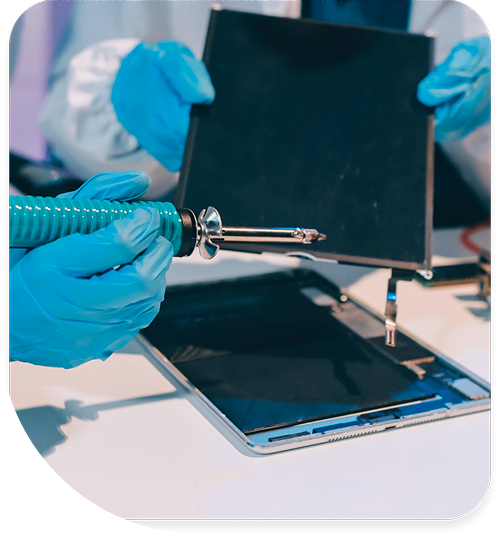
Battery replacement requires complete iPad disassembly. Displays must separate from frames using controlled heat softening perimeter adhesive. We use precision heating equipment maintaining exact temperature ranges. After display removal, swollen batteries present challenges—they adhere strongly to aluminum backing, and applying excessive force risks puncturing inflated cells. We use isopropyl alcohol dissolving battery adhesive, allowing safe extraction without puncture risk.
Why won't Lightning or USB-C ports charge reliably?
Charging failures present progressively: first requiring specific cable angles initiating charging, then intermittent charging recognition where battery icons flicker between states, finally complete charging failure despite trying multiple cables. These symptoms indicate port hardware degradation, internal debris accumulation, or flex cable damage rather than battery or charging circuit issues near Elmhurst.
Lightning ports on older iPads contain eight pins arranged in single rows. These pins handle power delivery, USB data transfer, and accessory communication. Repeated cable insertion and removal—hundreds of cycles annually for professionals—gradually wears contact surfaces. Pins lose springiness, reducing contact pressure against cable pins. Oxidation develops on pin surfaces, increasing electrical resistance until charging current cannot flow adequately.
USB-C ports on newer iPad Pros feature 24 pins in two rows with more complex functionality. Reversible design means either pin row must function correctly for charging and data transfer. Damage to pins in one row can disable specific functions—charging might work while data transfer fails, or vice versa depending which pins suffered damage.
Debris accumulation represents another common charging failure mode. iPads carried in bags accumulate lint, dust, and particulate matter. This debris compresses into port cavities over months, preventing cables from fully inserting. Reduced insertion depth means charging pins don't contact cable terminals properly, causing intermittent or absent charging.
iPad charging ports connect to logic boards via flex cables rather than direct soldering in most models. This modular design simplifies replacement—we access port assemblies after display removal, disconnect flex cables from logic boards, and install replacement port assemblies. Flex cables typically include ports, microphones, and cellular antenna connections, so replacement restores multiple functions simultaneously.
How does chassis bending affect functionality?
iPads' thin aluminum construction provides minimal resistance to bending forces. Sitting on devices, placing them in backpacks with heavy objects, or applying pressure to corners during handling near Queens Boulevard can permanently deform chassis. This bending creates multiple cascading failures beyond just cosmetic appearance.
The most immediate impact affects displays. Installing flat glass screens into bent frames creates uneven stress distribution. Glass experiences constant tension from warped frames trying to return to deformed shapes. This stress concentrates at mounting points, eventually fracturing glass even without additional impact.
Bent frames also misalign internal components. Logic boards mount to chassis at specific points—frame deformation shifts these mounting positions, stressing solder joints and flex cable connections. Battery mounting areas distort, preventing proper battery seating and potentially causing internal short circuits if battery edges contact frame irregularities.
We assess frame integrity using precision straightedge tools and measurement equipment. Deviation beyond acceptable tolerances requires frame straightening before any other repairs. We use specialized fixtures applying controlled pressure bending aluminum back toward designed geometry. For severe damage where straightening cannot restore proper geometry, frame replacement becomes necessary, involving complete component transfer to new housings.
What happens when Face ID sensors fail?
Face ID systems on iPad Pro models use structured light projection and infrared cameras mapping facial geometry. The TrueDepth camera array includes dot projectors, flood illuminators, and infrared cameras working together. This array also pairs to logic boards—replacing damaged components disables Face ID permanently. During display replacements, we transfer entire TrueDepth modules from damaged screens to replacements, maintaining Face ID capability.
Physical damage to Face ID sensors—cracked dot projector optics or flood illuminator damage—cannot be repaired while preserving Face ID functionality. Paired components make individual sensor replacement impossible without specialized Apple proprietary equipment. In these cases, we inform users that mechanical repairs restore all functionality except Face ID, which requires passcode authentication instead.
Restoring iPad Functionality
iPad hardware failures affect productivity, creativity, and communication for users throughout Queens neighborhoods. Touchscreen issues, battery swelling, charging problems, or biometric failures represent specific component faults with proven repair solutions. Stop by 90-15 Queens Blvd, Queens, NY 11373, where we'll diagnose your iPad's exact issue through systematic component testing and explain repair options with complete technical transparency.
Frequently Asked Questions
Q: Will my data remain intact during iPad screen replacement in Queens, NY?
A: Screen replacement involves no interaction with storage or data systems. We disconnect batteries, remove damaged displays, and install replacements without accessing memory or files. Your photos, documents, and settings remain completely untouched. However, we always recommend iCloud backup before any repair as precautionary measures against unexpected complications.
Q: My iPad has a small crack in the corner—can I keep using it near Roosevelt Avenue?
A: While iPads may function currently, corner cracks propagate under normal handling stress. Cracks will spread across screens over days or weeks. More critically, cracks allow moisture infiltration corroding internal components. Continued use risks LCD damage, digitizer failure, or even logic board corrosion from moisture exposure. We recommend repair before crack progression causes additional damage requiring more extensive component replacement.
Q: Can you replace just the glass if screens display correctly but won't respond to touch?
A: Touch functionality depends on digitizer layers, not glass surfaces. Since iPads use laminated displays fusing glass, digitizers, and LCDs into one assembly, separating layers destroys LCD structure. Complete display assembly replacement becomes necessary even when only touch functionality failed. This ensures proper layer bonding and prevents dust infiltration occurring when attempting layer separation.
Other Locations Near By You
The Fix in Green Acres Mall
2034 Green Acres Mall Valley Stream, NY 11581
The Fix in Kings Plaza
5100 Kings Plaza Ste 2213, Brooklyn, NY 11234, United States
Your local repair experts for every device
From iPhones to gaming laptops, The Fix in New York, NY is your one-stop shop for device repair. Quick turnarounds, affordable prices, and local experts you can trust

Phone Cases
Protect your device in style! At The Fix in New York, NY, we offer a wide selection of durable phone cases for all major brands—sleek designs that keep your phone safe and looking great.

Nintendo Switch Repair
Cracked Nintendo Switch screen? We repair Switch devices in New York, NY quickly and affordably. Fast, easy, and always with high-quality parts.

MacBook Repair
For broken screens, battery replacements, or other issues, The Fix in New York, NY provides quick MacBook repairs with premium parts.

PlayStation Repair
Is your PlayStation giving you trouble? At The Fix in New York, NY, we handle PlayStation repairs with care and quality parts—no long waits, no hassle.

Google Repair
Need your Google Pixel fixed? At The Fix in New York, NY, we repair cracked screens, charging issues, and more—always using high-quality parts for lasting results.

Tablet Repair
Whether your tablet screen is cracked or the battery won’t hold a charge, The Fix in New York, NY provides fast, affordable tablet repairs with free diagnostics.

Computer Repair
Need PC or desktop service in New York, NY? We provide free diagnostics and affordable repairs, always with high-quality parts.

Game Console Repair
From Nintendo Switch® to PlayStation and Xbox, The Fix in New York, NY repairs all major game consoles. Fast service and dependable results.

Laptop Repair
Got a broken laptop? The Fix In New York, NY, our team repairs most laptop brands and models using high-quality replacement parts.

Cell Phone Repair
We repair all major phone brands in New York, NY. iPhone, Samsung, Google, and more—get your phone fixed fast.

iPhone Repair
Cracked screen? Battery draining too fast? Our team in New York, NY repairs iPhones with precision and high-quality parts to make your device feel new again.

Samsung Repair
Whether it’s a Galaxy screen replacement or a charging issue, The Fix in New York, NY offers fast and reliable Samsung repairs.

Xbox Repair
Xbox not working properly? Our team in New York, NY offers quick, reliable Xbox repairs with free diagnostics and high-quality replacement parts.


Trusted repair solution for mobile phones, tablets, gaming consoles, and computer systems. We provide fast, reliable, and affordable repair services to get your devices back in perfect working condition.
The Fix is an independent repair service provider and is not affiliated with, sponsored by, or endorsed by Apple Inc., Samsung Electronics, Google LLC, or any other device manufacturer. We use high-quality compatible replacement parts unless explicitly stated. All trademarks are property of their respective owners.


© Copyright The Fix Solutions All rights reserved 2026.
Design by Deepcoder