






Tablet Repair in The Fix in Westfield Wheaton
Cracked screen or charging issues slowing you down? At The Fix in Maryland, MD, we repair all major tablet brands, including Samsung, Lenovo, Huawei, and more. With free diagnostics and high-quality parts, we make it easy to get your tablet working like new.

Professional Tablet Repair Services
- Screen Repair & Replacement
- Battery Replacement
- Water Damage Repair
- Charging Port Repair
- Camera Repair
- Speaker & Microphone Repair
- Software Troubleshooting & Recovery
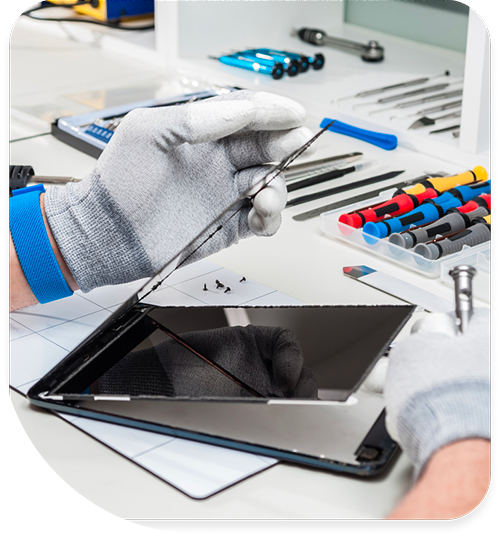
Professional Tablet Repair Services In The Fix in Westfield Wheaton
Large-Format Devices Face Unique Structural Challenges in Wheaton, MD
Tablets occupy an awkward middle ground—too large to fit in most protective cases during use, too valuable to treat carelessly. That 10-inch iPad or Galaxy Tab gets carried around Wheaton without the protection smartphones enjoy. One slip while reading on Metro, one bump while walking through Westfield Wheaton, one tumble off a coffee table at home—and you're facing a cracked screen significantly larger and more expensive than phone displays.
The physics of tablet damage differs from phones. Larger screens flex more during impacts, distributing stress differently across glass. Tablets lack the structural rigidity smaller devices benefit from. And because people often use tablets without cases—particularly at home—impact absorption that cases provide is absent during most accidents.
At Tablet Repair in Wheaton, MD, we service all major brands at 11160 Veirs Mill Rd, Wheaton, MD 20902. From iPads to Samsung Galaxy Tabs, Microsoft Surface devices to Amazon Fire tablets, we handle repairs restoring functionality to these versatile devices.
Glass Digitizer Bonding Technology in Wheaton
Tablet screens bond glass digitizers directly to LCD or OLED panels using optically clear adhesive applied during manufacturing. This construction creates thin, responsive displays but complicates repairs significantly. When glass cracks, the entire assembly typically requires replacement because separating glass from displays without damage proves extremely difficult.
Glass-only replacement is technically possible but carries substantial risk. The process involves heating damaged glass to approximately 80-90°C to soften adhesive, then carefully separating glass from the display panel without applying pressure that cracks LCD backlights or damages OLED organic layers. Success rates for glass-only replacement are significantly lower than complete assembly replacement.
We typically recommend full assembly replacement for reliability. This ensures optimal touch response, eliminates LCD damage risk during repair, and provides better long-term reliability. After installation taking 40-60 minutes depending on model, we test touch sensitivity across the entire surface, verify multi-touch gestures work correctly, and check for proper palm rejection on tablets supporting stylus input like iPads with Apple Pencil or Galaxy Tabs with S Pen.
Battery Swelling in Large-Format Lithium Polymer Cells in Wheaton, MD
Tablet batteries use large lithium polymer cells—significantly bigger than phone batteries due to power demands of 10+ inch displays. When these cells swell from chemical degradation, the force applied to internal components can be substantial. You'll notice screens separating from frames, back covers bulging outward, or difficulty placing tablets flat on surfaces.
The pressure from swollen batteries can crack screens from the inside out—we've seen cases where swelling was so severe the screen completely separated from the frame, exposing internal components to damage and contamination. Swollen batteries also pose serious fire risks, particularly if punctured during attempted removal.
We remove swollen batteries using controlled heat to soften adhesive and specialized plastic tools to pry cells free without puncturing them. Maryland summer heat accelerates battery degradation—tablets left in vehicles parked at Westfield Wheaton during hot afternoons face extreme thermal stress causing permanent damage even if swelling isn't immediately visible.
Battery replacements typically take 35-50 minutes including safe removal, proper disposal, and testing to verify charging circuitry recognizes new cells correctly.
Charging Port Durability in Large Devices in Wheaton
Tablet charging ports experience less frequent use than phone ports—larger batteries require charging every few days rather than daily. However, ports still fail from cable insertion at improper angles, debris accumulation, or corrosion from Maryland humidity.
We inspect ports using magnification to identify damage types. Lint and debris compaction is common particularly in households with pets or in dusty environments—careful cleaning taking 10-15 minutes often restores charging without parts replacement.
When ports sustain physical damage—bent pins, cracked housings, or corroded contacts—replacement techniques vary by tablet design. Some tablets use modular charging assemblies easily replaced, while others solder ports directly to motherboards requiring microsoldering expertise. Port replacements typically take 40-60 minutes depending on construction complexity.
Some tablets use proprietary magnetic charging connectors rather than standard USB ports. Microsoft Surface devices, for example, use magnetic connectors that align automatically. We replace failed magnetic charging assemblies taking 35-50 minutes and verify proper alignment, secure connection, and correct current delivery.
Logic Board Failures Require Component-Level Diagnosis in Wheaton, MD
Tablets that won't power on despite good batteries require logic board diagnosis. Common failure points include power management ICs, voltage regulators controlling processor power delivery, or damaged RAM modules soldered to boards.
Many repair facilities immediately recommend logic board replacement at costs approaching new tablet prices—particularly for premium iPad Pro or Surface Pro models. We perform component-level diagnostics using precision equipment. Multimeters test voltage rails, thermal cameras identify overheating components, and microscopes allow inspection of solder joints and traces.
Replacing individual failed components often restores functionality at a fraction of logic board replacement cost. This granular repair approach proves particularly valuable for tablets containing important data that wasn't backed up or for older models where replacement tablets aren't readily available.
Logic board diagnostics and component-level repair typically require 24-48 hours for systematic testing, component sourcing, and precision microsoldering work.
Camera Quality Expectations in Wheaton
Tablets see increasing use for video calls, document scanning, and photography despite cameras typically being lower quality than flagship phone cameras. Failed cameras produce blurry images, show black screens, or crash camera apps entirely.
We replace failed camera modules taking 30-45 minutes and test focus accuracy, exposure metering, and video recording quality. For tablets with dual cameras, we verify both front and rear cameras function correctly and produce image quality appropriate for their specifications.
Some tablets use cameras for augmented reality applications—proper camera function with accurate depth sensing is essential for these features to work correctly. After camera replacement, we test AR capabilities where supported.
Speaker System Configurations in Wheaton, MD
Tablet speakers deliver media audio, notification sounds, and call audio for video conferences. Stereo speakers positioned for landscape orientation provide immersive audio during movie watching or gaming. When speakers fail partially or completely, entertainment value diminishes substantially.
We replace failed speaker assemblies taking 30-45 minutes and test audio quality across frequency ranges. Tablets used for music playback or movie watching require speakers capable of producing clear audio across the spectrum—we verify replacement speakers meet these requirements and that left/right channels produce balanced output in stereo configurations.
Microphone failures prevent voice recording, video call audio, and voice assistant commands. We diagnose microphone problems through systematic testing and replace damaged components. Modern tablets use multiple microphones for noise cancellation and directional audio—all must function properly for optimal performance.
Button and Flex Cable Reliability in Wheaton
Power buttons, volume rockers, and home buttons connect to logic boards through flexible ribbon cables. These cables can be damaged by drops, liquid exposure, or simply from repeated flexing over years of use. Failed buttons become unresponsive or register multiple presses from single touches.
We replace damaged button assemblies and flex cables taking 30-45 minutes. For tablets with capacitive touch buttons rather than physical buttons, we verify touch sensitivity works correctly after replacement and that haptic feedback (if present) operates at proper intensity.
Water Resistance and Liquid Damage in Wheaton, MD
Most tablets lack water resistance ratings, making them vulnerable to liquid damage from kitchen accidents, bathroom steam, or weather exposure. When liquid enters through speaker grilles or charging ports, it can short circuit components immediately or leave corrosive residues causing delayed failures.
If your tablet suffered liquid exposure in Wheaton, power it off immediately and bring it to us. We use ultrasonic cleaning to remove contaminants and inspect under magnification for corroded connections. Early intervention after liquid exposure significantly improves recovery chances—devices brought to us within hours have better outcomes than those where users attempted powering on repeatedly or delayed treatment.
Liquid damage recovery typically requires 24-48 hours for thorough cleaning, drying, and systematic component testing.
Software Recovery Options in Wheaton
Corrupted system files, failed updates, or insufficient storage can cause symptoms resembling hardware failure. We attempt software recovery before recommending hardware service, potentially saving customers significant expense.
Factory resets, system updates, and storage management resolve many issues without parts replacement. For Android tablets, we can flash firmware to restore corrupted systems taking 30-45 minutes. For Windows tablets, we perform clean OS installations while attempting to preserve user data. For iPads, we use iTunes/Finder to restore iOS while attempting data preservation.
Visit Our Westfield Wheaton Location for Tablet Repairs
Don't let tablet damage interrupt productivity or entertainment. Stop by 11160 Veirs Mill Rd, Wheaton, MD 20902 for professional tablet diagnostics and repairs across all major brands.
Common Questions About Tablet Services in Wheaton
Q: Can you replace just the glass on my tablet without replacing the LCD?
A: Glass-only replacement is technically feasible but rarely advisable. The glass digitizer bonds to the LCD using optically clear adhesive applied during manufacturing. Separating them requires heating the glass to approximately 80-90°C to soften adhesive, then carefully prying it from the LCD without applying pressure that cracks the backlight array or damages individual pixels. Even with specialized equipment including vacuum suction systems and calibrated heating plates, success rates for glass-only replacement are substantially lower than complete assembly replacement. LCD damage during separation attempts often results in needing full assembly replacement anyway, increasing total costs beyond initial glass-only estimates. We typically recommend complete assembly replacement for reliability and lower overall risk.
Q: How long do typical tablet repairs take at your Wheaton location?
A: Screen replacements typically take 40-60 minutes depending on tablet model and construction complexity—iPads generally require more time than Samsung tablets due to stronger adhesives. Battery replacements require 35-50 minutes including safe removal of swollen cells and adhesive curing time. Complex repairs like logic board diagnostics require 24-48 hours for systematic testing and component replacement. We provide accurate time estimates after initial evaluation. Many customers visiting Westfield Wheaton prefer to shop, grab lunch, or handle other errands rather than waiting in the store during repairs.
Q: My tablet powers on but gets stuck on the logo screen—can this be fixed?
A: Logo screen loops indicate either software corruption or storage failure. We start with software recovery attempts including factory resets and firmware reinstallation through recovery modes, typically taking 30-45 minutes if successful. If software recovery fails, the storage drive may be failing or the bootloader may be corrupted. Our diagnostic process at 11160 Veirs Mill Rd, Wheaton, MD 20902 determines whether the issue is software-related and fixable through reinstallation, or hardware failure requiring storage replacement taking 45-60 minutes. Some logo loops also result from incompatible system modifications or failed update installations—we can identify these causes and recommend appropriate solutions.
Other Locations Near By You
The Fix in Clarksburg Premium Outlets
22705 Clarksburg Rd, Clarksburg, MD 20871, USA
The Fix in Walmart Frederick
7400 Guilford Dr, Frederick, MD 21704, United States
The Fix in Walmart Landover Hills
6210 Annapolis Rd, Landover Hills, MD 20784, United States
The Fix in Walmart Laurel
3549 Russett Green E, Laurel, MD 20724, United States
The Fix in The Mall in Columbia
10300 Little Patuxent Pkwy #1708, Columbia, MD 21044, United States
The Fix in Towson Town Center
825 Dulaney Valley Rd, Towson, MD 21204, United States
The Fix in Westfield Montgomery
7101 Democracy Blvd #212B, Bethesda, MD 20817, United States
Your local repair experts for every device
From iPhones to gaming laptops, The Fix in Maryland, MD is your one-stop shop for device repair. Quick turnarounds, affordable prices, and local experts you can trust

Phone Cases
Protect your device in style! At The Fix in Maryland, MD, we offer a wide selection of durable phone cases for all major brands—sleek designs that keep your phone safe and looking great.

Nintendo Switch Repair
Cracked Nintendo Switch screen? We repair Switch devices in Maryland, MD quickly and affordably. Fast, easy, and always with high-quality parts.

MacBook Repair
For broken screens, battery replacements, or other issues, The Fix in Maryland, MD provides quick MacBook repairs with premium parts.

PlayStation Repair
Is your PlayStation giving you trouble? At The Fix in Maryland, MD, we handle PlayStation repairs with care and quality parts—no long waits, no hassle.

Google Repair
Need your Google Pixel fixed? At The Fix in Maryland, MD, we repair cracked screens, charging issues, and more—always using high-quality parts for lasting results.

Computer Repair
Need PC or desktop service in Maryland, MD? We provide free diagnostics and affordable repairs, always with high-quality parts.

Game Console Repair
From Nintendo Switch® to PlayStation and Xbox, The Fix in Maryland, MD repairs all major game consoles. Fast service and dependable results.

Laptop Repair
Got a broken laptop? The Fix In Maryland, MD, our team repairs most laptop brands and models using high-quality replacement parts.

iPad Repair
Need your iPad fixed? At The Fix in Maryland, MD, we repair cracked screens, charging issues, and more—always using high-quality parts for lasting results.

Cell Phone Repair
We repair all major phone brands in Maryland, MD. iPhone, Samsung, Google, and more—get your phone fixed fast.

iPhone Repair
Cracked screen? Battery draining too fast? Our team in Maryland, MD repairs iPhones with precision and high-quality parts to make your device feel new again.

Samsung Repair
Whether it’s a Galaxy screen replacement or a charging issue, The Fix in Maryland, MD offers fast and reliable Samsung repairs.

Xbox Repair
Xbox not working properly? Our team in Maryland, MD offers quick, reliable Xbox repairs with free diagnostics and high-quality replacement parts.


Trusted repair solution for mobile phones, tablets, gaming consoles, and computer systems. We provide fast, reliable, and affordable repair services to get your devices back in perfect working condition.
The Fix is an independent repair service provider and is not affiliated with, sponsored by, or endorsed by Apple Inc., Samsung Electronics, Google LLC, or any other device manufacturer. We use high-quality compatible replacement parts unless explicitly stated. All trademarks are property of their respective owners.


© Copyright The Fix Solutions All rights reserved 2026.
Design by Deepcoder