






Nintendo Switch Repair in The Fix in The Mall in Columbia
Is your Nintendo Switch not working properly? At The Fix in Columbia, MD, we repair screens, batteries, and more—always with free diagnostics and high-quality parts. Whether it’s a cracked screen or Joy-Con issue, our team gets you back to gaming fast.
Professional Nintendo Switch Repair Services
- Joy-Con Drift & Controller Repair
- Screen Repair & Replacement
- Battery Replacement
- Charging Port Repair
- Water Damage Repair
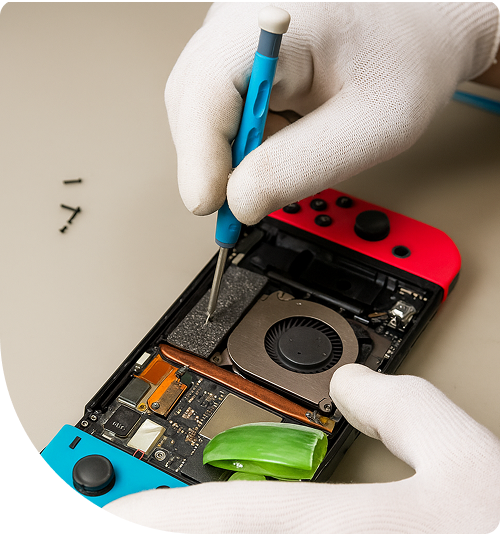
Professional Nintendo Switch Repair Services In The Fix in The Mall in Columbia
Gaming Hardware Faces Maryland's Climate Extremes in Columbia, MD
Maryland's dramatic seasonal temperature swings challenge gaming hardware in ways stable climates don't. Your Switch generates internal heat during gameplay—when ambient temperatures climb during Columbia summers reaching the low 90s, cooling efficiency decreases. Winter presents different challenges—bringing cold Switches indoors from near-freezing temperatures causes condensation forming inside devices, potentially creating electrical shorts.
Gaming during family outings around Lake Kittamaqundi, entertaining children during cold Maryland winters indoors, or unwinding after concerts at Merriweather Post Pavilion—the Switch delivers portability traditional consoles can't match. But drops onto tile floors at The Mall in Columbia, exposure to humidity, and temperature extremes take tolls on components.
At Nintendo Switch Repair in Columbia, MD, we provide diagnostics and repairs at 10300 Little Patuxent Pkwy #1708, Columbia, MD 21044. Our technicians understand how Maryland's climate affects gaming hardware.
Joy-Con Drift Mechanisms in Columbia
Analog stick drift originates from microscopic component degradation. Inside each Joy-Con module, spring-loaded mechanisms press conductive pads against graphite-coated resistive strips arranged along X and Y axes. Through thousands of gaming sessions, physical contact gradually erodes this graphite coating.
Once conductive material breaks down sufficiently, potentiometers send inaccurate position data to processors. Consoles interpret these false signals as intentional movement even when sticks sit neutral—characters drift without input, menus scroll randomly, and precision becomes impossible.
Switch Lite systems integrate controllers directly into device bodies. Repairing Lite drift requires complete disassembly—disconnecting batteries, removing heatsink assemblies, extracting motherboards, and replacing analog stick modules without damaging digitizer ribbon cables or cracking LCD panels.
We replace worn modules and calibrate them post-installation. Proper calibration ensures dead zones are configured appropriately and diagonal inputs register accurately. Joy-Con repairs typically take 40-55 minutes per controller, while Switch Lite repairs require 75-90 minutes due to extensive disassembly requirements.
Screen Damage and Replacement in Columbia, MD
Switch screens use 6.2-inch capacitive touchscreens (7-inch on OLED models) where digitizer layers bond directly to LCD panels. When devices drop screen-first onto hard surfaces—concrete around Columbia's lakefront, tile at The Mall in Columbia, or hardwood floors at home—spider-web cracks spread across glass.
Crack propagation can sever microscopic traces carrying touch data through digitizers. Even if LCDs still display images, touch input may fail partially or completely. Screen replacement involves applying controlled heat softening adhesive without warping plastic housing or damaging internal components.
Temperature control proves critical—excessive heat damages LCD polarizing films causing permanent display issues, while insufficient heat makes separation impossible without tearing delicate flex cables. We use calibrated heating equipment maintaining optimal temperatures throughout removal processes.
After removing damaged screens, we clean adhesive residue, install fresh digitizer assemblies, and test touch response across all zones. Screen replacements typically take 50-70 minutes for standard models, 60-80 minutes for OLED models requiring additional care with organic display panels.
Battery Swelling in Maryland Heat in Columbia
Lithium polymer batteries naturally expand during degradation, but environmental factors accelerate this process. Leaving Switches in vehicles parked at The Mall in Columbia during Maryland summer afternoons—where interior temperatures reach 150-160°F—causes rapid cell swelling.
Swollen batteries push back covers away from frames, sometimes with enough force to crack plastic housing. This isn't merely cosmetic—swollen batteries pose fire risks and apply pressure to internal components potentially causing additional damage including screen separation or motherboard flexing.
Battery replacement involves disconnecting small battery connectors from motherboards, removing retention screws, and carefully prying cells from adhesive pads. Excessive force risks puncturing lithium polymer cells which can ignite. We follow strict safety protocols during extraction.
Fresh installations restore runtime and eliminate safety hazards. Battery replacements typically take 35-50 minutes including safety checks and proper disposal procedures through electronic waste channels.
USB-C Charging Port Failures in Columbia, MD
Switch USB-C ports handle both charging and docking functionality. Center pins manage power delivery and communication protocols. Repeated cable insertion at improper angles—common when gaming while charging—damages these critical pins.
When center pins bend or break, consoles won't charge or dock properly. Switches may charge intermittently requiring specific cable angles to establish connection. Docking may fail completely preventing TV gameplay even though handheld mode works fine.
Port replacement requires microsoldering expertise. USB-C connectors attach to motherboards through numerous fine-pitch pins requiring precise alignment. We use temperature-controlled hot air stations removing damaged ports without disturbing adjacent components, then install fresh connectors with perfect alignment.
After replacement, we test charging at various wattages and verify proper dock communication. Port repairs typically take 60-80 minutes due to precision microsoldering required.
Game Card Reader Problems in Columbia
Cartridge slots contain spring-loaded pins reading data from physical game cards. Environmental factors common in Columbia—winter condensation when bringing cold devices indoors, summer humidity infiltrating through slot openings, or dust accumulation—can prevent games from loading.
Consoles display "unable to read game card" errors or fail to detect cartridges entirely. Sometimes cartridges are recognized initially but stop being read after devices warm up, indicating thermal expansion issues with damaged components.
Reader replacement requires motherboard removal and precise desoldering of assemblies. Replacements must align perfectly with case openings preventing cartridge jamming during insertion. After installation, we test multiple cartridges verifying consistent detection and stable data transfer rates.
Game card reader repairs typically take 55-75 minutes including motherboard removal, component replacement, and comprehensive testing with various cartridges.
Cooling System Maintenance in Columbia, MD
Switch active cooling uses small axial fans exhausting heat from custom Tegra processors. When dust clogs fan blades or heatsink fins, internal temperatures rise beyond safe thresholds triggering thermal protection shutdowns.
Maryland's four-season environment contributes to dust accumulation. We disassemble cooling systems, remove all accumulated dust from fans and heatsinks, and replace dried thermal paste on processor dies. Factory paste dries out over years of heat cycling, losing thermal conductivity.
Fresh paste application can reduce operating temperatures by 8-14°C under load. Lower temperatures allow fans to run quieter while processors maintain higher clock speeds improving performance in demanding games. Thermal maintenance typically takes 40-55 minutes.
Liquid Exposure Recovery in Columbia
Spills happen—drinks knocked over during gaming, getting caught in sudden Maryland thunderstorms, or water bottles leaking in bags. When liquid enters through ventilation openings or button gaps, it causes immediate short circuits or leaves residues causing delayed failures.
If your Switch suffered liquid exposure in Columbia, power it off immediately and bring it to us. Don't attempt charging or powering on—electrical current through contaminated boards accelerates corrosion through electrochemical reactions dramatically reducing recovery chances.
We use ultrasonic cleaning with specialized solutions removing residues from motherboard traces and component pins. After cleaning, microscopic inspection reveals corroded connections requiring component replacement. Liquid damage recovery typically requires 24-48 hours for thorough cleaning and systematic testing.
Visit Our Mall in Columbia Location
Hardware failures shouldn't interrupt your gaming library. Stop by 10300 Little Patuxent Pkwy #1708, Columbia, MD 21044 for professional Switch diagnostics and repairs.
Common Questions About Switch Repairs in Columbia
Q: How long does Joy-Con drift repair typically take at your Columbia location?
A: Standard Joy-Con analog stick replacement takes 40-55 minutes per controller. We can service both Joy-Cons simultaneously completing repairs in roughly the same timeframe. Switch Lite drift repair requires 75-90 minutes due to integrated controller design necessitating complete console disassembly to access analog stick modules. After replacement, we calibrate sticks ensuring dead zones are properly configured and diagonal inputs register accurately across the full range of motion. Most repairs complete same-day, allowing you to shop at The Mall in Columbia or handle other errands while we work.
Q: Can game save data be preserved if my Switch needs motherboard replacement?
A: Nintendo encrypts game saves to specific console hardware for security purposes. If repair involves motherboard replacement, saves stored on internal memory are permanently lost unless you maintain Nintendo Switch Online cloud backup. We cannot manually transfer saves due to Nintendo's encryption tying data to specific hardware. However, some games don't support cloud backup due to their competitive online nature or game design. Always enable cloud backup for games supporting it—this is your only protection against save data loss from catastrophic hardware failures requiring motherboard replacement.
Q: Why does my Switch charge extremely slowly or stop charging at certain percentages?
A: Slow or incomplete charging indicates either a failing battery losing capacity, a damaged charging port preventing proper current delivery, or failed power management components on the motherboard affecting charging circuits. At our Columbia location, we use calibrated testing equipment measuring actual charging current and voltage under controlled conditions. This diagnostic process identifies whether you need simple port cleaning taking 15-20 minutes, port replacement requiring 60-80 minutes of precision microsoldering, battery replacement taking 35-50 minutes, or more complex motherboard-level repair addressing power management circuit failures. Some charging issues also stem from using incompatible third-party chargers that don't implement proper USB Power Delivery protocols required by Switch.
Other Locations Near By You
The Fix in Clarksburg Premium Outlets
22705 Clarksburg Rd, Clarksburg, MD 20871, USA
The Fix in Walmart Frederick
7400 Guilford Dr, Frederick, MD 21704, United States
The Fix in Westfield Wheaton
11160 Veirs Mill Rd, Wheaton, MD 20902
The Fix in Walmart Landover Hills
6210 Annapolis Rd, Landover Hills, MD 20784, United States
The Fix in Walmart Laurel
3549 Russett Green E, Laurel, MD 20724, United States
The Fix in Towson Town Center
825 Dulaney Valley Rd, Towson, MD 21204, United States
The Fix in Westfield Montgomery
7101 Democracy Blvd #212B, Bethesda, MD 20817, United States
Your local repair experts for every device
From iPhones to gaming laptops, The Fix in Columbia, MD is your one-stop shop for device repair. Quick turnarounds, affordable prices, and local experts you can trust

Phone Cases
Protect your device in style! At The Fix in Columbia, MD, we offer a wide selection of durable phone cases for all major brands—sleek designs that keep your phone safe and looking great.

MacBook Repair
For broken screens, battery replacements, or other issues, The Fix in Columbia, MD provides quick MacBook repairs with premium parts.

PlayStation Repair
Is your PlayStation giving you trouble? At The Fix in Columbia, MD, we handle PlayStation repairs with care and quality parts—no long waits, no hassle.

Google Repair
Need your Google Pixel fixed? At The Fix in Columbia, MD, we repair cracked screens, charging issues, and more—always using high-quality parts for lasting results.

Tablet Repair
Whether your tablet screen is cracked or the battery won’t hold a charge, The Fix in Columbia, MD provides fast, affordable tablet repairs with free diagnostics.

Computer Repair
Need PC or desktop service in Columbia, MD? We provide free diagnostics and affordable repairs, always with high-quality parts.

Game Console Repair
From Nintendo Switch® to PlayStation and Xbox, The Fix in Columbia, MD repairs all major game consoles. Fast service and dependable results.

Laptop Repair
Got a broken laptop? The Fix In Columbia, MD, our team repairs most laptop brands and models using high-quality replacement parts.

iPad Repair
Need your iPad fixed? At The Fix in Columbia, MD, we repair cracked screens, charging issues, and more—always using high-quality parts for lasting results.

Cell Phone Repair
We repair all major phone brands in Columbia, MD. iPhone, Samsung, Google, and more—get your phone fixed fast.

iPhone Repair
Cracked screen? Battery draining too fast? Our team in Columbia, MD repairs iPhones with precision and high-quality parts to make your device feel new again.

Samsung Repair
Whether it’s a Galaxy screen replacement or a charging issue, The Fix in Columbia, MD offers fast and reliable Samsung repairs.

Xbox Repair
Xbox not working properly? Our team in Columbia, MD offers quick, reliable Xbox repairs with free diagnostics and high-quality replacement parts.


Trusted repair solution for mobile phones, tablets, gaming consoles, and computer systems. We provide fast, reliable, and affordable repair services to get your devices back in perfect working condition.
The Fix is an independent repair service provider and is not affiliated with, sponsored by, or endorsed by Apple Inc., Samsung Electronics, Google LLC, or any other device manufacturer. We use high-quality compatible replacement parts unless explicitly stated. All trademarks are property of their respective owners.


© Copyright The Fix Solutions All rights reserved 2026.
Design by Deepcoder