






Game Console Repair in The Fix in Walmart Orlando
Having trouble with your game console? At The Fix in Orlando, FL, we repair all major consoles—including Nintendo Switch, PlayStation, and Xbox. Whether it’s a broken screen, overheating console, or controller drift, our technicians provide fast repairs with free diagnostics and high-quality parts.

Professional Game Console Repair Services
- Nintendo Switch Repair
- PlayStation Repair
- Xbox Repair
- Controller & Stick Drift Repair
- HDMI Port Repair & Replacement
- Overheating & Fan Repair
- Disc Drive Repair
- Power Supply Repair
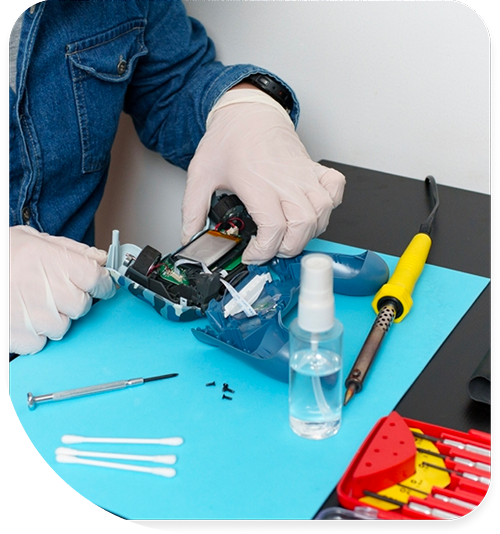
Professional Game Console Repair Services In The Fix in Walmart Orlando
Game Console Repair in Orlando, FL: What Entertainment Center Enclosures and Storm Season Power Events Do to Console Hardware
Game consoles generate substantial heat under load — the processors and graphics chips inside a modern console draw 150 to 200 watts during intensive gameplay, and nearly all of that power converts to heat that must be expelled through the exhaust system. The console's fan is sized to handle this heat load in open air at reasonable ambient temperatures. When the console sits inside a closed entertainment center cabinet — a common furniture choice in East Orlando apartments and homes where aesthetics and space constraints matter — the exhaust air has nowhere to go. It recirculates back into the intake, raising inlet temperature progressively over a gaming session until the thermal protection circuit shuts the system down. This is the most common game console failure mechanism in the Waterford Lakes and Union Park demographic, and it is entirely preventable with enclosure clearance.
The Fix at 11250 E Colonial Dr handles game console repair across PlayStation, Xbox, and Nintendo platforms — fan cleaning and thermal paste service for overheating consoles, HDMI port repair for no-video-output failures, disc drive service, and controller port repair. For game console repair in Orlando, FL, the shop is in the Walmart on E Colonial Drive near SR 417.
The Overheating and Fan Failure Sequence Across Platforms
Console fan systems accumulate dust and pollen on the blades and through the heat sink fins over months of operation. In Orlando homes with oak and pine pollen during late winter and spring — and fine particulate from the SR 50 corridor's heavy commercial traffic — this accumulation builds faster than in lower-particulate environments. The dust layer on fan blades reduces airflow volume; the layer on heat sink fins reduces heat transfer surface area. Both effects raise the thermal operating temperature of the console. Thermal paste between the processor and heat pipe dries out faster in a console that runs near its thermal limit, which accelerates the overheating cycle. Fan cleaning and thermal paste replacement together restore the prior heat transfer path.
HDMI port failure is the second most common game console repair. The HDMI port on a PlayStation or Xbox is soldered to the main board, and the solder joints are susceptible to mechanical stress from cables that are pulled at an angle. The symptom — no video output despite the console powering on — is frequently attributed to the HDMI cable or the television, but when both of those test correctly, the port itself is the failure point. Reflowing the solder joints or replacing the port entirely restores video output without affecting any other console function.
Storm Season and Power Event Risks for Consoles in East Orlando
Orlando's convective thunderstorm season runs from June through September, with peak storm activity in the afternoon hours that coincide with peak gaming time for UCF students and families in Union Park who arrive home from school or work. Consoles that are powered on and connected during storm-related voltage fluctuations face intermittent risk: most modern consoles include basic surge protection, but repeated sub-threshold surge events can stress the power supply's capacitors over time, reducing their ability to filter voltage noise and eventually causing the console to produce instability symptoms — random crashes, disc read errors, or failure to power on — that appear unrelated to power events.
A console that won't turn on after a storm event may have experienced a power supply failure rather than a logic board or processor issue. Power supply assessment is a critical diagnostic step before any more involved console repair, since a failed power supply is a discrete, replaceable component that does not indicate broader board damage. The Fix diagnoses power supply integrity separately from the main board before recommending further service.
Controller ports — both the USB-A ports on PlayStation and Xbox used for controller charging, and the proprietary connections on older controllers — collect moisture and debris in the high-humidity environment of a Florida gaming room. A controller that charges intermittently, or that requires the cable to be held in a specific position, typically has either a worn USB port or oxidized contacts on the charging cable connector. Port cleaning resolves the issue in early stages; replacement is needed when the contacts are physically deformed.
Console Repair Assessment at The Fix
The Fix begins all console repair assessments with a power-on test and a thermal measurement under brief load before opening the unit. This sequence separates power supply failures from thermal protection shutdowns from logic board failures — three symptoms (won't turn on) with three different causes and three different service paths. A console that powers on but shuts down under load points to thermal service. One that won't power on at all requires power supply assessment. One that powers on but produces no video goes to HDMI port diagnosis.
Disc drive service covers laser lens cleaning, spindle motor assessment, and full drive replacement where the mechanism is worn beyond cleaning. The Fix at 11250 E Colonial Dr handles game console repair across all current platforms. For consoles that won't turn on, overheat, show no video, or have controller port issues, search game console repair in Orlando for current service details.
Frequently Asked Questions
After a thunderstorm, my console won't turn on. Is the console broken?
Not necessarily. A storm-related power event can trip a protection fuse inside the power supply without damaging the main logic board. The fuse is a discrete component that can be assessed and replaced independently. It is worth having the power supply tested before assuming the main board is the failure point, since replacing a fuse is significantly simpler than a logic board repair.
My console overheats, but I already cleaned the outside of it. What else could it be?
External cleaning addresses dust on the console's surface but not the internal accumulation on fan blades and heat sink fins. Internal cleaning requires opening the console and cleaning the fan and heat sink directly, which removes the layer of accumulated particulate that is causing the thermal restriction. Internal thermal paste replacement may also be needed if the unit has been running hot for an extended period.
How long does a typical console thermal paste service add to the console's lifespan?
Thermal paste service and fan cleaning restore the console's heat transfer to near-baseline specification, which removes the accelerated component wear caused by sustained high-temperature operation. How much lifespan that adds depends on subsequent use conditions — a console that returns to an enclosed cabinet without clearance will accumulate dust and heat stress again. Giving the console open exhaust clearance after servicing makes the repair last significantly longer.
Other Locations Near By You
The Fix in Walmart Orlando
8990 Turkey Lake Rd, Orlando, FL 32819, United States
The Fix in Walmart Jacksonville
6767 103rd St, Jacksonville, FL 32210, United States
The Fix in Walmart West Melbourne
845 Palm Bay Rd NE, West Melbourne, FL 32904, United States
The Fix in Walmart Jacksonville
10251 Shops Ln, Jacksonville, FL 32258, United States
The Fix in Walmart Brandon
1208 E Brandon Blvd, Brandon, FL 33510, United States
The Fix in Walmart Zephyrhills
7631 Gall Blvd, Zephyrhills, FL 33541, United States
The Fix in Walmart Casselberry
1239 State Road 436 Ste 101, Casselberry, FL 32707
The Fix in Walmart Lake Worth
4545 Hypoluxo Rd, Lake Worth Beach, FL 33463, United States
The Fix in Walmart Stuart
4001 SE Federal Hwy, Stuart, FL 34997, United States
The Fix in Walmart Naples
5420 Juliet Blvd, Naples, FL 34109, United States
Your local repair experts for every device
From iPhones to gaming laptops, The Fix in Orlando, FL is your one-stop shop for device repair. Quick turnarounds, affordable prices, and local experts you can trust

Phone Cases
Protect your device in style! At The Fix in Orlando, FL, we offer a wide selection of durable phone cases for all major brands—sleek designs that keep your phone safe and looking great.

Nintendo Switch Repair
Cracked Nintendo Switch screen? We repair Switch devices in Orlando, FL quickly and affordably. Fast, easy, and always with high-quality parts.

MacBook Repair
For broken screens, battery replacements, or other issues, The Fix in Orlando, FL provides quick MacBook repairs with premium parts.

PlayStation Repair
Is your PlayStation giving you trouble? At The Fix in Orlando, FL, we handle PlayStation repairs with care and quality parts—no long waits, no hassle.

Google Repair
Need your Google Pixel fixed? At The Fix in Orlando, FL, we repair cracked screens, charging issues, and more—always using high-quality parts for lasting results.

Tablet Repair
Whether your tablet screen is cracked or the battery won’t hold a charge, The Fix in Orlando, FL provides fast, affordable tablet repairs with free diagnostics.

Computer Repair
Need PC or desktop service in Orlando, FL? We provide free diagnostics and affordable repairs, always with high-quality parts.

Laptop Repair
Got a broken laptop? The Fix In Orlando, FL, our team repairs most laptop brands and models using high-quality replacement parts.

iPad Repair
Need your iPad fixed? At The Fix in Orlando, FL, we repair cracked screens, charging issues, and more—always using high-quality parts for lasting results.

Cell Phone Repair
We repair all major phone brands in Orlando, FL. iPhone, Samsung, Google, and more—get your phone fixed fast.

iPhone Repair
Cracked screen? Battery draining too fast? Our team in Orlando, FL repairs iPhones with precision and high-quality parts to make your device feel new again.

Samsung Repair
Whether it’s a Galaxy screen replacement or a charging issue, The Fix in Orlando, FL offers fast and reliable Samsung repairs.

Xbox Repair
Xbox not working properly? Our team in Orlando, FL offers quick, reliable Xbox repairs with free diagnostics and high-quality replacement parts.


Trusted repair solution for mobile phones, tablets, gaming consoles, and computer systems. We provide fast, reliable, and affordable repair services to get your devices back in perfect working condition.
The Fix is an independent repair service provider and is not affiliated with, sponsored by, or endorsed by Apple Inc., Samsung Electronics, Google LLC, or any other device manufacturer. We use high-quality compatible replacement parts unless explicitly stated. All trademarks are property of their respective owners.


© Copyright The Fix Solutions All rights reserved 2026.
Design by Deepcoder