






iPad Repair in The Fix in Walmart Frederick
Cracked screen or battery draining too fast? At The Fix in Frederick, MD, we provide fast and reliable iPad repairs. From screen replacements to charging issues, our technicians use high-quality parts and offer free diagnostics so you know exactly what’s needed.

Professional iPad Repair Services
- Screen Repair & Replacement
- Battery Replacement
- Water Damage Repair
- Charging Port Repair
- Camera Repair
- Speaker & Microphone Repair
- iOS Troubleshooting & Recovery
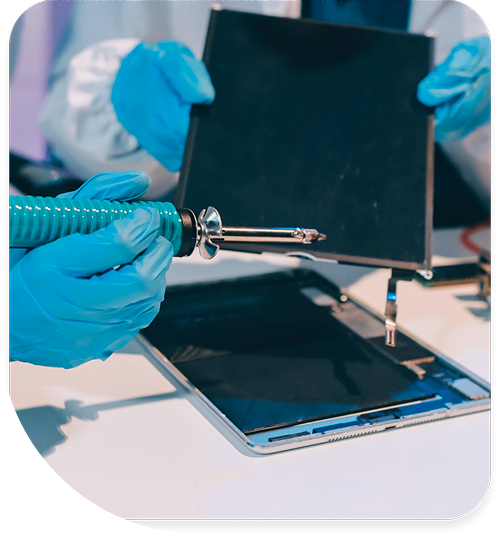
Professional iPad Repair Services In The Fix in Walmart Frederick
iPad Repair in Frederick, MD: What the Teardown Reveals
iPad failures in Frederick often appear catastrophic when they actually involve discrete component issues requiring targeted restoration. The touchscreen responsiveness degradation that makes an iPad feel unusable frequently stems from digitizer force-adhesive layer separation rather than processor failure. When an iPad exhibits display discoloration, refuses to register touch input, or shows LCD backlight failures, the cause traces to environmental stress accumulated through Frederick's unique climate conditions and user handling patterns. The thunderstorm season electrical transients, humidity fluctuations between 40–70% year-round with summer spikes to 85%+, and thermal cycling from temperature swings create conditions that progressively degrade component interfaces.
Understanding what the teardown actually reveals separates actual failures from component-level issues that preserve the bulk of the device's functionality. Most iPad owners have never considered the technical distinction between display glass damage, digitizer failure, and processor degradation. When you need professional assessment of iPad repair in Frederick, MD touch and display issues, technicians who understand the layered architecture of modern iPad displays can identify precisely which component layer requires intervention and whether the main processor subsystem remains fully functional.
The Intake Brief
The intake brief during iPad diagnosis establishes the failure pattern that guides technical approach. Digitizer force-adhesive layer separation represents the most common failure mechanism affecting iPad responsiveness. The digitizer sensor—typically a capacitive touchscreen overlay—bonds to the LCD glass through force-sensitive adhesive. This adhesive serves dual purposes: mechanical bonding and optical coupling that minimizes air gaps reducing display clarity. The adhesive degrades under environmental stress. Frederick's humidity penetrates the device enclosure, introducing moisture into the adhesive layer. Thermal cycling from outdoor temperature swings and indoor climate control creates expansion stresses in the laminated stack. The adhesive bonds the digitizer to glass while simultaneously bonding the glass to the LCD backlight assembly. Separation typically begins at the edges where moisture ingress proceeds most rapidly. As separation progresses, the digitizer and glass lift away from the LCD, introducing air gaps that scatter light. Touch responsiveness degrades because the mechanical coupling deteriorates—capacitive signals weaken as the gap increases. Users perceive complete digitizer failure when in reality the separation is still partial. The device continues functioning while touch input becomes increasingly unreliable. LCD backlight MOSFET gate failure represents another targeted component failure.
The LCD backlight assembly uses multiple high-intensity LED strips to illuminate the display. MOSFETs (metal-oxide-semiconductor field-effect transistors) control current flow through these LEDs. The MOSFET gate receives control signals from the display driver IC determining brightness. Electrolytic capacitors in the gate drive circuit store charge, then discharge to switch the MOSFET on-off. These capacitors degrade in Frederick's climate, losing capacitance as the electrolytic medium dries out from thermal cycling. The gate drive signal weakens as capacitor performance degrades. The MOSFET responds sluggishly, causing flickering or uneven backlight illumination. Certain LED sections may illuminate fully while adjacent sections remain dim, creating visible banding or hot spots in the display. The display appears corrupted, yet the LCD panel itself remains functional. Smart Connector pin oxidation from humidity exposure represents another failure pattern affecting iPad Pro models and accessories. The Smart Connector provides power and data communication to keyboard cases and stylus devices. The connector pins experience direct environmental exposure on the bottom iPad edge. Humidity in the Frederick Monocacy River valley environment creates corrosion on connector pins. Oxidation increases contact resistance, preventing reliable data communication. Accessories fail to charge or remain undetected despite proper seating. The connector itself remains physically intact, but electrical conductivity has degraded.
What the Teardown Reveals
Component-level teardown reveals layered failure modes that casual inspection cannot identify. Battery cycle count degradation versus calendar aging distinguishes between use-related degradation and time-dependent decay. Lithium battery cells degrade through two independent mechanisms. Cycle count degradation occurs through charge-discharge cycles, with each cycle introducing structural stress in the battery materials. Calendar aging occurs through chemical processes progressing regardless of device use—the electrolyte gradually oxidizes, the cathode material slowly transforms, and the separator becomes chemically fragile. A battery showing poor performance after six months of light use reveals calendar aging as the dominant failure mode, potentially requiring storage condition changes. A battery showing poor performance after three years of heavy use reveals cycle count degradation. The distinction determines whether simple storage protocols can slow future degradation or whether battery replacement becomes inevitable. Front camera bracket misalignment after drop events demonstrates another discrete failure. The front camera module mounts via mechanical brackets with slight flexure tolerance. A significant drop imparts shock loads to the mounting brackets, bending them minutely. Even a bend of 0.5mm creates misalignment sufficient to throw the camera focus out of spec. The camera lens cannot focus properly, producing blurry images. Users believe the optical system has failed, yet the lens and image sensor remain fully functional. Bracket realignment restores focus without component replacement. iPad Pro mini-LED local dimming zone failure affects newer Pro models. The mini-LED backlight uses hundreds of individually-controlled LED zones, each driven by dedicated MOSFET switches. If individual zone MOSFETs fail open or shorted, that LED zone either remains dark or stays perpetually bright. Surrounding zones continue operating normally, creating visible banding or hot spots in the display corresponding to the failed zone. The backlight control IC continues functioning, the LCD panel remains intact, and the processor subsystem operates normally. Localized LED replacement restores normal backlight operation.
Digitizer force-adhesive separation appears as complete touch failure during intake but reveals partial separation during teardown. Peeling back the display glass gradually while monitoring touch response identifies exactly how far separation has progressed. Separated areas show zero touch responsiveness while still-bonded areas continue registering input normally. This separation pattern guides repair strategy—conservative repairs may be possible if separation is limited to edges, while extensive separation may require display replacement. Smart Connector corrosion appears as connector pin discoloration during teardown. Light oxidation shows as light green or white surface deposits on pins. Heavy corrosion shows as thick oxide layers that block line-of-sight to the underlying copper. The corrosion severity determines whether chemical cleaning and contact protection suffices or whether connector replacement becomes necessary. Apple Pencil digitizer recalibration requirements become apparent during testing if the stylus exhibits offset tracking or pressure sensitivity failures. The iPad digitizer includes calibration data stored in persistent memory that maps stylus position measurements to actual screen coordinates. Drop events or component replacement can corrupt this calibration data. Recalibration procedures restore accurate stylus tracking without component replacement. LCD panel failures versus backlight failures become clear during teardown. A panel failure shows pixel defects, dead pixels, or color corruption visible when the backlight is off. Backlight failures show uniform dimming, flickering, or banding visible only when the backlight attempts illumination. Component-level examination distinguishes between these failure types that produce superficially similar display symptoms.
The teardown process itself requires precision. Removing the display glass without damaging the digitizer layer underneath demands specialized tools and technique. Prying forces must be applied at specific angles to separate the adhesive without shattering the glass or tearing the digitizer ribbon cable. The Blue Ridge Mountains proximity creates weather patterns that intensify humidity exposure—spring and summer thunderstorms introduce moisture spikes that accelerate digitizer separation. Temperature swings from freezing winter mornings to warm afternoons create thermal cycling stress that weakens adhesive bonds. Federal workers at Hood College, Frederick Community College, and the Fort Detrick research campus subject iPads to commute thermal cycles daily. The teardown reveals whether component separation is uniform (suggesting calendar aging as primary cause) or concentrated at edges (suggesting humidity-driven separator degradation). Understanding local climate patterns helps predict future failure progression even after component-level repair.
The Repair Record
Successful iPad repairs require precise documentation of component state before replacement. Digitizer separation repair requires careful assessment of adhesive integrity. If separation is limited to edges and the central portion remains well-bonded, conservative approaches may involve partial edge resealing with medical-grade adhesive and desiccant insertion to prevent future humidity ingress. If separation is extensive, display replacement becomes necessary—attempting to re-bond a separated digitizer to glass typically fails due to air bubbles and uneven pressure distribution. LCD backlight MOSFET replacement requires identification of the specific failed component. The display backlight cable connects individual LED strings to the motherboard power delivery system. Failed MOSFETs short or open the gate drive circuit, requiring component-level replacement at the solder joint level. This level of repair demands microelectronics expertise and appropriate soldering equipment. Smart Connector corrosion requires corrosion assessment before repair planning. Light corrosion responds to contact cleaning compounds and protective coating application. Heavy corrosion where oxide layers are 50+ micrometers thick often requires connector replacement due to mechanical damage during oxide removal. Front camera bracket realignment requires precision adjustment and reassembly. Slight bends typically correct to specification with gradual leverage applied through mechanical adjustment jigs. Significant bending that has plastically deformed the bracket material requires bracket replacement. Apple Pencil digitizer recalibration involves software procedures walking through touchpoint mapping where the user touches specific screen locations while the calibration routine records and maps the digitizer response.
iPad repair success depends on matching intervention precision to the specific component failure pattern. Attempting component replacement without understanding whether the failure is electrical, mechanical, or environmental in origin risks introducing new failures during the repair process. Adhesive resealing requires understanding moisture barriers and adhesive selection. Backlight MOSFET replacement demands microelectronics soldering capability. Connector replacement must maintain signal integrity through proper connector alignment and crimping force. The Fix in Walmart Frederick provides the component-level diagnostic precision and repair capability to address iPad failures while understanding local Frederick humidity patterns and their role in digitizer separation and other environment-driven failures.
Field Notes
My iPad won't respond to touch input, but the screen looks fine. Is the processor broken?
Unresponsive touch with a visually intact screen indicates digitizer layer failure rather than processor problems. The digitizer overlay senses touch and communicates with the processor. When digitizer-to-glass adhesive separates, the mechanical coupling degrades and touch signals weaken. The processor itself continues functioning normally—it simply receives degraded or absent touch input signals. Component teardown reveals whether digitizer separation is partial (potentially repairable through adhesive restoration) or extensive (requiring display replacement).
Why does my screen have bright and dark spots that keep getting worse?
Bright spots indicate LED zones remaining illuminated due to MOSFET switch failure in the gate drive circuit. Dark spots indicate LED zones that have lost power. Both patterns reflect backlight control issues rather than LCD panel degradation. The LCD panel itself functions normally—it simply receives uneven illumination from the backlight assembly. Identifying which LED zone or MOSFET has failed allows targeted replacement restoring uniform backlight distribution.
My iPad Pro doesn't charge when connected to a keyboard case. The keyboard case works on other iPads. What's wrong?
Smart Connector pin corrosion prevents reliable electrical contact between the iPad and accessory. The connector pins oxidize in Frederick's humid environment, blocking current flow and data communication. Light oxidation may respond to contact cleaning, while heavy corrosion often requires connector replacement. Testing other accessories on the same iPad helps determine whether the failure is connector-side (affecting all accessories) or case-side (limited to that specific accessory).
Other Locations Near By You
The Fix in Clarksburg Premium Outlets
22705 Clarksburg Rd, Clarksburg, MD 20871, USA
The Fix in Westfield Wheaton
11160 Veirs Mill Rd, Wheaton, MD 20902
The Fix in Walmart Landover Hills
6210 Annapolis Rd, Landover Hills, MD 20784, United States
The Fix in Walmart Laurel
3549 Russett Green E, Laurel, MD 20724, United States
The Fix in The Mall in Columbia
10300 Little Patuxent Pkwy #1708, Columbia, MD 21044, United States
The Fix in Towson Town Center
825 Dulaney Valley Rd, Towson, MD 21204, United States
The Fix in Westfield Montgomery
7101 Democracy Blvd #212B, Bethesda, MD 20817, United States
Your local repair experts for every device
From iPhones to gaming laptops, The Fix in Frederick, MD is your one-stop shop for device repair. Quick turnarounds, affordable prices, and local experts you can trust

Phone Cases
Protect your device in style! At The Fix in Frederick, MD, we offer a wide selection of durable phone cases for all major brands—sleek designs that keep your phone safe and looking great.

Nintendo Switch Repair
Cracked Nintendo Switch screen? We repair Switch devices in Frederick, MD quickly and affordably. Fast, easy, and always with high-quality parts.

MacBook Repair
For broken screens, battery replacements, or other issues, The Fix in Frederick, MD provides quick MacBook repairs with premium parts.

PlayStation Repair
Is your PlayStation giving you trouble? At The Fix in Frederick, MD, we handle PlayStation repairs with care and quality parts—no long waits, no hassle.

Google Repair
Need your Google Pixel fixed? At The Fix in Frederick, MD, we repair cracked screens, charging issues, and more—always using high-quality parts for lasting results.

Tablet Repair
Whether your tablet screen is cracked or the battery won’t hold a charge, The Fix in Frederick, MD provides fast, affordable tablet repairs with free diagnostics.

Computer Repair
Need PC or desktop service in Frederick, MD? We provide free diagnostics and affordable repairs, always with high-quality parts.

Game Console Repair
From Nintendo Switch® to PlayStation and Xbox, The Fix in Frederick, MD repairs all major game consoles. Fast service and dependable results.

Laptop Repair
Got a broken laptop? The Fix In Frederick, MD, our team repairs most laptop brands and models using high-quality replacement parts.

Cell Phone Repair
We repair all major phone brands in Frederick, MD. iPhone, Samsung, Google, and more—get your phone fixed fast.

iPhone Repair
Cracked screen? Battery draining too fast? Our team in Frederick, MD repairs iPhones with precision and high-quality parts to make your device feel new again.

Samsung Repair
Whether it’s a Galaxy screen replacement or a charging issue, The Fix in Frederick, MD offers fast and reliable Samsung repairs.

Xbox Repair
Xbox not working properly? Our team in Frederick, MD offers quick, reliable Xbox repairs with free diagnostics and high-quality replacement parts.


Trusted repair solution for mobile phones, tablets, gaming consoles, and computer systems. We provide fast, reliable, and affordable repair services to get your devices back in perfect working condition.
The Fix is an independent repair service provider and is not affiliated with, sponsored by, or endorsed by Apple Inc., Samsung Electronics, Google LLC, or any other device manufacturer. We use high-quality compatible replacement parts unless explicitly stated. All trademarks are property of their respective owners.


© Copyright The Fix Solutions All rights reserved 2026.
Design by Deepcoder