






iPhone Repair in The Fix in Baybrook Mall (Food Court)
Need iPhone repair in Friendswood, TX? Our technicians provide quick fixes for screens, batteries, and more.

Professional iPhone Repair Services
- Battery Health Check & Replacement
- Water Damage Repair
- Face ID & Touch ID Repair
- Camera & Speaker Repair
- Screen Replacement
- iCloud Unlock Assistance
- iOS Troubleshooting & Recovery
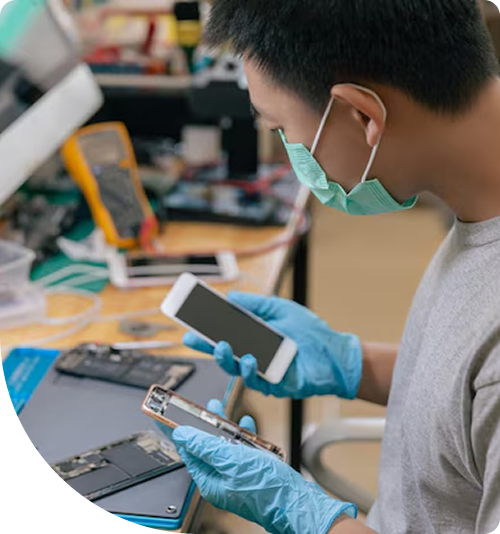
Professional iPhone Repair Services In The Fix in Baybrook Mall (Food Court)
iPhone Screen Broken or Battery Dying Fast?
iPhones deliver the seamless experience Apple promises, making them essential tools for Friendswood residents. From managing schedules to capturing life's moments, your iPhone keeps you connected. But when screens crack, batteries degrade, or Face ID stops working, that seamless experience disappears. Hardware failures disrupt everything from work communication to family coordination.
When you need iPhone Repair in Friendswood, TX, our Food Court location at Baybrook Mall delivers expert service. From iPhone SE to the latest Pro Max models, we handle repairs that restore functionality. Our technicians understand Apple's evolving hardware architecture and use precision techniques preserving device integrity.
Display Replacement and True Tone Calibration
iPhone displays represent cutting-edge technology—Super Retina XDR panels deliver stunning brightness, contrast, and color accuracy. When screens crack from drops or impacts, proper replacement requires more than just swapping parts.
True Tone technology adjusts display color temperature based on ambient lighting. After screen replacement, True Tone functionality can be lost without proper calibration equipment. At our Friendswood, TX 77546 location, we use specialized programmers to transfer display data, preserving True Tone.
We also carefully handle Face ID sensors housed in the display notch. Improper handling damages these delicate components, permanently disabling biometric authentication. We transfer sensors carefully to fresh screen assemblies, maintaining all security features.
Battery Health and Replacement Services
iPhone battery health metrics in Settings provide clear indicators when replacement is necessary. Maximum capacity below 80% indicates significant degradation—you'll experience shorter runtime, unexpected shutdowns, and performance throttling.
Texas heat accelerates battery degradation. Leaving iPhones in hot vehicles or exposing them to direct sunlight causes faster capacity loss. We remove depleted batteries and install fresh cells meeting Apple's specifications.
After replacement, iOS recognizes the new battery and resets health metrics. Peak performance capability returns, eliminating unexpected shutdowns and performance limitations.
Back Glass Repair on Modern iPhones
Since iPhone 8, Apple has used glass backs enabling wireless charging. While beautiful, glass backs shatter easily from drops. Replacing back glass is extraordinarily difficult because it's fused to the aluminum or stainless steel frame with extremely strong adhesive.
We use specialized equipment to remove shattered back glass and install fresh panels. This process requires precision—excessive force damages internal components while inadequate heating leaves adhesive intact.
After replacement, we verify wireless charging works correctly and water resistance seals are properly restored.
Charging Port and Lightning Connector Issues
Lightning ports fail from repeated cable insertion, lint accumulation, or liquid exposure. Symptoms range from intermittent charging to complete power delivery failure.
We first inspect ports for debris—lint compaction is surprisingly common and easily resolved through professional cleaning. When ports are physically damaged, we replace them using microsoldering techniques that maintain proper data transfer and charging functionality.
Camera System Repairs
iPhones feature increasingly complex camera systems—multiple lenses, computational photography, and sensor-shift stabilization. When cameras fail, you lose one of the iPhone's signature features.
We replace failed camera modules, damaged lens covers, and malfunctioning stabilization mechanisms. After replacement, we test all camera modes including Night mode, Portrait mode, and video recording to ensure full functionality.
Face ID and TrueDepth Camera Issues
Face ID revolutionized smartphone security but the TrueDepth camera system is delicate. Damage from drops or liquid exposure can disable facial recognition permanently.
We diagnose Face ID failures and replace damaged components when possible. However, some Face ID components are paired to specific logic boards by Apple for security, making certain repairs impossible without Apple's proprietary tools.
Earpiece and Loudspeaker Replacement
iPhone audio systems include earpiece speakers for calls, bottom-firing speakers for media, and multiple microphones for noise cancellation. When audio components fail, communication and media playback suffer.
We replace failed speakers and microphones, testing audio quality across the frequency spectrum. For iPhones with spatial audio features, we verify proper function after component replacement.
Haptic Engine and Vibration Motor
The Taptic Engine provides sophisticated haptic feedback—from subtle taps to strong vibrations. When the Taptic Engine fails, you lose all haptic feedback including notification vibrations.
Logic Board Repair and Component-Level Service
When iPhones won't power on despite good batteries and screens, logic board failure is likely. Common failures include power management ICs, damaged voltage regulators, or corroded connections from liquid exposure.
We perform board-level diagnostics using microscopes and precision testing equipment. Component-level repair through microsoldering can restore function without logic board replacement, saving significant cost.
Liquid Damage and Corrosion Repair
Despite water resistance ratings, iPhones can suffer liquid damage from prolonged submersion, hot liquids, or compromised seals. If your iPhone got wet in Friendswood, power it off immediately and bring it to us.
We disassemble phones, use ultrasonic cleaning to remove corrosive residues, and inspect under magnification for damaged components. Early intervention significantly improves recovery chances.
Home Button and Touch ID Repair
Older iPhone models use physical home buttons with integrated Touch ID sensors. These buttons fail from wear or liquid damage.
While we can restore physical button function, Touch ID cannot be re-enabled if the original sensor is damaged—Apple pairs sensors to logic boards for security. We explain this limitation before proceeding with repairs.
Proximity Sensor and Ambient Light Sensor
These sensors control screen behavior during calls and adjust brightness automatically. When they fail, screens don't turn off during calls (causing accidental touches) or brightness doesn't adjust to lighting conditions.
We replace failed sensor assemblies and verify proper function through systematic testing.
Wi-Fi and Bluetooth Module Replacement
Network connectivity issues often trace to failed wireless modules. We replace damaged modules and test connectivity, signal strength, and data transfer speeds.
SIM Card Tray and Slot Repair
Damaged SIM trays prevent proper network connectivity. We replace broken trays and repair damaged slots that prevent proper card reading.
Protecting Your iPhone Investment
Quality cases with raised edges protect screens and camera modules. Screen protectors absorb impact energy and prevent scratches.
Avoid extreme temperatures—don't leave your iPhone in hot cars or expose it to freezing conditions. Both temperature extremes damage batteries and can cause temporary or permanent hardware issues.
Visit The Fix Today
Your iPhone deserves expert care from technicians who understand Apple's engineering. Stop by our Baybrook Mall Food Court location and let our team diagnose what's wrong. We provide honest assessments and quality repairs.
Common Questions About iPhone Services
Q: Can you repair iPhones with water damage?
A: Water damage repair success depends on exposure duration and liquid type. Fresh water exposure caught early has good recovery chances. Salt water or sugary beverages are more corrosive and cause more extensive damage. At our Friendswood location, we provide free diagnostics to assess damage extent and provide honest repair feasibility estimates.
Q: Will my iPhone lose data during repair?
A: Most repairs don't affect data—screen, battery, and charging port replacements don't touch storage. However, logic board repairs or liquid damage can result in data loss. We always recommend having current iCloud or iTunes backups before repairs. If your phone is non-functional, we assess data recovery possibilities during diagnosis.
Q: How do I know if my iPhone needs a battery replacement?
A: Check Settings > Battery > Battery Health. Additionally, if you experience unexpected shutdowns, especially in cold weather, or if iOS displays performance management warnings, replacement is advisable. We can verify battery health during a free diagnostic evaluation at 500 Baybrook Mall Food Court.
Other Locations Near By You
The Fix in Baybrook Mall
500 Baybrook Mall #1079, Friendswood, TX 77546, United States
The Fix in Walmart Carrollton
1213 E Trinity Mls Rd, Carrollton, TX 75006, United States
The Fix in Walmart Lubbock
702 W Loop 289 Acc Rd, Lubbock, TX 79416, United States
The Fix in South Plains Mall
6002 Slide Rd, Lubbock, TX 79414
The Fix in Walmart North Richland Hills
6401 NE Loop 820, North Richland Hills, TX 76180, United States
The Fix in South Park Mall San Antonio
2310 SW Military Dr. Suite 118 San Antonio, TX 78224
The Fix in Walmart Odessa
2450 NW Loop 338 State Rte W, Odessa, TX 79763, United States
The Fix in Walmart La Porte
9025 Spencer Hwy, La Porte, TX 77571, United States
The Fix in Walmart Humble
9235 N Sam Houston Pkwy E, Humble, TX 77396, United States
The Fix in Walmart Weatherford
1836 S Main St, Weatherford, TX 76086, United States
Your local repair experts for every device
From iPhones to gaming laptops, The Fix in Friendswood, TX is your one-stop shop for device repair. Quick turnarounds, affordable prices, and local experts you can trust

Phone Cases
Protect your device in style! At The Fix in Friendswood, TX, we offer a wide selection of durable phone cases for all major brands—sleek designs that keep your phone safe and looking great.

Nintendo Switch Repair
Cracked Nintendo Switch screen? We repair Switch devices in Friendswood, TX quickly and affordably. Fast, easy, and always with high-quality parts.

MacBook Repair
For broken screens, battery replacements, or other issues, The Fix in Friendswood, TX provides quick MacBook repairs with premium parts.

PlayStation Repair
Is your PlayStation giving you trouble? At The Fix in Friendswood, TX, we handle PlayStation repairs with care and quality parts—no long waits, no hassle.

Google Repair
Need your Google Pixel fixed? At The Fix in Friendswood, TX, we repair cracked screens, charging issues, and more—always using high-quality parts for lasting results.

Tablet Repair
Whether your tablet screen is cracked or the battery won’t hold a charge, The Fix in Friendswood, TX provides fast, affordable tablet repairs with free diagnostics.

Computer Repair
Need PC or desktop service in Friendswood, TX? We provide free diagnostics and affordable repairs, always with high-quality parts.

Game Console Repair
From Nintendo Switch® to PlayStation and Xbox, The Fix in Friendswood, TX repairs all major game consoles. Fast service and dependable results.

Laptop Repair
Got a broken laptop? The Fix In Friendswood, TX, our team repairs most laptop brands and models using high-quality replacement parts.

iPad Repair
Need your iPad fixed? At The Fix in Friendswood, TX, we repair cracked screens, charging issues, and more—always using high-quality parts for lasting results.

Cell Phone Repair
We repair all major phone brands in Friendswood, TX. iPhone, Samsung, Google, and more—get your phone fixed fast.

Samsung Repair
Whether it’s a Galaxy screen replacement or a charging issue, The Fix in Friendswood, TX offers fast and reliable Samsung repairs.

Xbox Repair
Xbox not working properly? Our team in Friendswood, TX offers quick, reliable Xbox repairs with free diagnostics and high-quality replacement parts.


Trusted repair solution for mobile phones, tablets, gaming consoles, and computer systems. We provide fast, reliable, and affordable repair services to get your devices back in perfect working condition.
The Fix is an independent repair service provider and is not affiliated with, sponsored by, or endorsed by Apple Inc., Samsung Electronics, Google LLC, or any other device manufacturer. We use high-quality compatible replacement parts unless explicitly stated. All trademarks are property of their respective owners.


© Copyright The Fix Solutions All rights reserved 2026.
Design by Deepcoder