






Game Console Repair in The Fix in Baybrook Mall (Food Court)
Having trouble with your game console? At The Fix in Friendswood, TX, we repair all major consoles—including Nintendo Switch, PlayStation, and Xbox. Whether it’s a broken screen, overheating console, or controller drift, our technicians provide fast repairs with free diagnostics and high-quality parts.

Professional Game Console Repair Services
- Nintendo Switch Repair
- PlayStation Repair
- Xbox Repair
- Controller & Stick Drift Repair
- HDMI Port Repair & Replacement
- Overheating & Fan Repair
- Disc Drive Repair
- Power Supply Repair
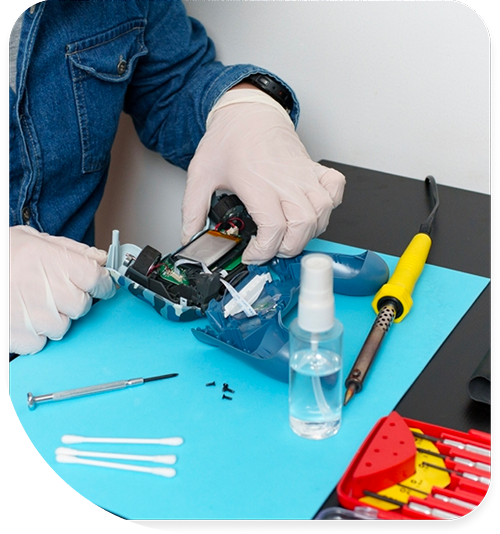
Professional Game Console Repair Services In The Fix in Baybrook Mall (Food Court)
Xbox, PlayStation, or Switch Not Working Right?
Gaming consoles deliver entertainment for the whole family in Friendswood homes. Whether you're exploring open worlds, competing online, or streaming movies, these systems represent significant investments. When hardware fails—disc drive errors, overheating shutdowns, or controller connectivity issues—your entertainment center becomes frustrating rather than fun.
At Game Console Repair in Friendswood, TX, we service all major gaming systems at our Food Court location in Baybrook Mall. From Xbox Series X/S to PlayStation 5 and Nintendo Switch, we handle repairs that restore your gaming experience. Our technicians understand the unique architecture each platform uses and apply appropriate diagnostic and repair techniques.
Overheating and Thermal Shutdown Problems
Modern consoles pack enormous processing power into compact enclosures. The thermal challenges are substantial—CPUs and GPUs generate heat that must be exhausted efficiently. When cooling systems fail or become clogged, consoles shut down mid-game to prevent permanent damage.
We disassemble cooling systems, remove accumulated dust from heatsink fins and fan blades, and replace dried thermal paste on processors. Factory thermal interface materials degrade over years of heat cycling. Fresh paste combined with clean cooling paths can reduce temperatures by 15-20°C under load.
After thermal maintenance, we stress test systems using demanding games to verify temperatures remain in safe ranges. Proper cooling allows processors to maintain maximum performance without throttling.
Disc Drive Failures Across Platforms
Optical disc drives use laser assemblies to read data from Blu-ray and DVD media. Over time, lasers weaken, tracking mechanisms wear out, and drive motors fail. You'll experience discs not being recognized, read errors during gameplay, or grinding noises from the drive.
We replace failed laser assemblies, drive motors, and complete drive mechanisms depending on failure mode. Each console generation uses proprietary drive firmware, requiring careful attention to compatibility during replacement.
PlayStation 5 presents unique challenges because Sony pairs disc drives to console motherboards for security. Drive replacement requires specialized procedures to maintain this pairing.
HDMI Port Damage and Video Output Issues
HDMI ports experience mechanical stress from cable connections. Pulling cables at angles, bumping consoles while connected, or using low-quality cables can bend internal pins or crack solder joints.
When ports fail, you see snow on screen, intermittent blackouts, or no video output at all. Port replacement requires microsoldering expertise—we remove damaged ports using hot air and flux, clean solder pads, and install fresh ports aligned perfectly with case openings.
After replacement, we test with multiple displays at various resolutions to verify stable video output and proper HDMI-CEC functionality.
Power Supply Failures and Electrical Issues
Console power supplies convert AC line voltage to the DC voltages required by internal components. These PSUs can fail from power surges, overheating, or component aging. Symptoms include consoles that won't power on, random shutdowns, or unusual clicking sounds.
We test PSU output voltages under load using specialized equipment. Failed units require replacement with components meeting manufacturer specifications. Installing incorrect PSUs can damage motherboards or cause fire hazards.
Controller Drift and Button Failures
Analog stick drift affects controllers across all platforms. Characters move without input, camera angles drift, and precise aiming becomes impossible. Drift results from worn potentiometers inside analog stick modules.
We replace failed analog stick assemblies with quality replacement modules and calibrate them to eliminate dead zones. For Xbox Elite controllers, we service the additional back paddles and adjustable stick tension mechanisms.
Button failures—sticky buttons, mushy response, or complete failure—typically result from debris accumulation or damaged rubber membranes. We disassemble controllers, clean contact pads, and replace worn components.
Hard Drive and SSD Failures
Console storage drives fail like any computer storage. Mechanical hard drives develop bad sectors and motor failures. SSDs wear out after write cycles or suffer controller chip failures.
When drives fail, consoles display "cannot start" errors, get stuck in database rebuild loops, or lose game saves. We replace failed drives with compatible units and reinstall system software.
For systems supporting storage expansion, we install additional drives that meet platform specifications. Xbox Series consoles require proprietary expansion cards, while PlayStation 5 accepts standard M.2 SSDs meeting Sony's speed requirements.
Network Adapter Failures
When consoles won't connect to Wi-Fi or experience constant disconnections, the network adapter may have failed. Wired Ethernet continuing to work while Wi-Fi fails confirms wireless module damage.
We replace failed network modules and test connectivity across multiple router configurations. For persistent issues after hardware replacement, we troubleshoot router settings and network congestion factors.
Liquid Damage and Corrosion Repair
Spills near gaming setups cause more console failures than people admit. Liquid entering through ventilation openings can short circuit components or leave corrosive residues causing delayed failures.
If your console suffered liquid exposure in Friendswood, TX 77546, do not power it on. We use ultrasonic cleaning to remove contaminants and inspect under magnification for damaged components. Early intervention significantly improves recovery chances.
Fan Noise and Mechanical Issues
Loud fan noise indicates either dust accumulation forcing fans to spin faster to maintain cooling, or failing bearings in the fan motor itself. Ignoring loud fans leads to overheating damage.
System Software Corruption
Not every console problem requires hardware repair. Corrupted system files, failed updates, or full storage can cause symptoms mimicking hardware failure. We attempt software recovery before recommending hardware service.
Factory resets, database rebuilds, and system software reinstallation resolve many issues. For consoles with extensive digital libraries, we guide users through proper backup procedures before performing software recovery.
Save Data Recovery Options
Lost game progress is devastating after hardware failure. Recovery options depend on the console and backup methods used. PlayStation Plus, Xbox Live Gold, and Nintendo Switch Online offer cloud save backup, but not all games support this feature.
For consoles with failed motherboards, save data may be permanently lost due to encryption tied to specific hardware. We recommend regular cloud backup adoption to protect against data loss.
USB Port Repairs
Console USB ports charge controllers, connect external storage, and support accessories. Physical damage from improper cable insertion or power surges can damage these ports.
We replace failed USB ports and verify proper data transfer speeds and charging current delivery. Multiple failed ports may indicate motherboard power distribution issues requiring more extensive diagnosis.
Why Professional Repair Matters
Gaming consoles use security screws and hidden clips designed to discourage user repair. Improper disassembly causes permanent damage—cracked housings, torn ribbon cables, and stripped fasteners.
Protecting Your Investment
Position consoles in well-ventilated areas with several inches of clearance on all sides. Enclosed entertainment centers trap heat and accelerate component aging.
Use surge protectors or uninterruptible power supplies (UPS) to protect against voltage spikes. Sudden power loss during system updates can corrupt firmware, requiring factory service.
Visit The Fix Today
Don't let hardware issues keep you from your gaming library. Stop by our Baybrook Mall location and let our team diagnose what's wrong. We provide honest assessments and transparent pricing.
Common Questions About Gaming Console Services
Q: Can you recover saved games from a console that won't turn on?
A: Recovery depends on the specific failure. If the storage drive is intact but other components failed, we can extract the drive and retrieve data. However, modern consoles encrypt saves to specific hardware, making recovery impossible if the motherboard is damaged. Cloud backup services are the best protection against data loss.
Q: How long do console repairs typically take?
A: Simple repairs like cleaning, thermal paste replacement, or controller service take 1-2 hours. Complex issues like HDMI port replacement or motherboard diagnostics may require 24-48 hours. We provide time estimates after diagnosis at our Friendswood location.
Other Locations Near By You
The Fix in Baybrook Mall
500 Baybrook Mall #1079, Friendswood, TX 77546, United States
The Fix in Walmart Carrollton
1213 E Trinity Mls Rd, Carrollton, TX 75006, United States
The Fix in Walmart Lubbock
702 W Loop 289 Acc Rd, Lubbock, TX 79416, United States
The Fix in South Plains Mall
6002 Slide Rd, Lubbock, TX 79414
The Fix in Walmart North Richland Hills
6401 NE Loop 820, North Richland Hills, TX 76180, United States
The Fix in South Park Mall San Antonio
2310 SW Military Dr. Suite 118 San Antonio, TX 78224
The Fix in Walmart Odessa
2450 NW Loop 338 State Rte W, Odessa, TX 79763, United States
The Fix in Walmart La Porte
9025 Spencer Hwy, La Porte, TX 77571, United States
The Fix in Walmart Humble
9235 N Sam Houston Pkwy E, Humble, TX 77396, United States
The Fix in Walmart Weatherford
1836 S Main St, Weatherford, TX 76086, United States
Your local repair experts for every device
From iPhones to gaming laptops, The Fix in Friendswood, TX is your one-stop shop for device repair. Quick turnarounds, affordable prices, and local experts you can trust

Phone Cases
Protect your device in style! At The Fix in Friendswood, TX, we offer a wide selection of durable phone cases for all major brands—sleek designs that keep your phone safe and looking great.

Nintendo Switch Repair
Cracked Nintendo Switch screen? We repair Switch devices in Friendswood, TX quickly and affordably. Fast, easy, and always with high-quality parts.

MacBook Repair
For broken screens, battery replacements, or other issues, The Fix in Friendswood, TX provides quick MacBook repairs with premium parts.

PlayStation Repair
Is your PlayStation giving you trouble? At The Fix in Friendswood, TX, we handle PlayStation repairs with care and quality parts—no long waits, no hassle.

Google Repair
Need your Google Pixel fixed? At The Fix in Friendswood, TX, we repair cracked screens, charging issues, and more—always using high-quality parts for lasting results.

Tablet Repair
Whether your tablet screen is cracked or the battery won’t hold a charge, The Fix in Friendswood, TX provides fast, affordable tablet repairs with free diagnostics.

Computer Repair
Need PC or desktop service in Friendswood, TX? We provide free diagnostics and affordable repairs, always with high-quality parts.

Laptop Repair
Got a broken laptop? The Fix In Friendswood, TX, our team repairs most laptop brands and models using high-quality replacement parts.

iPad Repair
Need your iPad fixed? At The Fix in Friendswood, TX, we repair cracked screens, charging issues, and more—always using high-quality parts for lasting results.

Cell Phone Repair
We repair all major phone brands in Friendswood, TX. iPhone, Samsung, Google, and more—get your phone fixed fast.

iPhone Repair
Cracked screen? Battery draining too fast? Our team in Friendswood, TX repairs iPhones with precision and high-quality parts to make your device feel new again.

Samsung Repair
Whether it’s a Galaxy screen replacement or a charging issue, The Fix in Friendswood, TX offers fast and reliable Samsung repairs.

Xbox Repair
Xbox not working properly? Our team in Friendswood, TX offers quick, reliable Xbox repairs with free diagnostics and high-quality replacement parts.


Trusted repair solution for mobile phones, tablets, gaming consoles, and computer systems. We provide fast, reliable, and affordable repair services to get your devices back in perfect working condition.
The Fix is an independent repair service provider and is not affiliated with, sponsored by, or endorsed by Apple Inc., Samsung Electronics, Google LLC, or any other device manufacturer. We use high-quality compatible replacement parts unless explicitly stated. All trademarks are property of their respective owners.


© Copyright The Fix Solutions All rights reserved 2026.
Design by Deepcoder