






PlayStation Repair in The Fix in Mid Rivers Mall
Is your PlayStation not working properly? At The Fix in St Peters, MO, we provide quick and reliable PlayStation repairs. From overheating consoles to controller issues, our technicians offer free diagnostics and use high-quality parts to get you back to gaming fast.

Professional PlayStation Repair Services
- HDMI Port Repair & Replacement
- Overheating & Fan Repair
- Controller & Stick Drift Repair
- Disc Drive Repair
- Power Supply Repair
- Software Troubleshooting & Updates
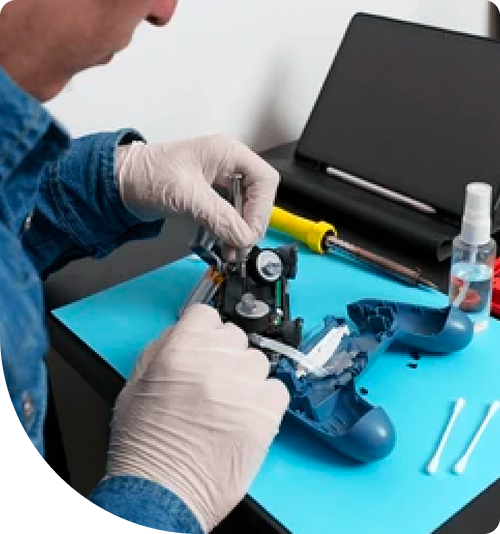
Professional PlayStation Repair Services In The Fix in Mid Rivers Mall
Myths vs. Reality: The Truth About PlayStation Hardware Failures
For gamers in St Peters, the PlayStation is more than an entertainment unit; it is a gateway to competitive play and immersive storytelling. However, when the console pulses with an ominous blue light or shuts down mid-game, panic often leads to misinformation. The internet is flooded with "quick fixes" and DIY hacks that promise to resurrect dead consoles. Unfortunately, many of these solutions do more harm than good. Separating engineering facts from forum fiction is essential for anyone seeking effective PlayStation repair in St Peters.
Understanding what is actually happening inside the black and white chassis of your PS4 or PS5 can save you from turning a minor repairable fault into a permanent paperweight. Let’s debunk the most common myths surrounding console hardware.
Myth 1: " The Towel Trick" Fixes Overheating
One of the most persistent and dangerous myths in the gaming community is the "towel trick" or using a hairdryer to heat up a failing console. The theory suggests that wrapping the console in a towel forces it to overheat, which supposedly "reflows" the solder connecting the processor to the motherboard, fixing contact issues (often associated with the Blue Light of Death).
The Reality: Thermal Destruction While extreme heat can temporarily expand metal and accidentally bridge a broken connection, this is not a repair. It is uncontrolled thermal stress.
- Component Damage: Wrapping a console blocks all airflow, raising internal temperatures well beyond safe limits. This can warp the motherboard, melt plastic connectors, and destroy the electrolytic capacitors that regulate power.
- The Solder Science: Proper solder reflow requires precise temperature curves controlled by industrial equipment. A hairdryer or trapped heat applies uneven thermal shock, which makes the solder brittle and prone to cracking again within days—often worse than before.
The Professional Solution: If a console has a BGA (Ball Grid Array) failure, the only permanent fix is professional re-balling or board-level repair using a rework station that heats specific areas to exact melting points without damaging surrounding components.
Myth 2: Blowing Compressed Air into the Vents Cleans the System
Many users believe that blasting canned air into the rear exhaust vents is good maintenance. It seems logical: air goes in, dust comes out.
The Reality: Compacting the Problem When you blow air from the outside in, you are often pushing dust further into the system. The heatsink fins inside a PlayStation are dense. Blowing air can dislodge "dust bunnies" and jam them deep between the fan blades or compress them into a solid felt-like layer against the heatsink. This blocks airflow entirely.
The Correct Approach: True cleaning requires disassembly. The outer shell, power supply unit, and metal shielding must be removed to access the fan and heatsink directly. We physically remove the dust accumulation and, crucially, clear the air intake pathways. This restores the aerodynamic efficiency of the cooling system, allowing the fan to run quietly and effectively.
Myth 3: HDMI Ports Break Because They Are "Weak"
A common complaint is that the HDMI port on the PlayStation is defectively weak. Users often report the port becoming loose or the pins looking bent "for no reason."
The Reality: Leverage and Physics The HDMI port is actually quite robust, but it is fighting against physics. The HDMI cable is often thick and heavy. If the console is pushed back against a wall, the cable head acts as a lever. A small amount of pressure on the cable translates to significant force on the internal solder joints.
- The Anchor Points: The port is held to the motherboard by four main anchor legs and 19 tiny data pins. Constant plugging and unplugging, or a single trip over the cord, can shear these legs.
- The Fix: This is not a "glue it back" situation. We must de-solder the damaged port, clean the microscopic pads on the motherboard, and install a brand-new port using high-quality replacement components. We often reinforce the anchor points to ensure the new port is stronger than the factory installation.
Myth 4: Hard Drive Failure Means the Console is Dead
When a PlayStation gets stuck in a "Safe Mode" loop or fails to load the operating system, many users assume the entire motherboard has failed.
The Reality: It’s Often Just Storage Mechanical hard drives (HDDs) found in older PS4s have spinning platters. One accidental drop while the system is reading data can cause the read/write head to crash into the platter, physically destroying sectors of the drive. Even the Solid State Drives (SSDs) in newer models have a finite lifespan.
The Upgrade Opportunity: A storage failure is often a blessing in disguise. Replacing a failed mechanical drive with a high-speed SSD (Solid State Drive) drastically reduces load times and texture pop-in in games. We can reinstall the system software on a new, faster drive, often making the console feel snappier than when it was new.
Myth 5: "If It Turns On, It's Fine"
Gamers often ignore loud fan noise (the "jet engine" sound) as long as the game is running. They believe that if the console hasn't shut down, there is no problem.
The Reality: The Silent Killer A loud fan is the system screaming for help. It means the console is thermally throttling—slowing down its processor to generate less heat because it cannot cool itself fast enough. Running a console in this state for months degrades the silicon and dries out the thermal paste.
- Thermal Paste Degradation: The factory thermal compound turns into a chalky, dry powder over time. It loses its ability to transfer heat from the chip to the cooler.
- The Consequence: Eventually, the heat will cause a catastrophic component failure that is much more expensive to fix than a simple maintenance service.
Why Professional Diagnosis Matters
PlayStation architecture is closer to a high-end PC than a toy. The interplay between the power supply, the APU, and the southbridge chip requires schematic-level knowledge to diagnose. Using a multimeter to trace voltage rails helps us identify whether a "no power" issue is a simple blown fuse or a complex power management IC failure.
At The Fix - Mid Rivers Mall, we treat your console with the respect a precision machine deserves. We don't use towels or guesswork. We use logic, physics, and professional tools to restore your gaming experience.
Frequently Asked Questions
Is it worth repairing an older PS4 or should I buy a PS5? This is a financial calculation. A typical repair (like an HDMI port or hard drive) costs significantly less than a new console. If your library of games is on disc, or if you simply want a working secondary console, repair is almost always the more economical choice compared to the high cost of a new generation system.
Will I lose my save data during a repair? It depends on the repair type. For HDMI ports, fans, or power supply replacements, your data remains untouched. However, if the hard drive itself has failed and needs replacement, the data on that specific drive is lost unless it was backed up to the cloud (PS Plus). We always prioritize data preservation whenever the hardware allows it.
How long does an HDMI port replacement take? Because this involves microsoldering under a microscope, it is not an instant fix. Typically, we aim for a 24-48 hour turnaround, depending on the current queue. This allows us time to solder, inspect the connections, and stress-test the video output to ensure stability.
Other Locations Near By You
The Fix in Walmart Manchester
201 Highlands Blvd Dr, Manchester, MO 63011, United States
The Fix in Walmart Kansas City
8301 N Church Rd, Kansas City, MO 64158, United States
The Fix in Walmart Lee's Summit
1000 NE Sam Walton Ln, Lee's Summit, MO 64086, United States
The Fix in Walmart Lake St. Louis
6100 Ronald Reagan Dr, Lake St Louis, MO 63367, United States
The Fix in South County Center
18 S County Center Way, MO
The Fix in Walmart Raytown
10300 E State Rte 350, Raytown, MO 64138, United States
The Fix in Walmart St. Louis
3270 Telegraph Rd, St. Louis, MO 63125, United States
The Fix in St. Louis Galleria
1155 Galleria Pkwy #1081, St. Louis, MO 63117, United States
The Fix in Walmart Wentzville
1971 Wentzville Pkwy, Wentzville, MO 63385, United States
The Fix in Walmart Maplewood
1900 Maplewood Commons Dr, Maplewood, MO 63143, United States
Your local repair experts for every device
From iPhones to gaming laptops, The Fix in St Peters, MO is your one-stop shop for device repair. Quick turnarounds, affordable prices, and local experts you can trust

Phone Cases
Protect your device in style! At The Fix in St Peters, MO, we offer a wide selection of durable phone cases for all major brands—sleek designs that keep your phone safe and looking great.

Nintendo Switch Repair
Cracked Nintendo Switch screen? We repair Switch devices in St Peters, MO quickly and affordably. Fast, easy, and always with high-quality parts.

MacBook Repair
For broken screens, battery replacements, or other issues, The Fix in St Peters, MO provides quick MacBook repairs with premium parts.

Google Repair
Need your Google Pixel fixed? At The Fix in St Peters, MO, we repair cracked screens, charging issues, and more—always using high-quality parts for lasting results.

Tablet Repair
Whether your tablet screen is cracked or the battery won’t hold a charge, The Fix in St Peters, MO provides fast, affordable tablet repairs with free diagnostics.

Computer Repair
Need PC or desktop service in St Peters, MO? We provide free diagnostics and affordable repairs, always with high-quality parts.

Game Console Repair
From Nintendo Switch® to PlayStation and Xbox, The Fix in St Peters, MO repairs all major game consoles. Fast service and dependable results.

Laptop Repair
Got a broken laptop? The Fix In St Peters, MO, our team repairs most laptop brands and models using high-quality replacement parts.

iPad Repair
Need your iPad fixed? At The Fix in St Peters, MO, we repair cracked screens, charging issues, and more—always using high-quality parts for lasting results.

Cell Phone Repair
We repair all major phone brands in St Peters, MO. iPhone, Samsung, Google, and more—get your phone fixed fast.

iPhone Repair
Cracked screen? Battery draining too fast? Our team in St Peters, MO repairs iPhones with precision and high-quality parts to make your device feel new again.

Samsung Repair
Whether it’s a Galaxy screen replacement or a charging issue, The Fix in St Peters, MO offers fast and reliable Samsung repairs.

Xbox Repair
Xbox not working properly? Our team in St Peters, MO offers quick, reliable Xbox repairs with free diagnostics and high-quality replacement parts.


Trusted repair solution for mobile phones, tablets, gaming consoles, and computer systems. We provide fast, reliable, and affordable repair services to get your devices back in perfect working condition.
The Fix is an independent repair service provider and is not affiliated with, sponsored by, or endorsed by Apple Inc., Samsung Electronics, Google LLC, or any other device manufacturer. We use high-quality compatible replacement parts unless explicitly stated. All trademarks are property of their respective owners.


© Copyright The Fix Solutions All rights reserved 2026.
Design by Deepcoder