






PlayStation Repair in The Fix in Walmart The Colony
Is your PlayStation not working properly? At The Fix in The Colony, TX, we provide quick and reliable PlayStation repairs. From overheating consoles to controller issues, our technicians offer free diagnostics and use high-quality parts to get you back to gaming fast.

Professional PlayStation Repair Services
- HDMI Port Repair & Replacement
- Overheating & Fan Repair
- Controller & Stick Drift Repair
- Disc Drive Repair
- Power Supply Repair
- Software Troubleshooting & Updates
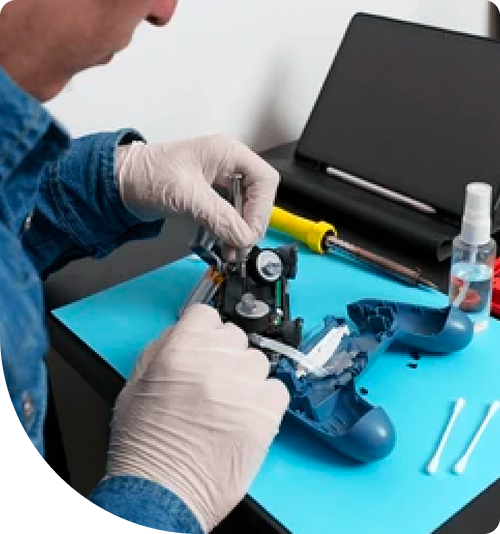
Professional PlayStation Repair Services In The Fix in Walmart The Colony
PlayStation Repair in The Colony, TX: Loud Fan Means Cooling Problem — but Which One Matters
A PlayStation running its fan at maximum speed during a gaming session in a Colony living room looks like an overheating problem — and it is. What the fan noise doesn't tell you is whether the cause is dust accumulation on the heatsink fins, thermal paste degradation at the APU contact surface, or restricted airflow from a console position that traps exhaust heat. Each of those causes requires a different intervention, and addressing the wrong one leaves the overheating condition in place while the APU continues accumulating thermal stress.
The assumption that a loud PlayStation just needs cleaning — or that it has overheated beyond repair — both miss the diagnostic step that determines what's actually failing. PlayStation repair in The Colony, TX means starting with what the thermal system is actually doing before deciding what it needs.
The Assumption Worth Questioning
Colony residents arrive with two opposing assumptions about a loud, hot PlayStation. The first is that the console just needs a cleaning — which is sometimes true, but cleaning alone doesn't address thermal paste degradation that has been occurring simultaneously. The second is that the console has been permanently damaged by overheating and isn't worth repairing. Both assumptions skip the same step: measuring what the internal temperature actually is under load, and identifying which part of the cooling chain is responsible for the gap between that temperature and the safe operating range.
The distinction between dust fouling and thermal paste failure matters practically. A heatsink clogged with the dust and biological debris that Lewisville Lake's shore winds carry across the 75056 area — including algae particles, fine mineral sand, and pollen from the lake corridor's vegetation — insulates the heatsink fins and reduces airflow. Cleaning that fouling restores airflow. But if the thermal paste between the PS5's APU and the heatsink has simultaneously dried, migrated, or — on PS5 models using liquid metal thermal interface material — pooled unevenly, airflow restoration alone will not bring temperatures into range. Both problems need to be addressed in the same service.
What the Fix Actually Does
PlayStation thermal service at The Fix covers the complete cooling chain, not just the fan and heatsink exterior. Diagnosis begins with internal temperature monitoring under a sustained gaming load — not just a power-on check — to establish actual APU temperature against the console's throttle and shutdown thresholds. Heatsink cleaning removes the fouling from the fin surfaces using precision tools that reach the interior fin gaps where biological particulate from the lake corridor accumulates. Thermal paste replacement removes the dried compound from the APU contact surface and applies fresh paste with controlled thickness, restoring the full thermal conductivity the interface was designed to provide.
PS5 liquid metal thermal interface material presents a specific service consideration. Sony's PS5 uses a liquid metal compound between the APU and the heatsink that provides very high thermal conductivity when evenly distributed. Over time, this compound can migrate toward the edges of the contact zone, leaving the APU center — where heat generation is highest — with a thinner interface layer. Refreshing the liquid metal distribution restores uniform contact and eliminates the hot spots that drive elevated APU temperatures during demanding sessions. This is a precision service that requires controlled application technique to prevent the liquid metal from contacting adjacent board traces.
HDMI Retimer chip damage from power surges during The Colony's spring storm season is a separate cause of console problems that gets conflated with thermal failures. The afternoon convective storms that track northeast along SH-121 from April through June deliver lightning and grid surges that can damage the HDMI output stage without producing any thermal symptoms. A console that runs quietly at safe temperatures but produces no video output has an HDMI signal chain problem, not a cooling problem — and cleaning the heatsink will not restore video output on a console with a damaged Retimer chip.
The Move That Pays Off
A PlayStation 5 that is thermally throttling or shutting down during sessions is a console that its owner cannot use for the purpose they purchased it. Thermal service restores the full performance envelope — the console runs at its designed clock speeds, sessions complete without shutdowns, and the fan returns to its normal operating range rather than maximum speed. For Colony gaming households where the PS5 is a primary entertainment platform, the time investment of a thermal service is recovered in the first week of reliable sessions that replace the interrupted ones.
The Fix at 4691 State Hwy 121 handles PS4 and PS5 thermal service, HDMI port replacement, and disc drive repair as walk-in services with no appointment. When Colony residents need PlayStation repair in The Colony, the technician confirms which part of the cooling chain is responsible for the thermal problem before beginning any service.
Field Notes from The Colony
My PS5 gets loud after about 20 minutes of play. Is that a dust problem or something worse?
A 20-minute threshold before loud fan behavior points to a thermal paste issue as much as a dust problem — if the console were clean but had degraded paste, it would reach elevated APU temperatures faster than a console with good paste and some dust. The timeline narrows the field: consoles that are loud from startup usually have severe dust fouling; consoles that escalate to loud after sustained use more often have paste degradation where the interface becomes resistive as the APU temperature rises. A thermal diagnosis under load confirms which factor is driving the temperature, and the service addresses both in the same visit.
Can The Colony's spring storms damage a PlayStation even if it doesn't lose power?
Yes. Grid surges during the convective storms that track along SH-121 can pass through a surge protector's clamping limit and reach connected devices. Partial HDMI Retimer chip damage is one of the most common post-surge PlayStation failures — the console continues to function normally in every other respect but produces no video output or intermittent signal drops. If your PlayStation started showing video issues after a storm near the Grandscape area or the SH-121 corridor, surge damage to the HDMI signal chain is the first thing to assess, independent of any thermal symptoms.
What does PlayStation thermal service actually include at The Fix?
The service covers full console disassembly, heatsink fin cleaning with precision tools to remove biological and dust fouling, thermal paste removal and reapplication at the APU contact surface, and — for PS5 models using liquid metal interface material — careful reapplication and distribution of the liquid metal compound. The fan assembly is inspected for bearing wear and cleaned. After reassembly, the console is tested under a sustained gaming load while internal temperatures are monitored to confirm that the cooling chain is maintaining safe APU temperatures. The Fix is at 4691 State Hwy 121, The Colony, TX 75056.
Other Locations Near By You
The Fix in Walmart Carrollton
1213 E Trinity Mls Rd, Carrollton, TX 75006, United States
The Fix in Walmart Lubbock
702 W Loop 289 Acc Rd, Lubbock, TX 79416, United States
The Fix in South Plains Mall
6002 Slide Rd, Lubbock, TX 79414
The Fix in Walmart North Richland Hills
6401 NE Loop 820, North Richland Hills, TX 76180, United States
The Fix in South Park Mall San Antonio
2310 SW Military Dr. Suite 118 San Antonio, TX 78224
The Fix in Walmart Odessa
2450 NW Loop 338 State Rte W, Odessa, TX 79763, United States
The Fix in Walmart La Porte
9025 Spencer Hwy, La Porte, TX 77571, United States
The Fix in Baybrook Mall
500 Baybrook Mall #1079, Friendswood, TX 77546, United States
The Fix in Walmart Humble
9235 N Sam Houston Pkwy E, Humble, TX 77396, United States
The Fix in Walmart Weatherford
1836 S Main St, Weatherford, TX 76086, United States
Your local repair experts for every device
From iPhones to gaming laptops, The Fix in The Colony, TX is your one-stop shop for device repair. Quick turnarounds, affordable prices, and local experts you can trust

Phone Cases
Protect your device in style! At The Fix in The Colony, TX, we offer a wide selection of durable phone cases for all major brands—sleek designs that keep your phone safe and looking great.

Nintendo Switch Repair
Cracked Nintendo Switch screen? We repair Switch devices in The Colony, TX quickly and affordably. Fast, easy, and always with high-quality parts.

MacBook Repair
For broken screens, battery replacements, or other issues, The Fix in The Colony, TX provides quick MacBook repairs with premium parts.

Google Repair
Need your Google Pixel fixed? At The Fix in The Colony, TX, we repair cracked screens, charging issues, and more—always using high-quality parts for lasting results.

Tablet Repair
Whether your tablet screen is cracked or the battery won’t hold a charge, The Fix in The Colony, TX provides fast, affordable tablet repairs with free diagnostics.

Computer Repair
Need PC or desktop service in The Colony, TX? We provide free diagnostics and affordable repairs, always with high-quality parts.

Game Console Repair
From Nintendo Switch® to PlayStation and Xbox, The Fix in The Colony, TX repairs all major game consoles. Fast service and dependable results.

Laptop Repair
Got a broken laptop? The Fix In The Colony, TX, our team repairs most laptop brands and models using high-quality replacement parts.

iPad Repair
Need your iPad fixed? At The Fix in The Colony, TX, we repair cracked screens, charging issues, and more—always using high-quality parts for lasting results.

Cell Phone Repair
We repair all major phone brands in The Colony, TX. iPhone, Samsung, Google, and more—get your phone fixed fast.

iPhone Repair
Cracked screen? Battery draining too fast? Our team in The Colony, TX repairs iPhones with precision and high-quality parts to make your device feel new again.

Samsung Repair
Whether it’s a Galaxy screen replacement or a charging issue, The Fix in The Colony, TX offers fast and reliable Samsung repairs.

Xbox Repair
Xbox not working properly? Our team in The Colony, TX offers quick, reliable Xbox repairs with free diagnostics and high-quality replacement parts.


Trusted repair solution for mobile phones, tablets, gaming consoles, and computer systems. We provide fast, reliable, and affordable repair services to get your devices back in perfect working condition.
The Fix is an independent repair service provider and is not affiliated with, sponsored by, or endorsed by Apple Inc., Samsung Electronics, Google LLC, or any other device manufacturer. We use high-quality compatible replacement parts unless explicitly stated. All trademarks are property of their respective owners.


© Copyright The Fix Solutions All rights reserved 2026.
Design by Deepcoder