






Laptop Repair in The Fix in Walmart Los Lunas
Broken laptop slowing you down? At The Fix in Los Lunas, NM, we repair all major laptop brands and models. From cracked screens to battery issues, our technicians provide fast, affordable service with free diagnostics and high-quality parts.

Professional Laptop Repair Services
- Screen Repair & Replacement
- Battery Replacement
- Water Damage Repair
- Keyboard & Trackpad Repair
- Charging Port Repair
- Overheating & Fan Repair
- Hard Drive / SSD Replacement & Data Recovery
- Software Troubleshooting & Recovery
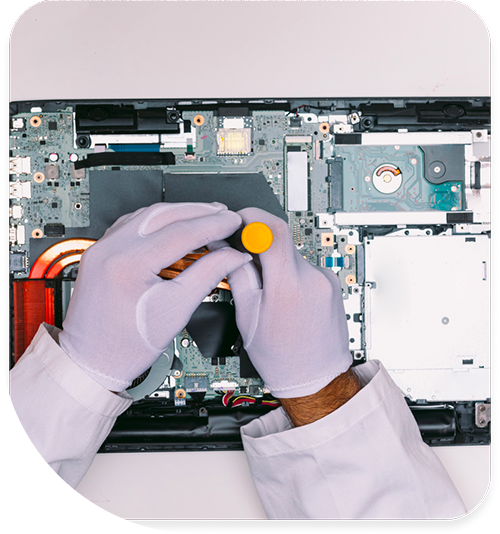
Professional Laptop Repair Services In The Fix in Walmart Los Lunas
Laptop Repair in Los Lunas, NM: How Dust, Thermal Cycling, and I-25 Commuter Use Wear a Laptop Over Time
A laptop belonging to an I-25 commuter from Los Lunas to Albuquerque goes through a specific daily thermal cycle: from a home at 75 degrees into a car that reaches 100 to 130 degrees in the sun, into an air-conditioned office at 70 degrees, and back through the same sequence in reverse. That daily temperature range — which can span more than 50 degrees from car interior to office interior — stresses the laptop's components through repeated expansion and contraction. Combined with the fine silicate dust that accumulates in the intake vents from carrying the laptop through the Rio Grande Valley air, and the low humidity that keeps static charge elevated, the I-25 commuter laptop in Valencia County is accumulating wear on a compressed timeline compared to a machine that stays in a temperature-controlled building.
The damage chain that commuter use and desert conditions build in a laptop over time, and what each stage of that chain produces, is what laptop repair in Los Lunas, NM addresses at the Main Street NW location.
What Thermal Cycling Does to a Laptop
Every material in a laptop expands when heated and contracts when cooled. The solder joints connecting components to the logic board, the cable connections at the display hinge, and the mechanical interfaces between parts all cycle through this expansion and contraction with every temperature change. In a laptop that makes the Los Lunas-to-Albuquerque commute daily, these cycles happen more than 200 times per year — far more than a laptop that stays in a stable indoor environment. The cumulative stress on solder joints is the primary long-term consequence: micro-fractures develop at joints, and eventually those fractures become electrical failures.
The display hinge cable is particularly vulnerable to this cycle. The cable that carries the display signal runs through the hinge joint and flexes with every screen opening and closing. A commuter laptop that is opened and closed multiple times per day is cycling that cable at a rate that accelerates mechanical wear, and the thermal cycling from car temperatures changes the flexibility of the cable insulation. In low humidity, cable insulation materials become more brittle than in humid environments. A cable that is both frequently flexed and thermally stressed in a dry environment develops micro-fractures in its insulation and conductors faster than the same cable under either stress alone.
The Dust and Battery Problems
Laptop battery degradation runs faster in the I-25 commuter pattern than in controlled indoor use. Leaving a laptop in a car that reaches 120 degrees for a lunch hour in June — the Los Lunas summer makes this a regular occurrence for commuters who do not bring the laptop inside — subjects the battery to high temperatures that accelerate the chemical degradation of lithium-ion cells. A laptop battery that regularly experiences vehicle temperatures degrades to 70-80 percent of its starting capacity within eighteen to twenty-four months, rather than the two-to-three-year timeline typical of controlled indoor use.
Heatsink accumulation follows the same trajectory as in stationary systems, but the commuter laptop adds the variable of being carried through outdoor environments — from a parking lot to a building, through summer dust, wind events before monsoon storms — that load the intake vents with particulate directly. The laptop cooling system draws in whatever is in the ambient air at the intake, and a laptop carried through a New Mexico spring dust event pulls that air through its heatsink. Over a season of commuting, the heatsink accumulates a dust layer that starts affecting thermal performance.
Keyboard and trackpad failures sometimes develop from the structural flexing that a commuter laptop experiences. A laptop carried in a bag that is slung over a shoulder or set down on hard surfaces undergoes torque stress on the chassis. Combined with the thermal cycling that slightly changes the dimensional relationship of the chassis components, the keyboard membrane — which sits in the chassis and connects to the board through a ribbon cable — can develop intermittent key registration issues. Individual keys that need extra force, or that register double inputs, often trace back to ribbon cable tension from chassis flexing.
Addressing the Commuter Laptop
A Los Lunas commuter laptop that has been through two or more New Mexico summers is likely dealing with at least battery degradation and some degree of heatsink dust accumulation. These two issues affect every session: battery limits the working time, thermal accumulation limits performance under load. Addressing both in the same service visit restores the laptop to daily usability without the battery anxiety and the sluggishness that thermal throttling produces. Display cable issues and keyboard problems, if present, add to the service scope but are addressable without replacing the machine.
Battery replacement, heatsink cleaning, display cable service, keyboard repair, and diagnostics for laptop repair in Los Lunas are handled at the Main Street NW location without shipping.
Field Notes from Los Lunas
I leave my laptop in my car sometimes — how bad is that for the battery in New Mexico?
Very hard on the battery. Car interiors in the Los Lunas summer reach 120 to 140 degrees within 20 minutes in direct sun, and lithium-ion batteries degrade at an accelerated rate at temperatures above 95 degrees. Sustained exposure at those temperatures is more damaging than an equivalent number of charge cycles in controlled conditions. The battery does not fail from a single hot-car event, but repeated exposures across a summer compress the timeline from the two-to-three-year capacity life expected under normal conditions to something closer to twelve to eighteen months. Keeping the laptop out of a hot car or covering it with a sunshade is the most effective single action for extending battery life in this climate.
My laptop display flickers at specific screen angles — is that the hinge?
The flicker is in the display cable, which runs through the hinge. The angle-dependence is the diagnostic signature: the cable makes and loses electrical contact depending on how it is flexed at the hinge point. The hinge itself may or may not have physical damage — the cable can develop micro-fractures from use and thermal cycling without the hinge being visibly broken. The flickering typically progresses from appearing at one specific angle to appearing at most angles, and eventually to consistent flickering or failure. Cable replacement at the intermittent stage is less involved than waiting until the cable has failed completely and the display no longer functions.
Can I upgrade the storage on my laptop, and would that help with slowness?
If the laptop has an HDD rather than an SSD, an SSD upgrade is one of the most effective performance improvements available for an older machine. HDDs have rotational latency that makes every file read and write slower than flash storage, and older HDDs that have been through the thermal cycling of a commuter laptop's life are slower still. An SSD upgrade makes the operating system launch faster, applications open faster, and file operations complete faster — the daily-use tasks that feel slow on an aging HDD-equipped machine. The laptop's processor, RAM, and display continue to function; it is the storage bottleneck that the upgrade addresses.
Other Locations Near By You
The Fix in Walmart Rio Rancho
901 Unser Blvd SE, Rio Rancho, NM 87124, United States
The Fix in Walmart Albuquerque
10224 Coors Bypass NW, Albuquerque, NM 87114, USA
The Fix in Walmart Albuquerque
2550 Coors Blvd NW, Albuquerque, NM 87120, United States
The Fix in Walmart Bernalillo
460 NM-528, Bernalillo, NM 87004, United States
Your local repair experts for every device
From iPhones to gaming laptops, The Fix in Los Lunas, NM is your one-stop shop for device repair. Quick turnarounds, affordable prices, and local experts you can trust

Phone Cases
Protect your device in style! At The Fix in Los Lunas, NM, we offer a wide selection of durable phone cases for all major brands—sleek designs that keep your phone safe and looking great.

Nintendo Switch Repair
Cracked Nintendo Switch screen? We repair Switch devices in Los Lunas, NM quickly and affordably. Fast, easy, and always with high-quality parts.

MacBook Repair
For broken screens, battery replacements, or other issues, The Fix in Los Lunas, NM provides quick MacBook repairs with premium parts.

PlayStation Repair
Is your PlayStation giving you trouble? At The Fix in Los Lunas, NM, we handle PlayStation repairs with care and quality parts—no long waits, no hassle.

Google Repair
Need your Google Pixel fixed? At The Fix in Los Lunas, NM, we repair cracked screens, charging issues, and more—always using high-quality parts for lasting results.

Tablet Repair
Whether your tablet screen is cracked or the battery won’t hold a charge, The Fix in Los Lunas, NM provides fast, affordable tablet repairs with free diagnostics.

Computer Repair
Need PC or desktop service in Los Lunas, NM? We provide free diagnostics and affordable repairs, always with high-quality parts.

Game Console Repair
From Nintendo Switch® to PlayStation and Xbox, The Fix in Los Lunas, NM repairs all major game consoles. Fast service and dependable results.

iPad Repair
Need your iPad fixed? At The Fix in Los Lunas, NM, we repair cracked screens, charging issues, and more—always using high-quality parts for lasting results.

Cell Phone Repair
We repair all major phone brands in Los Lunas, NM. iPhone, Samsung, Google, and more—get your phone fixed fast.

iPhone Repair
Cracked screen? Battery draining too fast? Our team in Los Lunas, NM repairs iPhones with precision and high-quality parts to make your device feel new again.

Samsung Repair
Whether it’s a Galaxy screen replacement or a charging issue, The Fix in Los Lunas, NM offers fast and reliable Samsung repairs.

Xbox Repair
Xbox not working properly? Our team in Los Lunas, NM offers quick, reliable Xbox repairs with free diagnostics and high-quality replacement parts.


Trusted repair solution for mobile phones, tablets, gaming consoles, and computer systems. We provide fast, reliable, and affordable repair services to get your devices back in perfect working condition.
The Fix is an independent repair service provider and is not affiliated with, sponsored by, or endorsed by Apple Inc., Samsung Electronics, Google LLC, or any other device manufacturer. We use high-quality compatible replacement parts unless explicitly stated. All trademarks are property of their respective owners.


© Copyright The Fix Solutions All rights reserved 2026.
Design by Deepcoder