






Game Console Repair in The Fix in Walmart Los Lunas
Having trouble with your game console? At The Fix in Los Lunas, NM, we repair all major consoles—including Nintendo Switch, PlayStation, and Xbox. Whether it’s a broken screen, overheating console, or controller drift, our technicians provide fast repairs with free diagnostics and high-quality parts.

Professional Game Console Repair Services
- Nintendo Switch Repair
- PlayStation Repair
- Xbox Repair
- Controller & Stick Drift Repair
- HDMI Port Repair & Replacement
- Overheating & Fan Repair
- Disc Drive Repair
- Power Supply Repair
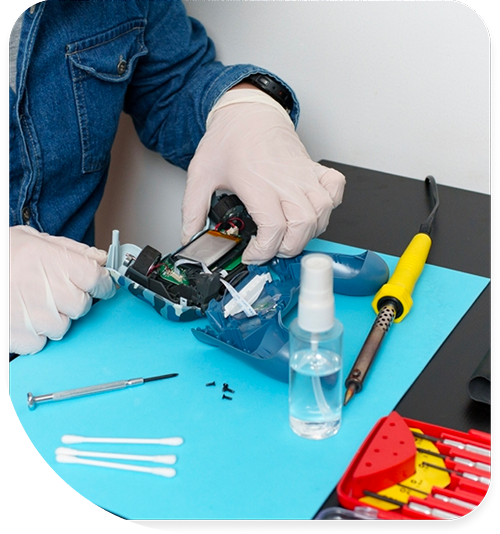
Professional Game Console Repair Services In The Fix in Walmart Los Lunas
Game Console Repair in Los Lunas, NM: How High Desert Heat and Dust Wear a Console's Cooling System Over Time
Gaming consoles in Los Lunas homes run in an environment their designers tested for on average — not specifically for the combination of fine Rio Grande Valley silicate dust, wide daily temperature swings between afternoon highs and cool evenings, and the low relative humidity that keeps electrostatic charge elevated. A console that sits in an entertainment center in a Valencia County living room, drawing in air through its intake vents during every gaming session, is pulling in particulate that builds up steadily on the heatsink and fan over months of use. The thermal performance that made the console quiet and responsive in its first year degrades as that particulate accumulates, and the process is slower but more consistent than the dramatic failure events most people watch for.
Understanding how that thermal wear cycle develops — and when it has progressed to the point where service makes sense — is what game console repair in Los Lunas, NM helps assess at the Main Street NW location.
How the Wear Cycle Starts
A new console runs quietly. The cooling system — fan, heat pipe, heatsink — moves air efficiently, and the processor stays well below the thermal protection threshold during normal gaming sessions. The fan runs at low speed because it does not need to work hard to keep temperatures in range. This is the baseline state that the console ships in and that it maintains while the heatsink surface stays clear. In a Los Lunas home, that baseline begins to shift within the first year as particulate from the desert air accumulates on the heatsink fins, reducing the surface area available for heat exchange.
The shift is gradual and easy to normalize. The fan starts running a bit louder during long sessions — noticeable if the television is muted or the room is quiet, but easy to attribute to a demanding game rather than a thermal condition. The console takes slightly longer to cool down after a session. Load times feel imperceptibly longer than they did in the first months. None of these individually constitute a failure, and each individually might be explained away. Together, they trace the thermal wear pattern that accelerates as the heatsink accumulates more particulate from the next season of use.
The Middle of the Wear Cycle
Audible fan noise during game menus and lighter titles marks the midpoint of the wear cycle. A console that runs its fan loudly while displaying a static main menu — a low-processing-demand state — is running warmer at idle than it should. The fan is compensating for a heatsink that can no longer exchange heat efficiently at low fan speeds. At this stage, gaming sessions produce fan noise that interferes with audio from the television, and the console is running hotter than it was designed to at comparable workloads.
Controller connectivity issues sometimes develop around the same period, though from an unrelated cause. In low-humidity environments, the USB-C or micro-USB port on a controller accumulates dust and develops intermittent connection problems during charging. A controller that charges unreliably or fails to pair consistently may have a port contamination issue or a battery that has degraded from heat exposure — both common wear items in the Los Lunas climate.
Storage performance can also decline on older console hard drive units — HDD-based PS4 models specifically — as the mechanical drive accumulates use hours. HDDs have moving parts that wear with use, and in a console that has been running warmer than designed because of thermal accumulation, the drive operating temperature is also elevated. Heat is the primary factor in HDD life reduction. SSD upgrades in HDD-based consoles resolve performance limitations and the heat sensitivity issue simultaneously.
When Service Resets the Clock
A console that has run through two or three New Mexico summers and is now loud, slow, and occasionally shutting down under load is not at the end of its hardware life in most cases. The underlying components — processor, RAM, storage — are typically intact. The cooling system is the part that is underperforming. Thermal service that clears the heatsink, replaces the thermal paste, and cleans the fan returns the cooling system to near its starting condition, and the console returns to operating at appropriate temperatures and fan speeds. For a Valencia County household that is not ready to replace a console, this service extends useful life by another several years.
Thermal service, controller repair, storage upgrades, and HDMI port replacement for game console repair in Los Lunas are handled at the Main Street NW location.
Field Notes from Los Lunas
My console shuts off mid-game but only on long sessions — why does it pass shorter play sessions fine?
Thermal protection activates when the processor reaches a temperature threshold set by the firmware. Shorter sessions may not generate enough sustained heat to reach that threshold before you stop playing, while longer sessions allow heat to build up to the point where the protection kicks in. The cooling system is managing heat adequately at moderate session lengths but cannot sustain that performance through longer continuous loads. This is consistent with a heatsink that has partial dust accumulation — not fully blocked, but compromised enough to fail under sustained heat generation.
Is fan noise during games normal for older consoles?
Some fan noise during demanding titles is expected — the cooling system responds to heat load by increasing fan speed. What is not normal is fan noise during low-demand states: the main menu, a pause screen, a title with simple graphics. If the console is audibly loud while displaying a menu it ran silently through in its first year, the fan is compensating for a thermal condition rather than responding to a game load. That distinction — loud during menus versus loud only during demanding games — is the diagnostic difference between a thermal maintenance issue and expected behavior.
My controller stops charging after a few minutes on the cable — is that a cable issue or the controller?
Likely the controller port rather than the cable, if the cable works with other devices. The charging port on a controller accumulates dust and lint from daily handling and pocket storage — more so in a high-desert environment where fine silicate dust is consistently present. Compacted particulate in the port prevents the cable from fully seating, which causes intermittent contact during charging. Port cleaning typically resolves this. If the controller battery also shows very short runtime on a full charge, the battery may be degraded separately and warrant replacement.
Other Locations Near By You
The Fix in Walmart Rio Rancho
901 Unser Blvd SE, Rio Rancho, NM 87124, United States
The Fix in Walmart Albuquerque
10224 Coors Bypass NW, Albuquerque, NM 87114, USA
The Fix in Walmart Albuquerque
2550 Coors Blvd NW, Albuquerque, NM 87120, United States
The Fix in Walmart Bernalillo
460 NM-528, Bernalillo, NM 87004, United States
Your local repair experts for every device
From iPhones to gaming laptops, The Fix in Los Lunas, NM is your one-stop shop for device repair. Quick turnarounds, affordable prices, and local experts you can trust

Phone Cases
Protect your device in style! At The Fix in Los Lunas, NM, we offer a wide selection of durable phone cases for all major brands—sleek designs that keep your phone safe and looking great.

Nintendo Switch Repair
Cracked Nintendo Switch screen? We repair Switch devices in Los Lunas, NM quickly and affordably. Fast, easy, and always with high-quality parts.

MacBook Repair
For broken screens, battery replacements, or other issues, The Fix in Los Lunas, NM provides quick MacBook repairs with premium parts.

PlayStation Repair
Is your PlayStation giving you trouble? At The Fix in Los Lunas, NM, we handle PlayStation repairs with care and quality parts—no long waits, no hassle.

Google Repair
Need your Google Pixel fixed? At The Fix in Los Lunas, NM, we repair cracked screens, charging issues, and more—always using high-quality parts for lasting results.

Tablet Repair
Whether your tablet screen is cracked or the battery won’t hold a charge, The Fix in Los Lunas, NM provides fast, affordable tablet repairs with free diagnostics.

Computer Repair
Need PC or desktop service in Los Lunas, NM? We provide free diagnostics and affordable repairs, always with high-quality parts.

Laptop Repair
Got a broken laptop? The Fix In Los Lunas, NM, our team repairs most laptop brands and models using high-quality replacement parts.

iPad Repair
Need your iPad fixed? At The Fix in Los Lunas, NM, we repair cracked screens, charging issues, and more—always using high-quality parts for lasting results.

Cell Phone Repair
We repair all major phone brands in Los Lunas, NM. iPhone, Samsung, Google, and more—get your phone fixed fast.

iPhone Repair
Cracked screen? Battery draining too fast? Our team in Los Lunas, NM repairs iPhones with precision and high-quality parts to make your device feel new again.

Samsung Repair
Whether it’s a Galaxy screen replacement or a charging issue, The Fix in Los Lunas, NM offers fast and reliable Samsung repairs.

Xbox Repair
Xbox not working properly? Our team in Los Lunas, NM offers quick, reliable Xbox repairs with free diagnostics and high-quality replacement parts.


Trusted repair solution for mobile phones, tablets, gaming consoles, and computer systems. We provide fast, reliable, and affordable repair services to get your devices back in perfect working condition.
The Fix is an independent repair service provider and is not affiliated with, sponsored by, or endorsed by Apple Inc., Samsung Electronics, Google LLC, or any other device manufacturer. We use high-quality compatible replacement parts unless explicitly stated. All trademarks are property of their respective owners.


© Copyright The Fix Solutions All rights reserved 2026.
Design by Deepcoder