






Nintendo Switch Repair in The Fix in Town East Mall
Is your Nintendo Switch not working properly? At The Fix in Mesquite, TX, we repair screens, batteries, and more—always with free diagnostics and high-quality parts. Whether it’s a cracked screen or Joy-Con issue, our team gets you back to gaming fast.

Professional Nintendo Switch Repair Services
- Joy-Con Drift & Controller Repair
- Screen Repair & Replacement
- Battery Replacement
- Charging Port Repair
- Water Damage Repair
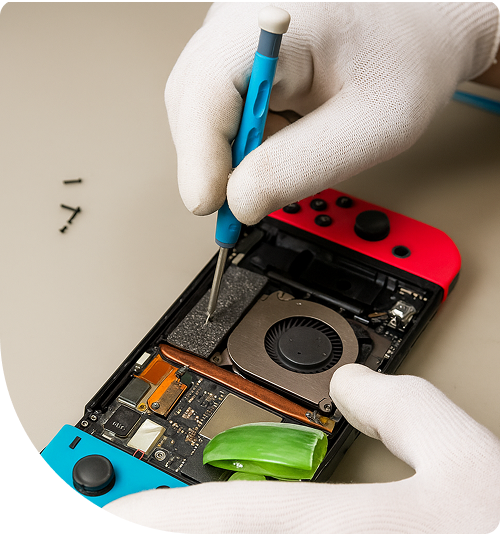
Professional Nintendo Switch Repair Services In The Fix in Town East Mall
When Gaming Sessions End in Hardware Failure
Texas summers push gaming hardware to its limits. Your Nintendo Switch generates internal heat during gameplay, and when ambient temperatures around Mesquite climb past 100°F, cooling systems struggle. Combine that with Texas humidity levels hovering between 60-80%, and you create conditions where dust accumulation accelerates, thermal paste dries faster, and components age prematurely.
Gaming during family trips to Lake Ray Hubbard, entertaining kids during scorching afternoons indoors, or unwinding after events at Devils Bowl Speedway—the Switch delivers portability that stationary consoles can't match. But drops onto Town East Mall tile floors, moisture exposure from sudden Mesquite thunderstorms, and constant use exact a toll on delicate components.
When you need Nintendo Switch Repair in Mesquite, TX, we provide diagnostics and repairs at 2063 Town East Mall #2024, Mesquite, TX 75150. Our technicians understand the hybrid console's architecture and address failures that interrupt gaming experiences.
The Drift Phenomenon Explained
Joy-Con drift has frustrated Switch owners worldwide since the console's launch. Characters move without input, menus scroll randomly, and precision becomes impossible in games requiring careful control. This stems from worn graphite contact pads inside analog stick mechanisms.
The joystick module uses resistive technology—a spring-loaded mechanism presses conductive pads against graphite strips arranged in X and Y axes. As you manipulate the stick, resistance changes proportionally to position. The console's processor interprets these resistance values as directional input.
Physical wear erodes the graphite coating over thousands of movements. Once the conductive material breaks down, the mechanism sends inaccurate position data. The processor receives false signals indicating movement when the stick sits neutral, creating drift.
Switch Lite systems compound repair complexity because controllers integrate directly into the body. Joystick replacement requires complete disassembly—disconnecting the battery, removing the heatsink assembly, and extracting the motherboard without damaging the digitizer ribbon cable or cracking the LCD beneath protective glass.
Replacement modules must be calibrated post-installation. Dead zones require proper configuration, and diagonal inputs need verification to ensure accurate registration across the full range of motion.
Screen Damage and Touch Failure
The Switch uses a 6.2-inch capacitive touchscreen (7-inch on OLED models) bonded to an LCD panel. When devices drop screen-first onto hard surfaces, spider-web cracks spread across glass. The digitizer layer sits directly beneath—crack propagation can sever the microscopic traces carrying touch data.
Screen replacement involves applying controlled heat to soften adhesive without warping the plastic housing or damaging internal components. Excessive temperature damages LCD polarizing films, while insufficient heat makes separation impossible without tearing delicate flex cables.
After removing damaged glass, we clean adhesive residue, install fresh digitizer assemblies, and test touch response across all zones. For OLED models, the process requires additional care—organic displays are more fragile than traditional LCDs and cost significantly more to replace.
Battery Degradation Patterns
Lithium polymer batteries naturally expand during degradation, but Texas heat accelerates this process dramatically. Leaving your Switch in vehicles during Mesquite summers—where interior temperatures can reach 165°F—causes cells to swell rapidly.
A swollen battery pushes the back cover away from the frame, sometimes with enough force to crack the housing. This isn't merely cosmetic—swollen batteries pose fire risks and apply pressure to internal components that can cause additional damage.
Battery replacement involves disconnecting the tiny battery connector, removing retention screws, and carefully prying the cell from adhesive pads. Excessive force risks puncturing the cell, which can ignite. We follow strict safety protocols during extraction and dispose of depleted batteries through proper electronic waste channels.
Fresh cells restore runtime, but we also verify the charging circuit functions correctly. Failed power management ICs can prevent charging despite having good batteries installed.
Charging Port Complications
The Switch uses USB-C for charging and docking. This port handles significant current during charging and sustained data transfer when docked. Repeated insertion at improper angles damages the center pin responsible for power delivery and communication protocols.
Port replacement requires microsoldering expertise. The connector attaches to the motherboard through numerous fine-pitch pins. We use hot air rework stations to remove damaged ports without disturbing adjacent components, then install fresh connectors with perfect alignment to ensure proper cable seating.
Some charging issues stem not from the port but from failed components on the motherboard—the M92T36 power management IC and BQ24193 charging IC are common failure points. These require component-level diagnosis and replacement.
Game Card Reader Failures
The cartridge slot contains spring-loaded pins reading data from physical game cards. Environmental factors common in Mesquite—dust from occasional dust storms, humidity from Gulf moisture, physical damage from forcing cartridges backward—can prevent games from loading.
The console displays "unable to read game card" errors or fails to detect cartridges entirely. Reader replacement requires motherboard removal and precise desoldering of the assembly. The replacement must align perfectly with the case opening to prevent cartridge jamming.
After installation, we test multiple cartridges to verify consistent detection and stable data transfer rates across different games.
Thermal Management Issues
The Switch's active cooling system uses a small axial fan exhausting heat from the custom Tegra processor. When dust clogs fan blades or heatsink fins, internal temperatures rise beyond safe thresholds. The system throttles performance to prevent damage—you'll notice longer load times, frame rate drops, and the console feeling hot to touch.
Texas environments accelerate dust accumulation. We disassemble cooling systems, clean all surfaces, and reapply thermal paste to the processor die. Factory paste dries out over years of heat cycling, losing thermal conductivity. Fresh application can reduce operating temperatures by 8-12°C under load, allowing the fan to run quieter while processors maintain higher clock speeds.
Dock-Related Problems
Some Switch systems won't output video when docked despite functioning normally in handheld mode. This typically indicates damage to the USB-C port's video pin array or failure in the dock's internal circuitry.
We test with known-good docks to isolate whether the console or dock has failed. If the console is faulty, the USB-C port requires replacement. If the dock failed, we can repair its internal power management board or HDMI transmitter chip—these components fail from power surges or static discharge during connection.
Liquid Contamination Recovery
Spills happen—soda knocked over during intense gaming, water bottles leaking in bags, or getting caught in sudden Mesquite thunderstorms. When liquid enters through ventilation openings or button gaps, it causes immediate short circuits or leaves residues that cause delayed failures.
Electrical current through contaminated boards accelerates corrosion through electrochemical reactions. We use ultrasonic cleaning with specialized solutions to remove residues from motherboard traces and component pins. After cleaning, microscopic inspection reveals corroded connections requiring component replacement.
Screen Calibration Procedures
After screen replacement, the touch digitizer requires calibration to ensure accurate input registration. We access the Switch's hidden calibration menu and guide the digitizer through precise touch point verification across the entire surface.
Proper calibration ensures menu navigation responds accurately, typing functions correctly, and games requiring touch input work as intended. Skipping calibration results in offset touch registration—tapping one location registers inches away from the actual contact point.
Kickstand and Rail Repairs
The Switch's kickstand uses a simple friction hinge that can break from excessive force or repeated use. Rail assemblies that connect Joy-Cons to the console can wear out, causing controllers to disconnect during play or not charge when attached.
We stock replacement kickstands and rail assemblies, ensuring these minor but important components function properly. Worn rails particularly frustrate users who prefer handheld mode, as controllers randomly disconnect mid-game.
Visit Our Mesquite Location Today
Hardware failures shouldn't keep you from your gaming library. Stop by our Town East Mall location and let our team diagnose Switch issues accurately. We provide transparent assessments and reliable repairs at 2063 Town East Mall #2024, Mesquite, TX 75150.
Common Questions About Switch Repairs in Mesquite
Q: How long does typical Joy-Con drift repair take?
A: Joy-Con analog stick replacement typically requires 45-60 minutes per controller. Standard Joy-Cons are faster to service than Switch Lite systems, which require complete console disassembly. We complete most repairs same-day at our Mesquite location, allowing pickup before leaving Town East Mall. For Switch Lite systems, repair time extends to 90-120 minutes due to the additional disassembly required to access integrated controllers.
Q: Can you transfer my game save data before repairing my Switch?
A: Game saves on Switch systems store in internal memory, not on game cards. Nintendo encrypts saves to the specific console for security purposes. If your repair involves motherboard replacement, saves are permanently lost unless you maintain Nintendo Switch Online cloud backup. We cannot manually transfer saves due to Nintendo's encryption. Always enable cloud backup for games that support it—some titles don't offer cloud save functionality due to their online competitive nature.
Q: My Switch charges extremely slowly or stops charging at certain percentages—what causes this?
A: Slow or incomplete charging indicates either a failing battery, damaged charging port, or failed power management components on the motherboard. At our Mesquite location, we use calibrated testing equipment to measure actual charging current and voltage. This diagnostic process identifies whether you need simple port cleaning, port replacement, battery replacement, or more complex motherboard-level repair. Some charging issues also stem from using incompatible third-party chargers that don't provide proper power delivery protocols for the Switch.
Other Locations Near By You
The Fix in Walmart Carrollton
1213 E Trinity Mls Rd, Carrollton, TX 75006, United States
The Fix in Walmart Lubbock
702 W Loop 289 Acc Rd, Lubbock, TX 79416, United States
The Fix in South Plains Mall
6002 Slide Rd, Lubbock, TX 79414
The Fix in Walmart North Richland Hills
6401 NE Loop 820, North Richland Hills, TX 76180, United States
The Fix in South Park Mall San Antonio
2310 SW Military Dr. Suite 118 San Antonio, TX 78224
The Fix in Walmart Odessa
2450 NW Loop 338 State Rte W, Odessa, TX 79763, United States
The Fix in Walmart La Porte
9025 Spencer Hwy, La Porte, TX 77571, United States
The Fix in Baybrook Mall
500 Baybrook Mall #1079, Friendswood, TX 77546, United States
The Fix in Walmart Humble
9235 N Sam Houston Pkwy E, Humble, TX 77396, United States
The Fix in Walmart Weatherford
1836 S Main St, Weatherford, TX 76086, United States
Your local repair experts for every device
From iPhones to gaming laptops, The Fix in Mesquite, TX is your one-stop shop for device repair. Quick turnarounds, affordable prices, and local experts you can trust

Phone Cases
Protect your device in style! At The Fix in Mesquite, TX, we offer a wide selection of durable phone cases for all major brands—sleek designs that keep your phone safe and looking great.

MacBook Repair
For broken screens, battery replacements, or other issues, The Fix in Mesquite, TX provides quick MacBook repairs with premium parts.

PlayStation Repair
Is your PlayStation giving you trouble? At The Fix in Mesquite, TX, we handle PlayStation repairs with care and quality parts—no long waits, no hassle.

Google Repair
Need your Google Pixel fixed? At The Fix in Mesquite, TX, we repair cracked screens, charging issues, and more—always using high-quality parts for lasting results.

Tablet Repair
Whether your tablet screen is cracked or the battery won’t hold a charge, The Fix in Mesquite, TX provides fast, affordable tablet repairs with free diagnostics.

Computer Repair
Need PC or desktop service in Mesquite, TX? We provide free diagnostics and affordable repairs, always with high-quality parts.

Game Console Repair
From Nintendo Switch® to PlayStation and Xbox, The Fix in Mesquite, TX repairs all major game consoles. Fast service and dependable results.

Laptop Repair
Got a broken laptop? The Fix In Mesquite, TX, our team repairs most laptop brands and models using high-quality replacement parts.

iPad Repair
Need your iPad fixed? At The Fix in Mesquite, TX, we repair cracked screens, charging issues, and more—always using high-quality parts for lasting results.

Cell Phone Repair
We repair all major phone brands in Mesquite, TX. iPhone, Samsung, Google, and more—get your phone fixed fast.

iPhone Repair
Cracked screen? Battery draining too fast? Our team in Mesquite, TX repairs iPhones with precision and high-quality parts to make your device feel new again.

Samsung Repair
Whether it’s a Galaxy screen replacement or a charging issue, The Fix in Mesquite, TX offers fast and reliable Samsung repairs.

Xbox Repair
Xbox not working properly? Our team in Mesquite, TX offers quick, reliable Xbox repairs with free diagnostics and high-quality replacement parts.


Trusted repair solution for mobile phones, tablets, gaming consoles, and computer systems. We provide fast, reliable, and affordable repair services to get your devices back in perfect working condition.
The Fix is an independent repair service provider and is not affiliated with, sponsored by, or endorsed by Apple Inc., Samsung Electronics, Google LLC, or any other device manufacturer. We use high-quality compatible replacement parts unless explicitly stated. All trademarks are property of their respective owners.


© Copyright The Fix Solutions All rights reserved 2026.
Design by Deepcoder