






iPad Repair in The Fix in The Woodlands Mall
Cracked screen or battery draining too fast? At The Fix in The Woodlands, TX, we provide fast and reliable iPad repairs. From screen replacements to charging issues, our technicians use high-quality parts and offer free diagnostics so you know exactly what’s needed.

Professional iPad Repair Services
- Screen Repair & Replacement
- Battery Replacement
- Water Damage Repair
- Charging Port Repair
- Camera Repair
- Speaker & Microphone Repair
- iOS Troubleshooting & Recovery
Professional iPad Repair Services In The Fix in The Woodlands Mall
iPad Screen Broken or Battery Draining Fast in The Woodlands?
iPads serve countless roles in Woodlands homes—from educational tools for children learning remotely to business presentation devices for corporate professionals and creative workstations for digital artists. These versatile tablets deliver the benefits of Apple's ecosystem but remain vulnerable to physical damage and hardware wear. Cracked screens, battery degradation, and charging issues disrupt the seamless experience Apple promises.
When you need iPad Repair in The Woodlands, TX, our Woodlands Mall location provides expert service. From iPad Air to iPad Pro models, we handle repairs that restore functionality at 1201 Lake Woodlands Dr, The Woodlands, TX 77380. Our technicians understand Apple's precise engineering standards and use specialized tools to maintain device integrity during repairs.
Screen and Digitizer Replacement
iPad screens bond the glass digitizer directly to the LCD panel using optically clear adhesive. When glass cracks from drops or impacts, the digitizer often remains temporarily functional, but further damage can cause touch zones to become unresponsive or register phantom touches.
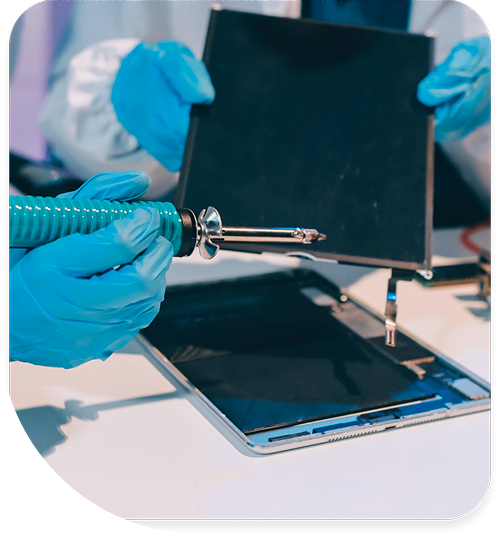
Complete screen assembly replacement ensures all touch functionality works correctly. We carefully remove damaged assemblies using controlled heat to soften adhesive without warping aluminum frames or damaging LCD panels beneath. The process requires patience and precision—rushing causes irreversible damage to expensive components.
After removing damaged glass, we clean adhesive residue from frames, install fresh digitizer assemblies, and apply pre-cut adhesive strips that restore construction integrity and maintain resistance to dust and humidity. We test touch response across the entire screen surface, checking for dead zones, incorrect input registration, and proper palm rejection functionality.
For iPads used with Apple Pencil, we verify proper digitizer calibration ensuring pressure sensitivity and palm rejection work correctly. Artists and note-takers depend on precise stylus input, so we test across the full pressure range and verify tilt detection functions properly.
Texas heat presents unique challenges for iPad screens. Leaving iPads in vehicles during The Woodlands' scorching summers—where dashboard temperatures regularly exceed 160°F—can cause adhesive to soften or LCDs to develop permanent image retention. We educate customers about proper device care in extreme heat.
Battery Swelling and Power Management Issues
iPad batteries use large-capacity lithium polymer cells prone to swelling when they degrade. You'll notice the screen separating from the frame, difficulty placing the iPad flat on surfaces, or visible bulging. Swollen batteries apply pressure to internal components and present serious fire risks.
Apple uses strong adhesive securing batteries to aluminum back plates. We use controlled heat and specialized plastic prying tools to safely extract swollen batteries without puncturing cells. Punctured lithium polymer batteries can ignite, creating dangerous situations. Our technicians follow strict safety protocols during battery removal.
Fresh battery installations restore hours of runtime and eliminate safety hazards. We verify battery management systems recognize new cells and implement proper charging algorithms. Modern iPads use adaptive charging that learns usage patterns to extend long-term battery health.
Some iPads experience power management IC failures independent of battery condition. When these chips malfunction, iPads won't charge despite fresh batteries. We diagnose power management failures using multimeter testing and thermal imaging, replacing failed components through precision microsoldering when necessary.
Texas's extreme temperatures accelerate battery degradation. The combination of high heat and humidity in The Woodlands creates challenging conditions for lithium polymer cells. We recommend storing iPads in climate-controlled environments and avoiding prolonged sun exposure, particularly in vehicles.
Charging Port Problems and Lightning Connector Repairs
Lightning ports fail from repeated cable insertion, debris accumulation, or corrosion from moisture exposure. The Woodlands' humidity can accelerate corrosion in charging ports. Symptoms include intermittent charging, requiring precise cable angles to charge, or complete charging failure.
We first inspect ports for lint and debris compaction—this is surprisingly common and often the actual problem rather than physical damage. Years of pocket or bag carry allow lint to compact deep in ports, preventing proper cable contact. Professional cleaning using specialized tools restores proper connection in many cases.
When ports are physically damaged—bent pins, cracked housings, or corroded contacts—replacement requires microsoldering expertise. Lightning connectors attach to logic boards through dozens of fine-pitch pins. We remove damaged ports using hot air stations and install fresh connectors aligned perfectly to accept cables without binding.
After replacement, we test data transfer functionality, charging at various wattages, and accessory compatibility. Lightning ports handle multiple functions—power, data, audio, and accessory communication. All functions must work correctly after repair.
Logic Board Failures and Component-Level Repair
When iPads won't power on at all, logic board failure is likely. Common culprits include failed power management chips, damaged charging circuitry, or shorted voltage regulators. Many repair shops immediately recommend full logic board replacement at enormous cost.
We perform board-level diagnostics using multimeters, thermal cameras, and microscopes to identify failed components. Replacing single ICs or passive components can restore function without the expense of logic board replacement. This granular approach saves customers significant money while being environmentally responsible.
Component-level repair is particularly valuable for iPads containing irreplaceable data or older models where replacement parts are scarce. Business users with critical documents, artists with extensive creative work, or families with years of photos benefit from component-level repair that preserves their data.
Home Button and Touch ID Repair
Older iPad models use physical home buttons with integrated Touch ID sensors. These buttons fail from wear or liquid damage, preventing biometric authentication and reducing navigation convenience.
Home button replacement requires careful handling—the Touch ID sensor pairs to the specific logic board for security. While we can restore physical button functionality, Touch ID cannot be re-enabled if the sensor itself is damaged. Apple's security pairing prevents unauthorized sensor replacement to protect user data.
We explain this limitation before proceeding with repairs. Many users accept restored physical button function even without Touch ID, as alternative authentication methods like passcodes remain available.
Camera Failures and Lens Damage
Both front and rear cameras can fail from physical impacts, liquid damage, or manufacturing defects. Symptoms include blurry images, black camera screens, or camera app crashes. iPads are increasingly used for document scanning, video calls, and photography, making camera functionality essential.
We replace failed camera modules with components meeting Apple's specifications. After installation, we test focus accuracy, exposure metering, video recording at various resolutions, and image stabilization. For iPads with multiple cameras, we verify all lenses work correctly and produce consistent image quality.
External camera lens glass protects internal optics but can scratch from abrasive contact. While lens scratches seem minor, they create lens flare and reduce sharpness significantly. We replace scratched lens covers restoring image quality without requiring full camera module replacement—a more cost-effective solution.
Speaker and Audio Issues
iPad speakers provide media audio, notification sounds, and call audio for FaceTime conversations. When speakers fail partially or completely, you lose these essential audio cues.
We replace failed speaker assemblies and test audio quality across frequency ranges. iPads use stereo speaker systems in landscape orientation—we verify both left and right channels produce balanced output. Audio quality testing includes music playback, spoken word content, and notification sounds to ensure full-spectrum performance.
Microphone failures prevent voice memos, FaceTime calls, and Siri commands. We diagnose microphone problems through systematic testing and replace damaged components. Modern iPads use multiple microphones for noise cancellation and directional audio—all must function properly for optimal performance.
Wi-Fi and Cellular Module Failures
Network connectivity issues often trace to failed wireless modules. Dropping Wi-Fi connections, lost cellular signals, or Bluetooth pairing problems indicate hardware failure rather than software glitches.
We replace failed modules and test connectivity, signal strength, and data transfer speeds. For cellular-equipped iPads, we verify proper carrier registration and LTE performance. Strong connectivity is essential for Woodlands residents who rely on iPads for work communication, video conferencing, or streaming content.
Texas's large distances between cell towers in some areas demand strong cellular hardware. We ensure replacement modules meet specifications for optimal signal reception.
Liquid Damage and Corrosion Repair
Despite lacking water resistance ratings on most models (except newer iPad Pros), many users expose iPads to moisture. Kitchen accidents, bathroom steam, or outdoor weather exposure can allow liquid to infiltrate through speaker grilles or button openings.
If your iPad suffered liquid exposure in The Woodlands, TX 77380, power it off immediately and bring it to us. We disassemble devices, use ultrasonic cleaning to remove corrosive residues, and inspect under magnification for damaged components.
Early intervention after liquid exposure significantly improves recovery chances. Attempting to power on contaminated iPads accelerates corrosion through electrochemical reactions, reducing recovery likelihood. Time is critical—bring liquid-damaged devices to us as quickly as possible.
Apple Pencil Charging and Magnetic Attachment
iPads supporting Apple Pencil use magnetic docking points and wireless charging coils. Physical impacts can damage these magnets or charging coils, preventing Pencil attachment or charging.
We diagnose magnetic attachment problems and replace damaged components. After repair, we test secure Pencil docking and proper charging functionality. Artists, students, and professionals depend on Apple Pencil for precision work—proper function is essential.
Smart Connector and Keyboard Docking
iPads with Smart Connectors support Magic Keyboard and Smart Keyboard accessories. Damaged connectors prevent proper communication, causing keyboards to not be recognized or function intermittently.
We replace failed Smart Connectors and test with actual keyboards to verify data transfer and power delivery work correctly. These accessories significantly enhance iPad productivity, particularly for business users who treat iPads as laptop replacements.
Software Issues and Reset Solutions
Not every iPad problem requires hardware repair. Corrupted system files, problematic app updates, or insufficient storage can cause symptoms mimicking hardware failure. We attempt software recovery before recommending hardware service, potentially saving customers significant expense.
Resets, iOS updates, and storage management resolve many software-induced issues. For iPads in bootloop states, we can restore iOS using Mac computers while attempting to preserve user data. This is particularly important for devices containing important documents or irreplaceable photos.
Screen Protectors and Protective Cases
We stock quality screen protectors specifically designed for iPads. Tempered glass protectors provide excellent protection while maintaining Apple Pencil functionality and touch sensitivity. Installation requires precision to avoid dust contamination or misalignment.
Protective cases with shock-absorbing corners guard against the most common damage scenario—corner drops onto hard surfaces. For iPads used in education or industrial settings, we recommend ruggedized cases meeting military drop standards.
Why Professional iPad Repair Matters
Apple uses proprietary screws, strong adhesives, and delicate ribbon cables making iPad repair challenging. Online tutorials skip the failures—cracked glass during separation, torn digitizer cables, or damaged LCD panels. These mistakes often make professional repair more expensive or impossible.
At 1201 Lake Woodlands Dr, The Woodlands, TX 77380, we have specialized tools including precision hot plates, vacuum suction systems, and microscopes. Our technicians have completed thousands of iPad repairs across all generations, developing expertise that standard repair shops lack.
Visit The Fix Today
Your iPad deserves expert care from technicians who understand Apple's engineering. Stop by our Woodlands Mall location and let our team diagnose what's preventing proper function. We provide honest assessments and quality repairs.
Common Questions About iPad Services in The Woodlands
Q: Can you replace just the glass on my iPad without replacing the entire screen?
A: Glass-only replacement is technically possible but rarely advisable. The glass digitizer bonds to the LCD using optically clear adhesive, and separating them without damaging the LCD requires specialized equipment and significant skill. Even with proper equipment, LCD damage risk is substantial. In most cases, complete screen assembly replacement provides more reliable results with lower failure rates than glass-only repairs. We discuss both options during diagnostics and explain the risks associated with each approach.
Q: Will my iPad maintain its protective features after screen replacement?
A: Newer iPad Pro models have water resistance ratings, while older models lack this protection. Screen replacement requires removing the adhesive seal. We apply fresh adhesive strips during reassembly that provide dust and splash resistance, though not to the same level as factory seals. For iPads used in environments where water resistance is critical, we recommend protective cases providing additional environmental sealing.
Q: My iPad charges very slowly—what causes this?
A: Slow charging usually indicates either a failing battery, a damaged charging port, or use of an insufficient power adapter. iPads require higher wattage chargers than iPhones—using a 5-watt iPhone charger to charge an iPad takes significantly longer than using the proper 12-20 watt iPad charger. At our The Woodlands location, we test with calibrated equipment to identify whether you need port cleaning, port replacement, battery replacement, or simply an appropriate power adapter. We can also check for software issues causing excessive battery drain during charging.
Other Locations Near By You
The Fix in Walmart Carrollton
1213 E Trinity Mls Rd, Carrollton, TX 75006, United States
The Fix in Walmart Lubbock
702 W Loop 289 Acc Rd, Lubbock, TX 79416, United States
The Fix in South Plains Mall
6002 Slide Rd, Lubbock, TX 79414
The Fix in Walmart North Richland Hills
6401 NE Loop 820, North Richland Hills, TX 76180, United States
The Fix in South Park Mall San Antonio
2310 SW Military Dr. Suite 118 San Antonio, TX 78224
The Fix in Walmart Odessa
2450 NW Loop 338 State Rte W, Odessa, TX 79763, United States
The Fix in Walmart La Porte
9025 Spencer Hwy, La Porte, TX 77571, United States
The Fix in Baybrook Mall
500 Baybrook Mall #1079, Friendswood, TX 77546, United States
The Fix in Walmart Humble
9235 N Sam Houston Pkwy E, Humble, TX 77396, United States
The Fix in Walmart Weatherford
1836 S Main St, Weatherford, TX 76086, United States
Your local repair experts for every device
From iPhones to gaming laptops, The Fix in The Woodlands, TX is your one-stop shop for device repair. Quick turnarounds, affordable prices, and local experts you can trust

Phone Cases
Protect your device in style! At The Fix in The Woodlands, TX, we offer a wide selection of durable phone cases for all major brands—sleek designs that keep your phone safe and looking great.

Nintendo Switch Repair
Cracked Nintendo Switch screen? We repair Switch devices in The Woodlands, TX quickly and affordably. Fast, easy, and always with high-quality parts.

MacBook Repair
For broken screens, battery replacements, or other issues, The Fix in The Woodlands, TX provides quick MacBook repairs with premium parts.

PlayStation Repair
Is your PlayStation giving you trouble? At The Fix in The Woodlands, TX, we handle PlayStation repairs with care and quality parts—no long waits, no hassle.

Google Repair
Need your Google Pixel fixed? At The Fix in The Woodlands, TX, we repair cracked screens, charging issues, and more—always using high-quality parts for lasting results.

Tablet Repair
Whether your tablet screen is cracked or the battery won’t hold a charge, The Fix in The Woodlands, TX provides fast, affordable tablet repairs with free diagnostics.

Computer Repair
Need PC or desktop service in The Woodlands, TX? We provide free diagnostics and affordable repairs, always with high-quality parts.

Game Console Repair
From Nintendo Switch® to PlayStation and Xbox, The Fix in The Woodlands, TX repairs all major game consoles. Fast service and dependable results.

Laptop Repair
Got a broken laptop? The Fix In The Woodlands, TX, our team repairs most laptop brands and models using high-quality replacement parts.

Cell Phone Repair
We repair all major phone brands in The Woodlands, TX. iPhone, Samsung, Google, and more—get your phone fixed fast.

iPhone Repair
Cracked screen? Battery draining too fast? Our team in The Woodlands, TX repairs iPhones with precision and high-quality parts to make your device feel new again.

Samsung Repair
Whether it’s a Galaxy screen replacement or a charging issue, The Fix in The Woodlands, TX offers fast and reliable Samsung repairs.

Xbox Repair
Xbox not working properly? Our team in The Woodlands, TX offers quick, reliable Xbox repairs with free diagnostics and high-quality replacement parts.


Trusted repair solution for mobile phones, tablets, gaming consoles, and computer systems. We provide fast, reliable, and affordable repair services to get your devices back in perfect working condition.
The Fix is an independent repair service provider and is not affiliated with, sponsored by, or endorsed by Apple Inc., Samsung Electronics, Google LLC, or any other device manufacturer. We use high-quality compatible replacement parts unless explicitly stated. All trademarks are property of their respective owners.


© Copyright The Fix Solutions All rights reserved 2026.
Design by Deepcoder