





Tablet Repair in The Fix in Walmart Midlothian
Cracked screen or charging issues slowing you down? At The Fix in Midlothian, VA, we repair all major tablet brands, including Samsung, Lenovo, Huawei, and more. With free diagnostics and high-quality parts, we make it easy to get your tablet working like new.

Professional Tablet Repair Services
- Screen Repair & Replacement
- Battery Replacement
- Water Damage Repair
- Charging Port Repair
- Camera Repair
- Speaker & Microphone Repair
- Software Troubleshooting & Recovery
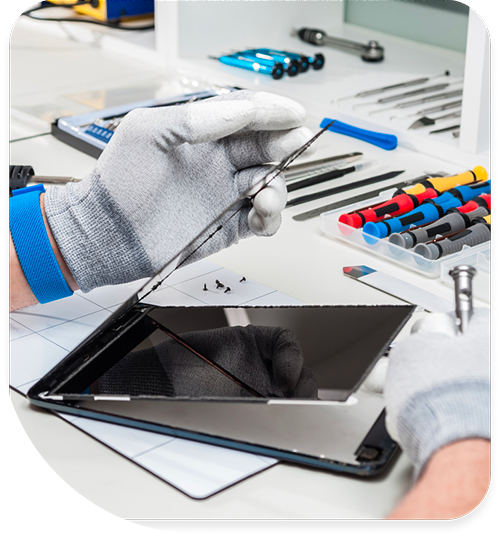
Professional Tablet Repair Services In The Fix in Walmart Midlothian
Tablet Repair in Midlothian, VA: What Heavy Pollen Seasons and Summer Heat Do to a Family Tablet
A tablet showing display lines, dead zones, or charging problems in a Midlothian home has been accumulating the conditions for those symptoms across multiple uses and seasonal exposures. The display symptom is the endpoint of a progression that started earlier.
Most requests for tablet repair in Midlothian, VA in Chesterfield County involve tablets that have been in active family use across multiple seasons. The display or port issue that appeared recently reflects stress that built over months.
What Family Use in Midlothian's Climate Means
Tablets in shared family use in Midlothian move through a wide range of conditions: outdoor use at Chesterfield County parks in summer heat, car use during Richmond area drives, indoor use in air-conditioned rooms, and transitions between all of these. Each transition introduces a thermal or humidity differential that the display adhesive and port seals absorb. Over a Virginia summer of this use pattern, the adhesive layers in non-laminated tablet assemblies accumulate stress that appears as cloudiness or separation visible under direct light.
Virginia's spring pollen season settles into tablet port openings and speaker grilles aggressively. Tablets left on outdoor tables during a Midlothian spring afternoon, or carried to outdoor events in Chesterfield County, accumulate pollen in every opening. Pollen compacted into the charging port — alongside the lint and debris that follows in summer — produces the slow charging or intermittent connection that is the first port symptom. Cleaning resolves this at the accumulation stage before the contacts themselves are affected.
What the Display Symptoms Mean
Horizontal or vertical lines across the display are a panel-level issue. Either the LCD panel absorbed a direct impact, or the ribbon cable connecting it to the logic board was stressed or displaced. Tablet repair in Midlothian, VA for display lines requires identifying which of these is the cause — a displaced cable may be reseatable, while a cracked panel requires replacement. Both present as lines, but the repair scope differs.
Dead zones — areas that don't register touch — are digitizer layer issues. The digitizer cable on a heavily used family tablet in Midlothian accumulates stress from daily handling combined with the thermal cycling of Virginia's seasonal transitions. Tablet repair in Midlothian for dead zones that appeared without a clear drop event often traces to cumulative cable stress rather than a single impact. Assessment determines whether the cable or the digitizer itself is the cause.
Tablets that were in use during a Midlothian winter ice event may have been exposed to power surge conditions at restoration. A tablet that became erratic — touch inconsistencies, display flicker, connectivity issues — after a power restoration event in January or February should be assessed for surge-related logic board or display driver issues before individual component replacement is attempted.
What the Assessment Determines
Tablet repair in Midlothian is scoped at the assessment stage. The combination of Midlothian's seasonal climate and heavy family use means tablets here often arrive with more than one affected component — display adhesive separation from thermal cycling, a port with pollen and humidity accumulation, and a digitizer cable stressed by both use volume and seasonal temperature changes. The assessment identifies which components are involved before repair is committed.
Walk-ins are welcome. tablet repair in Midlothian at The Fix inside Walmart at Chattanooga Plaza handles tablet display and port assessment. Bringing the tablet in at the first display symptom gives the most options before the damage chain extends further.
Field Notes from Midlothian
My tablet has a spreading cloudy area under the glass but still works. What is that?
Cloudiness that spreads under direct light is display adhesive separation — the bond between the glass and the panel beneath it has been disrupted. In Midlothian's humid subtropical climate, this develops from the heat and humidity cycling of a Virginia summer working on the display adhesive layer. It's an early-stage indicator — addressing it before the separation reaches the panel itself keeps the repair scope smaller.
The tablet charges but only with certain cables and very slowly. Is the port broken?
Slow charging that requires specific cables is almost always compacted debris preventing full cable seating, not port hardware failure. Virginia's heavy spring pollen and summer humidity contribute to port accumulation faster than in drier or lower-pollen climates. Cleaning the port is the correct first step before replacement is considered.
Is a tablet with a cracked screen worth repairing?
Repair is cost-effective when the tablet is otherwise fully functional. If the display lines, dead zones, or charging issues are the only problem — and the tablet connects to WiFi, runs apps, and responds to touch in the unaffected areas — repair is typically significantly less expensive than replacement. An assessment determines whether the damage is limited to one component or involves multiple, which determines the full cost comparison.
Other Locations Near By You
The Fix in Walmart Williamsburg
731 E Rochambeau Dr, Williamsburg, VA 23188, United States
The Fix in Walmart Fredericksburg
10001 Southpoint Pkwy, Fredericksburg, VA 22407, United States
The Fix in Walmart Short Pump
11400 W Broad St Rd, Glen Allen, VA 23060
The Fix in Walmart Newport News
12401 Jefferson Ave, Newport News, VA 23602, United States
The Fix in Walmart Stafford
217 Garrisonville Rd Stafford, VA 22554
The Fix in Walmart Colonial Heights
671 Southpark Blvd, Colonial Heights, VA 23834, United States
The Fix in Greenbrier Mall
1401 Greenbrier Pkwy, Chesapeake, VA 23320
The Fix in Walmart Chester
12000 Iron Bridge Rd, Chester, VA 23831, United States
The Fix in Potomac Mills
2700 Potomac Mills Cir, Woodbridge, VA 22192, USA
The Fix in Walmart Richmond
2410 Sheila Ln, Richmond, VA 23225, United States
Your local repair experts for every device
From iPhones to gaming laptops, The Fix in Midlothian, VA is your one-stop shop for device repair. Quick turnarounds, affordable prices, and local experts you can trust

Phone Cases
Protect your device in style! At The Fix in Midlothian, VA, we offer a wide selection of durable phone cases for all major brands—sleek designs that keep your phone safe and looking great.

Nintendo Switch Repair
Cracked Nintendo Switch screen? We repair Switch devices in Midlothian, VA quickly and affordably. Fast, easy, and always with high-quality parts.

MacBook Repair
For broken screens, battery replacements, or other issues, The Fix in Midlothian, VA provides quick MacBook repairs with premium parts.

PlayStation Repair
Is your PlayStation giving you trouble? At The Fix in Midlothian, VA, we handle PlayStation repairs with care and quality parts—no long waits, no hassle.
Google Repair
Need your Google Pixel fixed? At The Fix in Midlothian, VA, we repair cracked screens, charging issues, and more—always using high-quality parts for lasting results.

Computer Repair
Need PC or desktop service in Midlothian, VA? We provide free diagnostics and affordable repairs, always with high-quality parts.

Game Console Repair
From Nintendo Switch® to PlayStation and Xbox, The Fix in Midlothian, VA repairs all major game consoles. Fast service and dependable results.

Laptop Repair
Got a broken laptop? The Fix In Midlothian, VA, our team repairs most laptop brands and models using high-quality replacement parts.

iPad Repair
Need your iPad fixed? At The Fix in Midlothian, VA, we repair cracked screens, charging issues, and more—always using high-quality parts for lasting results.

Cell Phone Repair
We repair all major phone brands in Midlothian, VA. iPhone, Samsung, Google, and more—get your phone fixed fast.

iPhone Repair
Cracked screen? Battery draining too fast? Our team in Midlothian, VA repairs iPhones with precision and high-quality parts to make your device feel new again.

Samsung Repair
Whether it’s a Galaxy screen replacement or a charging issue, The Fix in Midlothian, VA offers fast and reliable Samsung repairs.

Xbox Repair
Xbox not working properly? Our team in Midlothian, VA offers quick, reliable Xbox repairs with free diagnostics and high-quality replacement parts.


Trusted repair solution for mobile phones, tablets, gaming consoles, and computer systems. We provide fast, reliable, and affordable repair services to get your devices back in perfect working condition.
The Fix is an independent repair service provider and is not affiliated with, sponsored by, or endorsed by Apple Inc., Samsung Electronics, Google LLC, or any other device manufacturer. We use high-quality compatible replacement parts unless explicitly stated. All trademarks are property of their respective owners.


© Copyright The Fix Solutions All rights reserved 2026.
Design by Deepcoder