






Nintendo Switch Repair in The Fix in Willowbrook Mall (Store)
Is your Nintendo Switch not working properly? At The Fix in Houston, TX, we repair screens, batteries, and more—always with free diagnostics and high-quality parts. Whether it’s a cracked screen or Joy-Con issue, our team gets you back to gaming fast.

Professional Nintendo Switch Repair Services
- Joy-Con Drift & Controller Repair
- Screen Repair & Replacement
- Battery Replacement
- Charging Port Repair
- Water Damage Repair
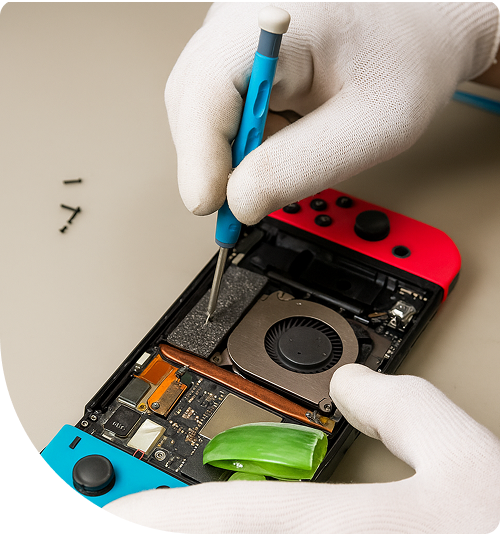
Professional Nintendo Switch Repair Services In The Fix in Willowbrook Mall (Store)
When the Game Stops: Troubleshooting Nintendo Switch Failures in Houston, TX
For families living in the Cypress Creek community and gamers around the Champions area, the Nintendo Switch is more than a toy; it is the centerpiece of social interaction. Whether it's a Smash Bros tournament after school near Bleyl Middle School or a family Mario Party night to unwind after a week of commuting on Beltway 8, this console bridges the gap between portable play and living room entertainment. But this hybrid nature comes with a cost: distinct mechanical vulnerabilities that standard consoles don't face.
When the console fails to dock or the fans start screaming, the disruption is felt instantly. For residents seeking Nintendo Switch Repair in Houston, TX, the answer lies in our dedicated storefront at 2000 Willowbrook Mall, Ste 1536. Unlike a quick kiosk stop, our store environment allows for deep-dive diagnostics into the video encoding chips and power management circuits that often plague these devices. Here are the real-world scenarios we solve daily.
Scenario 1: The "Green Light, Black Screen" Docking Failure
The Situation: You are ready to play on the big screen. You slide the Switch into the dock, the little green LED on the dock lights up indicating a connection, but your TV says "No Signal." You swap HDMI cables, try a different TV, and wiggle the console. It charges, but it refuses to output video to the television.
The Technical Reality: This is rarely a port issue if the device still charges. The culprit is typically the P13USB Video Encoder Chip or the filters surrounding it on the motherboard. This chip is notoriously sensitive to voltage fluctuations, often caused by using third-party "fast chargers" or generic docks that don't regulate power correctly. The chip burns out, killing the HDMI output while leaving the rest of the console functional.
The Resolution: No amount of cable swapping will fix a fried chip. We perform a board-level repair where we desolder the damaged video encoder and install a new IC (Integrated Circuit). This restores the console's ability to "handshake" with the TV, bringing your gaming back to the big screen.
Scenario 2: The "Slider Rail" Disconnect
The Situation: You are playing in handheld mode, perhaps in the backseat of a car or waiting for a table at a restaurant on FM 1960. Even though the Joy-Cons are physically clicked into the sides of the screen, the console keeps asking you to "Connect Controller." You have to physically squeeze the controller against the tablet to get it to register, but the moment you let go, it disconnects.
The Technical Reality: While people blame the controllers, the fault often lies with the Console Rails. Inside the Switch, the metal rails are connected to the motherboard by a thin ribbon cable that wraps around a sharp metal bracket. Over thousands of hours of sliding controllers on and off, this ribbon cable gets pinched and severed. The physical rail is fine, but the data line is cut.
The Resolution: We replace the entire rail assembly on the console side. This ensures a fresh, un-crimped ribbon cable connection. We also tighten the screws that secure the rail to the chassis, which often loosen over time, ensuring a rock-solid mechanical fit for the controllers.
Scenario 3: The "Jet Engine" Grind
The Situation: You are playing a graphically intense game like Zelda or Apex Legends. Suddenly, the console starts making a loud buzzing or grinding noise, audible even over the game volume. Shortly after, the system may throw a heat warning and shut down.
The Technical Reality: The Switch uses a micro-fan with a delicate sleeve bearing. Unlike dust buildup which causes a "whoosh" sound, a grinding noise indicates that the fan bearing has failed or the fan blades have become unbalanced due to a drop. The fan is wobbling as it spins, hitting its own housing.
The Resolution: Cleaning won't fix a broken bearing. The solution is the complete replacement of the internal cooling fan. We also take this opportunity to replace the dried-out factory thermal paste with high-performance compound, ensuring the new fan doesn't have to work as hard to keep the system cool.
Scenario 4: The Wi-Fi "Blind Spot"
The Situation: Your other devices have full signal, but your Switch constantly drops its connection to the eShop or lags uncontrollably during online matches unless you are standing two feet away from the router. It shows one bar of signal while your phone shows full bars.
The Technical Reality: This is often a symptom of a disconnected or damaged Wi-Fi Antenna. The antenna cables inside the Switch run dangerously close to the battery and the heat sink. If the console has been opened previously by an amateur, or if it suffered a hard impact, these tiny coaxial connectors can pop off the motherboard. In some cases, the Wi-Fi IC itself (the chip managing wireless signals) may have failed.
The Resolution: We open the unit to inspect the antenna integrity. Often, simply re-seating the coaxial cables and securing them with Kapton tape solves the range issue. If the chip is at fault, we perform the necessary board repairs to restore range and stability.
Scenario 5: The "Bulging Back" Hazard
The Situation: You notice that the plastic backplate of your console is starting to warp or crack near the center. The console no longer sits flat on a table; it wobbles. It looks like something is pushing it from the inside.
The Technical Reality: This is a critical safety warning. The Lithium-Ion battery is failing and swelling with gas. In the tight enclosure of the Switch, this expansion has nowhere to go but out, pushing against the back panel and the screen. If left unchecked, this pressure can crack the LCD screen from behind or rupture the battery casing.
The Resolution: This requires immediate attention. We safely extract the swollen battery, check the internal chassis for deformation, and install a new, fresh battery pack. This returns the console to its flat profile and eliminates the fire risk.
Frequently Asked Questions
Q: Can you fix the console if it got wet in a backpack? A: Yes, but speed is key. Water often enters through the top vents, hitting the battery connector and the backlight driver first. If the screen is black but you hear sounds, the backlight circuit is likely corroded. Do not charge it. Bring it to our store immediately for an ultrasonic cleaning and circuit repair.
Q: Why does my Switch turn on but stay stuck on the logo? A: A "boot loop" or getting stuck on the logo can be caused by a failing Wi-Fi chip (the system checks for it on boot and hangs if it can't find it) or a corrupted NAND (storage) chip. It is rarely a simple software glitch. We can diagnose which component is stalling the boot sequence.
Q: My game cartridge slot cover broke off; does that matter? A: Functionally, the games will still play, but that cover is the primary dust seal for the cartridge reader. Without it, dust, lint, and moisture enter the sensitive pin reader freely. We can replace the housing part to restore that seal and protect the internal reader mechanism.
Other Locations Near By You
The Fix in Walmart Carrollton
1213 E Trinity Mls Rd, Carrollton, TX 75006, United States
The Fix in Walmart Lubbock
702 W Loop 289 Acc Rd, Lubbock, TX 79416, United States
The Fix in South Plains Mall
6002 Slide Rd, Lubbock, TX 79414
The Fix in Walmart North Richland Hills
6401 NE Loop 820, North Richland Hills, TX 76180, United States
The Fix in South Park Mall San Antonio
2310 SW Military Dr. Suite 118 San Antonio, TX 78224
The Fix in Walmart Odessa
2450 NW Loop 338 State Rte W, Odessa, TX 79763, United States
The Fix in Walmart La Porte
9025 Spencer Hwy, La Porte, TX 77571, United States
The Fix in Baybrook Mall
500 Baybrook Mall #1079, Friendswood, TX 77546, United States
The Fix in Walmart Humble
9235 N Sam Houston Pkwy E, Humble, TX 77396, United States
The Fix in Walmart Weatherford
1836 S Main St, Weatherford, TX 76086, United States
Your local repair experts for every device
From iPhones to gaming laptops, The Fix in Houston, TX is your one-stop shop for device repair. Quick turnarounds, affordable prices, and local experts you can trust

Phone Cases
Protect your device in style! At The Fix in Houston, TX, we offer a wide selection of durable phone cases for all major brands—sleek designs that keep your phone safe and looking great.

MacBook Repair
For broken screens, battery replacements, or other issues, The Fix in Houston, TX provides quick MacBook repairs with premium parts.

PlayStation Repair
Is your PlayStation giving you trouble? At The Fix in Houston, TX, we handle PlayStation repairs with care and quality parts—no long waits, no hassle.

Google Repair
Need your Google Pixel fixed? At The Fix in Houston, TX, we repair cracked screens, charging issues, and more—always using high-quality parts for lasting results.

Tablet Repair
Whether your tablet screen is cracked or the battery won’t hold a charge, The Fix in Houston, TX provides fast, affordable tablet repairs with free diagnostics.

Computer Repair
Need PC or desktop service in Houston, TX? We provide free diagnostics and affordable repairs, always with high-quality parts.

Game Console Repair
From Nintendo Switch® to PlayStation and Xbox, The Fix in Houston, TX repairs all major game consoles. Fast service and dependable results.

Laptop Repair
Got a broken laptop? The Fix In Houston, TX, our team repairs most laptop brands and models using high-quality replacement parts.

iPad Repair
Need your iPad fixed? At The Fix in Houston, TX, we repair cracked screens, charging issues, and more—always using high-quality parts for lasting results.

Cell Phone Repair
We repair all major phone brands in Houston, TX. iPhone, Samsung, Google, and more—get your phone fixed fast.

iPhone Repair
Cracked screen? Battery draining too fast? Our team in Houston, TX repairs iPhones with precision and high-quality parts to make your device feel new again.

Samsung Repair
Whether it’s a Galaxy screen replacement or a charging issue, The Fix in Houston, TX offers fast and reliable Samsung repairs.

Xbox Repair
Xbox not working properly? Our team in Houston, TX offers quick, reliable Xbox repairs with free diagnostics and high-quality replacement parts.


Trusted repair solution for mobile phones, tablets, gaming consoles, and computer systems. We provide fast, reliable, and affordable repair services to get your devices back in perfect working condition.
The Fix is an independent repair service provider and is not affiliated with, sponsored by, or endorsed by Apple Inc., Samsung Electronics, Google LLC, or any other device manufacturer. We use high-quality compatible replacement parts unless explicitly stated. All trademarks are property of their respective owners.


© Copyright The Fix Solutions All rights reserved 2026.
Design by Deepcoder