






PlayStation Repair in The Fix in Westfield Fashion Square
Is your PlayStation not working properly? At The Fix in Sherman Oaks, CA, we provide quick and reliable PlayStation repairs. From overheating consoles to controller issues, our technicians offer free diagnostics and use high-quality parts to get you back to gaming fast.

Professional PlayStation Repair Services
- HDMI Port Repair & Replacement
- Overheating & Fan Repair
- Controller & Stick Drift Repair
- Disc Drive Repair
- Power Supply Repair
- Software Troubleshooting & Updates
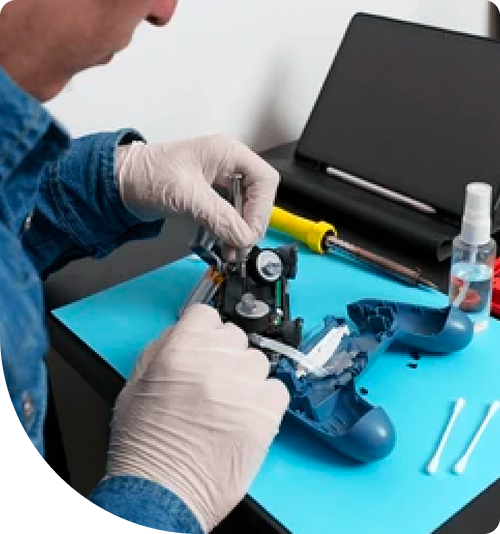
Professional PlayStation Repair Services In The Fix in Westfield Fashion Square
The Red Flags of Console Failure: PlayStation Repair in Sherman Oaks, CA
Your gaming console often signals its distress long before it refuses to turn on. For gamers in Sherman Oaks, listening to these auditory and visual cues is critical. The distinct microclimate of the San Fernando Valley—characterized by dry, dusty air and high ambient temperatures—creates a hostile environment for high-performance electronics.
When seeking PlayStation Repair in Sherman Oaks, CA, speed is the defining factor. The transition from a "loud fan" to a "Blue Light of Death" can happen rapidly in the 91423 zip code. The internal components of modern consoles operate at the edge of their thermal limits. When local environmental factors compromise the cooling system, the console initiates a sequence of warning signs that, if ignored, lead to catastrophic motherboard failure.
Warning Sign 1: The "Jet Engine" Fan Noise
The most common distress signal is acoustic. If your console sounds like a vacuum cleaner or a jet engine ramping up, it is not simply "working hard." It is suffocating.
Sherman Oaks is located in a valley basin that traps particulate matter. The cooling fans in PlayStation consoles are designed to pull in cool air, but they inevitably pull in this local dust. Over time, this dust forms a dense "felt" layer across the heatsink fins, blocking airflow. The system Management Controller (SMC) detects the rising temperature of the APU (Accelerated Processing Unit) and forces the fan to maximum RPM. Ignoring this noise leads to thermal warping of the mainboard, potentially cracking the microscopic solder joints that hold the processor in place.
Warning Sign 2: The "White Light, No Picture" (WLOD)
A console that powers on (showing a solid white light) but displays "No Signal" on the TV is a hallmark of the "HDMI Failure Protocol." This is rarely a software glitch; it is a physical break in the display chain.
We see two distinct causes for this in our Westfield Fashion Square workshop. First is Port Trauma: frequent unplugging and moving of the console—common for kids moving between households or taking systems to friends' houses—loosens the HDMI port's anchor points until the pins sever. Second is Chip Failure: The Panasonic HDMI encoder chip on the motherboard is sensitive to electrical fluctuations. A power surge from a storm or "hot-plugging" the HDMI cable while the TV is on can fry this chip. The console works, but it has lost its voice.
Warning Sign 3: The "Blue Light of Death" (BLOD)
If your console turns on, pulses blue for a few seconds, and then shuts off, you are witnessing the "Blue Light of Death." This indicates a general hardware failure, often related to the APU.
In the Valley, this is frequently caused by thermal cycling. As the console heats up during a gaming session and cools down rapidly in an air-conditioned room, the motherboard expands and contracts. Over thousands of cycles, if the cooling system is compromised by dried thermal paste (common in our dry heat), the solder balls under the processor can fracture. This breaks the electrical connection. This is a critical failure requiring a specialized "reflow" or "reballing" procedure to reconnect the processor to the board.
Warning Sign 4: The "Disc Grind" and Eject Issues
A mechanical grinding noise when inserting a disc, or a refusal to accept discs entirely, points to a dirty or misaligned optical drive mechanism.
The rubber rollers that pull the disc in rely on friction. The fine, dry dust found in Sherman Oaks coats these rollers, making them slippery. The drive spins the rollers, but they cannot grip the disc, resulting in a horrible grinding sound. Forcing the disc in manually often dislodges the timing gears. This is a mechanical failure that requires disassembling the drive to chemically clean the rollers and re-time the gear mechanism.
Warning Sign 5: Random Shutdowns (Power Supply Overheat)
If your console shuts down completely after 30-60 minutes of gameplay without warning (no error message), it is likely a Power Supply Unit (PSU) thermal trip.
The PSU is located inside the console and has its own ventilation slots. These slots are easily clogged by pet hair and dust, especially if the console is placed on a carpet or in a closed entertainment cabinet—a common setup in local living rooms. When the PSU overheats, it cuts power instantly to prevent a fire. This is a safety feature. Persistently restarting the console without addressing the blockage can cause the capacitors inside the PSU to burst.
Critical Console Q&A
Q: My PS5 works with PS4 games but turns off when I play PS5 games. Why? A: This is a definitive sign of an overheating Power Supply or a "dry spot" on the APU's liquid metal cooling. PS5 games draw significantly more wattage and generate more heat than backward-compatible PS4 games. The system can handle the low power of older games, but as soon as the power draw spikes for a next-gen title, the thermal protection kicks in and kills the power. It needs deep internal maintenance.
Q: Can I fix a broken HDMI port by propping the cable up at an angle? A: We strongly advise against this. While it might get the picture back temporarily, "propping" the cable puts immense leverage on the remaining solder pads. You risk ripping the copper traces (wiring) right off the motherboard. Once those traces are torn from the fiberglass board, the repair becomes significantly more difficult and complex. It is safer to stop using it and have the port replaced immediately.
Q: Why does my controller drift even after I updated the firmware? A: Stick drift is a mechanical wear issue, not a software one. The potentiometers (sensors) inside the joystick use physical wipers that rub against a carbon track. Over time, this friction creates dust that confuses the sensor, or the track simply wears away. No software update can fix worn-out physical parts. The analog stick mechanism must be desoldered and replaced with a new unit or a "Hall Effect" sensor that uses magnets to avoid wear.
Other Locations Near By You
The Fix in Plaza Bonita
3030 Plaza Bonita Rd Ste 2075 National City, CA 91950
The Fix in Walmart Dinuba
770 W El Monte Way, Dinuba, CA 93618, United States
The Fix in Walmart Livermore
2700 Las Positas Rd, Livermore, CA 94551, United States
The Fix in Walmart Palm Springs
5601 Ramon Rd, Palm Springs, CA 92264, United States
The Fix in Westfield Culver City
6000 Sepulveda Blvd #2351, Culver City, CA 90230
The Fix in Walmart Lakewood
2770 E Carson St, Lakewood, CA 90712, United States
The Fix in Walmart Redding
1515 Dana Dr, Redding, CA 96003, United States
The Fix in Walmart Vista
1800 University Dr, Vista, CA 92083, United States
The Fix in Walmart Hesperia
13401 Main St inside Hesperia Walmart Hesperia 92345-9123 California
The Fix in Visalia Mall
2025 S. Mooney blvd., SPC# 1545, Visalia, CA 93277
Your local repair experts for every device
From iPhones to gaming laptops, The Fix in Sherman Oaks, CA is your one-stop shop for device repair. Quick turnarounds, affordable prices, and local experts you can trust

Phone Cases
Protect your device in style! At The Fix in Sherman Oaks, CA, we offer a wide selection of durable phone cases for all major brands—sleek designs that keep your phone safe and looking great.

Nintendo Switch Repair
Cracked Nintendo Switch screen? We repair Switch devices in Sherman Oaks, CA quickly and affordably. Fast, easy, and always with high-quality parts.

MacBook Repair
For broken screens, battery replacements, or other issues, The Fix in Sherman Oaks, CA provides quick MacBook repairs with premium parts.

Google Repair
Need your Google Pixel fixed? At The Fix in Sherman Oaks, CA, we repair cracked screens, charging issues, and more—always using high-quality parts for lasting results.

Tablet Repair
Whether your tablet screen is cracked or the battery won’t hold a charge, The Fix in Sherman Oaks, CA provides fast, affordable tablet repairs with free diagnostics.

Computer Repair
Need PC or desktop service in Sherman Oaks, CA? We provide free diagnostics and affordable repairs, always with high-quality parts.

Game Console Repair
From Nintendo Switch® to PlayStation and Xbox, The Fix in Sherman Oaks, CA repairs all major game consoles. Fast service and dependable results.

Laptop Repair
Got a broken laptop? The Fix In Sherman Oaks, CA, our team repairs most laptop brands and models using high-quality replacement parts.

iPad Repair
Need your iPad fixed? At The Fix in Sherman Oaks, CA, we repair cracked screens, charging issues, and more—always using high-quality parts for lasting results.

Cell Phone Repair
We repair all major phone brands in Sherman Oaks, CA. iPhone, Samsung, Google, and more—get your phone fixed fast.

iPhone Repair
Cracked screen? Battery draining too fast? Our team in Sherman Oaks, CA repairs iPhones with precision and high-quality parts to make your device feel new again.

Samsung Repair
Whether it’s a Galaxy screen replacement or a charging issue, The Fix in Sherman Oaks, CA offers fast and reliable Samsung repairs.

Xbox Repair
Xbox not working properly? Our team in Sherman Oaks, CA offers quick, reliable Xbox repairs with free diagnostics and high-quality replacement parts.


Trusted repair solution for mobile phones, tablets, gaming consoles, and computer systems. We provide fast, reliable, and affordable repair services to get your devices back in perfect working condition.
The Fix is an independent repair service provider and is not affiliated with, sponsored by, or endorsed by Apple Inc., Samsung Electronics, Google LLC, or any other device manufacturer. We use high-quality compatible replacement parts unless explicitly stated. All trademarks are property of their respective owners.


© Copyright The Fix Solutions All rights reserved 2026.
Design by Deepcoder