






Nintendo Switch Repair in The Fix in Jordan Creek Town Center
Is your Nintendo Switch not working properly? At The Fix in West Des Moines, IA, we repair screens, batteries, and more—always with free diagnostics and high-quality parts. Whether it’s a cracked screen or Joy-Con issue, our team gets you back to gaming fast.

Professional Nintendo Switch Repair Services
- Joy-Con Drift & Controller Repair
- Screen Repair & Replacement
- Battery Replacement
- Charging Port Repair
- Water Damage Repair
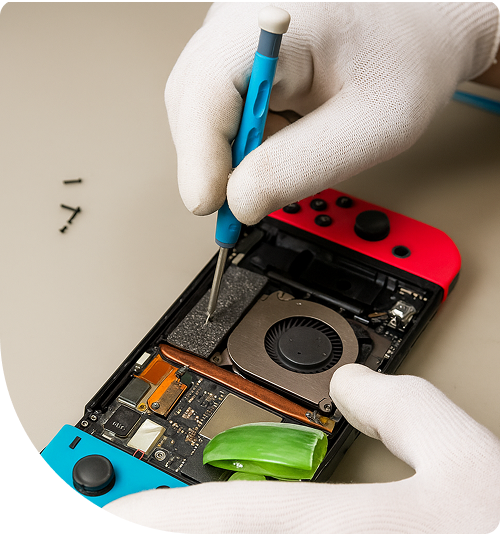
Professional Nintendo Switch Repair Services In The Fix in Jordan Creek Town Center
Is Your Nintendo Switch Acting Up in West Des Moines?
The Nintendo Switch has become a go-to gaming system for families and gamers across West Des Moines. Whether you're playing during breaks between classes at Drake University, entertaining kids during Iowa's long winter months, or unwinding with Animal Crossing after work downtown, this hybrid console delivers portability that traditional systems can't match. But that flexibility comes with vulnerability—drops, temperature extremes during Iowa winters, and wear from constant use take their toll.
When you need Nintendo Switch Repair in West Des Moines, IA, we provide diagnostics and repairs at our Jordan Creek Town Center location. From Joy-Con drift to cracked screens, we handle the issues that interrupt your gaming sessions at 101 S Jordan Creek Pkwy #12526, West Des Moines, IA 50266. Our technicians understand the unique architecture of these portable systems and use precision-tested components to restore functionality.
Understanding Joy-Con Drift and Analog Stick Failures
Joy-Con drift frustrates Switch owners worldwide. Your character moves without input, menus scroll randomly, and precise movements become impossible in games like Breath of the Wild or Splatoon. This issue stems from worn contact pads inside the analog stick mechanism. As the carbon-based conductive material degrades, it sends false position data to the console's processor.
The Switch Lite presents additional challenges since controllers are integrated into the body. Replacing analog sticks on a Lite requires complete disassembly, including disconnecting the battery, removing the heatsink assembly, and carefully extracting the motherboard. One wrong move can damage the digitizer ribbon cable or crack the LCD beneath the glass.
At our West Des Moines, IA location, we stock replacement analog stick modules for both standard Joy-Cons and Switch Lite systems. We calibrate fresh components after installation to ensure dead zones are properly set and diagonal inputs register accurately.
Cracked Screens and Digitizer Damage
Dropping your Switch screen-first onto tile floors at home or concrete walkways during Valley Junction visits often results in spider-web cracks across the display. The Switch uses a capacitive touchscreen, meaning the digitizer layer sits directly beneath the glass. When glass shatters, it can damage the digitizer traces, causing touch input to fail even if the LCD still displays images.
We separate damaged glass from the LCD panel using controlled heat to soften adhesive. This process requires precision—excessive heat damages the LCD's polarizing films, while insufficient heat makes separation impossible without tearing delicate flex cables. After cleaning residual adhesive, we install a fresh digitizer assembly and test all touch zones for responsiveness.
Battery Swelling and Charging Port Issues
Lithium polymer batteries naturally expand over time, but temperature extremes accelerate this process. Iowa's climate—with sub-zero winters and hot summers—stresses batteries more than moderate climates. Leaving your Switch in a cold car overnight or in a hot vehicle during summer can cause the battery to swell enough to push the back cover away from the frame. A swollen battery is a safety hazard—it can puncture and potentially ignite.
Battery replacement involves disconnecting the small battery connector from the motherboard, removing screws that secure the cell, and carefully prying it from adhesive pads. We dispose of depleted batteries through proper electronic waste channels and install fresh cells that meet capacity specifications.
Charging port failures often result from repeated insertion at improper angles. The USB-C port on the Switch uses a center pin that handles data transfer and power delivery. When this pin bends or breaks, the console won't charge or dock properly. We replace the entire port assembly, which involves microsoldering the connection points to the motherboard.
Game Card Reader Malfunctions
The game card slot contains spring-loaded pins that read data from physical cartridges. Dust accumulation, corrosion from humidity, or physical damage from forcing cartridges in backward can prevent games from loading. The console displays "unable to read game card" errors or fails to detect cartridges entirely.
Replacement requires opening the console, removing the motherboard, and desoldering the old reader assembly. The fresh reader must be aligned perfectly with the case opening to prevent cartridges from jamming. After installation, we test multiple cartridges to verify consistent detection and stable data transfer rates.
Cooling Fan Noise and Overheating Problems
The Switch's active cooling system uses a small axial fan to exhaust heat from the CPU and GPU. When dust clogs the fan blades or heatsink fins, temperatures rise, and the system throttles performance to prevent damage. You'll notice longer load times, frame drops, and the console feeling hot to the touch during gameplay.
We disassemble the cooling assembly, clean accumulated dust, and reapply thermal paste to the processor die. Thermal paste dries out over years of use, losing thermal conductivity. Fresh paste reduces temperatures by 8-12°C under load, allowing the fan to run quieter and extending component lifespan.
Dock Connectivity and HDMI Output Issues
Some users find their Switch won't output video when docked. This typically indicates damage to the USB-C port's video pin array or a failure in the dock's internal circuitry. Before replacing expensive parts, we test with a known-good dock to isolate the problem.
If the console itself is faulty, the USB-C port requires replacement. If the dock has failed, we can repair the dock's internal power management board or HDMI transmitter chip. These chips can fail due to power surges or static discharge during connection.
Liquid Damage Recovery for Gaming Systems
Spills happen—soda knocked over during intense gaming sessions, coffee accidents while playing in bed, or water bottle leaks in backpacks. When liquid enters the Switch through vent openings or button gaps, it can short circuit components or leave corrosive residue that causes delayed failures. If your Switch suffered liquid exposure in West Des Moines, IA 50266, do not attempt to power it on. Electrical current through contaminated boards accelerates corrosion.
We use ultrasonic cleaning baths with specialized solutions to remove residues from motherboard traces and component pins. After cleaning, we inspect under magnification for corroded connections and damaged components. Power management ICs are particularly vulnerable to liquid damage and may require replacement to restore functionality.
Why Professional Repair Beats DIY Attempts
Online tutorials make Switch repair look straightforward, but these videos don't show the failed attempts. Stripped screws, torn ribbon cables, and cracked solder pads are common DIY casualties. Nintendo uses non-standard tri-wing screws that require specific driver bits—using improper tools damages screw heads, making professional repair more difficult.
At 101 S Jordan Creek Pkwy #12526, West Des Moines, IA 50266, we have the correct tools, replacement parts, and experience to avoid these pitfalls. We also stand behind our work, providing peace of mind impossible with self-repair.
Protecting Your Investment Long-Term
Screen protectors designed for the Switch prevent scratches during docking and undocking. The dock design has a snug fit that can abrade the screen's plastic surface over repeated use. Tempered glass protectors absorb this wear while maintaining touch sensitivity.
Carrying cases with hard shells protect against drops and impacts during travel between home and campus at Drake University or trips to gaming meetups around Des Moines. Look for designs with game card storage slots and cable management—keeping everything organized reduces the chance of losing accessories or damaging ports with tangled cables.
Visit The FIX in West Des Moines Today
Don't let hardware issues keep you from your gaming library. Stop by our Jordan Creek Town Center location and let our team diagnose what's wrong with your Nintendo Switch. We provide honest assessments and transparent pricing at 101 S Jordan Creek Pkwy #12526, West Des Moines, IA 50266.
Common Questions About Nintendo Switch Repairs in West Des Moines
Q: How long does a typical Switch screen replacement take?
A: Screen replacements usually take 60-90 minutes depending on the model. The standard Switch is faster to service than the OLED model, which uses additional adhesive layers. We complete most repairs the same day at our West Des Moines location, allowing you to pick up your console before leaving the mall.
Q: Can you transfer my saved game data before repairing my Switch?
A: Game saves on the Switch are stored on the internal memory, not the game card. If your repair involves replacing the motherboard, saves are lost unless you have Nintendo Switch Online cloud backup enabled. We cannot transfer saves manually as Nintendo encrypts them to the specific console. Always maintain cloud backups for your important progress.
Q: My Switch charges slowly or intermittently—what causes this?
A: Slow or inconsistent charging points to either a failing battery, a damaged charging port, or an issue with the power management chip on the motherboard. At our West Des Moines, IA location, we test with calibrated equipment to measure actual charging current and voltage. This diagnostic identifies whether you need a simple port replacement or more extensive board-level repair.
Other Locations Near By You
The Fix in Coral Ridge Mall
1451 Coral Ridge Ave Space 221
Your local repair experts for every device
From iPhones to gaming laptops, The Fix in West Des Moines, IA is your one-stop shop for device repair. Quick turnarounds, affordable prices, and local experts you can trust

Phone Cases
Protect your device in style! At The Fix in West Des Moines, IA, we offer a wide selection of durable phone cases for all major brands—sleek designs that keep your phone safe and looking great.

MacBook Repair
For broken screens, battery replacements, or other issues, The Fix in West Des Moines, IA provides quick MacBook repairs with premium parts.

PlayStation Repair
Is your PlayStation giving you trouble? At The Fix in West Des Moines, IA, we handle PlayStation repairs with care and quality parts—no long waits, no hassle.

Google Repair
Need your Google Pixel fixed? At The Fix in West Des Moines, IA, we repair cracked screens, charging issues, and more—always using high-quality parts for lasting results.

Tablet Repair
Whether your tablet screen is cracked or the battery won’t hold a charge, The Fix in West Des Moines, IA provides fast, affordable tablet repairs with free diagnostics.

Computer Repair
Need PC or desktop service in West Des Moines, IA? We provide free diagnostics and affordable repairs, always with high-quality parts.

Game Console Repair
From Nintendo Switch® to PlayStation and Xbox, The Fix in West Des Moines, IA repairs all major game consoles. Fast service and dependable results.

Laptop Repair
Got a broken laptop? The Fix In West Des Moines, IA, our team repairs most laptop brands and models using high-quality replacement parts.

iPad Repair
Need your iPad fixed? At The Fix in West Des Moines, IA, we repair cracked screens, charging issues, and more—always using high-quality parts for lasting results.

Cell Phone Repair
We repair all major phone brands in West Des Moines, IA. iPhone, Samsung, Google, and more—get your phone fixed fast.

iPhone Repair
Cracked screen? Battery draining too fast? Our team in West Des Moines, IA repairs iPhones with precision and high-quality parts to make your device feel new again.

Samsung Repair
Whether it’s a Galaxy screen replacement or a charging issue, The Fix in West Des Moines, IA offers fast and reliable Samsung repairs.

Xbox Repair
Xbox not working properly? Our team in West Des Moines, IA offers quick, reliable Xbox repairs with free diagnostics and high-quality replacement parts.


Trusted repair solution for mobile phones, tablets, gaming consoles, and computer systems. We provide fast, reliable, and affordable repair services to get your devices back in perfect working condition.
The Fix is an independent repair service provider and is not affiliated with, sponsored by, or endorsed by Apple Inc., Samsung Electronics, Google LLC, or any other device manufacturer. We use high-quality compatible replacement parts unless explicitly stated. All trademarks are property of their respective owners.


© Copyright The Fix Solutions All rights reserved 2026.
Design by Deepcoder