






iPad Repair in The Fix in Woodland Hills Mall
Cracked screen or battery draining too fast? At The Fix in Tulsa, OK, we provide fast and reliable iPad repairs. From screen replacements to charging issues, our technicians use high-quality parts and offer free diagnostics so you know exactly what’s needed.

Professional iPad Repair Services
- Screen Repair & Replacement
- Battery Replacement
- Water Damage Repair
- Charging Port Repair
- Camera Repair
- Speaker & Microphone Repair
- iOS Troubleshooting & Recovery
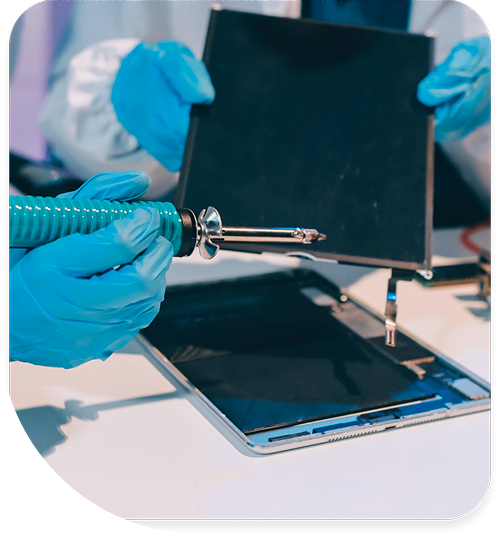
Professional iPad Repair Services In The Fix in Woodland Hills Mall
Logic Board Diagnostics and Micro-Component Recovery: Expert iPad Repair in Tulsa, OK
In the digital classrooms of Jenks Public Schools and the medical offices surrounding Saint Francis Hospital, the iPad is an essential operational tool. Unlike passive entertainment devices, these tablets handle critical workflows, from patient charting to architectural rendering. When they fail, the disruption is immediate. However, the complexity of Apple’s proprietary engineering often means that what looks like a simple "broken screen" is actually a multi-layered electronic failure.
For users requiring professional iPad Repair in Tulsa, OK, our full-service store at 7021 S Memorial Dr #274 inside Woodland Hills Mall provides a level of diagnostic capability that goes far beyond simple part swapping. We utilize board-view schematics and thermal analysis to identify the microscopic faults that cause boot loops, touch failures, and power issues.
The "Fake Charging" and Hydra IC Failure
The Technical Insight: A common symptom is an iPad that displays the "Plugged In" icon but never actually gains percentage, or one that discharges while plugged in. Users often blame the battery. The Store Reality: In 90% of these cases, the battery is healthy. The failure lies in the Hydra (or Tristar on older models) USB Logic Chip. This tiny IC on the motherboard is responsible for negotiating the voltage input from the lightning or USB-C cable. Using uncertified (non-MFi) charging cables bought at gas stations or high-voltage car chargers can spike this chip, effectively burning out the "gateway" for power. We perform a microsoldering repair to remove the damaged BGA chip and install a new power management unit, restoring the device's ability to accept a charge.
Backlight Filter Blowouts (The "Dark Screen" Issue)
The Technical Insight: The device sounds like it’s working—you hear notifications and Siri—but the screen is pitch black. This often happens after a drop or an attempted DIY repair. The Store Reality: The LCD backlight requires high voltage (up to 30V) to illuminate. The data lines run on low voltage (1.8V). If the screen connector is disconnected or reconnected while the battery is still live (even if the device is off), a spark can jump between these pins. This blows the Backlight Filter, a microscopic fuse on the logic board. We use microscopes to bridge or replace this fuse, bringing the light back to the display without needing to replace the expensive screen panel itself.
Panic Log Analysis: Decoding the "Restart Loop"
The Technical Insight: The iPad turns on, shows the Apple logo for 20 seconds, turns off, and repeats endlessly. iTunes/Finder throws an "Error 4013" during update attempts. The Store Reality: This is rarely a "bad update." Modern iPads run a check of all sensors during boot. If a sensor fails to report in, the system panics and restarts (Kernel Panic). We access the internal Panic Logs (specifically looking for "thermalmonitord" or "i2c" errors). Often, a corroded charging port flex or a damaged Face ID illuminator is causing the panic. By identifying the exact sensor halting the boot process, we can disconnect or replace the faulty peripheral and recover the user's data.
Laminated vs. Non-Laminated Display Architecture
The Technical Insight: Not all screens are built the same. On iPad Air (newer gens) and iPad Pro models, the glass digitizer and the LCD are fused into a single laminated unit. On the base model iPad (9th/10th Gen), they are separate. The Store Reality: For laminated screens, "glass only" repair is technically impossible without factory-grade lamination machines, as separating them destroys the polarizer. We replace the entire Fused Assembly to ensure zero dust ingress and perfect touch responsiveness. For non-laminated models, we can replace just the digitizer glass, but we focus heavily on Dust Sealing. We use clean-room techniques to ensure no dust particles are trapped in the air gap between the new glass and the old LCD, a common flaw in quick kiosk repairs.
Touch ID and Home Button Serialization
The Technical Insight: The Home Button on iPads with Touch ID is cryptographically paired to the main CPU (Secure Enclave). The Store Reality: If the Home Button cable is torn during a screen break, the Touch ID function is lost forever if the button is simply replaced. The new button will click, but it won't scan fingerprints. Our repair protocols prioritize the preservation of the home button flex cable. If the cable is nicked, we can sometimes perform Flex Trace Repair under a microscope to salvage the button and keep the biometric security intact.
FPC Connector Reconstruction
The Technical Insight: After a hard drop, the iPad might develop "dead zones" on the touch screen or vertical colored lines, even after testing a new screen. The Store Reality: The force of the impact can crush the "teeth" inside the FPC (Flexible Printed Circuit) connector on the motherboard itself. No amount of new screens will fix a broken motherboard socket. We have the capability to desolder the crushed plastic connector from the logic board and solder on a brand new socket, restoring the physical connection between the "brain" and the display.
Advanced iPad Q&A
Q: My Apple Pencil won't draw straight lines after a screen repair. Why? A: This is a symptom of a low-quality aftermarket digitizer lacking proper Copper EMI Shielding. The electrical noise from the LCD interferes with the Pencil's signal. We use high-grade parts that replicate the copper shielding to ensure the Pencil tracks smoothly and accurately for artists and notetakers.
Q: Is it worth fixing a bent iPad Pro? A: Yes, but only if the frame is straightened first. The iPad Pro aluminum is very thin. If you install a new screen into a bent frame, the glass is under tension and will crack again spontaneously. We use a specialized "gooling" sidewall tool to reshape the chassis back to flat before installing the new display.
Other Locations Near By You
The Fix in Walmart Del City
5401 Tinker Diagonal St, Del City, OK 73115, United States
The Fix in Penn Square Mall
1901 Northwest Expy, Oklahoma City, OK 73118, United States
Your local repair experts for every device
From iPhones to gaming laptops, The Fix in Tulsa, OK is your one-stop shop for device repair. Quick turnarounds, affordable prices, and local experts you can trust

Phone Cases
Protect your device in style! At The Fix in Tulsa, OK, we offer a wide selection of durable phone cases for all major brands—sleek designs that keep your phone safe and looking great.

Nintendo Switch Repair
Cracked Nintendo Switch screen? We repair Switch devices in Tulsa, OK quickly and affordably. Fast, easy, and always with high-quality parts.

MacBook Repair
For broken screens, battery replacements, or other issues, The Fix in Tulsa, OK provides quick MacBook repairs with premium parts.

PlayStation Repair
Is your PlayStation giving you trouble? At The Fix in Tulsa, OK, we handle PlayStation repairs with care and quality parts—no long waits, no hassle.

Google Repair
Need your Google Pixel fixed? At The Fix in Tulsa, OK, we repair cracked screens, charging issues, and more—always using high-quality parts for lasting results.

Tablet Repair
Whether your tablet screen is cracked or the battery won’t hold a charge, The Fix in Tulsa, OK provides fast, affordable tablet repairs with free diagnostics.

Computer Repair
Need PC or desktop service in Tulsa, OK? We provide free diagnostics and affordable repairs, always with high-quality parts.

Game Console Repair
From Nintendo Switch® to PlayStation and Xbox, The Fix in Tulsa, OK repairs all major game consoles. Fast service and dependable results.

Laptop Repair
Got a broken laptop? The Fix In Tulsa, OK, our team repairs most laptop brands and models using high-quality replacement parts.

Cell Phone Repair
We repair all major phone brands in Tulsa, OK. iPhone, Samsung, Google, and more—get your phone fixed fast.

iPhone Repair
Cracked screen? Battery draining too fast? Our team in Tulsa, OK repairs iPhones with precision and high-quality parts to make your device feel new again.

Samsung Repair
Whether it’s a Galaxy screen replacement or a charging issue, The Fix in Tulsa, OK offers fast and reliable Samsung repairs.

Xbox Repair
Xbox not working properly? Our team in Tulsa, OK offers quick, reliable Xbox repairs with free diagnostics and high-quality replacement parts.


Trusted repair solution for mobile phones, tablets, gaming consoles, and computer systems. We provide fast, reliable, and affordable repair services to get your devices back in perfect working condition.
The Fix is an independent repair service provider and is not affiliated with, sponsored by, or endorsed by Apple Inc., Samsung Electronics, Google LLC, or any other device manufacturer. We use high-quality compatible replacement parts unless explicitly stated. All trademarks are property of their respective owners.


© Copyright The Fix Solutions All rights reserved 2026.
Design by Deepcoder