






Nintendo Switch Repair in The Fix in Willowbrook Mall (Kiosk)
Is your Nintendo Switch not working properly? At The Fix in Houston, TX, we repair screens, batteries, and more—always with free diagnostics and high-quality parts. Whether it’s a cracked screen or Joy-Con issue, our team gets you back to gaming fast.

Professional Nintendo Switch Repair Services
- Joy-Con Drift & Controller Repair
- Screen Repair & Replacement
- Battery Replacement
- Charging Port Repair
- Water Damage Repair
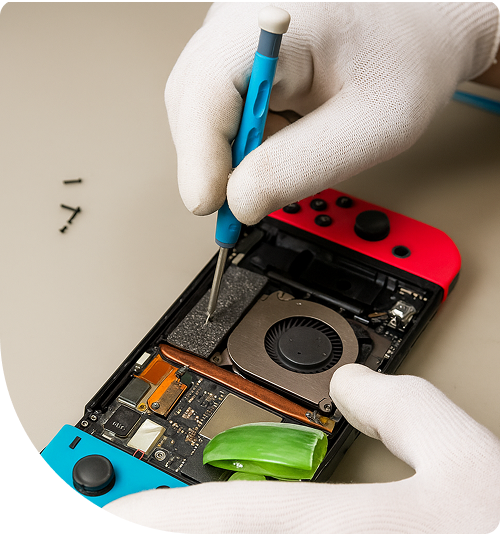
Professional Nintendo Switch Repair Services In The Fix in Willowbrook Mall (Kiosk)
The Gamer’s Nightmare: Scenarios That Demand Expert Nintendo Switch Repair in Houston, TX
In the sprawling commercial hub of Northwest Houston, the Nintendo Switch is the ultimate companion. It keeps kids occupied while parents shop at Willowbrook Mall, entertains patients in the waiting rooms of Methodist Willowbrook, and serves as the primary stress relief for students and professionals unwinding at home in the 77070 area. Its portability is its greatest strength, but also its greatest weakness. Being constantly moved, docked, and tossed into bags exposes the console to a variety of physical failures.
When the screen goes black or the controls drift, the fun stops abruptly. For Houston residents facing these interruptions, finding reliable Nintendo Switch Repair in Houston, TX, is about reclaiming that valuable downtime. At The Fix, located at 2000 Willowbrook Drive (Kiosk K5539) inside Willowbrook Mall, we encounter the specific hardware traumas that arise from the active lifestyles of this community. Recognizing these common scenarios can help you distinguish between a temporary glitch and a hardware failure requiring professional attention.
Scenario 1: The "Drift" That Ruins the Race
The Situation: You are sitting in the food court or waiting in the car, trying to finish a lap in Mario Kart or aim a bow in Zelda. Suddenly, your character starts veering to the left. You aren't touching the thumbstick, but the movement continues. You try to counter-steer, but the inputs fight back. The game becomes unplayable, turning a relaxing break into a frustrating battle with the controller.
The Technical Reality: This is the infamous "Joy-Con drift." It is rarely a software issue; it is physical wear. The joystick mechanism uses internal potentiometers with carbon tracks to track movement. As the stick is used, the metal wiper rubs against the carbon track, creating microscopic conductive dust. This dust confuses the sensor, causing it to register movement where there is none.
The Resolution: Blowing air into the stick is a temporary stopgap that often pushes the dust deeper or introduces moisture. The only permanent solution is the replacement of the analog stick module. Installing a new, high-precision component restores the 1:1 input accuracy, ensuring that when your thumb stops, the character stops.
Scenario 2: The Charging Port Angle Game
The Situation: The battery indicator turns red. You plug in the USB-C charger, but nothing happens. You wiggle the cable, prop it up against a book, or hold it at a specific, tight angle. Suddenly, the lightning bolt icon appears. You freeze, afraid to breathe and disrupt the connection. The moment you let go, the charging stops.
The Technical Reality: This "angle game" is a clear sign of a compromised charging port. The USB-C port is soldered to the main logic board by two rows of tiny pins. In a portable environment like a busy mall or car, chargers are often yanked out in a hurry or tripped over. This leverage cracks the solder joints connecting the port to the motherboard or bends the internal pins.
The Resolution: Continuing to wiggle the cable is dangerous. It can cause electrical arcing (sparks) inside the port or bridge the power pins to the data lines, which can fry the main power management chip (M92T36). Professional repair involves microsoldering: removing the damaged port under a microscope and fusing a new one to the board with fresh solder, restoring a solid connection.
Scenario 3: The Houston Heatwave Shutdown
The Situation: You left your Switch in the car while running a quick errand on Tomball Parkway during a sweltering Houston afternoon. Or perhaps you are playing a graphically intense game in a room without AC. Suddenly, a message appears: "The console is getting too hot. It will go to sleep." The fan sounds like a jet engine, and the back of the unit is scorching to the touch.
The Technical Reality: Electronics and heat are enemies. The console relies on a copper heat pipe and a small fan to expel the heat generated by the processor. Over time, the thermal paste—the substance that transfers heat from the chip to the cooler—dries out and cracks, losing its efficiency. In the humid and hot Houston climate, this degradation accelerates.
The Resolution: Ignoring this warning can lead to permanent board warping or battery failure. The fix involves a deep internal cleaning to remove airflow blockages (dust and lint) and, critically, the application of premium-grade thermal compound. This restores the thermal transfer efficiency, allowing the console to run cool even during marathon gaming sessions.
Scenario 4: The "Blue Screen" Drop on Tile
The Situation: Walking through Willowbrook Mall, the console slips out of a bag or hand and hits the hard tile floor. The screen doesn't crack, but when you turn it on, there is no menu—just a solid, unmoving blue (or sometimes orange) screen. No buttons work. A hard reset does nothing.
The Technical Reality: This is often a sign of board-level impact damage. The force of the drop has traveled through the chassis and flexed the motherboard. This flexion can sever the microscopic connections under the main processor (APU) or the memory chips. The "Blue Screen" is the system's way of saying it cannot communicate with its own brain or RAM.
The Resolution: This is not a simple part swap. It requires advanced diagnostics to inspect the board for separated components. In many cases, a skilled technician can reflow or re-seat the affected components to restore the electrical pathways, bringing the "dead" console back to life.
Scenario 5: The Game Card Read Error
The Situation: You buy a new game and insert it into the slot, expecting the icon to pop up. Instead, a message reads: "The game card could not be read." You blow on the cartridge (a classic habit) and try again. Still nothing. Other games work fine, or perhaps no games work at all.
The Technical Reality: The game card reader is a physical slot with delicate metal pins that touch the contact pads on the cartridge. If a game is inserted forcibly, or if debris (pocket lint) is pushed into the slot, these pins can bend or break. Once a pin is misaligned, the data connection is broken.
The Resolution: The game card reader is a modular component on its own sub-board. Replacing this module eliminates the read errors. It is a straightforward repair that restores the console's ability to play physical media immediately.
Frequently Asked Questions
Q: Why does my battery drain so fast even when the console is off? A: If the console is in "Sleep Mode," it still consumes power. However, if the battery drains rapidly from 100% to 0% in minutes, or dies while powered down completely, it often indicates a short circuit on the motherboard (often related to a damaged charging port or P13USB chip) rather than just a bad battery. Diagnostics are needed to rule out board-level power leaks.
Q: Can a cracked screen be fixed without replacing the whole unit? A: Yes. The Switch screen assembly consists of two main parts: the outer touch glass (digitizer) and the inner image panel (LCD). If only the front plastic/glass is cracked but the image is fine, only the digitizer needs replacement. If the image has black blobs or lines, the LCD is damaged. We can replace whichever layer is broken, saving you money compared to a full assembly swap.
Q: Is my save data lost if the console won't turn on? A: Not necessarily. Save data is stored on a NAND memory chip soldered to the motherboard. If the issue is a bad battery, a broken charging port, or a damaged screen, the motherboard (and your data) is likely safe. Fixing the power or display issue will allow you to access and back up your save files again.
Other Locations Near By You
The Fix in Walmart Carrollton
1213 E Trinity Mls Rd, Carrollton, TX 75006, United States
The Fix in Walmart Lubbock
702 W Loop 289 Acc Rd, Lubbock, TX 79416, United States
The Fix in South Plains Mall
6002 Slide Rd, Lubbock, TX 79414
The Fix in Walmart North Richland Hills
6401 NE Loop 820, North Richland Hills, TX 76180, United States
The Fix in South Park Mall San Antonio
2310 SW Military Dr. Suite 118 San Antonio, TX 78224
The Fix in Walmart Odessa
2450 NW Loop 338 State Rte W, Odessa, TX 79763, United States
The Fix in Walmart La Porte
9025 Spencer Hwy, La Porte, TX 77571, United States
The Fix in Baybrook Mall
500 Baybrook Mall #1079, Friendswood, TX 77546, United States
The Fix in Walmart Humble
9235 N Sam Houston Pkwy E, Humble, TX 77396, United States
The Fix in Walmart Weatherford
1836 S Main St, Weatherford, TX 76086, United States
Your local repair experts for every device
From iPhones to gaming laptops, The Fix in Houston, TX is your one-stop shop for device repair. Quick turnarounds, affordable prices, and local experts you can trust

Phone Cases
Protect your device in style! At The Fix in Houston, TX, we offer a wide selection of durable phone cases for all major brands—sleek designs that keep your phone safe and looking great.

MacBook Repair
For broken screens, battery replacements, or other issues, The Fix in Houston, TX provides quick MacBook repairs with premium parts.

PlayStation Repair
Is your PlayStation giving you trouble? At The Fix in Houston, TX, we handle PlayStation repairs with care and quality parts—no long waits, no hassle.

Google Repair
Need your Google Pixel fixed? At The Fix in Houston, TX, we repair cracked screens, charging issues, and more—always using high-quality parts for lasting results.

Tablet Repair
Whether your tablet screen is cracked or the battery won’t hold a charge, The Fix in Houston, TX provides fast, affordable tablet repairs with free diagnostics.

Computer Repair
Need PC or desktop service in Houston, TX? We provide free diagnostics and affordable repairs, always with high-quality parts.

Game Console Repair
From Nintendo Switch® to PlayStation and Xbox, The Fix in Houston, TX repairs all major game consoles. Fast service and dependable results.

Laptop Repair
Got a broken laptop? The Fix In Houston, TX, our team repairs most laptop brands and models using high-quality replacement parts.

iPad Repair
Need your iPad fixed? At The Fix in Houston, TX, we repair cracked screens, charging issues, and more—always using high-quality parts for lasting results.

Cell Phone Repair
We repair all major phone brands in Houston, TX. iPhone, Samsung, Google, and more—get your phone fixed fast.

iPhone Repair
Cracked screen? Battery draining too fast? Our team in Houston, TX repairs iPhones with precision and high-quality parts to make your device feel new again.

Samsung Repair
Whether it’s a Galaxy screen replacement or a charging issue, The Fix in Houston, TX offers fast and reliable Samsung repairs.

Xbox Repair
Xbox not working properly? Our team in Houston, TX offers quick, reliable Xbox repairs with free diagnostics and high-quality replacement parts.


Trusted repair solution for mobile phones, tablets, gaming consoles, and computer systems. We provide fast, reliable, and affordable repair services to get your devices back in perfect working condition.
The Fix is an independent repair service provider and is not affiliated with, sponsored by, or endorsed by Apple Inc., Samsung Electronics, Google LLC, or any other device manufacturer. We use high-quality compatible replacement parts unless explicitly stated. All trademarks are property of their respective owners.


© Copyright The Fix Solutions All rights reserved 2026.
Design by Deepcoder