






Laptop Repair in The Fix in Westfield Oakridge
Broken laptop slowing you down? At The Fix in San Jose, CA, we repair all major laptop brands and models. From cracked screens to battery issues, our technicians provide fast, affordable service with free diagnostics and high-quality parts.

Professional Laptop Repair Services
- Screen Repair & Replacement
- Battery Replacement
- Water Damage Repair
- Keyboard & Trackpad Repair
- Charging Port Repair
- Overheating & Fan Repair
- Hard Drive / SSD Replacement & Data Recovery
- Software Troubleshooting & Recovery
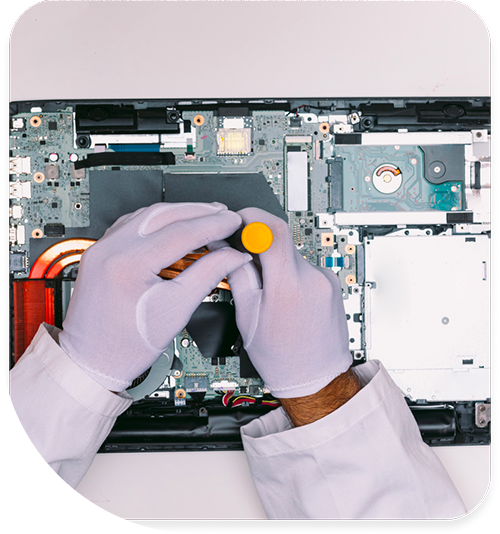
Professional Laptop Repair Services In The Fix in Westfield Oakridge
The Mobile Office: Laptop Repair in San Jose, CA
In San Jose, the laptop is the primary tool of the trade. Whether you are a hybrid worker logging in from a home office in Willow Glen, a student trekking across the SJSU campus, or an entrepreneur pitching at a coffee shop on The Alameda, your laptop is your lifeline. In the South Bay, "work" isn't a place you go; it's a thing you do on your laptop.
But this constant mobility comes with risks. We toss them in bags, open them on cramped Caltrain tables, and leave them in cars during the summer heat. At The Fix, located inside Westfield Oakridge, we specialize in laptop repair in San Jose, CA, addressing the physical toll that the Silicon Valley lifestyle takes on your hardware.
The "Commuter" Hinge Stress
Laptops are designed to be portable, but the hinge mechanism is a mechanical weak point.
The Stress: Think about how many times a day you open and close your lid. On the bus, at the desk, at the kitchen table. The Failure: You hear a "crack" when opening the laptop. The plastic bezel around the screen starts to separate, or the lid feels loose and floppy. The Anatomy: The metal hinge is anchored to the plastic chassis by small brass nuts. Over time, the plastic weakens from the leverage, and these nuts rip out. The Repair: Do not force it! Opening a broken hinge can crack the screen glass. We use structural epoxy to rebuild the anchor points in the chassis. We also tighten the internal hinge nut to ensure smooth, firm resistance.
The "Hot Car" Battery Swell
We all know the rule: don't leave pets in the car. But in San Jose summers, you shouldn't leave your laptop either.
The Danger: Temperatures inside a parked car at Oakridge can soar. Lithium-ion batteries degrade rapidly above 100°F. The Reaction: The battery cells begin to off-gas and expand. This is called "swelling" or "bloating." The Symptom: Your trackpad might stop clicking because the battery underneath is pushing up on it. Or, the bottom case of the laptop looks warped and won't sit flat on a table. The Urgent Fix: This is a fire safety issue. Bring it to us immediately. We safely remove the swollen battery and install a fresh one. Never try to squeeze or puncture a swollen battery.
The "Zoom" Fan Grind
In the era of remote work, video calls are daily rituals. But nothing ruins a meeting like a laptop that sounds like a lawnmower.
The Noise: You join a call, and your laptop starts making a loud grinding or rattling noise. The Cause: Laptop fans have tiny bearings. Over time, the lubricant inside dries up, or dust unbalances the blades. The "grind" is metal-on-metal friction. The Solution: You don't need a new computer; you just need a new fan. We replace the failing fan unit with a quiet, new part. It’s a quick, affordable repair that saves your CPU from overheating and saves you from embarrassment on your next call.
The "DC Jack" Wiggle
For laptops that use traditional round charging plugs (not USB-C), the charging port is a common failure point.
The Struggle: You plug the charger in, but the light doesn't come on unless you hold the cable at a "magic angle" or wrap it around the screen. The Risk: This loose connection creates electrical arcing (sparks) inside the laptop, which produces heat and can melt the plastic or damage the motherboard. The Fix: We remove the damaged DC Jack and solder in a new one. This restores a solid, safe electrical connection so you can charge without performing cable gymnastics.
San Jose Laptop Q&A: Quick Fixes
Q: My "E" key fell off. Do I need a whole new keyboard? A: Maybe not. Underneath the keycap is a tiny white plastic "scissor clip." If that clip and the metal hooks on the keyboard deck are intact, we can just snap a new keycap on. However, if the metal hooks are bent or the clip is shattered, we usually have to replace the entire keyboard assembly to make sure it won't fall off again.
Q: Can you save my data if my laptop won't turn on? A: In most cases, yes! Even if the motherboard is dead (fried by a spill or surge), the storage drive (SSD or Hard Drive) is a separate component. We can remove the drive, put it in an external enclosure, and transfer your documents, photos, and desktop files to a USB drive or your new computer.
Q: My screen is black but the computer is on (I can hear fans). A: This could be a "Backlight Fuse" issue or a loose display cable. Try shining a flashlight at the screen. If you can faintly see your desktop icons, the backlight is dead. If it's totally black, it might be the cable or RAM. We can diagnose the specific board-level issue.
Other Locations Near By You
The Fix in Plaza Bonita
3030 Plaza Bonita Rd Ste 2075 National City, CA 91950
The Fix in Walmart Dinuba
770 W El Monte Way, Dinuba, CA 93618, United States
The Fix in Walmart Livermore
2700 Las Positas Rd, Livermore, CA 94551, United States
The Fix in Walmart Palm Springs
5601 Ramon Rd, Palm Springs, CA 92264, United States
The Fix in Westfield Culver City
6000 Sepulveda Blvd #2351, Culver City, CA 90230
The Fix in Walmart Lakewood
2770 E Carson St, Lakewood, CA 90712, United States
The Fix in Walmart Redding
1515 Dana Dr, Redding, CA 96003, United States
The Fix in Walmart Vista
1800 University Dr, Vista, CA 92083, United States
The Fix in Walmart Hesperia
13401 Main St inside Hesperia Walmart Hesperia 92345-9123 California
The Fix in Visalia Mall
2025 S. Mooney blvd., SPC# 1545, Visalia, CA 93277
Your local repair experts for every device
From iPhones to gaming laptops, The Fix in San Jose, CA is your one-stop shop for device repair. Quick turnarounds, affordable prices, and local experts you can trust

Phone Cases
Protect your device in style! At The Fix in San Jose, CA, we offer a wide selection of durable phone cases for all major brands—sleek designs that keep your phone safe and looking great.

Nintendo Switch Repair
Cracked Nintendo Switch screen? We repair Switch devices in San Jose, CA quickly and affordably. Fast, easy, and always with high-quality parts.

MacBook Repair
For broken screens, battery replacements, or other issues, The Fix in San Jose, CA provides quick MacBook repairs with premium parts.

PlayStation Repair
Is your PlayStation giving you trouble? At The Fix in San Jose, CA, we handle PlayStation repairs with care and quality parts—no long waits, no hassle.

Google Repair
Need your Google Pixel fixed? At The Fix in San Jose, CA, we repair cracked screens, charging issues, and more—always using high-quality parts for lasting results.

Tablet Repair
Whether your tablet screen is cracked or the battery won’t hold a charge, The Fix in San Jose, CA provides fast, affordable tablet repairs with free diagnostics.

Computer Repair
Need PC or desktop service in San Jose, CA? We provide free diagnostics and affordable repairs, always with high-quality parts.

Game Console Repair
From Nintendo Switch® to PlayStation and Xbox, The Fix in San Jose, CA repairs all major game consoles. Fast service and dependable results.

iPad Repair
Need your iPad fixed? At The Fix in San Jose, CA, we repair cracked screens, charging issues, and more—always using high-quality parts for lasting results.

Cell Phone Repair
We repair all major phone brands in San Jose, CA. iPhone, Samsung, Google, and more—get your phone fixed fast.

iPhone Repair
Cracked screen? Battery draining too fast? Our team in San Jose, CA repairs iPhones with precision and high-quality parts to make your device feel new again.

Samsung Repair
Whether it’s a Galaxy screen replacement or a charging issue, The Fix in San Jose, CA offers fast and reliable Samsung repairs.

Xbox Repair
Xbox not working properly? Our team in San Jose, CA offers quick, reliable Xbox repairs with free diagnostics and high-quality replacement parts.


Trusted repair solution for mobile phones, tablets, gaming consoles, and computer systems. We provide fast, reliable, and affordable repair services to get your devices back in perfect working condition.
The Fix is an independent repair service provider and is not affiliated with, sponsored by, or endorsed by Apple Inc., Samsung Electronics, Google LLC, or any other device manufacturer. We use high-quality compatible replacement parts unless explicitly stated. All trademarks are property of their respective owners.


© Copyright The Fix Solutions All rights reserved 2026.
Design by Deepcoder