






Game Console Repair in The Fix in Walmart Scottsdale
Having trouble with your game console? At The Fix in Scottsdale, AZ, we repair all major consoles—including Nintendo Switch, PlayStation, and Xbox. Whether it’s a broken screen, overheating console, or controller drift, our technicians provide fast repairs with free diagnostics and high-quality parts.

Professional Game Console Repair Services
- Nintendo Switch Repair
- PlayStation Repair
- Xbox Repair
- Controller & Stick Drift Repair
- HDMI Port Repair & Replacement
- Overheating & Fan Repair
- Disc Drive Repair
- Power Supply Repair
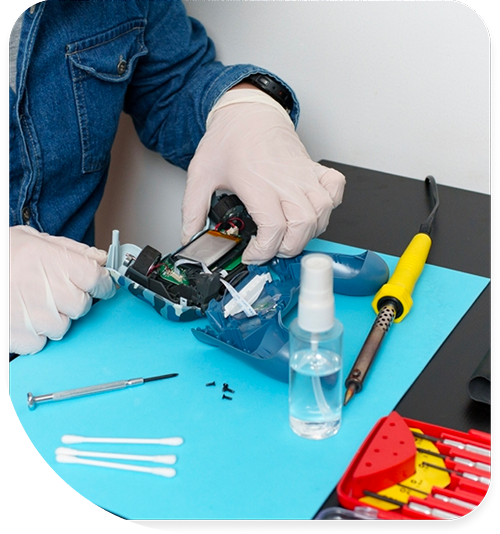
Professional Game Console Repair Services In The Fix in Walmart Scottsdale
Game Console Repair in Scottsdale, AZ: How Haboob Dust and Sonoran Desert Heat Wear a Console Over Time
Game consoles in Scottsdale living rooms age through a wear pattern that is shaped by two specific features of the Sonoran Desert environment: the haboob dust events that push concentrated particulate through every air gap in the home during monsoon season, and the extreme summer heat that makes the HVAC system run continuously from May through October, cycling desert air through the home's air handling system and everything in it. A console that sits in an entertainment center on the N Pima Rd corridor, powered on for gaming sessions several times per week, is drawing in this air continuously through its intake vents. The heatsink accumulates what that air carries. The wear is incremental, invisible from the outside, and easily normalized until the fan noise during gaming sessions becomes undeniable.
Understanding the wear cycle — how it starts, what stage it is at for a given console, and when service makes sense — is what game console repair in Scottsdale, AZ helps assess at the N Pima Rd location.
The Accumulation Cycle in a Desert Home
A new console runs quietly because its heatsink is clear and its thermal paste is conducting heat efficiently between the processor and the heat pipe. Over the first year in a Scottsdale home, particulate from the ambient desert air accumulates on the heatsink fins at a rate influenced by how often windows are opened, how the HVAC filters are maintained, and whether any haboob events occurred with the console running or the home unsealed. A haboob that arrives when a window is open or when the HVAC is pulling unfiltered outdoor air deposits months of normal accumulation across a single afternoon event.
The thermal paste on the processor follows a slower but parallel degradation path. The temperature differential the console goes through each gaming session — from room temperature up to operating temperature and back down after the session — cycles the paste between expansion and contraction states. In Scottsdale, where a gaming session in an air-conditioned room still starts from a higher ambient temperature than in a cooler climate, and where the paste was installed in a console that may have spent time in a car at 140 degrees during a retail purchase run, the total thermal cycling history of the paste is more aggressive than in temperate environments.
The Signs at Each Stage
In the first stage, the only change is fan behavior during demanding game loads — the fan runs slightly louder and at higher sustained speed than it did in the first year. This stage is easy to normalize; the game is demanding, the console is working hard, some fan noise is expected. The diagnostic distinction is whether the fan runs at this elevated level during game titles that used to produce no audible fan response. If a sports title or a classic RPG that the household has played for three years now makes the fan run loudly from the start, the heatsink has accumulated enough dust to change the thermal profile at low-to-moderate loads.
In the second stage, the fan runs audibly even during the main menu, and gaming sessions that previously ran for hours without incident now end in forced shutdown before the session is complete. The thermal protection threshold is being reached during gaming, which means the processor is sustaining temperatures that the firmware does not allow to continue. The console is not damaged at this point; the shutdown is protection working correctly. But running sessions at near-threshold temperatures repeatedly does stress components in ways that sustained operation within the design range would not.
Controller port and connectivity issues develop on a separate timeline from the thermal condition. The USB-A ports on older consoles and the USB-C ports on newer ones accumulate desert dust and lint from controller cable handling. The proprietary wireless receiver circuitry on PlayStation and Xbox controllers can develop pairing instability in the elevated static environment of a dry desert interior. Controller triggers and buttons that are sticky or that have reduced actuation response from fine desert particulate entering the mechanism are also a repair category distinct from the console thermal condition.
The Service Window
The practical service window for a game console in Scottsdale is before the thermal condition reaches the shutdown stage, because service at the fan-noise stage is simpler and faster than service at the shutdown stage. A console that is loud but not yet shutting down has a heatsink that is heavily loaded but still moving air; the cleaning is more straightforward and less time-consuming. A console that shuts down under load has been running at near-threshold temperatures for some period, which means the thermal paste has been under more stress. Both are addressable, but the earlier service window is the more efficient one.
Thermal service, controller repair, HDMI port service, and storage upgrades for game console repair in Scottsdale are handled at the N Pima Rd location.
Field Notes from Scottsdale
My console shuts down but only after a long session — shorter sessions are fine. What does that indicate?
This is the classic profile of a thermal protection trigger. Shorter sessions generate heat but not enough to push the processor to the firmware temperature ceiling before the session ends. Longer sessions generate sustained heat that gradually approaches the ceiling, and when the ceiling is reached the firmware shuts down the console to prevent damage. The time-to-shutdown gets shorter as heatsink accumulation increases — what takes two hours to trigger today will trigger in one hour after the next haboob season adds another dust layer to the heatsink. Thermal service at this stage restores the ability to run long sessions without shutdown.
Is it normal for a console to feel very hot on the outside?
Warm exhaust surfaces are normal; uncomfortably hot ones are not. The console exhausts heat through specific vents, and those surfaces will be warm during gaming — that is the cooling system working. What is not normal is a surface so hot it is difficult to hold a hand against for more than a few seconds, or exhaust air that feels very hot rather than warm. In Scottsdale, where the room the console is in is often air-conditioned but the exhaust air has come through a partially blocked heatsink, the exhaust temperature is a useful real-time indicator of how hard the thermal system is working.
My controller is sticky around the buttons — is that a hardware problem or just dirt?
Most button stickiness is surface contamination rather than hardware failure — skin oils, food residue, and the fine desert dust that settles on controllers in a Scottsdale living room combine into a film that makes button edges and the spaces around them tacky. Careful cleaning with isopropyl alcohol and a cotton swab around the button edges resolves this in most cases without service. If buttons feel sticky because of reduced spring return — the button compresses but returns slowly — that can indicate contamination under the button cap in the mechanism, which requires opening the controller to access.
Other Locations Near By You
The Fix in Walmart Scottsdale
15355 N Northsight Blvd, Scottsdale, AZ 85260, United States
The Fix in Walmart Avondale
13055 W Rancho Santa Fe Blvd, Avondale, AZ 85392, United States
The Fix in Walmart Glendale
5605 W Northern Ave, Glendale, AZ 85301, United States
The Fix in Walmart Phoenix
6145 N 35th Ave, Phoenix, AZ 85017, United States
The Fix in Walmart Phoenix
1825 W Bell Rd, Phoenix, AZ 85023, United States
Your local repair experts for every device
From iPhones to gaming laptops, The Fix in Scottsdale, AZ is your one-stop shop for device repair. Quick turnarounds, affordable prices, and local experts you can trust

Phone Cases
Protect your device in style! At The Fix in Scottsdale, AZ, we offer a wide selection of durable phone cases for all major brands—sleek designs that keep your phone safe and looking great.

Nintendo Switch Repair
Cracked Nintendo Switch screen? We repair Switch devices in Scottsdale, AZ quickly and affordably. Fast, easy, and always with high-quality parts.

MacBook Repair
For broken screens, battery replacements, or other issues, The Fix in Scottsdale, AZ provides quick MacBook repairs with premium parts.

PlayStation Repair
Is your PlayStation giving you trouble? At The Fix in Scottsdale, AZ, we handle PlayStation repairs with care and quality parts—no long waits, no hassle.

Google Repair
Need your Google Pixel fixed? At The Fix in Scottsdale, AZ, we repair cracked screens, charging issues, and more—always using high-quality parts for lasting results.

Tablet Repair
Whether your tablet screen is cracked or the battery won’t hold a charge, The Fix in Scottsdale, AZ provides fast, affordable tablet repairs with free diagnostics.

Computer Repair
Need PC or desktop service in Scottsdale, AZ? We provide free diagnostics and affordable repairs, always with high-quality parts.

Laptop Repair
Got a broken laptop? The Fix In Scottsdale, AZ, our team repairs most laptop brands and models using high-quality replacement parts.

iPad Repair
Need your iPad fixed? At The Fix in Scottsdale, AZ, we repair cracked screens, charging issues, and more—always using high-quality parts for lasting results.

Cell Phone Repair
We repair all major phone brands in Scottsdale, AZ. iPhone, Samsung, Google, and more—get your phone fixed fast.

iPhone Repair
Cracked screen? Battery draining too fast? Our team in Scottsdale, AZ repairs iPhones with precision and high-quality parts to make your device feel new again.

Samsung Repair
Whether it’s a Galaxy screen replacement or a charging issue, The Fix in Scottsdale, AZ offers fast and reliable Samsung repairs.

Xbox Repair
Xbox not working properly? Our team in Scottsdale, AZ offers quick, reliable Xbox repairs with free diagnostics and high-quality replacement parts.


Trusted repair solution for mobile phones, tablets, gaming consoles, and computer systems. We provide fast, reliable, and affordable repair services to get your devices back in perfect working condition.
The Fix is an independent repair service provider and is not affiliated with, sponsored by, or endorsed by Apple Inc., Samsung Electronics, Google LLC, or any other device manufacturer. We use high-quality compatible replacement parts unless explicitly stated. All trademarks are property of their respective owners.


© Copyright The Fix Solutions All rights reserved 2026.
Design by Deepcoder