






Google Repair in The Fix in Walmart Dawsonville
Is your Pixel giving you trouble? At The Fix in Dawsonville, GA, we handle Google repairs fast and hassle-free. From cracked screens to battery replacements, we use high-quality parts and provide free diagnostics so you know exactly what’s wrong before any repair begins.

Professional Google Repair Services
- Screen Repair & Replacement
- Battery Replacement
- Water Damage Repair
- Camera Repair
- Charging Port Repair
- Speaker & Microphone Repair
- Software Troubleshooting & Recovery
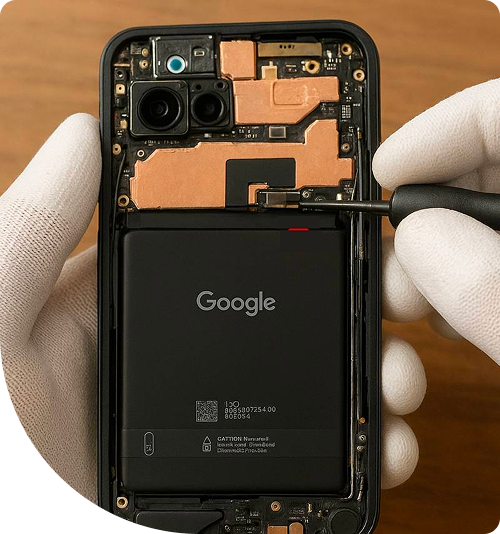
Professional Google Repair Services In The Fix in Walmart Dawsonville
Google Repair in Dawsonville, GA: The Timeline of Heat and Hardware
In the humid subtropical climate of North Georgia, your electronics are fighting a constant battle against thermodynamics. For Pixel owners in the 30534 zip code, this battle is intensified by the device's architecture. These devices, powered by high-performance processors, naturally run warmer than many competitors. When you combine that internal heat with a July afternoon at the North Georgia Premium Outlets or a hike up the stairs at Amicalola Falls, you create an environment that accelerates hardware degradation.
At The Fix in Walmart Dawsonville, we advocate for a "preventive maintenance" mindset. We don't just want to fix your phone when it dies; we want to intervene before catastrophic failure occurs. We provide specialized Google Repair in Dawsonville, GA that focuses on the specific timeline of how heat and humidity affect your device, helping you spot the early warning signs before a simple maintenance task becomes a system-wide failure.
Phase 1: The Chemical Shift (Months 12-18)
The first stage of degradation is invisible to the naked eye, occurring deep within the lithium-ion battery. Batteries are chemical reservoirs, and heat is the catalyst that speeds up their internal reactions—often in ways you don't want.
- The Trigger: Leaving your phone in the car while shopping at the outlets or using high-brightness GPS navigation on the dashboard while driving down GA-400.
- The Hidden Damage: High temperatures cause the electrolyte fluid inside the battery to break down faster. This increases "internal resistance."
- The Preventive Step: Avoid charging your phone while it is hot. If the device feels warm to the touch, let it cool down in the shade before plugging it in. Charging a hot battery forces ions into the anode under stress, permanently reducing capacity.
Phase 2: The "Spicy Pillow" Expansion (Months 18-24)
If the chemical stress from Phase 1 is ignored, the breakdown of electrolytes begins to generate gas (mostly oxygen and carbon dioxide). Since the battery is sealed in a foil pouch, this gas has nowhere to go.
- The Symptom: You might notice the back glass of your device feels slightly uneven, or your phone case fits tighter than usual.
- The Risk: This is battery swelling. As the battery expands, it exerts hundreds of pounds of pressure on the components above it—specifically the display panel and the motherboard.
- The Preventive Step: This is the critical intervention window. Replacing the battery now is a standard, safe procedure. Ignoring it means the battery will eventually push the screen out of the frame, cracking the display glass from the inside out.
Phase 3: The Seal Breach (Months 24+)
As the battery swells or the adhesive simply ages from years of thermal cycling (heating up and cooling down), the water-resistant seal around the edge of the phone fails.
- The Trigger: A humid day near the Etowah River or a sudden summer downpour.
- The Failure: The ingress protection rating is now compromised. Moisture enters the device through the failed adhesive bond.
- The Consequence: The first victim is often the charging port or the face unlock sensors. You may get a "Liquid or Debris in USB Port" warning that won't go away.
- The Preventive Step: If your screen is lifting even a millimeter, keep the device away from all moisture. Tape the gap if necessary and bring it in for a seal restoration and battery swap immediately.
Tensor Chip Thermal Management
The custom processors in these devices are designed for heavy machine learning tasks like "Magic Eraser" and live translation. However, they generate significant localized heat. Over time, the thermal pads inside the phone—which transfer heat from the chip to the aluminum frame—can dry out and lose effectiveness.
If your phone stays hot long after you stop using it, it may need a "thermal service." We can open the device and replace the dried stock thermal pads with high-performance thermal interface material. This helps the phone shed heat more efficiently, protecting the battery and processor from long-term heat damage.
Q&A: Preventive Maintenance Inquiries
How often should I clean my charging port? In Dawsonville, with the mix of pollen and red clay dust, we recommend inspecting your port monthly. Use a non-conductive pick (plastic or wood) to gently remove packed lint. Do not use metal, as it can short the pins. Packed lint pushes the cable out, causing a poor connection that generates excess heat during charging.
Is it worth replacing the battery if the phone is 3 years old? Yes. A battery replacement is significantly cheaper than a new device. By providing stable voltage, a new battery prevents the processor from "throttling" (slowing down), making your 3-year-old phone feel snappy again.
Will my phone be water-resistant after a repair? While we apply premium-grade adhesive templates that mimic the manufacturer's seal, we always advise treating a repaired device (and any device over two years old) as water-resistant, not waterproof. The seals are designed for accidents, not underwater photography in Lake Lanier.
Conclusion
The lifespan of your device isn't set in stone; it is determined by how well you manage the environmental stressors of life in Georgia. Heat, humidity, and battery chemistry are constantly interacting. Don't wait for the screen to pop off or the logic board to fry. If you notice your device getting too hot or the battery draining too fast, visit us at 98 Power Center Dr, Dawsonville, GA 30534 inside Walmart. A small preventive repair today can prevent a total system failure tomorrow.
Other Locations Near By You
The Fix in Walmart Augusta
260 Bobby Jones Expy, Augusta, GA 30907, United States
The Fix in Town Center at Cobb
400 Ernest W Barrett Pkwy NW ste 220, Kennesaw, GA 30144,
The Fix in Walmart Gainesville
400 Shallowford Rd inside Walmart Gainesville 30504 GA
The Fix in Walmart Toccoa
3886 GA-17, Eastanollee, GA 30538, United States
Your local repair experts for every device
From iPhones to gaming laptops, The Fix in Dawsonville, GA is your one-stop shop for device repair. Quick turnarounds, affordable prices, and local experts you can trust

Phone Cases
Protect your device in style! At The Fix in Dawsonville, GA, we offer a wide selection of durable phone cases for all major brands—sleek designs that keep your phone safe and looking great.

Nintendo Switch Repair
Cracked Nintendo Switch screen? We repair Switch devices in Dawsonville, GA quickly and affordably. Fast, easy, and always with high-quality parts.

MacBook Repair
For broken screens, battery replacements, or other issues, The Fix in Dawsonville, GA provides quick MacBook repairs with premium parts.

PlayStation Repair
Is your PlayStation giving you trouble? At The Fix in Dawsonville, GA, we handle PlayStation repairs with care and quality parts—no long waits, no hassle.

Tablet Repair
Whether your tablet screen is cracked or the battery won’t hold a charge, The Fix in Dawsonville, GA provides fast, affordable tablet repairs with free diagnostics.

Computer Repair
Need PC or desktop service in Dawsonville, GA? We provide free diagnostics and affordable repairs, always with high-quality parts.

Game Console Repair
From Nintendo Switch® to PlayStation and Xbox, The Fix in Dawsonville, GA repairs all major game consoles. Fast service and dependable results.

Laptop Repair
Got a broken laptop? The Fix In Dawsonville, GA, our team repairs most laptop brands and models using high-quality replacement parts.

iPad Repair
Need your iPad fixed? At The Fix in Dawsonville, GA, we repair cracked screens, charging issues, and more—always using high-quality parts for lasting results.

Cell Phone Repair
We repair all major phone brands in Dawsonville, GA. iPhone, Samsung, Google, and more—get your phone fixed fast.

iPhone Repair
Cracked screen? Battery draining too fast? Our team in Dawsonville, GA repairs iPhones with precision and high-quality parts to make your device feel new again.

Samsung Repair
Whether it’s a Galaxy screen replacement or a charging issue, The Fix in Dawsonville, GA offers fast and reliable Samsung repairs.

Xbox Repair
Xbox not working properly? Our team in Dawsonville, GA offers quick, reliable Xbox repairs with free diagnostics and high-quality replacement parts.


Trusted repair solution for mobile phones, tablets, gaming consoles, and computer systems. We provide fast, reliable, and affordable repair services to get your devices back in perfect working condition.
The Fix is an independent repair service provider and is not affiliated with, sponsored by, or endorsed by Apple Inc., Samsung Electronics, Google LLC, or any other device manufacturer. We use high-quality compatible replacement parts unless explicitly stated. All trademarks are property of their respective owners.


© Copyright The Fix Solutions All rights reserved 2026.
Design by Deepcoder