






iPad Repair in The Fix in Walmart Dawsonville
Cracked screen or battery draining too fast? At The Fix in Dawsonville, GA, we provide fast and reliable iPad repairs. From screen replacements to charging issues, our technicians use high-quality parts and offer free diagnostics so you know exactly what’s needed.

Professional iPad Repair Services
- Screen Repair & Replacement
- Battery Replacement
- Water Damage Repair
- Charging Port Repair
- Camera Repair
- Speaker & Microphone Repair
- iOS Troubleshooting & Recovery
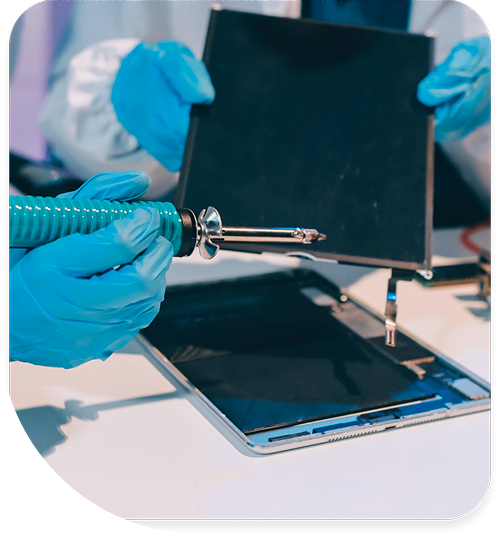
Professional iPad Repair Services In The Fix in Walmart Dawsonville
iPad Repair in Dawsonville, GA: Solving the Most Common Tablet Headaches
Picture this: You are enjoying a family meal near the historic Dawsonville Pool Room, trying to keep the kids entertained. You hand over the iPad, and two minutes later, you hear the sickening crunch of glass hitting the tile floor. Or perhaps you use your tablet for business along Kilough Road, and it suddenly decides to stop charging right before a client presentation.
Tablets have become essential to our daily lives in the 30534 area, serving as everything from babysitters to cash registers. But when they break, they often exhibit confusing symptoms. Is that screen glitch a virus? Why won't the battery go past 1%? At The Fix in Walmart Dawsonville, we specialize in translating these symptoms into solutions. Here is a guide to the specific iPad Repair in Dawsonville, GA scenarios we solve every day, helping you understand what is really going on with your device.
Scenario 1: The "Ghost Touch" Phenomenon
The Situation: You dropped your iPad. The glass is cracked, but you think, "I can still use this." A few days later, apps start opening on their own, or the keyboard types gibberish without you touching it.
The Diagnosis: This is called "Ghost Touch." When the digitizer (the touch-sensitive glass layer) is shattered, the shards press unevenly against the sensor grid. The tablet interprets this pressure as your finger tapping the screen. The Solution: You cannot "software update" this away. The digitizer must be replaced. Crucially, if the aluminum frame of the iPad was bent during the drop (common with drops on the hard pavement at Veterans Memorial Park), simply gluing a new screen on won't work. The bent frame will crush the new glass. We use a specialized "gTool" to reshape the metal corners back to factory geometry before installing the new screen, ensuring the repair lasts.
Scenario 2: The "Bloated" Battery
The Situation: Your iPad spends most of its life plugged into a charger, perhaps acting as a Point-of-Sale system for a business near GA-400 or a dedicated streaming device at home in Chestatee. Recently, you noticed the screen is bowing outward in the middle, or there is a white pressure spot on the display.
The Diagnosis: This is a swollen battery. Lithium-ion batteries degrade when kept at 100% charge constantly. The electrolytes inside break down and generate gas, inflating the battery like a balloon. The Solution: This is a safety priority. The pressure from the battery is pushing the screen out from the inside. If left unchecked, it will snap the expensive LCD panel or even puncture the battery pouch. We safely extract the volatile battery and replace it with a fresh cell, often saving the screen if caught early enough.
Scenario 3: The "Fake Charging" Issue
The Situation: You plug your iPad in before bed. The lightning bolt icon appears, so you go to sleep. You wake up, and the battery is still at 5%—or dead.
The Diagnosis: This is rarely the battery's fault. It is usually a failure of the "Tristar" chip on the logic board. This tiny microchip controls the USB logic. Using uncertified, gas-station charging cables (which often have unstable voltage) can burn this chip out. The iPad thinks it is charging (hence the icon), but the chip isn't actually allowing power to flow to the battery. The Solution: A battery swap won't fix this. We perform a diagnostic test to confirm the Tristar failure and then perform a microsoldering repair to replace the damaged chip, restoring the device’s ability to actually take a charge.
Q&A: Practical Repair Answers
My iPad is disabled because the broken screen entered the wrong passcode. Can you unlock it? If the device says "iPad is Disabled, Connect to iTunes," the data is unfortunately already encrypted and locked. We can repair the screen so the touch works again, but the device must be factory reset to be usable. This is why fixing a "ghost touching" screen immediately is vital—to prevent it from locking you out of your own data.
Do you replace just the glass or the whole screen? It depends on the model. On standard iPads (like the 9th Gen), the glass and image screen are separate, so we can replace just the glass (cheaper). On iPad Air and Pro models, the display is "laminated" (fused). If the glass breaks, the whole assembly must be swapped. We can identify which model you have in seconds.
Will my Touch ID still work after a screen repair? Yes, but only if the repair is done correctly. The home button is paired to your specific motherboard. We carefully transfer your home button to the new screen assembly to preserve your fingerprint security functions.
Conclusion
Whether it’s a shattered screen from a hike at the Appalachian approach or a battery that’s given up the ghost, you don't have to replace your tablet. Most issues are solvable with the right diagnosis. Bring your device to 98 Power Center Dr, Dawsonville, GA 30534 inside Walmart. We’ll troubleshoot the symptom, explain the fix, and get you back to your routine.
Other Locations Near By You
The Fix in Walmart Augusta
260 Bobby Jones Expy, Augusta, GA 30907, United States
The Fix in Town Center at Cobb
400 Ernest W Barrett Pkwy NW ste 220, Kennesaw, GA 30144,
The Fix in Walmart Gainesville
400 Shallowford Rd inside Walmart Gainesville 30504 GA
The Fix in Walmart Toccoa
3886 GA-17, Eastanollee, GA 30538, United States
Your local repair experts for every device
From iPhones to gaming laptops, The Fix in Dawsonville, GA is your one-stop shop for device repair. Quick turnarounds, affordable prices, and local experts you can trust

Phone Cases
Protect your device in style! At The Fix in Dawsonville, GA, we offer a wide selection of durable phone cases for all major brands—sleek designs that keep your phone safe and looking great.

Nintendo Switch Repair
Cracked Nintendo Switch screen? We repair Switch devices in Dawsonville, GA quickly and affordably. Fast, easy, and always with high-quality parts.

MacBook Repair
For broken screens, battery replacements, or other issues, The Fix in Dawsonville, GA provides quick MacBook repairs with premium parts.

PlayStation Repair
Is your PlayStation giving you trouble? At The Fix in Dawsonville, GA, we handle PlayStation repairs with care and quality parts—no long waits, no hassle.

Google Repair
Need your Google Pixel fixed? At The Fix in Dawsonville, GA, we repair cracked screens, charging issues, and more—always using high-quality parts for lasting results.

Tablet Repair
Whether your tablet screen is cracked or the battery won’t hold a charge, The Fix in Dawsonville, GA provides fast, affordable tablet repairs with free diagnostics.

Computer Repair
Need PC or desktop service in Dawsonville, GA? We provide free diagnostics and affordable repairs, always with high-quality parts.

Game Console Repair
From Nintendo Switch® to PlayStation and Xbox, The Fix in Dawsonville, GA repairs all major game consoles. Fast service and dependable results.

Laptop Repair
Got a broken laptop? The Fix In Dawsonville, GA, our team repairs most laptop brands and models using high-quality replacement parts.

Cell Phone Repair
We repair all major phone brands in Dawsonville, GA. iPhone, Samsung, Google, and more—get your phone fixed fast.

iPhone Repair
Cracked screen? Battery draining too fast? Our team in Dawsonville, GA repairs iPhones with precision and high-quality parts to make your device feel new again.

Samsung Repair
Whether it’s a Galaxy screen replacement or a charging issue, The Fix in Dawsonville, GA offers fast and reliable Samsung repairs.

Xbox Repair
Xbox not working properly? Our team in Dawsonville, GA offers quick, reliable Xbox repairs with free diagnostics and high-quality replacement parts.


Trusted repair solution for mobile phones, tablets, gaming consoles, and computer systems. We provide fast, reliable, and affordable repair services to get your devices back in perfect working condition.
The Fix is an independent repair service provider and is not affiliated with, sponsored by, or endorsed by Apple Inc., Samsung Electronics, Google LLC, or any other device manufacturer. We use high-quality compatible replacement parts unless explicitly stated. All trademarks are property of their respective owners.


© Copyright The Fix Solutions All rights reserved 2026.
Design by Deepcoder