






iPad Repair in The Fix in Walmart Aurora
Cracked screen or battery draining too fast? At The Fix in Aurora, CO, we provide fast and reliable iPad repairs. From screen replacements to charging issues, our technicians use high-quality parts and offer free diagnostics so you know exactly what’s needed.

Professional iPad Repair Services
- Screen Repair & Replacement
- Battery Replacement
- Water Damage Repair
- Charging Port Repair
- Camera Repair
- Speaker & Microphone Repair
- iOS Troubleshooting & Recovery
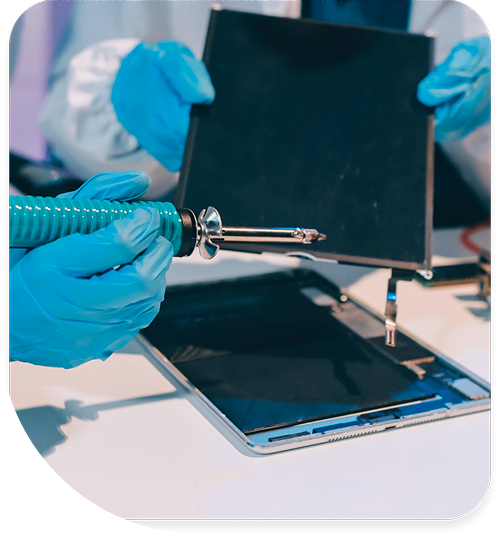
Professional iPad Repair Services In The Fix in Walmart Aurora
iPad Repair in Aurora, CO: What Colorado's Dry-Air Adhesive Failure and High-Altitude UV Do to Glass and Battery Systems
iPads in Aurora face a display adhesive challenge that has no parallel in most U.S. markets. The optically clear adhesive that bonds the iPad glass to the aluminum frame is calibrated for moderate-humidity environments; in Aurora's semi-arid climate, particularly in heated homes during winter where relative humidity can drop below 20 percent, the adhesive loses moisture and contracts. The contraction stress is highest at the corners and along the short edges of the iPad frame — the geometry where the adhesive has the least surface area to distribute the stress across. Buckley Space Force Base families who brought their iPads from humid duty stations — coastal Virginia, Japan, or Hawaii — notice the corner lifting that develops in their first Aurora winter most acutely, because the adhesive arrived already optimized for higher humidity than it will encounter in Colorado.
The Fix at 3301 Tower Rd handles iPad cracked screen replacement, digitizer repair, battery replacement, charging port service, and home button issues across all iPad generations. The shop serves the Buckley military community, Tower Triangle families, and the northeast Aurora 80011 zip code. For iPad repair in Aurora, CO, The Fix is in the Walmart at 3301 Tower Rd.
Glass, Adhesive, and Digitizer Failure in Colorado's Climate
Cracked iPad glass in Aurora's winter conditions — display glass at 40 to 50°F in a cold room, dropped on tile or hardwood floor — produces more extensive damage patterns than warm-condition drops of equivalent energy. Cold glass is more brittle: the fracture toughness of tempered glass decreases at lower temperatures, meaning cracks initiate more readily and propagate further from the impact point. An iPad dropped from the same height on the same surface in a 35°F Colorado morning versus a 75°F summer afternoon may show a dramatically different crack pattern — the winter drop potentially spiderwebbing from the impact point across a larger fraction of the panel. The underlying OLED or LCD panel is correspondingly more likely to be affected in a winter drop, since the crack propagation reaches the panel more often.
Battery degradation in iPads at Aurora's elevation is influenced by the same factors as other lithium-ion devices: cold-temperature charge acceptance reduction, high-charge-state storage in dry heated rooms near vents, and the UV exposure that comes with Aurora's high-altitude outdoor use. For iPads used at Aurora Sports Park and outdoor activities common to the military families near Buckley — family events, youth sports, outdoor recreation — the 25 percent elevated UV intensity at 5,400 feet accelerates the display's oleophobic coating loss and contributes marginally to OLED organic layer degradation on Pro models. The battery is not directly UV-affected, but the sustained outdoor brightness that users must apply to fight Aurora's intense sunlight draws higher backlight current and contributes to faster cycle accumulation.
Aurora-Specific iPad Use Patterns
Military families at Buckley Space Force Base use iPads as household management hubs — coordination of PCS moves, children's school schedules at Clyde Miller K-8, family calendars, and communication with deployed service members. The iPad in a Buckley household sees high daily use across multiple family members and age ranges, subjecting it to the range of handling care levels that a shared family device encounters. The combination of Aurora's dry-air adhesive stress and the handling intensity of a multi-user military family household creates a higher corner-lift and cracked-glass incidence than single-user or adult-only households would.
Amazon fulfillment workers along the Tower Road corridor who use personal iPads for shift logistics, schedule management, and communications during breaks carry them through the same outdoor-to-indoor thermal transitions that affect other devices — with the added factor that iPad display glass is larger than phone glass, making the thermal expansion and contraction per transition cycle a larger absolute dimension change. The adhesive bond is stressed proportionally to this dimension change, which means the per-transition stress on an iPad's display adhesive is meaningfully higher than on a phone despite the same temperature differential.
iPad charging ports in Aurora homes accumulate cottonwood fiber during the late May and June season specifically. The iPad's Lightning or USB-C port is typically left uncovered when the device is charging on a countertop or nightstand — during cottonwood season, floating fibers settle into the port opening and are compressed further inside by subsequent cable insertions. The fiber accumulation mimics a debris blockage rather than contact corrosion, and professional cleaning with the appropriate tools restores normal charging without port replacement in most cottonwood-blockage cases.
iPad Service at The Fix on Tower Road
The Fix performs a display adhesive integrity assessment — checking edge bond by attempting to detect any flex or gap along the perimeter before opening the device — as part of the initial inspection for any iPad brought in for screen or charging issues. Finding adhesive failure before internal service changes the repair scope, since an iPad with a compromised display adhesive needs the adhesive resealed or the display replaced as part of any service that involves opening the device. Battery capacity is tested against rated specification with attention to cold-weather behavior for devices in military households where storage conditions vary.
Screen replacement on iPads replaces the glass and digitizer assembly, and on models with an LCD panel, the panel is included as a bonded unit. Charging port service addresses cottonwood and silicate debris first, then contact condition, then port replacement only where contacts are physically compromised. The Fix at 3301 Tower Rd handles the complete iPad repair range. Search iPad repair in Aurora for current service availability.
Frequently Asked Questions
My iPad screen is lifting at the corner and we just moved here from Okinawa. Is the dry air responsible?
Very likely yes. Display adhesive formulated for the humidity of Okinawa or other humid duty stations is calibrated for conditions significantly moister than Aurora's semi-arid winter environment. The contraction stress from the humidity differential can cause corner lifting within one to three months of arrival at a dry-climate posting, particularly if the first Colorado winter is in an unhumidified home. Running a humidifier in the living space where the iPad charges and rests slows future adhesive stress; the corner that has already lifted needs resealing or display replacement to restore the bond.
My iPad cracked when it barely fell. Is that normal?
A drop that causes more damage than expected is consistent with cold-brittleness in the glass — at temperatures below 50°F, tempered glass has reduced fracture toughness and cracks more extensively from lighter impacts than at room temperature. If the drop happened in a cold room or after the iPad had been near a cold surface, this is the explanation.
Is there a way to prevent cottonwood fiber from getting into my iPad port?
Using a port cover or keeping the iPad in a closed case with a port cover flap during late May and early June eliminates most cottonwood fiber ingress. The season is predictable and relatively short — two to four weeks of heavy fiber release depending on the year — so using a protective cover only during that period is a practical approach. Periodic port cleaning with a wooden toothpick to dislodge any fiber that has accumulated also catches the issue before it compresses into a dense blockage.
Other Locations Near By You
The Fix in Walmart Lakewood
7455 W Colfax Ave, Lakewood, CO 80214, United States
The Fix in Walmart Grand Junction
2545 Rimrock Ave, Grand Junction, CO 81505, United States
The Fix in Walmart Colorado Springs
8250 Razorback Rd, Colorado Springs, CO 80920, United States
The Fix in Walmart Fountain
6310 S U.S. Hwy 85 87, Fountain, CO 80817, United States
Your local repair experts for every device
From iPhones to gaming laptops, The Fix in Aurora, CO is your one-stop shop for device repair. Quick turnarounds, affordable prices, and local experts you can trust

Phone Cases
Protect your device in style! At The Fix in Aurora, CO, we offer a wide selection of durable phone cases for all major brands—sleek designs that keep your phone safe and looking great.

Nintendo Switch Repair
Cracked Nintendo Switch screen? We repair Switch devices in Aurora, CO quickly and affordably. Fast, easy, and always with high-quality parts.

MacBook Repair
For broken screens, battery replacements, or other issues, The Fix in Aurora, CO provides quick MacBook repairs with premium parts.

PlayStation Repair
Is your PlayStation giving you trouble? At The Fix in Aurora, CO, we handle PlayStation repairs with care and quality parts—no long waits, no hassle.

Google Repair
Need your Google Pixel fixed? At The Fix in Aurora, CO, we repair cracked screens, charging issues, and more—always using high-quality parts for lasting results.

Tablet Repair
Whether your tablet screen is cracked or the battery won’t hold a charge, The Fix in Aurora, CO provides fast, affordable tablet repairs with free diagnostics.

Computer Repair
Need PC or desktop service in Aurora, CO? We provide free diagnostics and affordable repairs, always with high-quality parts.

Game Console Repair
From Nintendo Switch® to PlayStation and Xbox, The Fix in Aurora, CO repairs all major game consoles. Fast service and dependable results.

Laptop Repair
Got a broken laptop? The Fix In Aurora, CO, our team repairs most laptop brands and models using high-quality replacement parts.

Cell Phone Repair
We repair all major phone brands in Aurora, CO. iPhone, Samsung, Google, and more—get your phone fixed fast.

iPhone Repair
Cracked screen? Battery draining too fast? Our team in Aurora, CO repairs iPhones with precision and high-quality parts to make your device feel new again.

Samsung Repair
Whether it’s a Galaxy screen replacement or a charging issue, The Fix in Aurora, CO offers fast and reliable Samsung repairs.

Xbox Repair
Xbox not working properly? Our team in Aurora, CO offers quick, reliable Xbox repairs with free diagnostics and high-quality replacement parts.


Trusted repair solution for mobile phones, tablets, gaming consoles, and computer systems. We provide fast, reliable, and affordable repair services to get your devices back in perfect working condition.
The Fix is an independent repair service provider and is not affiliated with, sponsored by, or endorsed by Apple Inc., Samsung Electronics, Google LLC, or any other device manufacturer. We use high-quality compatible replacement parts unless explicitly stated. All trademarks are property of their respective owners.


© Copyright The Fix Solutions All rights reserved 2026.
Design by Deepcoder