






Nintendo Switch Repair in The Fix in Visalia Mall
Is your Nintendo Switch not working properly? At The Fix in Visalia, CA, we repair screens, batteries, and more—always with free diagnostics and high-quality parts. Whether it’s a cracked screen or Joy-Con issue, our team gets you back to gaming fast.

Professional Nintendo Switch Repair Services
- Joy-Con Drift & Controller Repair
- Screen Repair & Replacement
- Battery Replacement
- Charging Port Repair
- Water Damage Repair
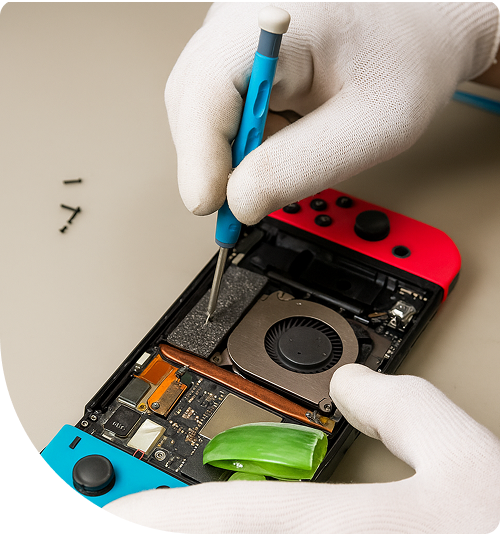
Professional Nintendo Switch Repair Services In The Fix in Visalia Mall
When the Screen Goes Dark: Common Nintendo Switch Scenarios Requiring Repair in Visalia, CA
For families in Visalia and the surrounding communities of Tulare and Exeter, the Nintendo Switch is the ultimate travel companion. It keeps the peace during long drives up Highway 198 to Sequoia National Park and serves as the entertainment hub for sleepovers after school at Redwood or Mt. Whitney High. However, this portability comes with a price. The Switch is dropped on driveways, stuffed into backpacks, and subjected to the inevitable wear and tear of daily use.
When the console stops working, the household disruption is immediate. Residents seeking Nintendo Switch Repair in Visalia, CA need a solution that goes beyond a temporary patch. At The Fix, located at 2031 S. Mooney Blvd, SPC# 5530 inside Visalia Mall, we recognize the specific patterns of failure that plague these devices and offer permanent mechanical solutions.
Scenario 1: The "No Signal" Docking Disaster
The Situation: It’s Friday night, and the family is gathered for a Mario Kart tournament. You slide the Switch into the dock. The green light on the dock turns on, indicating a connection, but the TV screen remains stubbornly black or displays "No Signal." You try a different HDMI cable and a different TV, but the result is the same. The Switch charges and works in handheld mode, but it refuses to output video.
The Reality: This is rarely a broken HDMI port. It is almost always a burnout of the P13USB Video Encoder Chip on the motherboard. This sensitive chip is easily fried by power surges or by using third-party "fast charging" docks that lack proper voltage regulation. It can no longer translate the video signal for the TV.
The Resolution: We perform a motherboard-level repair. Using microsoldering tools, we remove the burnt encoder chip and install a fresh integrated circuit. This restores the handshake between the console and the television, bringing family game night back to the big screen.
Scenario 2: The "Slider Rail" Struggle
The Situation: You are playing in handheld mode while waiting for an appointment near Kaweah Delta. Even though the Joy-Cons are physically snapped onto the sides, the console keeps pausing the game, asking you to "Connect Controller." You have to squeeze the controller tight against the screen to get it to register, but the moment you relax your grip, it disconnects again.
The Reality: This isn't a problem with the controllers themselves; it’s the Console Slider Rails. Inside the Switch, these metal rails connect to the motherboard via a fragile ribbon cable that wraps around a sharp metal bracket. Over time, the friction of sliding controllers on and off shears this ribbon cable. The physical rail holds the controller, but the data connection is severed.
The Resolution: We replace the entire rail assembly on the tablet side. This ensures a new, robust data connection. We also tighten the internal anchor screws, which often wobble loose over time, ensuring the controllers feel solid and "clicky" again.
Scenario 3: The "Loud Fan" Overheat
The Situation: You are ten minutes into a game of Zelda when the console starts making a noise like a tiny lawnmower or a buzzing insect. The back of the unit feels incredibly hot to the touch. Suddenly, a message pops up: "The console is getting too hot," and it shuts itself down to prevent melting.
The Reality: The Switch relies on a single micro-fan and a copper heat pipe. In the dust-prone environment of the San Joaquin Valley, the fan bearing can become clogged or unbalanced, causing it to wobble and grind against its housing. Furthermore, the factory thermal paste dries out after 2-3 years, turning into a chalky powder that blocks heat transfer.
The Resolution: We replace the failing fan with a high-quality unit to eliminate the grinding noise. Crucially, we also scrub off the old, dried thermal paste and apply a high-performance silver-based compound. This lowers the operating temperature significantly, preventing future shutdowns.
Scenario 4: The "Unreadable Game" Glitch
The Situation: You buy a new game cartridge, insert it into the slot, and... nothing. The system says "The game card could not be read." You blow on the cartridge (a classic habit), but it still doesn't work. Other games that used to work are now also failing to load.
The Reality: The game card reader inside the Switch contains rows of delicate gold pins. If a game is inserted at the wrong angle, or if a child accidentally jams a foreign object into the slot, these pins get bent or crushed. Once a pin is misaligned, it can short out the reader or simply fail to make contact with the cartridge pads.
The Resolution: The game card reader is a modular component on its own daughterboard (which also houses the headphone jack). We replace this entire module. This is a safer and more reliable repair than trying to bend the pins back, ensuring that your expensive game library is recognized instantly every time.
Scenario 5: The "Orange Screen" of WiFi Death
The Situation: You turn on the console, and instead of the main menu, the screen is a solid, blank orange color. Or, the system boots, but the WiFi signal is incredibly weak, dropping connection unless you are standing right next to the router.
The Reality: The "Orange Screen" or severe WiFi issues are often caused by a failing WiFi IC (Integrated Circuit). This chip manages wireless connectivity. If the console suffers a hard drop or overheats, the solder balls under this chip can crack. The system performs a check on boot; if it can't talk to the WiFi chip, it hangs on an orange screen.
The Resolution: This requires a "Reflow" or "Reball" of the WiFi chip. We heat the chip to melt the solder and re-establish the connection with the motherboard. If the chip is dead, we replace it. This clears the boot error and restores full-range wireless internet access for online gaming.
Frequently Asked Questions
Q: Can you fix a Switch Lite with joystick drift? A: Yes. On the standard Switch, you can just buy new Joy-Cons. On the Switch Lite, the joysticks are built into the main unit. To fix drift on a Lite, we have to disassemble the entire console to reach the joystick modules. We replace them with upgraded sensors that are more resistant to wear, permanently solving the drift issue.
Q: My charging port looks fine, but it won't charge. Is it the battery? A: If the port looks clean but doesn't work, it is usually the M92T36 Power Management Chip. This chip is the "first line of defense" for power input. It often burns out before the battery does. We test the board with a multimeter; if we find a short circuit around this chip, we replace the chip, not the battery.
Q: Is my save data safe during a repair? A: For the vast majority of hardware repairs (screen, fan, rail, charging port), your data is completely safe. The storage chip (NAND) is separate from these components. However, if the motherboard itself has catastrophic damage (like salt water corrosion), data recovery becomes the primary goal, which is a more complex process.
Other Locations Near By You
The Fix in Plaza Bonita
3030 Plaza Bonita Rd Ste 2075 National City, CA 91950
The Fix in Walmart Dinuba
770 W El Monte Way, Dinuba, CA 93618, United States
The Fix in Walmart Livermore
2700 Las Positas Rd, Livermore, CA 94551, United States
The Fix in Walmart Palm Springs
5601 Ramon Rd, Palm Springs, CA 92264, United States
The Fix in Westfield Culver City
6000 Sepulveda Blvd #2351, Culver City, CA 90230
The Fix in Walmart Lakewood
2770 E Carson St, Lakewood, CA 90712, United States
The Fix in Walmart Redding
1515 Dana Dr, Redding, CA 96003, United States
The Fix in Walmart Vista
1800 University Dr, Vista, CA 92083, United States
The Fix in Walmart Hesperia
13401 Main St inside Hesperia Walmart Hesperia 92345-9123 California
The Fix in Westfield Fashion Square
14006 Riverside Drive, Unit 211, Sherman Oaks, CA 91423
Your local repair experts for every device
From iPhones to gaming laptops, The Fix in Visalia, CA is your one-stop shop for device repair. Quick turnarounds, affordable prices, and local experts you can trust

Phone Cases
Protect your device in style! At The Fix in Visalia, CA, we offer a wide selection of durable phone cases for all major brands—sleek designs that keep your phone safe and looking great.

MacBook Repair
For broken screens, battery replacements, or other issues, The Fix in Visalia, CA provides quick MacBook repairs with premium parts.

PlayStation Repair
Is your PlayStation giving you trouble? At The Fix in Visalia, CA, we handle PlayStation repairs with care and quality parts—no long waits, no hassle.

Google Repair
Need your Google Pixel fixed? At The Fix in Visalia, CA, we repair cracked screens, charging issues, and more—always using high-quality parts for lasting results.

Tablet Repair
Whether your tablet screen is cracked or the battery won’t hold a charge, The Fix in Visalia, CA provides fast, affordable tablet repairs with free diagnostics.

Computer Repair
Need PC or desktop service in Visalia, CA? We provide free diagnostics and affordable repairs, always with high-quality parts.

Game Console Repair
From Nintendo Switch® to PlayStation and Xbox, The Fix in Visalia, CA repairs all major game consoles. Fast service and dependable results.

Laptop Repair
Got a broken laptop? The Fix In Visalia, CA, our team repairs most laptop brands and models using high-quality replacement parts.

iPad Repair
Need your iPad fixed? At The Fix in Visalia, CA, we repair cracked screens, charging issues, and more—always using high-quality parts for lasting results.

Cell Phone Repair
We repair all major phone brands in Visalia, CA. iPhone, Samsung, Google, and more—get your phone fixed fast.

iPhone Repair
Cracked screen? Battery draining too fast? Our team in Visalia, CA repairs iPhones with precision and high-quality parts to make your device feel new again.

Samsung Repair
Whether it’s a Galaxy screen replacement or a charging issue, The Fix in Visalia, CA offers fast and reliable Samsung repairs.

Xbox Repair
Xbox not working properly? Our team in Visalia, CA offers quick, reliable Xbox repairs with free diagnostics and high-quality replacement parts.


Trusted repair solution for mobile phones, tablets, gaming consoles, and computer systems. We provide fast, reliable, and affordable repair services to get your devices back in perfect working condition.
The Fix is an independent repair service provider and is not affiliated with, sponsored by, or endorsed by Apple Inc., Samsung Electronics, Google LLC, or any other device manufacturer. We use high-quality compatible replacement parts unless explicitly stated. All trademarks are property of their respective owners.


© Copyright The Fix Solutions All rights reserved 2026.
Design by Deepcoder