






Nintendo Switch Repair in The Fix in The Parks Mall At Arlington
Is your Nintendo Switch not working properly? At The Fix in Arlington, TX, we repair screens, batteries, and more—always with free diagnostics and high-quality parts. Whether it’s a cracked screen or Joy-Con issue, our team gets you back to gaming fast.

Professional Nintendo Switch Repair Services
- Joy-Con Drift & Controller Repair
- Screen Repair & Replacement
- Battery Replacement
- Charging Port Repair
- Water Damage Repair
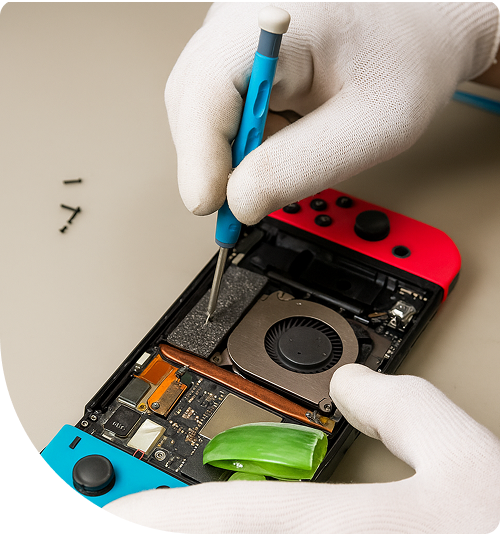
Professional Nintendo Switch Repair Services In The Fix in The Parks Mall At Arlington
The Silence in the Backseat: When Portable Gaming Stops Being Portable
It is a scenario that plays out on highways like I-20 or Highway 360 every single day. You are navigating the traffic or preparing for a long wait at DFW Airport, and the backseat is blissfully quiet. The reason for this peace is often a handheld gaming console engaging the passengers. Then, the silence breaks. It isn't a battery draining naturally; it is a sudden hardware failure. Maybe the character on the screen keeps walking left into a lava pit despite the joystick being untouched, or perhaps the device refuses to recognize the charging cable no matter how it is angled.
For parents and gamers in the 76015 area, this moment is more than just a technical glitch; it is the disruption of a carefully planned travel strategy. When these moments happen, finding reliable Nintendo Switch Repair in Arlington, TX, becomes an immediate priority. At The FIX inside The Parks Mall at Arlington, the understanding is that these devices are not just toys—they are essential travel companions and entertainment hubs. When they fail, the frustration is real, but understanding the mechanical reasons behind these failures can make the solution less stressful.
The Phenomenon of the "Phantom Walk"
One of the most relatable and frustrating experiences for any console owner is the infamous "drift." Picture this common situation: A player is in the final moments of a high-stakes match. The thumb is completely off the joystick, yet the on-screen avatar slowly, maddeningly drifts to the side, causing a loss. It feels like the controller has developed a mind of its own.
This isn't a ghost in the machine; it is a mechanical inevitability known as potentiometer wear. The internal mechanism of the joystick relies on contact pads to translate physical movement into electrical signals. Over time, and with the enthusiastic gameplay common among younger players, these contact pads degrade. Microscopic dust and particles from the wear process accumulate inside the sensor housing. This debris confuses the sensor, causing it to register movement where there is none.
While many users attempt temporary fixes like blasting compressed air into the crevices or recalibrating the software settings, these are rarely permanent solutions. The physical wear on the contact pads cannot be reversed by software updates. The reality is that this hardware has a lifespan, and heavy users reach that end point faster. Replacing the joystick mechanism with high-quality components is the only way to truly restore precision, ensuring that when the thumb stops moving, the character stops moving too.
The Charging Port Struggle
Another frequent scenario involves the delicate dance of the charging cable. It often starts with needing to prop the cable at a specific angle against a book or pillow to get the charging light to turn on. Eventually, even that trick stops working. This usually happens right before a long trip or during a critical game update.
The USB-C port on modern handheld consoles is a marvel of data and power throughput, but it is also mechanically complex. Unlike older, larger charging ports, the USB-C standard relies on a central tongue with tiny, precise pins. In a household environment, chargers are often yanked out quickly, tripped over, or inserted at odd angles. Each of these minor physical stresses can loosen the port's connection to the main logic board or bend the internal pins.
Once those pins are bridged or disconnected, the device may stop charging altogether, or worse, it might charge but fail to display on the TV when docked. This loss of "hybrid" functionality defeats the purpose of the console. The anxiety of watching the battery percentage drop with no way to replenish it is a common pain point. Professional repair involves microsoldering—a precise process of removing the damaged port and fusing a new one to the board under a microscope—restoring the seamless connection that users expect.
The Blue Screen and Logic Board Complications
There is a more severe scenario that stops everything in its tracks: the device turns on, but the screen is just a solid, unmoving color, often blue or orange. The buttons do nothing. The reset trick doesn't work. It feels like the device has become a brick.
This situation often arises from drop damage or long-term bending stress. Although the console looks rugged, the internal logic board is sensitive. A heavy drop on a hard surface—like the tile floors common in Arlington homes—can sever the connection between the main processor and the memory chips. Alternatively, long sessions of playing in handheld mode can exert subtle twisting forces on the device chassis, eventually popping microscopic solder joints.
This isn't a simple part swap; it requires board-level diagnostics to identify which circuit has broken. It is a complex puzzle that requires understanding the architecture of the device. For the user, the panic is often about save data. "Are the hundreds of hours of progress lost?" In many cases, repairing the board connection allows the device to boot again, preserving the digital worlds that users have spent so much time building.
Heat, Ventilation, and Summer Gaming
Texas summers bring their own set of challenges. Electronics struggle with heat, and portable consoles are no exception. A common scenario involves a device that shuts down randomly after 30 minutes of play, often feeling hot to the touch.
Inside the console, a small fan and a copper heat pipe work to move heat away from the processor. Over years of use, the thermal paste—a substance that helps transfer heat from the chip to the cooler—can dry out and crack. Simultaneously, the fan can become clogged with pet hair or dust. When the cooling system becomes inefficient, the system engages a safety protocol and shuts down to prevent permanent chip damage.
Hearing the fan spin loudly like a jet engine while the game stutters is a clear warning sign. It is the device screaming for fresh air. A maintenance service that involves cleaning the internals and applying fresh, premium-grade thermal paste can make the console run whisper-quiet and cool again, ready for those long gaming marathons. Seeking professional Nintendo Switch Repair in Arlington, TX, for thermal maintenance is often the key to extending the console's life.
The Screen Vulnerability
Finally, there is the visual heartbreak: the cracked screen. Unlike phones which use glass, the standard version of this popular console uses a plastic top layer. While this makes it shatter-resistant, it is highly prone to deep scratches that distort the image. However, the OLED models and the internal LCDs underneath the plastic are glass and can fracture upon impact.
A spiderweb crack across the display ruins the immersion. It turns a beautiful graphical landscape into a fragmented mess. But beyond the visual annoyance, a damaged digitizer (the touch layer) can lead to "ghost touches" similar to joystick drift, where the screen registers taps that didn't happen. Replacing the screen assembly restores not just the view, but the accurate interaction with the game world.
At the location at 3811 South Cooper Street #1068, these scenarios are seen daily. The goal is to turn that interruption into a brief pause, getting the user back to the game with a device that feels solid and responsive again.
Frequently Asked Questions
Q: Why does the console get so hot when played in the dock compared to handheld mode? A: When the console is docked, the system unlocks higher performance profiles to output higher resolution to the TV. This draws more power and generates significantly more heat. If the air intakes are blocked by a cabinet wall or dust, or if the internal thermal paste has degraded, the heat cannot escape efficiently. While some heat is normal, if the fan is screaming or the system shuts down, it indicates a thermal management failure that needs attention.
Q: Is it worth repairing a console that won't turn on, or is buying a used one better? A: This often depends on the nature of the failure, but repair is frequently the more economical and data-safe option. A "dead" console often has a simple issue like a damaged charging port or a battery that has fallen below its voltage threshold—both of which are standard repairs. Furthermore, buying a used unit comes with the risk of inheriting someone else's drifting controllers or dying battery, whereas a repair on the existing unit ensures reliable components are installed.
Q: Can a damaged charging port damage games or save files? A: Directly, a damaged port is unlikely to corrupt data on the storage memory. However, if the port causes electrical shorts or power surges while the device is writing data (saving), there is a small risk of file corruption. The more immediate risk is simply losing access to that data because the device cannot be powered on. Fixing the power input is the key to unlocking and backing up valuable save data.
Other Locations Near By You
The Fix in Walmart Carrollton
1213 E Trinity Mls Rd, Carrollton, TX 75006, United States
The Fix in Walmart Lubbock
702 W Loop 289 Acc Rd, Lubbock, TX 79416, United States
The Fix in South Plains Mall
6002 Slide Rd, Lubbock, TX 79414
The Fix in Walmart North Richland Hills
6401 NE Loop 820, North Richland Hills, TX 76180, United States
The Fix in South Park Mall San Antonio
2310 SW Military Dr. Suite 118 San Antonio, TX 78224
The Fix in Walmart Odessa
2450 NW Loop 338 State Rte W, Odessa, TX 79763, United States
The Fix in Walmart La Porte
9025 Spencer Hwy, La Porte, TX 77571, United States
The Fix in Baybrook Mall
500 Baybrook Mall #1079, Friendswood, TX 77546, United States
The Fix in Walmart Humble
9235 N Sam Houston Pkwy E, Humble, TX 77396, United States
The Fix in Walmart Weatherford
1836 S Main St, Weatherford, TX 76086, United States
Your local repair experts for every device
From iPhones to gaming laptops, The Fix in Arlington, TX is your one-stop shop for device repair. Quick turnarounds, affordable prices, and local experts you can trust

Phone Cases
Protect your device in style! At The Fix in Arlington, TX, we offer a wide selection of durable phone cases for all major brands—sleek designs that keep your phone safe and looking great.

MacBook Repair
For broken screens, battery replacements, or other issues, The Fix in Arlington, TX provides quick MacBook repairs with premium parts.

PlayStation Repair
Is your PlayStation giving you trouble? At The Fix in Arlington, TX, we handle PlayStation repairs with care and quality parts—no long waits, no hassle.

Google Repair
Need your Google Pixel fixed? At The Fix in Arlington, TX, we repair cracked screens, charging issues, and more—always using high-quality parts for lasting results.

Tablet Repair
Whether your tablet screen is cracked or the battery won’t hold a charge, The Fix in Arlington, TX provides fast, affordable tablet repairs with free diagnostics.

Computer Repair
Need PC or desktop service in Arlington, TX? We provide free diagnostics and affordable repairs, always with high-quality parts.

Game Console Repair
From Nintendo Switch® to PlayStation and Xbox, The Fix in Arlington, TX repairs all major game consoles. Fast service and dependable results.

Laptop Repair
Got a broken laptop? The Fix In Arlington, TX, our team repairs most laptop brands and models using high-quality replacement parts.

iPad Repair
Need your iPad fixed? At The Fix in Arlington, TX, we repair cracked screens, charging issues, and more—always using high-quality parts for lasting results.

Cell Phone Repair
We repair all major phone brands in Arlington, TX. iPhone, Samsung, Google, and more—get your phone fixed fast.

iPhone Repair
Cracked screen? Battery draining too fast? Our team in Arlington, TX repairs iPhones with precision and high-quality parts to make your device feel new again.

Samsung Repair
Whether it’s a Galaxy screen replacement or a charging issue, The Fix in Arlington, TX offers fast and reliable Samsung repairs.

Xbox Repair
Xbox not working properly? Our team in Arlington, TX offers quick, reliable Xbox repairs with free diagnostics and high-quality replacement parts.


Trusted repair solution for mobile phones, tablets, gaming consoles, and computer systems. We provide fast, reliable, and affordable repair services to get your devices back in perfect working condition.
The Fix is an independent repair service provider and is not affiliated with, sponsored by, or endorsed by Apple Inc., Samsung Electronics, Google LLC, or any other device manufacturer. We use high-quality compatible replacement parts unless explicitly stated. All trademarks are property of their respective owners.


© Copyright The Fix Solutions All rights reserved 2026.
Design by Deepcoder