






Laptop Repair in The Fix in Town Center at Cobb
Broken laptop slowing you down? At The Fix in Kennesaw, GA, we repair all major laptop brands and models. From cracked screens to battery issues, our technicians provide fast, affordable service with free diagnostics and high-quality parts.

Professional Laptop Repair Services
- Screen Repair & Replacement
- Battery Replacement
- Water Damage Repair
- Keyboard & Trackpad Repair
- Charging Port Repair
- Overheating & Fan Repair
- Hard Drive / SSD Replacement & Data Recovery
- Software Troubleshooting & Recovery
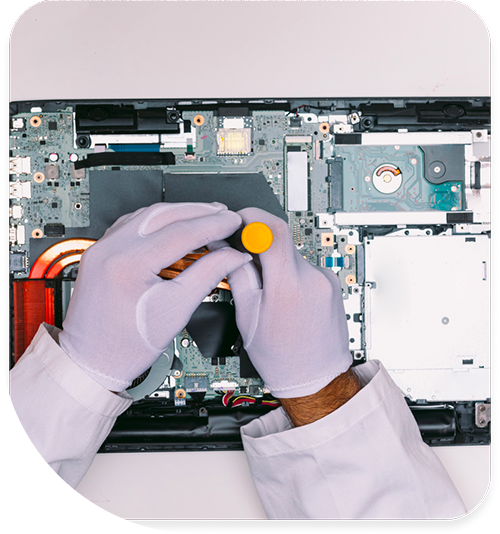
Professional Laptop Repair Services In The Fix in Town Center at Cobb
The Economics of Electronics: Dispelling Myths About Laptop Repair in Kennesaw, GA
In the academic hub of Kennesaw, where Kennesaw State University (KSU) students rely on laptops for everything from research papers to remote exams, and where local businesses on Barrett Parkway manage their operations digitally, the prevailing narrative often suggests that modern devices are "disposable." When a screen cracks or a keyboard fails, the immediate impulse is often to browse for a new machine at the Town Center mall. This "replace-first" mindset is driven by misconceptions about the complexity and cost of service.
However, the reality of hardware architecture tells a different story. For students and professionals seeking Laptop Repair in Kennesaw, GA, understanding the actual mechanical state of their device often reveals that repair is not only viable but significantly more economical than replacement. At The FIX, located at 400 Ernest W Barrett Pkwy NW inside Town Center at Cobb, our goal is to bridge the gap between user perception and technical reality. By analyzing the engineering differences between components, we can dismantle the myths that lead to unnecessary electronic waste.
Myth 1: "A broken hinge is just a loose screw."
The Reality: Structural Chassis Failure
One of the most common mechanical failures in laptops used for daily commuting to KSU campus is the hinge system. Users often experience a "wobbly" screen or a clicking sound when opening the lid. The prevailing belief is that a simple tightening of a screw will resolve the issue.
The Educational Truth: Modern laptops do not anchor metal hinges directly into a metal frame. To save weight, manufacturers anchor high-tension metal hinges into small brass inserts (knurled nuts) that are heat-staked into the plastic chassis. The "wobble" is rarely the hinge itself loosening; it is the brass inserts ripping out of the plastic housing entirely. Tightening the screw often pulls the insert further out, worsening the damage. The repair usually requires a structural reconstruction of the mounting points using high-strength epoxy or replacing the entire palm rest assembly (top case) to restore the factory-strength anchor points.
Myth 2: "My laptop is slow because it has a virus."
The Reality: The HDD vs. SSD Bottleneck
When a laptop becomes sluggish—taking five minutes to boot or freezing when opening a browser—users frequently blame malware or "bloatware." They install antivirus software, run cleaners, and see no improvement.
The Educational Truth: In 80% of cases involving laptops older than three years, the bottleneck is physical, not digital. The culprit is the mechanical Hard Disk Drive (HDD). HDDs rely on a physical arm moving across a spinning platter to find data, a process that degrades with time and transport vibration. No amount of software cleaning can make a mechanical arm move faster. Comparing an HDD to a Solid State Drive (SSD) is like comparing a bicycle to a jet. An SSD has no moving parts and accesses data electronically. Replacing a failing HDD with an SSD is a hardware intervention that yields a massive performance increase, instantly modernizing the machine without the need for a new purchase.
Myth 3: "Cracked glass is a cosmetic issue; I can just peel it off."
The Reality: Fused Display Assemblies
On older laptops, the bezel was a separate plastic rectangle, and the screen was a simple panel behind it. If the front glass broke, it was often a separate protective layer. In modern "ultrabook" and touchscreen designs, this architecture has changed fundamentally.
The Educational Truth: To achieve thinness and reduce glare, manufacturers now fuse the LCD (the image layer) and the Digitizer (the touch glass) using Optically Clear Adhesive (OCA). They are effectively one solid component. A crack in the glass compromises the structural tension of the entire assembly. Attempting to "peel off" the broken glass will invariably destroy the polarizing film on the LCD underneath. Professional repair involves replacing the entire fused display assembly. While this sounds more complex, it ensures that brightness uniformity, color accuracy, and touch sensitivity stay sharp and consistent.
Myth 4: "Leaving the charger plugged in ruins the battery."
The Reality: Charge Cycles vs. Voltage Stress
A longstanding myth suggests that keeping a laptop plugged in "overcharges" the battery, causing it to explode or fail. This leads users to constantly plug and unplug their devices, micromanaging the percentage.
The Educational Truth: Modern laptops employ sophisticated Battery Management Systems (BMS) that cut off current to the battery once it reaches 100%, powering the laptop directly from the AC adapter. You cannot "overcharge" a modern battery. However, what actually kills batteries is heat and "depth of discharge." Draining a battery to 0% and charging it to 100% (a full cycle) wears it out faster than keeping it topped up. The most damaging practice is actually heat exposure—such as leaving the laptop in a car in the Kennesaw summer heat—which degrades the chemical electrolyte inside the cells regardless of charge level.
Myth 5: "I spilled water, but it works, so I'm safe."
The Reality: The Corrosion Timeline
The "survival bias" of water damage is dangerous. If a spill occurs and the laptop doesn't immediately shut down, users often assume the liquid missed the critical components. They wipe the keyboard and continue working.
The Educational Truth: Liquid that enters a keyboard almost always drips down to the motherboard. Even if it doesn't cause an immediate short circuit, the liquid begins to evaporate, leaving behind conductive minerals. As long as the battery is connected, a low-voltage electrical current flows through these minerals, causing electrolysis (corrosion). This eats through copper traces over days or weeks. A "working" laptop with liquid inside is a ticking clock. The only safe protocol is immediate power disconnection and professional internal cleaning to neutralize the chemical reaction before the copper traces are severed permanently.
Myth 6: "Keyboard replacement is a quick fix."
The Reality: The Riveted Keyboard Assembly
Historically, keyboards were separate units held in by two screws and a ribbon cable. You could pop them out from the top in seconds.
The Educational Truth: In the quest for thinner devices, manufacturers now rivet the keyboard into the palm rest assembly from the bottom. To replace the keyboard, a technician must completely disassemble the laptop—removing the battery, motherboard, fans, and speakers—to access the underside of the top case. Then, nearly 50 to 100 tiny rivets must be broken or removed. Because of this labor-intensive process, it is often more cost-effective and structurally sound to replace the entire "Top Case Assembly" (which includes the keyboard, trackpad, and metal housing) rather than attempting to swap just the keyboard grid.
Comparative Q&A
Q: Should I repair my 4-year-old laptop or buy a cheap new one for the same price? A: This is a classic "quality vs. novelty" comparison. A 4-year-old mid-range or high-end business laptop usually has a superior build quality, better screen, and faster processor than a brand-new "budget" laptop found in the $300 range. The budget laptop likely uses cheap plastic, soldered RAM (non-upgradable), and a low-quality processor. Repairing the older, high-quality machine—usually by adding a new battery or SSD—often results in a better user experience and longer lifespan than downgrading to a cheap new unit.
Q: Do cooling pads actually fix overheating laptops? A: A cooling pad is an external band-aid for an internal problem. While it might lower the case temperature by a few degrees, it does not solve the root cause: dried thermal paste or clogged internal heatsinks. If the heat cannot leave the processor to get to the outside of the case, blowing air on the plastic shell won't help. The only true fix for overheating is internal maintenance: cleaning the dust out of the fans and reapplying fresh thermal compound to the CPU.
Q: Is data recovery possible if my laptop won't turn on? A: Yes, and this highlights the difference between "computer failure" and "drive failure." If the motherboard is dead (power issue), the storage drive (SSD or HDD) is often still perfectly healthy. We can open the laptop, remove the drive, and place it in an external enclosure to read your files on another machine. However, if the drive itself is encrypted (BitLocker or FileVault) and the security keys are lost, or if the drive chips are damaged, the process becomes significantly more complex.
Other Locations Near By You
The Fix in Walmart Augusta
260 Bobby Jones Expy, Augusta, GA 30907, United States
The Fix in Walmart Dawsonville
98 Power Center Dr, Dawsonville, GA 30534
The Fix in Walmart Gainesville
400 Shallowford Rd inside Walmart Gainesville 30504 GA
The Fix in Walmart Toccoa
3886 GA-17, Eastanollee, GA 30538, United States
Your local repair experts for every device
From iPhones to gaming laptops, The Fix in Kennesaw, GA is your one-stop shop for device repair. Quick turnarounds, affordable prices, and local experts you can trust

Phone Cases
Protect your device in style! At The Fix in Kennesaw, GA, we offer a wide selection of durable phone cases for all major brands—sleek designs that keep your phone safe and looking great.

Nintendo Switch Repair
Cracked Nintendo Switch screen? We repair Switch devices in Kennesaw, GA quickly and affordably. Fast, easy, and always with high-quality parts.

MacBook Repair
For broken screens, battery replacements, or other issues, The Fix in Kennesaw, GA provides quick MacBook repairs with premium parts.

PlayStation Repair
Is your PlayStation giving you trouble? At The Fix in Kennesaw, GA, we handle PlayStation repairs with care and quality parts—no long waits, no hassle.

Google Repair
Need your Google Pixel fixed? At The Fix in Kennesaw, GA, we repair cracked screens, charging issues, and more—always using high-quality parts for lasting results.

Tablet Repair
Whether your tablet screen is cracked or the battery won’t hold a charge, The Fix in Kennesaw, GA provides fast, affordable tablet repairs with free diagnostics.

Computer Repair
Need PC or desktop service in Kennesaw, GA? We provide free diagnostics and affordable repairs, always with high-quality parts.

Game Console Repair
From Nintendo Switch® to PlayStation and Xbox, The Fix in Kennesaw, GA repairs all major game consoles. Fast service and dependable results.

iPad Repair
Need your iPad fixed? At The Fix in Kennesaw, GA, we repair cracked screens, charging issues, and more—always using high-quality parts for lasting results.

Cell Phone Repair
We repair all major phone brands in Kennesaw, GA. iPhone, Samsung, Google, and more—get your phone fixed fast.

iPhone Repair
Cracked screen? Battery draining too fast? Our team in Kennesaw, GA repairs iPhones with precision and high-quality parts to make your device feel new again.

Samsung Repair
Whether it’s a Galaxy screen replacement or a charging issue, The Fix in Kennesaw, GA offers fast and reliable Samsung repairs.

Xbox Repair
Xbox not working properly? Our team in Kennesaw, GA offers quick, reliable Xbox repairs with free diagnostics and high-quality replacement parts.


Trusted repair solution for mobile phones, tablets, gaming consoles, and computer systems. We provide fast, reliable, and affordable repair services to get your devices back in perfect working condition.
The Fix is an independent repair service provider and is not affiliated with, sponsored by, or endorsed by Apple Inc., Samsung Electronics, Google LLC, or any other device manufacturer. We use high-quality compatible replacement parts unless explicitly stated. All trademarks are property of their respective owners.


© Copyright The Fix Solutions All rights reserved 2026.
Design by Deepcoder