






iPhone Repair in The Fix in Town Center at Cobb
Need iPhone repair in Kennesaw, GA? Our technicians provide quick fixes for screens, batteries, and more.

Professional iPhone Repair Services
- Battery Health Check & Replacement
- Water Damage Repair
- Face ID & Touch ID Repair
- Camera & Speaker Repair
- Screen Replacement
- iCloud Unlock Assistance
- iOS Troubleshooting & Recovery
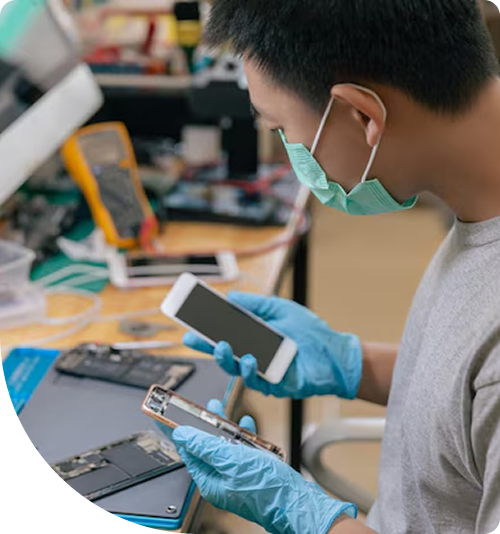
Professional iPhone Repair Services In The Fix in Town Center at Cobb
Silence on the Line: When Daily Scenarios Demand Professional iPhone Repair in Kennesaw, GA
It is a situation familiar to anyone navigating the heavy traffic on Barrett Parkway or rushing to an 8:00 AM class at Kennesaw State University (KSU). The smartphone is mounted on the dashboard, providing critical GPS directions to avoid the morning gridlock. Suddenly, the screen dims to black, or the charging cable falls out for the third time, leaving the driver without navigation. In a world where these devices serve as our maps, wallets, and connection to family or study groups, a hardware failure is not just an inconvenience; it is a disruption of modern operations.
For residents and students in the 30144 area, these moments of technical failure often occur at the worst possible times—right before a final exam or during a busy shopping trip at Town Center at Cobb. When they do, finding reliable iPhone Repair in Kennesaw, GA, becomes a priority to restore normalcy. At The FIX, located at 400 Ernest W Barrett Pkwy NW inside Town Center at Cobb, we understand the specific frustrations that come with these scenarios. By breaking down common user experiences, we can shed light on the mechanical realities behind the glitches.
Scenario 1: The "Splash" and the Face ID Failure
The Situation: It is a humid afternoon in Cobb County. A student is walking across the KSU campus or hiking at Kennesaw Mountain and gets caught in a sudden downpour. The phone gets wet but seems fine. It dries off, the screen works, and calls go through. However, the next time the user tries to unlock the device to pay for lunch, a message appears: "Face ID is not available" or "Move iPhone a little lower/higher." No matter the angle, the lock remains shut.
The Explanation: This specific failure is a classic symptom of liquid intrusion affecting the "Dot Projector" or "Flood Illuminator." These components, located in the notch or dynamic island, are incredibly sensitive. Even a single drop of water entering through the ear speaker mesh can corrode the delicate sensor array. Once the precise alignment of the dot projector is disturbed by corrosion, the security system disables Face ID permanently to prevent security breaches.
The Resolution: Rice will not fix this. The solution involves a technician carefully opening the device to clean the corrosion. If the sensor is damaged, specialized microsoldering is required to transfer the encrypted security chip to a new flex cable. This intricate process restores the biometrics without losing the security pairing with the logic board.
Scenario 2: The "Fake Charging" Morning Surprise
The Situation: A busy professional plugs their phone in before bed, hearing the reassuring "ding" of the charging connection. They wake up seven hours later, expecting a full battery to start their commute, only to find the device at 12%—or completely dead. The cable was plugged in, but the phone stopped accepting a charge sometime during the night.
The Explanation: This "intermittent charging" scenario is often caused by debris compaction. Every time the phone is shoved into a pocket—especially jeans or gym shorts common in student life—lint and dust are forced into the charging port. Eventually, this forms a hard, felt-like wall at the bottom of the port. The charging cable clicks in, but it doesn't seat fully, preventing the gold pins from making a solid electrical connection. A slight bump during the night disconnects the power.
The Resolution: While it is tempting to dig around with a paperclip, this can permanently damage the fragile pins. Professional cleaning involves using non-conductive tools and magnification to safely extract the compacted debris without shorting the power rails. If the port itself is worn out from years of use, replacing the flex cable assembly restores that solid, satisfying "click" and reliable overnight charging.
Scenario 3: The "Ghost" in the Group Chat
The Situation: A user is sitting in the Town Center food court, trying to type a text message or an email. Suddenly, the keyboard starts acting erratically. Letters are typed that weren't pressed, apps open and close on their own, or the screen swipes uncontrollably. It feels like an invisible finger is using the phone. This is often referred to as "Ghost Touch."
The Explanation: This is rarely a software virus. It is almost always a hardware failure of the digitizer—the touch-sensitive layer fused to the display. This can happen after a hard drop on pavement, even if the glass doesn't crack. The impact damages the grid of capacitive sensors or the controller chip on the screen's flex cable. In some older models, it can also be a symptom of "Touch Disease," where the touch controller chip on the main logic board begins to desolder due to the frame bending.
The Resolution: A factory reset won't exorcise this ghost. The fix requires replacing the screen assembly with a high-quality component that has a calibrated digitizer. This restores precise, accurate input control, ensuring you only send the messages you intend to write.
Scenario 4: The Muffled Speakerphone Struggle
The Situation: During a call while walking through the mall, the user switches to speakerphone to multitask. However, the person on the other end sounds distant, distorted, or like they are underwater. The volume is maxed out, but the sound is barely audible over the background noise of the shopping center.
The Explanation: The bottom speaker grilles on modern devices are magnets for trouble—literally. The speakers use magnets to function, which attract microscopic metal filings from keys, coins, or environmental dust. Over time, this debris, combined with skin oils, creates a sludge that blocks the acoustic mesh. It acts as a soundproofing wall, trapping the audio inside the phone.
The Resolution: External cleaning often pushes the sludge deeper, damaging the speaker diaphragm. The correct approach is internal service. Technicians disassemble the device to clean the mesh from the inside out using ultrasonic cleaners. If the speaker unit itself is blown or clogged with iron filings, replacing the module restores the crisp, loud audio needed for calls and media.
Scenario 5: The Cracked Back and Wireless Charging Risk
The Situation: The phone drops in the parking lot. The front screen survives, but the back glass shatters into a spiderweb of cracks. The user decides to put a case on it and ignore it. A few weeks later, the phone starts overheating when placed on a wireless charger, or stops wireless charging altogether.
The Explanation: The back glass is not just cosmetic; it is a structural insulator. The wireless charging coil sits directly beneath that glass. When the glass shatters, shards can shift and puncture the protective layer of the coil, or cut into the battery pouch. Placing a phone with broken back glass on a wireless charger can cause arcing or excessive heat buildup due to the disrupted magnetic field and lack of insulation.
The Resolution: Ignoring back glass damage is a fire risk. The repair involves removing the shattered glass—often using a specialized laser machine to vaporize the permanent adhesive without damaging the internal components—and installing a new glass panel. This reseals the device and ensures the safety of the charging coil and battery.
Frequently Asked Questions
Q: Will I lose "True Tone" if I replace my screen? A: If a screen is replaced without transferring the serial data, yes, the "True Tone" feature (which adjusts color temperature based on ambient light) will disappear. However, professional technicians use a specialized programmer to copy the serial number and calibration data from your broken screen to the new replacement screen. This process preserves True Tone functionality and auto-brightness behavior.
Q: What does "Battery Health" actually mean, and when should I replace it? A: Battery Health is a measure of the battery's maximum chemical capacity compared to when it was new. A health of 80% means the battery can only hold 80% of its original charge. Manufacturers generally recommend replacement when health drops below 80%. At this stage, you may experience "peak power" shutdowns, where the phone turns off at 20-30% because the battery can no longer deliver the voltage needed for the processor to run fast tasks.
Q: Is my phone still water-resistant after a repair? A: Opening any sealed device compromises the factory water resistance seal. However, during a professional repair, technicians apply a new water-resistant adhesive gasket between the frame and the screen. While this restores a level of dust and splash resistance, it is generally recommended to treat any repaired device as not waterproof and to avoid submerging it, as manual seals can never perfectly replicate the factory vacuum seal conditions.
Other Locations Near By You
The Fix in Walmart Augusta
260 Bobby Jones Expy, Augusta, GA 30907, United States
The Fix in Walmart Dawsonville
98 Power Center Dr, Dawsonville, GA 30534
The Fix in Walmart Gainesville
400 Shallowford Rd inside Walmart Gainesville 30504 GA
The Fix in Walmart Toccoa
3886 GA-17, Eastanollee, GA 30538, United States
Your local repair experts for every device
From iPhones to gaming laptops, The Fix in Kennesaw, GA is your one-stop shop for device repair. Quick turnarounds, affordable prices, and local experts you can trust

Phone Cases
Protect your device in style! At The Fix in Kennesaw, GA, we offer a wide selection of durable phone cases for all major brands—sleek designs that keep your phone safe and looking great.

Nintendo Switch Repair
Cracked Nintendo Switch screen? We repair Switch devices in Kennesaw, GA quickly and affordably. Fast, easy, and always with high-quality parts.

MacBook Repair
For broken screens, battery replacements, or other issues, The Fix in Kennesaw, GA provides quick MacBook repairs with premium parts.

PlayStation Repair
Is your PlayStation giving you trouble? At The Fix in Kennesaw, GA, we handle PlayStation repairs with care and quality parts—no long waits, no hassle.

Google Repair
Need your Google Pixel fixed? At The Fix in Kennesaw, GA, we repair cracked screens, charging issues, and more—always using high-quality parts for lasting results.

Tablet Repair
Whether your tablet screen is cracked or the battery won’t hold a charge, The Fix in Kennesaw, GA provides fast, affordable tablet repairs with free diagnostics.

Computer Repair
Need PC or desktop service in Kennesaw, GA? We provide free diagnostics and affordable repairs, always with high-quality parts.

Game Console Repair
From Nintendo Switch® to PlayStation and Xbox, The Fix in Kennesaw, GA repairs all major game consoles. Fast service and dependable results.

Laptop Repair
Got a broken laptop? The Fix In Kennesaw, GA, our team repairs most laptop brands and models using high-quality replacement parts.

iPad Repair
Need your iPad fixed? At The Fix in Kennesaw, GA, we repair cracked screens, charging issues, and more—always using high-quality parts for lasting results.

Cell Phone Repair
We repair all major phone brands in Kennesaw, GA. iPhone, Samsung, Google, and more—get your phone fixed fast.

Samsung Repair
Whether it’s a Galaxy screen replacement or a charging issue, The Fix in Kennesaw, GA offers fast and reliable Samsung repairs.

Xbox Repair
Xbox not working properly? Our team in Kennesaw, GA offers quick, reliable Xbox repairs with free diagnostics and high-quality replacement parts.


Trusted repair solution for mobile phones, tablets, gaming consoles, and computer systems. We provide fast, reliable, and affordable repair services to get your devices back in perfect working condition.
The Fix is an independent repair service provider and is not affiliated with, sponsored by, or endorsed by Apple Inc., Samsung Electronics, Google LLC, or any other device manufacturer. We use high-quality compatible replacement parts unless explicitly stated. All trademarks are property of their respective owners.


© Copyright The Fix Solutions All rights reserved 2026.
Design by Deepcoder