






Xbox Series X Repair Services
Get fast, reliable, and professional Xbox Series X repair services at The Fix — your trusted destination for expert device care.
Common Repairs We Handle Daily


Xbox Series X Repair: Maximizing Your Xbox Series X Investment
Why does your Xbox Series X refuse to display anything on your TV even though the console powers on and the fan spins? Or why does it sound like a jet engine and shut down after 30 minutes of gaming? Maybe the HDMI port stopped working after someone accidentally yanked the cable, or the disc drive makes terrible grinding noises before ejecting discs. Could be your Xbox controller developed stick drift where characters move without input, or the console won't turn on at all despite being relatively new. Perhaps you're dealing with random crashes during gameplay, or the console overheats constantly despite being in an open space.
Here's what most people miss: the Xbox Series X is repairable, and professional Xbox Series X repair addresses these issues without the hassle and expense of console replacement. HDMI port damaged? We fix that. Overheating problems? Solvable with proper maintenance. Power supply failures? Usually repairable. Disc drive issues? Handled. This guide breaks down what goes wrong with Microsoft's current-generation flagship console, why these problems happen, and how repair maximizes the investment you've made in gaming hardware and your game library.
What Makes the Xbox Series X Tick
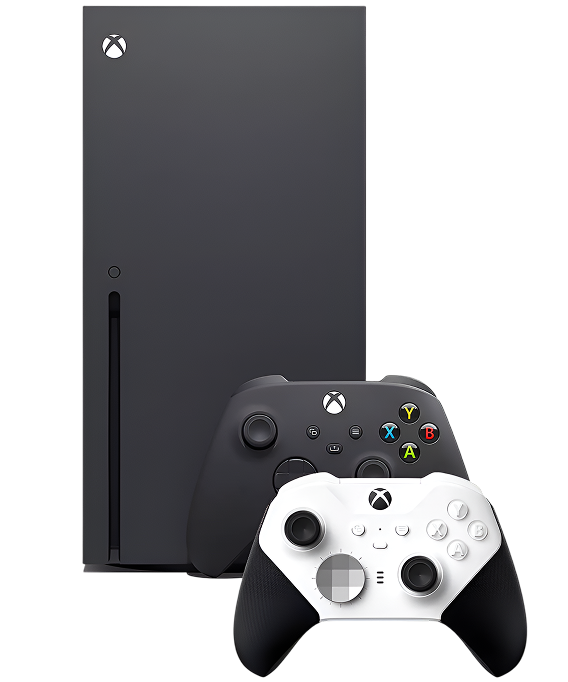
Microsoft launched the Xbox Series X in November 2020 as their most powerful console ever. The hardware is impressive: custom AMD Zen 2 CPU with 8 cores at 3.8GHz, custom RDNA 2 GPU delivering 12 teraflops, 16GB GDDR6 RAM, 1TB custom NVMe SSD with lightning-fast load times, and native 4K gaming at 60fps with support for 120fps in many titles. The console's tower design prioritizes cooling—a massive vapor chamber, split motherboard design for better heat distribution, and a large 130mm fan pulling air through the entire system. The disc drive reads 4K UHD Blu-rays. Xbox Game Pass gives access to hundreds of games. Backward compatibility plays thousands of games from previous Xbox generations.
What makes the Series X interesting from a repair perspective? Microsoft used modular construction where major components can be serviced individually. The HDMI port is replaceable (common failure point). The power supply is integrated but serviceable. The disc drive is its own module. The cooling system is accessible for maintenance. The split motherboard design actually makes some repairs easier by providing better access to components. Microsoft clearly designed this for manufacturing efficiency, which makes professional repair feasible—though the console's compact design and advanced cooling system require proper technique and tools.
Why Devices Don't Age Gracefully
Every Xbox Series X eventually shows wear, and that's not Microsoft cutting corners—it's just physics meeting intensive gaming use. Here's what's actually happening inside your console over time.
Your cooling system degrades like a coffee maker brewing slower after years of daily use. When it was new, everything heated and flowed perfectly. After years of thermal cycling, mineral buildup and component wear slow the process. Your Series X's cooling system faces similar degradation. The thermal paste between the APU (combined CPU/GPU) and vapor chamber can dry out or degrade over years of thermal cycling. The large 130mm fan bearings wear from thousands of hours spinning. Dust accumulates in the heatsink and fan intake, restricting airflow. The vapor chamber itself is sealed and usually doesn't fail, but thermal interface degradation reduces its effectiveness. As cooling efficiency drops, temperatures rise, the fan spins faster and louder trying to compensate, and eventually thermal protection shuts down the console.
The HDMI port faces stress it wasn't designed for. Think about zipper teeth misaligning after years of use—they're supposed to interlock smoothly, but wear and stress cause them to skip or jam. Your Series X's HDMI port is similar. It's a 19-pin connector soldered to the motherboard, designed for occasional cable changes, not daily stress or lateral force. When HDMI cables get yanked accidentally—someone trips, the console gets moved while connected, or cables are pulled at angles during cable management—the port experiences force from the side. The metal shield bends. Internal pins bend or break. Solder joints crack. One damaged pin means no video or audio.
The disc drive's mechanical components wear from constant use. The motor that spins discs at high speeds, the laser assembly that reads data, gears that move components—all experience wear over time. The Series X disc drive spins 4K UHD Blu-rays faster than standard Blu-rays, putting more stress on motors and bearings. The eject mechanism can jam or fail. Dust accumulation interferes with laser operation.
Xbox controller analog sticks use potentiometers that wear from constant movement. After millions of stick movements across thousands of gaming hours, the graphite-coated contact pads wear away. Metal dust accumulates inside. Spring tension changes. Eventually, the controller reports movement when you're not touching the stick—that's drift.
HDMI Port Stopped Working After Cable Was Yanked
You've got no display on your TV even though your Xbox Series X clearly powers on—you hear it boot up, the fan spins, but the screen stays black. Maybe you get intermittent video that cuts out when you move the cable. Could be the picture is there but heavily distorted or flickering. Perhaps the HDMI cable won't stay firmly in the port anymore—it feels loose. Some Series X owners accidentally pulled the HDMI cable at an angle and immediately lost all video output.
Why this happens: The HDMI port is a 19-pin connector handling high-bandwidth 4K and 8K video signals plus audio. It's soldered to the motherboard with tiny connection points. The port's designed for stability when cables are inserted properly and left alone, not for lateral stress or repeated rough handling. When HDMI cables get yanked accidentally, the port experiences force from the side that it wasn't engineered to handle. This bends the metal shield around the port opening, bends or breaks the delicate internal pins (each less than 1mm wide), or cracks the solder joints connecting the port to the motherboard traces. Even without obvious yanking, poor-quality HDMI cables that fit too tight or too loose create stress with repeated insertions. Power surges through HDMI (from TVs with faulty power supplies) can damage the port's circuitry.
What you can try:
- Test with multiple different HDMI 2.1 cables—cheap or damaged cables cause intermittent connections
- Try different HDMI inputs on your TV to eliminate TV port problems
- Inspect the HDMI port carefully with a flashlight—look for bent metal shield or visible damage to pins
- Try a completely different TV or monitor to isolate console versus display issues
- Check Xbox video settings—try different resolutions or disable HDR to test
- Don't wiggle or force the cable if it won't insert smoothly—additional force causes more damage
The consistent trend we observe: HDMI port damage is the most common hardware repair we perform on Xbox Series X consoles. Physical port damage from yanked cables accounts for 60% of cases we see. Bent or broken internal pins make up 30%. Cracked solder joints from repeated stress represent 10%. When you bring HDMI issues to The Fix, we start with thorough inspection under magnification—we're looking for bent metal shields, damaged pins visible through the port opening, and signs of stress on the port housing. We test with known-good high-quality HDMI 2.1 cables to confirm it's the port. Xbox Series X repair for HDMI ports involves several precise steps. First, we carefully desolder the damaged port using temperature-controlled soldering equipment—it's got 19 data pins plus multiple shield ground connections, and each must be removed cleanly without damaging the circuit board traces underneath. The Series X motherboard uses multiple layers with dense component placement, so extreme care is necessary. We thoroughly clean all the connection pads with desoldering braid and flux to remove old solder and oxidation. We position a new port with precision alignment tools—even 0.5mm misalignment prevents proper pin contact. We solder each connection point cleanly, using proper temperature (too hot damages the board, too cool creates weak joints) and solder flow techniques. We inspect all solder joints under magnification for quality—looking for cold joints, solder bridges between pins, or insufficient solder that could cause intermittent connections. Finally, we test extensively: video output at multiple resolutions (1080p, 1440p, 4K, 120Hz modes), HDR functionality, audio pass-through, different HDMI cables, and stress-testing by connecting and disconnecting multiple times. The repair typically takes 90-120 minutes. It's advanced motherboard-level work requiring proper equipment and technique, but it's completely feasible and costs much less than replacing the entire console.
Console Overheats and Shuts Down During Gaming
Your Xbox Series X sounds incredibly loud—the fan runs at maximum speed constantly making distracting noise. Or maybe the console shuts down randomly after 30-60 minutes of gaming, especially during demanding titles like Starfield, Forza Motorsport, or Cyberpunk 2077. Could be you see overheating warnings on screen before shutdowns. Perhaps certain areas of the console feel extremely hot to touch. Some Series X owners notice performance degradation—frame drops, stuttering—during extended sessions before thermal shutdowns kick in.
Why this happens: The Xbox Series X generates significant heat—the custom AMD APU can pull 150-200 watts during intensive gaming. Microsoft designed an elaborate cooling system: split motherboard design for better heat distribution, massive vapor chamber covering the entire APU, large 130mm fan pulling air through the entire console from bottom to top. But several things can degrade this system over time. Dust accumulates in the fan intake at the bottom and the heatsink at the top, restricting airflow. The fan bearings can wear out after thousands of hours of operation, reducing effectiveness or causing grinding noises. The thermal paste between the APU and vapor chamber can degrade over years (though the Series X is still relatively new, so this is less common than on older consoles). The vapor chamber's thermal interface can degrade. Blocked external vents from poor console placement prevent intake and exhaust. Sometimes it's environmental—using the console in hot rooms, enclosed spaces, or on carpet that blocks bottom intake vents causes overheating.
What you can try:
- Clean the bottom intake vents thoroughly with compressed air—blow from multiple angles
- Ensure the console sits on a hard, flat surface—not carpet or soft surfaces that block intake
- Verify the top exhaust vent has clearance—don't stack things on top of the console
- Clean the top vent area with compressed air
- Listen to the fan—grinding, clicking, or rattling suggests bearing failure
- Note which games cause shutdowns—thermal issues manifest most in graphically demanding titles
- Track timing until shutdown—consistent duration indicates thermal protection activating at specific temperature thresholds
Initial assessment of your console's condition: When you bring overheating problems to The Fix, we start with external inspection and testing. We run the console with thermal monitoring equipment to measure actual component temperatures during stress testing. We listen to fan operation for bearing noise. We check vent blockage and airflow from both intake and exhaust. For dust-related overheating (most common cause on Series X), we perform comprehensive internal cleaning. We carefully disassemble the console to access the cooling system—the Series X uses a clever design where the outer shell and fan assembly remove as one unit, giving access to the heatsink and vapor chamber. We use compressed air and anti-static brushes to thoroughly clean the heatsink fins and fan blades. We clean the bottom intake area where dust accumulates heavily. We inspect the fan bearings and blade balance. For thermal interface degradation (less common on relatively new consoles but possible), we proceed to more advanced work. We carefully remove the vapor chamber assembly from the APU (requires specific screw removal pattern and careful handling of the vapor chamber—it's a sealed unit that can't be damaged). We inspect the thermal paste application between the APU and vapor chamber. If degradation is visible, we clean thoroughly with isopropyl alcohol and lint-free materials, then apply fresh high-quality thermal paste with proper amount and spread technique. We reassemble following proper procedures—the vapor chamber must seat perfectly, and the mounting pressure must be correct. After reassembly, we run extended stress tests with demanding games while monitoring temperatures to verify proper cooling performance. Xbox Series X repair for thermal issues typically takes 90-120 minutes including disassembly, thorough cleaning, thermal interface work if necessary, reassembly, and extensive testing. Most overheating problems resolve completely with proper cleaning—we regularly see temperature drops of 15-20°C and significant fan noise reduction after service.
Power Supply Failed—Console Won't Turn On
You press the power button and absolutely nothing happens—no lights, no sounds, no fan spinning, complete silence. Maybe it turns on briefly, you hear a beep, but then it immediately shuts off before displaying anything. Could be you see the white Xbox logo light come on but nothing else happens—no display, no additional sounds. Perhaps the console was working perfectly, you put it in standby, and when you tried to power it the next day it was completely dead. Some Series X owners experienced sudden power loss during gameplay and the console hasn't turned on since.
Why this happens: Power issues on Xbox Series X consoles have several potential causes. The internal power supply converts AC wall power to multiple DC voltages the console needs. Components on the PSU can fail from power surges, voltage spikes, or age-related degradation (though age is less common on newer consoles). The power button is a capacitive sensor that can malfunction. The standby power circuit can fail, preventing the console from waking from standby mode. The APU can suffer catastrophic failure, though this is rare. Fuses on the motherboard protecting circuits can blow from power surges. Sometimes it's not the console—it's the power cable or power outlet that's faulty.
What you can try:
- Test with a different power cable (if you have one) and try multiple different power outlets
- Unplug everything from the console (HDMI, USB devices, network cable) and let it sit completely disconnected for 10 minutes, then reconnect only the power cable and attempt startup
- Try the Xbox startup/shutdown procedure: press and hold the Xbox button on the front for 10 seconds until it fully shuts down, wait 30 seconds, then power on again
- Listen very carefully when you press the power button—any sounds at all (beeps, fan starting, clicking) indicate partial power delivery
- Check if the Xbox logo button lights up at all, even momentarily
- Don't repeatedly attempt power-on if it's immediately shutting down—repeated power cycling can stress components
Explanation of what needs to be fixed: When you bring a non-powering Xbox Series X to The Fix, we use systematic diagnostic procedures. We test the power cable and outlet with a multimeter to verify proper AC delivery. We open the console and visually inspect the power supply area for obvious failures—bulging capacitors, burn marks, discolored components, or cracked solder joints. We use a multimeter to measure DC voltage outputs from the PSU at various test points—we're checking if the PSU produces proper voltages even when the console won't boot. We test the power button's capacitive sensor for proper operation. We measure motherboard voltage rails at multiple test points to identify which circuits receive power and which don't—this isolates PSU failure versus motherboard component failure. We check the standby power circuit since Series X has always-on functionality for quick resume. We inspect and test fuses using continuity testing. Based on systematic testing, we identify the specific failed component. For PSU failures, we repair the power supply—the Series X uses an internal PSU that's serviceable, and we can replace failed capacitors, voltage regulators, or other components. For power button sensor failures, we replace or repair the sensor. For standby circuit issues, we repair the affected circuitry. For blown fuses, we replace them and investigate why they blew to prevent recurrence. Xbox Series X repair for power issues typically takes 75-120 minutes depending on the specific failure. Most power problems are completely solvable—catastrophic APU failure is rare and usually preceded by other symptoms like crashes or graphical glitches.
Disc Drive Makes Grinding Noises or Won't Read Discs
Your Xbox Series X's disc drive makes terrible grinding, clicking, or buzzing noises when you insert discs. Or maybe it won't accept discs at all—they get pushed back out immediately. Could be it accepts discs but can't read them, giving error messages about unreadable discs. Perhaps the drive worked fine initially but started making concerning noises over time. Some Series X owners find discs get stuck and won't eject no matter what they try.
Why this happens: The Xbox Series X disc drive reads 4K UHD Blu-rays, DVDs, and standard Blu-rays—it's a complex optical drive with motors spinning discs at high speeds, laser assemblies reading data, gears moving components, and sensors detecting disc insertion. Multiple things can fail. The motor that spins discs can weaken or develop bearing issues, causing grinding noises or slow spinup. The laser lens can get dirty or the laser itself can weaken over time—4K UHD lasers are complex and can fail. Gears in the mechanism can strip or crack from wear. The disc insertion mechanism can jam from debris or worn components. The eject motor or mechanism can fail. Dust accumulation interferes with operation. Sometimes poorly maintained discs (scratched, dirty, warped) jam or damage the mechanism. Physical impacts to the console while the disc is spinning can damage the drive.
What you can try:
- Try multiple different discs—games, 4K UHD movies, standard Blu-rays, DVDs—to identify what formats fail
- Clean discs thoroughly before testing—dirt and fingerprints cause read errors
- Make sure you're inserting discs correctly (label side facing right when console is vertical)
- Listen to what sounds the drive makes—grinding suggests mechanical issues, clicking suggests laser assembly problems
- Don't force discs if they won't insert smoothly
- For stuck discs, there's a manual eject hole—check Xbox support documentation for your specific model
- Check if the drive even attempts to spin up discs
Part sourcing and quality verification: Xbox Series X disc drive repair requires drive removal and internal diagnosis. We carefully remove the drive assembly from the console—it's connected via cables and held with screws and clips. We disassemble the drive to access internal components (4K UHD Blu-ray drives are complex with multiple circuit boards and assemblies). We clean the laser lens with proper cleaning solution and lens tissue—contamination causes reading errors. We clean and inspect all mechanical components—motors, gears, belts. We test motor operation and bearing condition. We test laser power output with specialized equipment. For weak lasers (common as drives age), we replace the laser assembly—4K UHD laser assemblies are expensive but available. For mechanical failures, we replace worn gears, belts, or motors as needed. For eject mechanism issues, we repair or replace the mechanism. For severely damaged drives, we replace the entire drive unit. Note: Xbox Series X disc drives are paired to motherboards digitally for DRM purposes, so drive replacement requires additional technical steps—we handle the pairing process using proper procedures. Xbox Series X repair for disc drives typically takes 90-120 minutes including drive removal, internal work, reinstallation or replacement, pairing if necessary, and testing with multiple disc formats to verify proper reading. We test 4K UHD discs, standard Blu-rays, DVDs, and game discs to ensure full functionality.
Xbox Controller Has Stick Drift
Your character moves in games without you touching the analog stick. Or maybe you can't move in straight lines—the character constantly veers left or right even with centered stick input. Could be menu cursors drift slowly across the screen. Perhaps controller calibration shows the stick isn't centered even when you've released it completely. Some Xbox controller owners find drift is intermittent—working fine sometimes, terrible other times, temporarily improving after vigorous stick movement before worsening again.
Why this happens: Xbox Series X controllers (same design as Xbox One controllers) use analog sticks with potentiometers measuring stick position. Inside each stick module are graphite-coated contact pads that physically slide across resistive elements as you move the stick. This constant physical contact creates wear—the graphite coating gradually wears away, exposing underlying material with different electrical properties. This changes resistance readings, causing the controller to register movement when the stick is centered. Metal dust particles from wear accumulate inside the mechanism, creating random resistance variations. The spring that centers the stick loses tension over thousands of hours of use, affecting neutral position. Environmental factors accelerate degradation—dust getting under the rubber module, humidity causing oxidation, oils from hands degrading materials.
What you can try:
- Update controller firmware by connecting it to the Xbox via USB cable and checking Settings > Devices & connections > Accessories for updates
- Try the controller reset: disconnect it completely, remove batteries for 30 seconds, reinstall batteries, reconnect
- Use compressed air under and around the analog stick base—short bursts from multiple angles
- Test drift in the Xbox's controller test menu (Settings > Devices & connections > Accessories > select controller > Configure) to see raw stick input
- Try electronic contact cleaner specifically designed for potentiometers (spray around stick base, move stick vigorously, let dry for 30+ minutes)
- Test with multiple different games—sometimes drift is game-specific deadzone configuration
Repair execution with care and precision: Xbox controller repair for analog stick drift involves careful disassembly and component replacement. We open the controller shell using proper tools—it uses Torx screws and clips that must be released carefully to avoid breaking the plastic. We disconnect the battery pack or batteries. We remove the circuit board from the shell to access the analog stick modules. We desolder or unscrew the old analog stick module (Xbox uses a combination of screws and solder depending on controller revision). We clean the contact area on the circuit board. We install a replacement analog stick module—we use high-quality components, some with improved contact materials designed for better longevity than the modules Microsoft uses. We reconnect everything precisely, ensuring all connections are solid and ribbon cables seat fully in their connectors. We reassemble the controller shell carefully, making sure all clips engage properly and the shell closes without gaps. We test extensively: we verify the new stick reads accurately across its full range of motion, centers properly at neutral position when released, doesn't develop drift during aggressive stress testing where we rapidly move the stick in circles and figure-eight patterns hundreds of times, responds consistently to both slow micro-movements and fast full-deflection movements, and functions properly in actual gameplay. Each controller repair takes 30-45 minutes. Many customers opt to replace both analog sticks preventatively even if only one has drift, since they've experienced similar use and the second stick often develops drift shortly after the first. We also offer preventative maintenance where we replace both sticks at early signs of drift before it becomes severe enough to impact gameplay.
Keep Your Series X Running Great
Ventilation is absolutely critical. The Series X pulls air from the bottom and exhausts through the top—both must be unobstructed. Place it on hard, flat surfaces—never carpet or soft surfaces. Keep at least 6 inches of clearance above the top vent. Don't stack anything on top. Clean bottom intake vents monthly with compressed air. Clean top exhaust area quarterly.
HDMI cable care prevents expensive repairs. Use high-quality HDMI 2.1 cables—cheap cables cause problems and stress ports. Never yank cables. Route cables to minimize tension and prevent tripping hazards. Don't move the console while HDMI is connected. Consider HDMI port savers (short extension adapters) to reduce direct port stress.
Power protection matters. Use a quality surge protector rated for gaming electronics. Don't repeatedly power cycle during troubleshooting—give it 30 seconds between attempts. Use standby mode properly rather than frequent full shutdowns. Don't unplug during system updates or game installations.
Disc drive care. Clean discs before inserting them. Handle discs by edges only. Store discs in their cases—don't leave them lying around. Never use damaged or warped discs—they can jam or damage the drive. Don't move the console while discs are spinning.
Controller care prevents drift. Keep hands clean while gaming—skin oils accelerate stick degradation. Never eat while gaming—food particles contaminate stick assemblies. Store controllers in clean, dry locations. Clean around analog stick bases monthly with compressed air. Don't slam sticks to maximum deflection aggressively during gameplay—controlled movements reduce wear.
Storage management. The 1TB SSD fills quickly with modern games. Monitor storage regularly and delete games you've completed. Use the expansion storage slot for additional space. Don't fill the SSD to 100%—leave at least 100GB free for optimal performance and game updates.
Software maintenance. Keep system software updated—Microsoft releases stability, performance, and security improvements regularly. Clear the cache occasionally by doing a full shutdown (not standby). Restart the console weekly rather than always using quick resume.
Professional Repair Is the Smart Choice
The Xbox Series X represents significant investment—$500 for the console, potentially hundreds or thousands in games and Game Pass subscriptions, plus your save files and achievements. Most problems—HDMI port damage, overheating, power supply failures, disc drive issues, controller drift—are completely repairable at costs well below console replacement. These are well-engineered machines that respond well to professional maintenance and repair.
Having issues with your Xbox Series X? The Fix specializes in current-generation console repairs. Stop by our shop—we'll diagnose the problem for free, explain what's happening in plain English, and get your device working right again. We've got the specialized equipment and expertise to handle advanced gaming console repairs correctly. Your gaming investment deserves expert attention.


Trusted repair solution for mobile phones, tablets, gaming consoles, and computer systems. We provide fast, reliable, and affordable repair services to get your devices back in perfect working condition.
The Fix is an independent repair service provider and is not affiliated with, sponsored by, or endorsed by Apple Inc., Samsung Electronics, Google LLC, or any other device manufacturer. We use high-quality compatible replacement parts unless explicitly stated. All trademarks are property of their respective owners.


© Copyright The Fix Solutions All rights reserved 2026.
Design by Deepcoder