






Xbox 360 Repair Services
Get fast, reliable, and professional Xbox 360 repair services at The Fix — your trusted destination for expert device care.
Common Repairs We Handle Daily


Maximize Xbox 360 Life: Smart Maintenance Strategies
Between its launch in November 2005 and discontinuation in 2016, Microsoft sold over 84 million Xbox 360 consoles worldwide, making it one of the most successful gaming systems ever. Millions of these consoles are still in use today—retro gaming enthusiasts keep them for the massive library, families use them as affordable entertainment systems, and collectors maintain them for nostalgia. But here's what's happening now: you're dealing with the infamous red ring of death where three red lights flash and the console won't boot, or the disc drive makes grinding noises before refusing to read discs, or the console overheats and shuts down after 20 minutes of gameplay, or the HDMI port (on models that have it) stopped working after years of cable changes.
Here's what most people don't know: Xbox 360 consoles are repairable, even the notorious red ring of death has solutions. RROD? Often fixable with proper techniques. Disc drive failures? Repairable. Overheating? Solvable with maintenance. HDMI damage? Replaceable. This guide covers what goes wrong with Xbox 360 consoles after 15-20 years, why these legendary problems happen, and how professional repair keeps classic gaming accessible.
The Xbox 360 Story
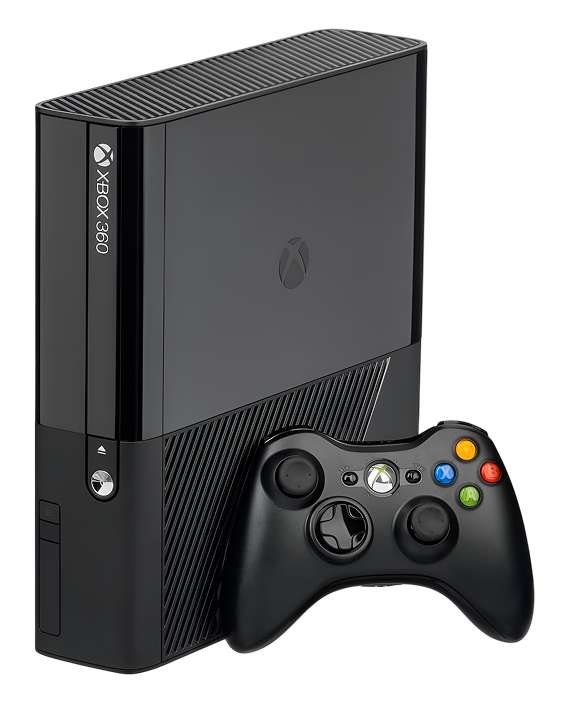
Microsoft launched the Xbox 360 in November 2005 with ambitious hardware—the first console with a custom triple-core PowerPC processor, unified shader architecture GPU, and HD gaming capabilities. The console went through multiple revisions: the original "fat" Xbox 360 (2005-2010) with notorious reliability issues, the Xbox 360 S (2010) with improved cooling and built-in WiFi, and the Xbox 360 E (2013) with final design refinements. The game library is incredible: Halo series, Gears of War, Forza, Red Dead Redemption, Mass Effect, and thousands more titles. Many games never came to other platforms or run differently on Xbox 360 than their PC/PS3 versions, making the console worth preserving.
What makes the Xbox 360 interesting from a repair perspective? The original "fat" models are notorious for the red ring of death (RROD)—a design flaw where thermal stress caused GPU failure at epidemic rates. Microsoft extended warranties and revised the hardware, but millions of early units exist with fundamental thermal design problems. Later Xbox 360 S and E models are much more reliable. From a repair standpoint, Xbox 360s range from challenging (RROD requires advanced GPU reball or reflow techniques) to straightforward (disc drives, HDMI ports, power supplies are serviceable). The main challenge is finding technicians with the skills and equipment to handle advanced Xbox 360 repairs, especially GPU work on RROD units.
Understanding Why All Smartphones Age
Every Xbox 360 eventually needs attention, and for early models, that need came way too soon due to design flaws. Here's what's physically happening inside these consoles.
Your cooling system on early Xbox 360s was inadequate from day one. Think about a laptop battery from college that barely holds charge anymore—it was marginal when new and degraded rapidly with use. The Xbox 360's original cooling design is similar—it was barely adequate to cool the GPU and CPU when new, and after years of use it's completely insufficient. The thermal paste between the GPU/CPU and heatsinks dries out. Dust accumulates in heatsinks. The fans wear out. But the real problem is deeper—the GPU's solder connections crack from thermal stress because Microsoft used lead-free solder that's more brittle and the cooling system allowed the GPU to run too hot. This caused the red ring of death at epidemic rates. Later revisions fixed the cooling, but early units have fundamental flaws.
The disc drive faces mechanical wear from thousands of disc insertions over years. Think about a headphone jack after thousands of plugs—the contacts wear down, connections become intermittent, and eventually it fails. Xbox 360 disc drives experience similar wear. Motors weaken. Lasers fade. Gears strip. The disc tray mechanism jams. The eject mechanism fails. Early Xbox 360 disc drives had quality issues and failed at higher rates than later revisions.
HDMI ports (on models that have them—early Xbox 360s only had component video) face the same stress as all gaming consoles. Years of cable insertions and occasional yanks bend pins or crack solder joints. The HDMI port on Xbox 360 S and E models is vulnerable because it's mounted without substantial support.
Power supplies—external on all Xbox 360 models—fail from age and electrical stress. Capacitors bulge or leak. Voltage regulators fail. The power supply fan can fail, causing the brick itself to overheat. After 15-20 years, power brick failures are common.
Red Ring of Death—Three Red Lights and No Boot
You power on the Xbox 360, and instead of the normal green light, you get three flashing red lights around the power button. The console beeps but won't boot. Or maybe you've been experiencing random shutdowns or graphical glitches, and now you've got the full RROD. Could be the console worked for years and suddenly developed RROD after a particularly long gaming session. Perhaps it's been sitting unused and you got RROD when you tried to use it again.
Why this happens: The red ring of death (specifically three red lights—there are other error codes with different light patterns) indicates general hardware failure. In reality, RROD almost always stems from GPU failure caused by thermal stress and design flaws. Here's what happened: Microsoft used a 90nm GPU that generated massive heat. The cooling solution was inadequate—the heatsink was too small, the thermal paste application was inconsistent, and the airflow design was poor. The GPU ran hot—very hot. Microsoft also transitioned to lead-free solder (for environmental reasons) which is more brittle than leaded solder. Over months or years of thermal cycling (heating during gaming, cooling when off), the GPU's BGA (ball grid array) solder connections underneath the chip developed micro-cracks from thermal expansion and contraction. Different materials expand at different rates, creating stress. Eventually, enough solder connections failed that the GPU couldn't communicate with the motherboard. The console detected this during power-on self-test and displayed RROD. This was a design flaw that affected millions of units—Microsoft eventually extended warranties, but the problem was systemic in early Xbox 360s.
What you can try:
- Let the console cool completely for several hours—sometimes early RROD temporarily works when cold
- Check if you get any error codes displayed on the screen (if video works)
- Try different power outlets and cables
- Clean vents thoroughly—some RROD is actually overheating rather than permanent GPU failure
- Don't repeatedly attempt power-on—this stresses the GPU further
What we've seen in our repair shop: RROD repair on Xbox 360 consoles is complex and comes with important caveats. The famous "towel trick" or "heat gun reflow" methods that circulated online are temporary at best and can cause additional damage—we don't recommend them. Professional Xbox 360 repair for RROD involves several approaches depending on severity and customer goals. For RROD that's recent or intermittent, we first try comprehensive thermal maintenance—replacing thermal paste, cleaning cooling systems, adding additional cooling solutions (better thermal pads, upgraded heatsinks if the customer approves)—this sometimes prevents RROD from becoming permanent if caught very early. For established RROD where the GPU solder has clearly failed, we have two main options. Option one is professional reflow using proper temperature-controlled infrared equipment—this reheats the GPU's solder connections in a controlled manner, allowing them to reflow and reconnect. This is more reliable than heat gun methods but still temporary (typical lifespan 6 months to 2 years). Option two is GPU reball—completely removing the GPU chip, removing all old solder balls, applying new solder balls using precision stencils and equipment, and reinstalling the chip. Reballing is expensive, time-consuming (4-6 hours of work), requires specialized equipment, and has risks—but it's the closest thing to a permanent fix. We're completely honest about RROD: early Xbox 360s had fundamental design flaws. Reflow gives temporary extensions. Reballing is the best option but expensive. Success rate for reballing is 60-70%—not perfect due to GPU die damage from years of heat stress. Some Xbox 360s are too far gone. We explain all options, costs, realistic expectations, and let you make informed decisions. For many retro gaming enthusiasts, even temporary RROD fixes are worthwhile to play classic games for a while longer.
Disc Drive Making Grinding Noises or Won't Read Discs
Your Xbox 360's disc drive makes terrible grinding, clicking, or buzzing noises when you insert discs. Or maybe it won't accept discs at all—the tray opens but won't close with a disc inserted. Could be it accepts discs but can't read them, giving errors about unreadable or damaged discs. Perhaps the tray won't open when you press eject. Some Xbox 360 owners find the drive worked for years and suddenly started making concerning noises.
Why this happens: Xbox 360 disc drives are complex mechanical devices that have suffered from quality issues across all models. The drive uses motors to open/close the tray and spin discs, laser assemblies to read data, gears to move components, and sensors to detect disc insertion. Early Xbox 360 disc drives (2005-2007) had particularly bad reliability—the Hitachi, Samsung, and BenQ drives used in various units all had issues. The motor that opens/closes the tray weakens or the gears strip. The rubber drive belt (in some models) stretches. The laser lens gets dirty or the laser diode weakens. The disc spindle motor weakens. Gears crack or strip from wear. The mechanism that clamps the disc can fail. Sometimes discs get scratched by the drive itself—the infamous "disc scratching" problem where the console was moved while the disc spun, causing the laser assembly to contact the disc and create circular scratches.
What you can try:
- Try multiple different discs to identify if it's disc-specific or drive failure
- Clean discs thoroughly before testing
- For stuck trays that won't open, try the manual eject—insert a paperclip into the small hole near the disc slot
- Listen to what sounds the drive makes—grinding suggests mechanical issues, clicking suggests motor problems
- Check if the tray opens and closes smoothly without a disc—if it struggles, it's likely mechanical
- Don't force discs or trays—additional force damages components
Worried about the cost versus the console's value? Here's our honest take: Xbox 360 disc drive repair varies significantly by issue. When you bring drive problems to The Fix, we systematically diagnose the specific failure. We test with multiple known-good discs. We listen to drive operation. We attempt manual controls. Disc drive work involves opening the console, removing the drive assembly (connected via SATA and power cables), disassembling the drive to access internal components, cleaning the laser lens with proper cleaning solution, inspecting all mechanical components—motors, gears, belts, rails, checking for stripped gears or worn components, lubricating moving parts appropriately, testing motor operation, and checking sensor function. For weak lasers (common on aging drives), we replace the laser assembly. For mechanical failures, we replace worn gears, belts, or motors. For tray mechanism issues, we repair or replace the tray drive system. For severely damaged drives, we replace the entire mechanism. Note: Xbox 360 disc drives are married to motherboards with encrypted keys, so drive replacement requires proper procedures—we handle drive pairing using specialized tools. Xbox 360 repair for disc drives takes 90-120 minutes. Given that Xbox 360s are retro gaming hardware now, disc drive repair often makes sense for enthusiasts with physical game collections. Many users are also migrating to digital libraries or using the disc drive just to install games before playing from the hard drive.
Console Overheats and Shuts Down After Brief Gaming
Your Xbox 360 sounds incredibly loud—the fans run at maximum speed constantly. Or maybe the console shuts down after 15-30 minutes of gameplay with no warning. Could be you see the red dot light up before shutdowns (overheating indicator). Perhaps you can't play demanding games at all—the console overheats within minutes. Some Xbox 360 owners notice the console feels extremely hot to touch near the vents.
Why this happens: Xbox 360 thermal design was problematic from day one—the GPU and CPU generate massive heat, and Microsoft's cooling solution was inadequate. After 15-20 years, thermal performance is even worse. Thermal paste has completely dried out—we see Xbox 360s where thermal paste looks like dust. Dust accumulation in heatsinks is massive after years of use. The fans themselves wear out, reducing airflow or causing noise. The heatsink mounting can loosen over time, reducing contact pressure and thermal transfer. Early Xbox 360s used X-clamps to mount heatsinks—these clamps allowed warping and were part of the RROD problem. As thermal performance degrades, the console runs hotter, hits thermal limits faster, and shuts down to prevent permanent damage. This is actually good—thermal protection prevents RROD by shutting down before GPU damage occurs.
What you can try:
- Clean all external vents thoroughly with compressed air from multiple angles
- Ensure the console has massive clearance—these generate serious heat
- Don't use it in enclosed TV cabinets
- Note how quickly shutdowns occur—faster shutdowns indicate worse thermal performance
- Listen to the fans—grinding or loud noise suggests bearing failure
- Try using the console in a cooler room with better airflow
Not sure if repair is worth it on such an old console? Here's the reality: When you bring overheating Xbox 360s to The Fix, we see the same pattern on almost every unit—completely dried thermal paste and heatsinks caked with years of dust. Thermal paste replacement on Xbox 360 requires complete disassembly. We remove the outer case to access the motherboard. We carefully remove the heatsink assemblies from both the GPU and CPU (different models use different mounting systems—X-clamps on early units, bolts on later revisions). We clean off all old thermal paste thoroughly with isopropyl alcohol and patience—it's often baked onto the chips. We apply fresh high-quality thermal paste with proper amount and spread technique. We thoroughly clean all heatsink fins—the amount of dust is shocking. We clean fan blades and inspect bearings. We replace thermal pads on secondary components. For early Xbox 360s with X-clamps, many repair shops recommend X-clamp replacement with bolt-through mods for better mounting pressure—we discuss this option as it can reduce RROD risk. We reassemble carefully and run extended stress tests while monitoring temperatures. Xbox 360 repair for thermal issues takes 90-120 minutes for complete service. The results are dramatic—temperatures drop 25-35°C, fan speeds decrease significantly (much quieter), and thermal shutdowns stop. For 15-20 year old Xbox 360s still in use, thermal paste replacement is essentially mandatory maintenance. It can also prevent RROD on units that haven't failed yet by reducing thermal stress on the GPU.
HDMI Port Stopped Working (Xbox 360 S/E Models)
You've got no display on your TV even though your Xbox 360 S or E powers on normally—you hear it boot, the power button lights up, but the screen stays black. Maybe you get intermittent video that cuts out randomly. Could be the HDMI cable won't stay in the port—it feels loose. Perhaps you accidentally pulled the HDMI cable and immediately lost video. Some Xbox 360 owners find component video cables still work but HDMI doesn't, confirming port failure.
Why this happens: Only Xbox 360 S (2010+) and E (2013+) models have HDMI ports—early Xbox 360s only had component video output. On models with HDMI, the port faces the same issues as all gaming consoles. It's a 19-pin connector soldered to the motherboard. When HDMI cables get yanked accidentally, the port experiences lateral force. The metal shield bends. Internal pins bend or break. Solder joints crack. After years of cable insertions, wear accumulates. Poor-quality HDMI cables stress the port.
What you can try:
- Test with multiple HDMI cables and TV inputs
- Try a different TV to isolate console versus display
- Test with component video cables (if you have them) to verify the console works—if component works but HDMI doesn't, it's definitely the HDMI port
- Inspect the HDMI port for visible damage
- Check Xbox video settings if you can access them via component
- Don't wiggle or force the HDMI cable
Can the HDMI port be replaced on Xbox 360 S/E? Yes, absolutely: HDMI port replacement on Xbox 360 S and E models is straightforward compared to RROD repairs. We desolder the damaged port using temperature-controlled equipment—19 pins plus shield connections. We clean connection pads thoroughly. We position a new port with precise alignment. We solder all connections cleanly. We inspect under magnification. We test extensively with multiple cables. Xbox 360 repair for HDMI ports takes 60-90 minutes. It's motherboard-level work but completely feasible. Success rate is nearly 100% when done properly. Many Xbox 360 users prefer HDMI over component video for better image quality, making port repair worthwhile.
Power Brick Failed—Console Won't Turn On
You press the power button and nothing happens—no lights, no sounds. Maybe the power brick's LED is orange or red instead of green. Could be you hear a click but no other activity. Perhaps the console worked fine and suddenly died. Some Xbox 360 owners find the power brick feels extremely hot or smells burned.
Why this happens: All Xbox 360 models use external power bricks converting AC wall power to DC voltages the console needs. These power supplies fail from age, electrical stress, and thermal cycling. The power brick has capacitors that bulge or leak after years. Voltage regulators fail. The internal fan in the power brick can fail, causing the brick to overheat and shut down for protection. Sometimes the connector where the brick plugs into the console develops bad connections. The power brick's LED indicates status—green means good, orange/red means problem, no light means brick failure.
What you can try:
- Check the power brick LED—note the color
- Try different power outlets and power cables
- Unplug the brick for 10 minutes, let it cool, then try again
- Check if the brick feels excessively hot—overheating bricks shut down
- Inspect the connector for visible damage
- Try jiggling the connector where it plugs into the console—if video flickers, it's a bad connection
How we keep you informed during the repair: When you bring power issues to The Fix, diagnosis is straightforward. For Xbox 360s, the external power brick makes diagnosis easier. We test the power brick output with a multimeter—it should deliver proper DC voltage. If the brick has failed, replacement is simple—replacement power bricks are readily available since 84 million Xbox 360s were sold. We test the console with a known-good brick to verify the console itself works. For power bricks that are overheating but functional, we can clean the internal fan and check for component failures—sometimes repair is possible. For console-side issues (bad power connector), we can repair or replace the connector. Xbox 360 repair for power issues typically takes 30-60 minutes if it's just power brick replacement, or 60-90 minutes for console-side connector work. Most power problems are completely solvable. Your saved games and data remain safe on the hard drive—power brick work doesn't affect data.
Hard Drive Failed or Is Making Clicking Noises
Your Xbox 360 won't save games, or saved games disappeared. Maybe you hear clicking noises coming from the hard drive area. Could be you get error messages about corrupted storage. Perhaps the console won't recognize the hard drive at all. Some Xbox 360 owners find games freeze or crash frequently, suggesting hard drive issues.
Why this happens: Xbox 360 uses removable hard drives (2.5" SATA drives in proprietary enclosures). After 15-20 years, mechanical hard drives fail. The drive motor weakens. Read/write heads can crash onto platters. The drive controller can fail. Sectors go bad. The drive makes clicking sounds when heads try to read damaged areas. Corrupted file systems prevent proper operation. Physical shocks from dropping or moving the console while powered can damage drives.
What you can try:
- Remove and reseat the hard drive—sometimes connection issues cause problems
- Try the hard drive in a different Xbox 360 if available
- Check if the drive is recognized in storage settings
- Listen for clicking—this indicates mechanical failure
- Try clearing the system cache (Settings > System > Storage > select hard drive > press Y for device options > Clear System Cache)
- Back up important saves if the drive still works
Making sure you're satisfied before you leave: Hard drive issues require systematic testing. We remove the hard drive and test it in external enclosures to check functionality. We listen for clicking or grinding indicating mechanical failure. We test with known-good hard drives to verify the console's SATA interface works. For failed hard drives, replacement is straightforward—Xbox 360 hard drives are still available (both official Microsoft drives in proprietary enclosures and third-party solutions). We can install a new drive, format it for Xbox 360 use, and your console is ready. Your saved games are lost if the old drive failed catastrophically, but Xbox 360 saves can be backed up to USB drives or cloud storage (with Xbox Live Gold). For drives with file system corruption but working mechanically, we can sometimes recover data before replacing. Xbox 360 repair for hard drive issues takes 45-75 minutes including testing, drive replacement, formatting, and setup. We always recommend backing up saves regularly to prevent data loss.
Keep Your Xbox 360 Running Longer
Thermal maintenance is critical for early models. If you've got an original Xbox 360 and haven't had thermal paste replaced, schedule it before RROD develops. Clean vents monthly. Keep in open spaces with massive clearance. Never use in enclosed spaces.
For models with X-clamps. Consider X-clamp replacement with bolt-through mods during thermal paste service—improves mounting pressure and reduces RROD risk.
HDMI care for S/E models. Use quality cables. Never yank cables. Don't move the console while connected.
Power brick maintenance. Keep the power brick in open air—don't let it overheat by enclosing it. Check the LED color—orange/red indicates problems. Replace failing bricks before they damage the console.
Disc drive care. Clean discs before use. Handle by edges. Store in cases. Don't use damaged discs. NEVER move the console while discs spin—this caused the infamous disc scratching problem.
Hard drive care. Back up saves regularly to USB drives or cloud (with Xbox Live). Don't fill the drive to 100%. Consider upgrading to SSD for better reliability.
Ventilation is mandatory. Xbox 360s run hot—ensure proper airflow. Early models especially need cooling. Keep in cool rooms if possible.
Expert Care for Classic Consoles
The Xbox 360 might be 15-20 years old, but it's got an incredible game library and remains beloved by retro gaming enthusiasts. Most problems—RROD, disc drives, HDMI ports, power bricks, overheating—are repairable with the right expertise. These consoles are now retro gaming hardware, and professional repair keeps classic games playable.
Don't trust your Xbox 360 to just anyone. The Fix has the experience, tools, and expertise to handle legacy console repairs correctly. We'll diagnose your device for free, explain your options honestly, and do the work right the first time. We understand these are aging systems that people keep for nostalgia and exclusive libraries, and we're committed to preserving gaming history.


Trusted repair solution for mobile phones, tablets, gaming consoles, and computer systems. We provide fast, reliable, and affordable repair services to get your devices back in perfect working condition.
The Fix is an independent repair service provider and is not affiliated with, sponsored by, or endorsed by Apple Inc., Samsung Electronics, Google LLC, or any other device manufacturer. We use high-quality compatible replacement parts unless explicitly stated. All trademarks are property of their respective owners.


© Copyright The Fix Solutions All rights reserved 2026.
Design by Deepcoder