






Toshiba Excite 7 Repair Services
Get fast, reliable, and professional Toshiba Excite 7 repair services at The Fix — your trusted destination for expert device care.
Common Repairs We Handle Daily


Maximize Toshiba Excite 7 Life: Smart Maintenance Strategies
Why does your compact Toshiba Excite 7 suddenly refuse to charge, or why has the touchscreen that was so responsive developed dead zones where taps don't register? Maybe you're dealing with a cracked screen from an accidental drop, or the battery that used to last all day now dies before dinner. You bought this 7-inch tablet because the size was perfect for reading and portability, the price was right, and Android gave you app flexibility. Now something's broken, and you're wondering if a budget tablet from several years ago is even worth fixing.
Here's what you need to know: professional Toshiba Excite 7 repair costs significantly less than replacing this tablet with something comparable, and most problems are completely fixable. These compact tablets used straightforward construction that makes repair practical. Whether it's screen damage, battery degradation, charging port failure, or software issues, repair makes excellent financial sense. Let's walk through what goes wrong, why it happens, and how to keep your perfectly-sized tablet running for years to come.
The Toshiba Excite 7 Story
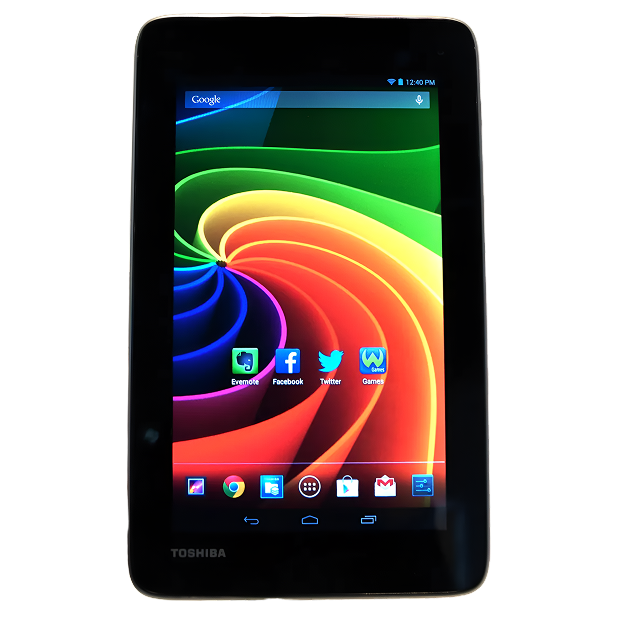
Toshiba released the Excite 7 around 2013 as a budget-friendly 7-inch Android tablet competing with devices like the Nexus 7 and Kindle Fire. You're looking at a 7-inch 1280x800 display that was sharp enough for reading and video, a quad-core processor that handled basic Android tasks without issues, 1GB RAM, 16GB storage, and decent battery life for the price point. The compact size fit easily in bags and large pockets. The lightweight build made one-handed use comfortable. It wasn't flagship hardware, but it delivered solid value.
What's interesting about the Excite 7 from a repair perspective? Toshiba used pretty standard tablet construction here—nothing exotic or impossible to service. The screen is held with adhesive like most tablets, but it's manageable with proper tools and technique. The battery is accessible once you're inside. The charging port is soldered to the motherboard but replaceable with appropriate equipment. Components are modular enough that targeted repairs make sense rather than replacing entire assemblies. It's a tablet built to a price point, which actually makes it more economical to repair than premium devices with specialized components.
What Causes Tech to Break Down
Every Toshiba Excite 7 eventually needs attention, and that's not Toshiba cutting corners—it's just materials science meeting years of daily use. Here's what's physically happening inside your tablet over time.
Your battery is like a coffee maker that brews slower after years of daily use. When it was new, a full pot brewed in minutes. After years of heating and cooling cycles, it takes twice as long and doesn't maintain temperature. That's lithium-ion battery degradation. The Excite 7's battery was decent for a budget tablet—around 3500mAh capacity—but after several years and 500-800+ charge cycles, capacity drops significantly. You might be down to 50-60% of what the battery could hold when new, which means runtime that's half of what you remember.
The display is simultaneously functional and vulnerable. Think about a seat belt buckle mechanism—it clicks in reliably thousands of times, but eventually the spring weakens and the latch doesn't engage as firmly. Your Excite 7's screen isn't quite the same mechanism, but the principle applies: the touch digitizer layer responds reliably to millions of taps, but after years of constant input, the conductive coating can degrade. The glass itself is chemically strengthened for scratch resistance, but drop it onto concrete? That glass cracks. The LCD underneath can fail from age or pressure damage even when the glass looks perfect.
Charging ports face mechanical fatigue from repeated cable insertions. You've plugged in that micro-USB cable hundreds or thousands of times. Each connection creates microscopic wear on the internal metal contacts. The port can loosen from its circuit board mounting if cables were yanked sideways repeatedly. Dust accumulates inside. Corrosion from humidity affects contacts. The plastic housing can crack. Eventually, charging becomes unreliable—you're holding cables at specific angles or dealing with intermittent connections.
Software also ages in ways people overlook. The Excite 7 shipped with Android 4.2 Jelly Bean, and while some units might've received updates, Toshiba stopped supporting these tablets years ago. As Android apps evolve and require newer system features, older tablets struggle. Apps crash more frequently. Performance slows down. The internal storage—budget-grade flash memory—can develop bad sectors after years of read/write cycles, causing freezing and data corruption.
The Screen Cracked or Stopped Responding
You've got cracks spreading from where the tablet hit the ground, or maybe the glass looks perfect but touch doesn't work in large sections of the screen. Could be the display shows weird discoloration or lines across areas. Perhaps touch registers in completely wrong locations—you tap the top of the screen, it registers at the bottom. Some Excite 7 owners see the backlight working but no actual image, just a lit blank screen. Maybe touch worked fine yesterday and completely stopped today with no clear cause.
Why this happens: The Excite 7 uses a display assembly where glass, touch digitizer, and LCD are separate layers bonded together. Physical damage from drops is common—these compact tablets slip out of hands or pockets easily. Impact cracks glass and often damages the digitizer or LCD underneath. Pressure damage occurs when the tablet's stored with heavy objects on top or gets compressed in a bag. The digitizer can fail independently from age—after years of millions of touch inputs, the conductive coating degrades. We've seen ribbon cable failures where the display connects to the motherboard—these tiny cables can crack from flexing or develop connection issues over time. Sometimes it's the display controller circuit failing, which prevents proper image output even when the screen hardware is functional.
What you can try:
- Restart the tablet—sometimes touch digitizer glitches clear with a simple reboot
- Check for Android system updates that might include touch driver fixes
- Try a factory reset if the screen looks fine but touch is erratic (backup data first)
- Test if rotating the screen changes which areas respond—this helps isolate digitizer versus software issues
- Apply gentle pressure around the screen edges to see if touch improves—this indicates a loose connection
What we've seen in our repair shop: Screen issues on Toshiba Excite 7 tablets break down into physical damage versus functional failures. Physical damage—cracked glass, broken LCD—requires display assembly replacement. Functional failures—dead touch zones, intermittent response—sometimes resolve with software fixes but usually indicate hardware problems. Toshiba Excite 7 repair for screens involves carefully heating edges to soften adhesive, separating the damaged screen using proper pry tools, disconnecting the old display, inspecting connectors thoroughly for damage or corrosion, installing a replacement display assembly with precise alignment, reconnecting ribbon cables carefully, and sealing with appropriate adhesive. We test every inch of touch response, verify display quality across the full screen, check brightness adjustment, look for dead pixels, and ensure the screen is securely bonded. The repair typically takes 90-120 minutes. Replacement screens for Excite 7 units are still available since Toshiba sold these tablets in volume to budget-conscious consumers.
Battery Dies Way Too Fast Now
Your Excite 7 used to last all day with moderate use. Now it's dead by mid-afternoon. The battery percentage drops rapidly even when you're just reading or browsing. Maybe it shuts down suddenly at 30-40% remaining. Could be it won't charge past a certain percentage, stuck at 70% or refuses to go higher. Perhaps it won't hold any charge at all anymore, only working when constantly plugged in. Some owners find their tablet won't turn on despite charging overnight.
Why this happens: Lithium-ion batteries have finite lifespans measured in charge cycles. The Excite 7's 3500mAh battery was adequate for a 7-inch tablet when new, but after several years and 500-800+ cycles, capacity loss is dramatic. If you've been using this tablet since 2013-2014, you've likely exceeded 1000 charge cycles. At that point, you might be down to 40-50% of what the battery could hold when new. Battery cells can fail entirely, causing immediate shutdown even when the meter shows charge. The battery management circuit can malfunction, reporting incorrect levels or refusing to charge for safety reasons. Heat accelerates degradation—if you used your Excite 7 in hot environments, direct sunlight, or while charging (which generates heat), you damaged the battery faster. Sometimes it's not the battery but the charging circuit on the motherboard failing.
What you can try:
- Check battery stats in Android settings if available to see reported battery health
- Let it charge for 6-8 hours even if the charging indicator seems stuck—deeply discharged batteries need patient charging
- Try a different micro-USB cable and power adapter—accessories fail more often than tablets
- Clean the charging port carefully with compressed air
- Try recalibrating by draining to 0%, then charging uninterrupted to 100%
- Check if the back panel feels hot or bulges—swelling indicates dangerous failure requiring immediate attention
The reality from our repair experience: Battery replacement on Toshiba Excite 7 tablets is straightforward. The back panel removes with careful prying (it's held with clips and mild adhesive). Once inside, the battery is right there—connected via a standard connector that unplugs easily and held with mild adhesive. We disconnect the old battery, remove it carefully, install a replacement battery matching proper capacity specifications, secure it appropriately, reconnect everything, and run comprehensive tests. We charge to 100%, discharge to 50% while running power-intensive tasks, recharge to 100%, and verify Android reports accurate battery percentage throughout. Toshiba Excite 7 repair for battery issues typically takes 60-90 minutes and restores solid all-day runtime. Customers regularly tell us they got another 2-3 years of use after battery replacement, which is excellent value.
Charging Has Become Impossible
You have to hold the charging cable at a specific angle to get charging to work, or wiggle it constantly. Maybe charging happens sometimes but fails other times with no clear pattern. The cable doesn't seat firmly in the port anymore—it feels loose and moves around easily. Could be charging is incredibly slow, taking 8+ hours to fully charge when it used to take 3-4 hours. Perhaps the charging indicator never comes on no matter what you try. Some owners have replaced multiple charging cables, and they all develop the same issues with this tablet.
Why this happens: The micro-USB charging port faces years of mechanical stress. Each cable insertion creates wear on internal contacts. The port can physically separate from the circuit board if cables were yanked sideways repeatedly. Dust and lint accumulate inside over time, preventing solid contact. Corrosion from humidity degrades the metal contacts. The plastic housing can crack. We've seen ports where internal pins are bent, ports that have loosened from the motherboard, ports so corroded they barely conduct electricity, and ports that have completely broken off. Sometimes it's not the port—it's the charging cable developing internal breaks that cause intermittent charging, or the power adapter dying.
What you can try:
- Inspect the charging port closely with a flashlight—look for visible debris, bent pins, or obvious damage
- Clean thoroughly with compressed air followed by a dry soft brush
- Test with multiple micro-USB cables—cheap cables fail surprisingly often
- Try different USB power adapters or a computer USB port to rule out adapter failure
- Apply gentle pressure in different directions while plugged in to identify if it's a loose connection
- Check if the port moves when you touch the cable—it shouldn't have any play whatsoever
What actually happens with most units: Charging port problems on Toshiba Excite 7 tablets are extremely common given device age. We test with known-good cables and adapters first—this resolves about 25% of charging complaints because the accessory was the problem. Thorough port cleaning solves another 20%. The remaining 55% require port replacement. We carefully desolder the damaged micro-USB port using proper temperature-controlled soldering equipment, clean the circuit board connection pads with desoldering braid and flux, position a new port precisely (alignment is critical—even slight misalignment prevents proper connection), solder all connection points cleanly, inspect joints under magnification for quality, and test extensively. We verify proper charging speed with USB power meters, confirm solid physical connection without wiggling, and stress-test with repeated plug/unplug cycles. Toshiba Excite 7 repair for charging ports typically takes 60-90 minutes and restores reliable charging at proper speeds.
Touch Sensitivity Has Become Terrible
The touchscreen works but requires excessive pressure to register taps. Or maybe certain areas of the screen don't respond at all while other areas work fine. Could be touch is wildly inaccurate—you tap one spot, it registers several inches away. Perhaps you're getting phantom touches where the screen registers taps you're not making, opening apps or scrolling randomly. Some Excite 7 owners find touch works initially after restart but degrades after a few minutes of use.
Why this happens: Touch digitizers on budget tablets like the Excite 7 use capacitive technology similar to phones, where a transparent conductive layer detects finger position. This layer can fail from age—the coating degrades after years of constant touch input. Physical damage from drops or pressure can crack the digitizer even when the glass looks perfect. Sometimes it's not the digitizer itself but the ribbon cable connecting it to the motherboard coming loose or developing connection issues. Software calibration can drift over time, causing touch accuracy problems without actual hardware failure. Screen protectors occasionally interfere with touch sensitivity, especially if air bubbles or debris get trapped underneath. We've seen cases where moisture damage corroded internal connections, causing intermittent touch problems.
What you can try:
- Remove any screen protector and test—sometimes protectors develop issues that mimic digitizer failure
- Clean the screen thoroughly—oils, dirt, and residue can interfere with capacitive touch
- Restart the tablet and check for Android system updates
- Try touch calibration if Android settings have that option
- Test if specific areas consistently fail versus the entire touchscreen being problematic
- Check if touch works better immediately after restart, then degrades—this suggests overheating or software issues
Here's what we've learned from the repair bench: Touchscreen issues on Toshiba Excite 7 tablets divide between software and hardware causes. Software problems—calibration drift, driver bugs—account for maybe 20% of cases and sometimes resolve with updates or factory resets. Hardware problems—failed digitizers, damaged ribbon cables, corroded connections—make up the remaining 80%. When you bring touch problems to The Fix, we clean the screen meticulously first because sometimes it's just dirt. We test systematically across the entire screen to map which areas work and which don't. We check ribbon cable connections internally if needed. For failed digitizers, replacement involves carefully separating the digitizer from the display assembly (they're bonded together on many units), installing a replacement digitizer, ensuring perfect alignment, and recalibrating touch response. Digitizer work is delicate because the LCD underneath is fragile. Toshiba Excite 7 repair for touch issues typically takes 90-120 minutes including extensive testing where we verify touch response across every zone of the screen.
First 30 Minutes—Comprehensive Initial Assessment
When you bring your Toshiba Excite 7 to The Fix, we start with systematic evaluation. We listen to your description—what's happening, when did it start, what have you tried? Then we move to hands-on testing. We power up the tablet and check basic functionality—does it boot, are there error messages, how long does boot take? We test the display for physical damage, dead pixels, backlight function, and touch response across the full screen. We plug in a charger and observe charging behavior—does the indicator light up, does Android recognize charging, is it actually drawing power?
We test the battery if the tablet powers on—we check battery percentage reporting, run power-intensive tasks while monitoring discharge rate, and look for sudden shutdowns or percentage jumps that indicate battery meter inaccuracy. We check physical buttons—power, volume. We test speakers and headphone jack. We navigate through Android checking for software issues, freezing, or crashes. We examine the charging port under magnification for physical damage or debris.
For tablets that won't turn on, we use bench power supplies to bypass potentially failed batteries and see if the motherboard responds. We measure charging current with professional USB meters. We inspect internally if necessary for obvious failures like swollen batteries or corroded connections.
Next 45 Minutes—Detailed Diagnosis and Root Cause Analysis
With initial findings in hand, we dive deeper. Suspect screen damage? We're determining if it's just the glass, the digitizer, the LCD, or multiple components. We test touch with detailed patterns that isolate specific zones. We check display output quality at various brightness levels and with different colors.
Battery draining fast? We're running power reports if Android allows, testing actual capacity with specialized equipment, checking for excessive background drain from apps, and determining if it's physical battery degradation or software issues causing poor runtime.
Charging port intermittent? We're testing with multiple known-good cables and adapters, measuring actual charging current and voltage, checking if the port has physically loosened, inspecting under magnification for bent pins or corrosion, and determining whether cleaning will solve it or if port replacement is necessary.
Throughout this phase, we're identifying the specific component that needs attention. Accurate diagnosis saves time and money—fixing the wrong thing helps nobody.
Next 1-2 Hours—The Actual Repair Work
Timeframes vary by repair type. Screen replacement takes 90-120 minutes because we can't rush heating and separating the adhesive—doing it too fast cracks screens. We heat edges evenly, soften adhesive completely, carefully separate the screen, disconnect the old display, inspect all connectors, install the replacement screen with precise alignment, reconnect ribbon cables gently, and seal with appropriate adhesive.
Battery replacement runs 60-90 minutes. We open the back panel carefully (clips can break if forced), disconnect the old battery, remove it without damaging surrounding components, install a new battery matching proper specifications, secure it appropriately, reconnect everything precisely, and test charging and discharge behavior before closing.
Charging port replacement takes 60-90 minutes. We desolder the damaged port using controlled heat to avoid circuit board damage, clean all connection pads thoroughly, position the new port with precision alignment, solder each connection point cleanly, inspect under magnification for quality, and test functionality extensively before reassembly.
Throughout repairs, we work methodically. Rushing causes mistakes—damaged components, incorrect connections, poor solder joints. We take the time needed to do it right.
Final 30 Minutes—Extensive Testing and Quality Verification
After any Toshiba Excite 7 repair, we run comprehensive tests before calling the job complete. For screens, we verify touch response in every zone using grid test patterns, check display quality with solid colors and gradients, confirm brightness adjustment works properly, test viewing angles, look for dead or stuck pixels, verify no backlight bleed or uneven illumination, and ensure the screen is securely bonded without flex or gaps.
For battery repairs, we charge to 100% while monitoring charging current and time, discharge to 50% running video and intensive apps, recharge to 100%, verify Android reports accurate battery percentage throughout all cycles, check charging speed matches expected duration, and test standby power drain over an extended period.
For charging port repairs, we test with multiple cable brands, verify proper charging speed with USB power meters, confirm solid physical connection without wiggling or specific angles, test charging while powered on and powered off, and stress-test with 20+ plug/unplug cycles.
We don't release repaired tablets until they pass every test. Your Excite 7 must function properly—that's our standard, not negotiable.
Keep Your Excite 7 Running Great
Screen protection saves money. Use a protective case or sleeve during transport. Never stack heavy objects on your tablet. Set it down gently on clean surfaces. Clean the screen regularly with microfiber cloths.
Battery care extends lifespan. Avoid draining to 0% regularly—charge when you hit 20-30%. Don't leave it plugged in at 100% for extended periods. Keep away from extreme temperatures—no hot cars or direct sunlight for extended exposure.
Charging port maintenance prevents problems. Clean the port monthly with compressed air. Don't yank cables sideways—pull straight out. Use decent quality micro-USB cables rather than the absolute cheapest available. If the connection starts feeling loose, address it before complete failure.
Software optimization helps. Uninstall apps you don't use. Clear cache files occasionally through Android settings. Don't fill storage to 100%—leave at least 1-2GB free for system operations. Restart weekly instead of always using sleep mode.
Physical care basics. Keep your tablet away from liquids. Avoid exposing it to humidity extremes. Don't use it while charging if you can avoid it—this generates heat. Handle with clean, dry hands to prevent screen oils and moisture damage.
Expert Repair Is the Smart Investment
Your Toshiba Excite 7 might not be the newest tablet available, but it's functional, familiar, and the perfect size for your needs. Most problems—cracked screens, dying batteries, faulty charging ports, touch issues—are completely repairable at costs well below replacement. These budget tablets weren't designed to be disposable, and with professional care, they'll keep working for years.
Don't trust your Toshiba Excite 7 to just anyone. The Fix has the experience, tools, and expertise to handle budget tablet repairs correctly. We'll diagnose your device for free, explain your options honestly, and do the work right the first time. Your compact tablet deserves professional attention from people who understand both the repair process and the value of keeping capable devices running.


Trusted repair solution for mobile phones, tablets, gaming consoles, and computer systems. We provide fast, reliable, and affordable repair services to get your devices back in perfect working condition.
The Fix is an independent repair service provider and is not affiliated with, sponsored by, or endorsed by Apple Inc., Samsung Electronics, Google LLC, or any other device manufacturer. We use high-quality compatible replacement parts unless explicitly stated. All trademarks are property of their respective owners.


© Copyright The Fix Solutions All rights reserved 2026.
Design by Deepcoder