






Samsung Galaxy Tab S4 Repair Services
Get fast, reliable, and professional Samsung Galaxy Tab S4 repair services at The Fix — your trusted destination for expert device care.
Common Repairs We Handle Daily


Your Complete Samsung Galaxy Tab S4 Repair Analysis: What Really Works
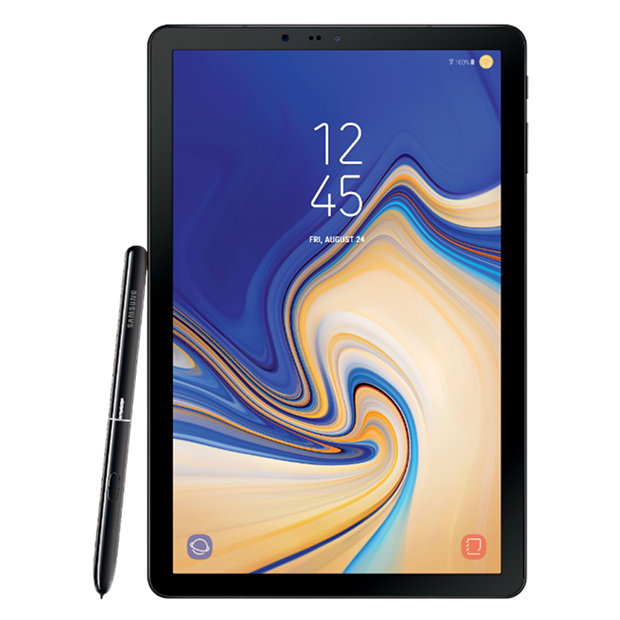
Remember when Samsung tried to position a tablet as a laptop replacement? The Galaxy Tab S4 arrived in 2018 with that exact ambition. Samsung removed the physical home button, expanded the 10.5-inch Super AMOLED display to nearly edge-to-edge, included the S Pen in the box, and launched Samsung DeX—a desktop interface that activated when you connected a keyboard. The Snapdragon 835 processor provided solid performance, quad speakers delivered room-filling audio, and the Book Cover Keyboard turned the tablet into a surprisingly capable productivity machine. For users wanting Android flexibility with laptop-like capabilities, the Tab S4 represented Samsung's most serious attempt yet.
Six years later, these tablets are still handling productivity tasks, serving as digital art canvases, and functioning as media consumption devices. But six-year-old flagship tablets develop problems. Super AMOLED screens crack, batteries degrade significantly, S Pens lose connectivity, USB-C ports wear out, and performance slows under current software demands. If you're dealing with a broken Galaxy Tab S4 and wondering whether Samsung Galaxy Tab S4 repair makes sense or if it's time to upgrade, let's analyze what actually goes wrong and what your realistic repair options look like.
Expert Context: The Laptop Replacement Dream
Samsung positioned the Tab S4 as more than just a tablet—they marketed it as a potential laptop replacement. DeX mode transformed the Android interface into a desktop environment with windowed apps, taskbar, and mouse support. Connect the Book Cover Keyboard and you had something approaching traditional computing.
The reality was more nuanced. For light productivity—email, web browsing, document editing, video calls—the Tab S4 handled it capably. For serious work requiring specific desktop applications, file management complexity, or power-user workflows, it fell short. But as a hybrid device that excelled at media consumption while offering productivity capabilities when needed, it found its audience.
The 10.5-inch Super AMOLED display (2560x1600 resolution) delivered gorgeous visuals. Vibrant colors, deep blacks, excellent viewing angles—this was premium display technology that made content consumption genuinely enjoyable. Six years later, that screen still looks great when it's not damaged.
The Snapdragon 835 processor was Qualcomm's flagship chip in 2017-2018. Eight cores (four high-performance, four efficiency) handled multitasking smoothly when new. The Adreno 540 GPU provided solid graphics performance. Six years later, it struggles with current demanding apps but remains adequate for moderate use.
The S Pen attached magnetically to the back and charged wirelessly. It offered 4,096 pressure levels, low latency, and Samsung's suite of productivity features. For note-taking, sketching, and document markup, it was genuinely useful. When S Pen connectivity fails, you lose a major feature that differentiates this tablet.
The 7,300mAh battery provided solid all-day runtime when new. Fast charging via USB-C enabled quick top-ups. Six years of charge cycles later, those batteries show significant degradation, and some have failed completely.
Issue Analysis: What We're Actually Seeing
Screen Damage Patterns
What really happens in most cases: the Super AMOLED display cracks from drops, pressure in bags, or accumulated stress over years of use. The edge-to-edge design means less bezel protection, so corner impacts often crack the screen more easily than older designs with substantial bezels.
Physical cracks create spiderweb patterns radiating from impact points. But we also see AMOLED-specific issues—burn-in where ghost images of static elements remain visible, dead pixels appearing as black spots, or color shift where whites look yellowish. These aren't from physical damage—they're from organic materials in AMOLED degrading over thousands of operational hours.
The display assembly on Tab S4 includes the glass, AMOLED panel, and digitizer bonded together. You can't replace just the glass—it's an all-or-nothing proposition. This makes screen repair expensive because the part itself costs significantly.
The display connects to the main board via ribbon cables that can work loose from drops or develop connection issues from age. Symptoms include flickering, partial display operation, lines across the screen, or complete display failure despite no visible cracks.
Screen separation occurs when adhesive weakening allows the display to lift from the frame. You'll see gaps along edges. This creates ingress points for dust and moisture that can damage internal components.
Battery Degradation Timeline
Your battery follows a predictable decline. First couple years, battery life matches Samsung's claims—roughly 10-12 hours of mixed use. Years three and four, you notice it's not lasting quite as long. Year six, you're hunting for charging cables by mid-afternoon, barely making it through half a day.
The 7,300mAh capacity sounds substantial, but after 1,000-1,500+ charge cycles, you're probably sitting at 60-70% of design capacity or lower. The battery still works—it just holds dramatically less charge than when new. This isn't failure, it's the expected endpoint of lithium-ion lifecycle.
Some batteries develop worse problems than gradual degradation. Random shutdowns at non-zero percentages mean the battery can't deliver peak current when demanded. You might see 30% remaining, then the tablet suddenly dies. The battery holds charge but can't release it fast enough for the device's needs.
Battery swelling is dangerous and requires immediate professional attention. If your Tab S4's screen is lifting from the frame or the back feels bulged, stop using it immediately. Swollen lithium-ion batteries can rupture, causing fires or toxic chemical exposure.
Heat generation during use indicates increased internal resistance. Degraded batteries convert more energy to heat rather than stored electrical energy. If your Tab S4 feels warmer during charging or use than it used to, that's a sign of battery degradation.
S Pen Connectivity Failures
The S Pen uses electromagnetic resonance technology for basic drawing and Bluetooth for wireless features. When problems occur, diagnosis depends on which functionality you've lost.
If drawing and tapping work but air actions, remote shutter, and presentation controls don't, it's a Bluetooth connection issue. The pen's tiny battery (which charges via magnetic attachment) might be depleted, or the Bluetooth pairing has failed. Software troubleshooting often solves this.
If nothing works—no drawing, no tapping, no recognition at all—it's either a completely dead pen or failed digitizer in the display. The digitizer is integrated into the AMOLED panel, so failure means expensive display replacement to restore S Pen functionality.
The magnetic charging strip uses pogo pins that can corrode, bend, or fail over time. Clean them carefully with isopropyl alcohol and inspect for damage. If they're corroded or bent, S Pen won't charge properly.
Sometimes S Pen issues stem from software glitches rather than hardware failure. Samsung updates occasionally cause recognition problems. Restarting the tablet, re-pairing the pen, or updating software can restore functionality.
USB-C Port Problems
The USB-C port handles charging, data transfer, DisplayPort video output for DeX mode, and accessory connections. When it fails, multiple functions disappear. After six years of daily use, port problems are increasingly common.
Charging issues appear first. The tablet only charges when the cable's held at specific angles. Charging works intermittently with no pattern. The device doesn't recognize when you've plugged in power. These symptoms indicate worn internal contacts or debris accumulation.
DeX mode can fail independently of charging. The port has 24 pins handling different signals. Damaged pins affect specific functions. You might charge fine but can't get video output, or data transfer fails while charging works.
Debris accumulation is incredibly common. Six years of use packs the port with compressed lint, dust, and particles. This prevents proper cable seating and blocks electrical contacts. Professional cleaning solves many "broken" charging ports without actual repair.
Port replacement requires micro-soldering expertise. The USB-C port is surface-mounted to the main board with numerous tiny solder joints. Replacement means desoldering the old port, cleaning pads, and precisely soldering the new port. It's delicate work on expensive hardware.
Performance Degradation
The Snapdragon 835 was flagship-level in 2018. Now it's six generations behind current flagship processors. It struggles with Android 12 or 13 (depending on updates) and current apps designed for much more powerful chips.
Storage affects performance dramatically. When your Tab S4 is nearly full, the system struggles with temporary files and cache. Apps take longer to launch, multitasking becomes sluggish, and everything feels bogged down. Freeing storage often improves responsiveness noticeably.
Software bloat accumulates over years. Android collects cached data, old app files, and system cruft that slows performance. A factory reset eliminates this accumulated weight and often restores snappier performance.
Some slowdowns indicate actual hardware problems. Failing storage chips cause random performance drops and crashes. Degraded thermal paste or dust-blocked vents trigger thermal throttling. Professional diagnosis separates software limitations from hardware failure.
Professional Perspective: Repair Realities
When Screen Repair Makes Sense
Screen replacement on Tab S4 is expensive because Super AMOLED displays cost significantly more than LCD alternatives. We're talking about premium display technology with integrated digitizer and S Pen support. The part itself represents major expense before labor.
For a six-year-old tablet, screen repair makes sense only in specific situations. If you're heavily invested in S Pen workflows for digital art or note-taking, the Tab S4 remains excellent for those tasks. If you just stream video and browse, cheaper tablets handle those functions fine without the screen replacement cost.
The repair process requires precision. We heat adhesive carefully to separate the broken screen without damaging the frame or internal components. We protect all ribbon cables during removal. We install the new display assembly with proper adhesive application and verify S Pen functionality works correctly.
Quality matters enormously with AMOLED replacements. Cheap displays exist but they compromise color accuracy, brightness, touch sensitivity, and S Pen response. We source quality displays that match Samsung's specifications because anything less creates problems.
Battery Replacement Considerations
Battery replacement restores runtime to near-original levels. For a six-year-old tablet with decent battery degradation but otherwise good functionality, this can be worthwhile. You'll get 2-3 years of good battery life from a quality replacement.
The replacement process requires nearly complete disassembly. We remove the back cover, disconnect numerous components, carefully release the battery from strong adhesive, install the new battery with proper adhesive strips, and reassemble everything. It's time-intensive but straightforward.
Battery quality varies significantly. We source cells that meet or exceed Samsung's specifications for capacity and safety. Cheap batteries might advertise high capacity but underdeliver in reality, or they present safety risks. Quality batteries cost more but deliver reliable performance.
After installation, we test charging behavior, percentage accuracy, power delivery under load, and thermal performance. We verify the battery management system communicates correctly with the new cell and charging works as expected.
S Pen Repair Options
If S Pen drawing works but Bluetooth features don't, we start with software troubleshooting. Re-pairing the pen, checking for software updates, and verifying Bluetooth settings solve many issues. This costs nothing and takes minutes.
If the magnetic charging strip has failed, repair requires disassembly and potentially micro-soldering work. The pogo pins connect to the main board through small solder joints. Repairing or replacing them is technically possible but expensive for what amounts to a charging feature.
If the digitizer has failed (pen doesn't draw at all), that's a display replacement situation. The digitizer is integrated into the AMOLED panel—you can't replace it independently. This is the most expensive S Pen repair scenario.
Sometimes the S Pen itself is the problem rather than the tablet. Testing with a known-good S Pen isolates whether the issue is the pen or the tablet. S Pen replacement costs far less than tablet repairs.
Recommendations: Making the Smart Choice
Repair Value Assessment
For single repairs like batteries or port cleaning, Samsung Galaxy Tab S4 repair often makes sense. These cost significantly less than replacement, and the tablet remains capable for many tasks. The Super AMOLED display is still gorgeous, and S Pen functionality (if working) remains useful.
Multiple simultaneous repairs require careful cost-benefit analysis. If you need screen, battery, and port all replaced, combined costs might approach or exceed what you could pay for a significantly newer tablet with better specs and longer software support remaining.
Consider your specific use case. If you're invested in DeX mode for productivity, the Tab S4 still handles that reasonably well. If you need better performance for demanding apps, the Snapdragon 835's limitations will frustrate you even with repairs.
Software support timeline matters. Samsung's major Android updates have ended for Tab S4. Security patches might continue briefly, but new features won't arrive. If you need current software, that's a valid reason to consider upgrading.
Reality Check: Six-Year-Old Flagship
The Tab S4 was premium hardware in 2018. Now it's a six-year-old device running on outdated silicon with limited software support remaining. Repair doesn't change these fundamental realities—it just fixes the specific broken component.
Set realistic expectations about what repair achieves. A new battery restores runtime but doesn't make the Snapdragon 835 faster. A new screen looks pristine but doesn't bring Android 14 or newer apps that require more powerful processors.
Consider the Tab S4's remaining useful life. With repairs, you might get another 1-2 years of service before software obsolescence or additional hardware failures make it impractical. That might be worth it if repair costs are modest and you're satisfied with the tablet's capabilities.
Environmental considerations matter. Keeping functional devices running through repair reduces electronic waste. If the Tab S4 meets your needs, repair is more sustainable than replacement. But recognize this is weighing environmental responsibility against economic efficiency.
What You See and Experience
When you bring your Tab S4 to The Fix, here's what happens from your perspective:
We greet you and ask about the problems you're experiencing. This isn't a long interrogation—just enough context to guide our diagnostic approach. You hand over your tablet and we take it to our diagnostic area.
Diagnostics take 15-20 minutes. You're welcome to wait or come back. We test everything—not just the reported problem. Sometimes issues you haven't noticed yet are developing, and comprehensive diagnostics reveal them.
We call you over and explain exactly what we found. If it's a cracked screen, we show you the damage under magnification. If it's battery degradation, we show you the diagnostic readings. We use plain language, not technical jargon that obscures rather than clarifies.
We provide honest guidance about repair value on your six-year-old tablet. Sometimes repair makes perfect sense. Other times, we genuinely believe replacement is smarter financially. We advise what we'd do if it were our device.
You decide whether to proceed. If you approve repair, we give you realistic timeline expectations. Most Tab S4 repairs complete same-day. We call when it's ready—you're not waiting weeks.
When you pick up, we walk through what we did. We show you the repair. We let you test functionality before you leave. Touch the screen, test the S Pen, verify charging, check DeX mode. We want you confident before you walk out.
You leave with your repaired Tab S4 and our commitment to quality work. If something goes wrong with our repair, we make it right. We stand behind our Samsung Galaxy Tab S4 repair work because our reputation depends on satisfied customers.
Your Next Step
Drop by The Fix for a free diagnostic. We'll run comprehensive tests on your Samsung Galaxy Tab S4, identify exactly what's happening, and give you honest recommendations. No pressure, no upselling—just straightforward guidance from technicians who work on these devices every day.
Your Tab S4 might be six years old, but it's still capable hardware for many users. The Super AMOLED display remains gorgeous. S Pen functionality (when working) is genuinely useful. With proper Samsung Galaxy Tab S4 repair, these tablets can continue serving for productivity, digital art, and media consumption. When yours needs attention, it deserves experienced technicians who understand Samsung's flagship tablets inside and out.


Trusted repair solution for mobile phones, tablets, gaming consoles, and computer systems. We provide fast, reliable, and affordable repair services to get your devices back in perfect working condition.
The Fix is an independent repair service provider and is not affiliated with, sponsored by, or endorsed by Apple Inc., Samsung Electronics, Google LLC, or any other device manufacturer. We use high-quality compatible replacement parts unless explicitly stated. All trademarks are property of their respective owners.


© Copyright The Fix Solutions All rights reserved 2026.
Design by Deepcoder