



Galaxy Tab A9+ Repair Services
At The Fix, we help with Galaxy Tab A9+ screen damage, battery problems, charging connection faults, and camera issues. Visit your nearest location to discuss the symptoms and get a repair quote.
Common Repairs We Handle Daily


Samsung Galaxy Tab A9+ Repair at The Fix
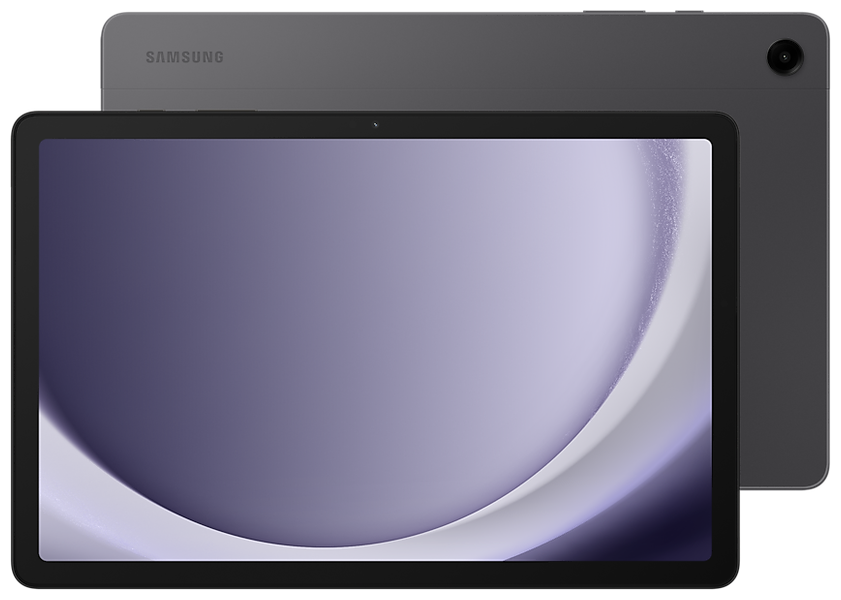
The Samsung Galaxy Tab A9+ has an 11-inch TFT display with a 1920 x 1200 resolution and a refresh rate of up to 90 Hz. Its large screen is useful for streaming, reading, and everyday tasks, but a drop or pressure can still cause cracks, touch problems, or display faults. The tablet also has a 7,040 mAh typical battery and a USB Type-C port, so battery life and charging issues can affect daily use.
At The Fix, we offer tablet repair services for issues such as screen damage, battery problems, charging connection faults, and camera issues. The right repair depends on the symptoms and the cause of the fault. Explore the options below, then visit your nearest The Fix location to discuss the repair and get a quote.
What should you do if your Galaxy Tab A9+ screen is damaged?
A cracked screen, areas that no longer respond to touch, flickering, lines, or dark patches can indicate display damage. The Galaxy Tab A9+ uses a TFT LCD panel, so an impact can affect the visible image or touch response even when the tablet still powers on. A screen protector cannot repair damage to the display itself.
Avoid pressing on cracked glass or using the tablet if sharp fragments are exposed. If the screen is lifting, the frame is bent, or the tablet becomes hot, stop using it and seek service. The Fix offers screen repair for tablet display problems. The repair needed and the quote depend on the actual damage.
When does your Galaxy Tab A9+ need a battery replacement?
The Galaxy Tab A9+ has a 7,040 mAh typical battery capacity. If the tablet runs out of charge much sooner than it used to, shuts down unexpectedly, or behaves inconsistently while unplugged, the battery may need attention. App usage, screen brightness, software activity, and charging accessories can also affect runtime, so battery symptoms alone do not confirm a failed battery.
The Fix offers battery replacement services for tablet battery problems. If the back of the device appears to bulge, the screen starts lifting, or the tablet becomes hot, stop using and charging it. Do not press the case closed or try to remove the battery yourself. Visit a repair location to discuss the symptoms and get a quote.
Why is your Galaxy Tab A9+ not charging properly?
The Galaxy Tab A9+ uses a USB Type-C charging port with USB 2.0 data connectivity. If charging starts and stops, the cable feels loose, or the tablet does not recognize a connected charger, the cause could be the cable, power adapter, port, battery, or another internal fault. A charging symptom does not automatically mean the port is damaged.
If you notice heat, a burning smell, visible damage, or liquid in the port, disconnect the charger if it is safe to do so and do not continue charging the tablet. Do not insert metal objects or liquids into the port. The Fix offers charging port repair for damaged or unreliable charging connections. The appropriate repair can be determined after the fault is identified.
What can you do if your Galaxy Tab A9+ camera stops working?
The Galaxy Tab A9+ has an 8 MP rear camera with autofocus and a 5 MP front camera. Blurry images, failed focus, a black preview, or an app that cannot access the camera may have more than one cause. Check whether the issue occurs in more than one camera app and whether the lens area is obstructed. If the camera still does not work, hardware service may be needed.
The Fix offers camera repair services for tablet camera problems. The repair depends on the symptom and the component responsible. Avoid opening the tablet or applying liquids around the camera area. Visit your nearest The Fix location to discuss the problem and get a quote.
How can The Fix help with your Galaxy Tab A9+ repair?
Choosing the right repair starts with describing what has changed: screen damage, shorter battery life, charging interruptions, or camera problems. Several faults can produce similar symptoms, so the visible issue should not be treated as a confirmed diagnosis. The repair and final quote depend on the fault found and the work required.
Many common repairs can take about 30 minutes or less, although the time varies by device condition and repair type. A more precise estimate can be provided after the issue is understood. Back up important data before service when the tablet is safe to use and you can do so without risking further damage. Data preservation cannot be promised during hardware service.
Frequently Asked Questions About Galaxy Tab A9+ Repair
Can a cracked Galaxy Tab A9+ screen be repaired?
Yes, screen repair is an available service for tablet display damage. The appropriate repair depends on whether the glass, display, touch response, or multiple parts are affected.
Why does my Galaxy Tab A9+ lose battery charge quickly?
Fast battery drain can result from battery wear, demanding apps, screen brightness, background activity, or other faults. If the change is sudden or the tablet shuts down unexpectedly, discuss the symptoms with a repair professional.
What should I do if my Galaxy Tab A9+ gets wet?
Disconnect power if safe, turn the tablet off if it is still on and can be shut down safely, and do not charge it while it may be wet. Avoid heat, inserting objects into ports, or opening the tablet. Seek professional advice, especially if it behaves unusually.
Need Galaxy Tab A9+ repair? Visit your nearest The Fix location to discuss the problem and get a quote for the service your tablet needs.


Trusted repair solution for mobile phones, tablets, gaming consoles, and computer systems. We provide fast, reliable, and affordable repair services to get your devices back in perfect working condition.
The Fix is an independent repair service provider and is not affiliated with, sponsored by, or endorsed by Apple Inc., Samsung Electronics, Google LLC, or any other device manufacturer. We use high-quality compatible replacement parts unless explicitly stated. All trademarks are property of their respective owners.


© Copyright The Fix Solutions All rights reserved 2026.