



Galaxy Tab A9 Repair Services
At The Fix, we provide Galaxy Tab A9 tablet repair services for screen damage, battery problems, charging connections, and camera faults. Tell us what your device is doing and contact your nearest location to discuss the repair and get a quote.
Common Repairs We Handle Daily


Samsung Galaxy Tab A9 Repair at The Fix
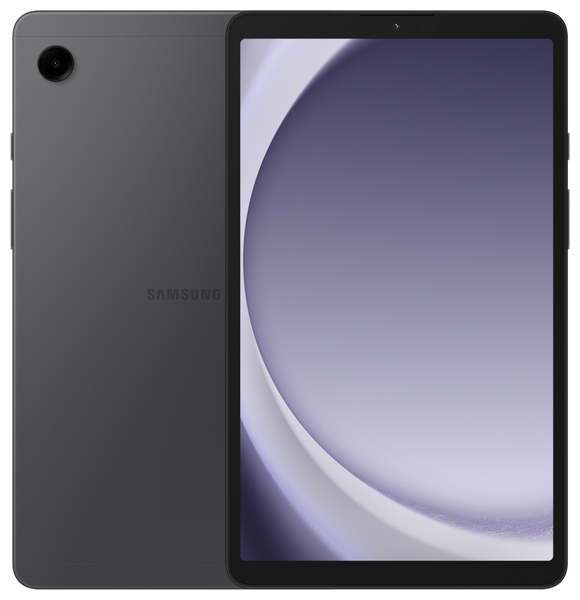
The Samsung Galaxy Tab A9 is a compact tablet with an 8.7-inch TFT display, an 8 MP rear camera, and a 5,100 mAh typical-capacity battery. Damage to the display, shorter battery life, charging trouble, or camera problems can make everyday tasks harder.
At The Fix, we provide tablet repair services for issues such as screen damage, battery problems, charging connections, and camera faults. The right repair depends on the symptoms and the cause. This guide explains common Galaxy Tab A9 repair needs and how to take the next step.
What Should You Do If Your Galaxy Tab A9 Screen Is Damaged?
A cracked screen, unresponsive touch area, flickering image, or unusual lines can interfere with using your Galaxy Tab A9. The tablet uses an 8.7-inch TFT display with a resolution of 1340 × 800 pixels, so damage can affect both viewing and touch interaction.
Screen symptoms do not always point to the same fault. A visible crack may accompany display or touch problems, while an image issue without a crack can have another cause. The Fix offers screen repair for tablet problems. Get a quote for your Galaxy Tab A9 after explaining what happened and what the screen is doing.
If glass is cracked or separating, avoid pressing on the damaged area. Loose fragments can cut skin, and pressure may make the damage worse. If the device has become hot, swollen, or physically deformed, stop using it and do not charge it.
When Might Your Galaxy Tab A9 Need a Battery Replacement?
A battery problem may show up as noticeably shorter use between charges, unexpected shutdowns, or a tablet that struggles to power on. The Galaxy Tab A9 has a 5,100 mAh typical-capacity battery, but that specification alone cannot establish the condition of an individual device.
Battery symptoms can overlap with charging-accessory or other power issues, so rapid drain does not prove that the battery is the only cause. The Fix offers battery replacement services for tablet battery problems. Contact your nearest location to discuss the symptoms and get a quote for the repair your device needs.
If the tablet's back is lifting or the battery appears swollen, stop using the device. Do not press the casing back into place, open the tablet, or connect it to a charger. Arrange professional service instead.
Why Is Your Galaxy Tab A9 Not Charging Properly?
If the tablet charges intermittently, does not respond when connected, or only charges when the cable is held at an angle, the cause may involve the cable, power adapter, charging port, battery, or another component. The Galaxy Tab A9 uses a USB-C connection and USB 2.0 data interface; that does not by itself identify the cause of a charging fault.
The Fix offers charging port repair for charging-connection problems. Describe whether charging starts and stops, whether the connection feels loose, and whether the issue began after a drop or exposure to liquid. Those details help frame the repair request, but the symptom alone does not confirm that the port is defective.
Do not insert metal objects or liquids into the port. If the tablet or connector has been exposed to liquid, disconnect power if it is safe to do so and do not continue charging while the device may be wet.
What Can You Do About Galaxy Tab A9 Camera Problems?
The Galaxy Tab A9 has an 8 MP rear camera with autofocus and a 2 MP front camera. If an app cannot access the camera, the image is unexpectedly unclear, or the camera does not open, the symptom may come from software settings or a hardware fault.
Restarting the tablet and checking camera permissions can help distinguish a simple app issue from a persistent problem. If the camera continues to malfunction, The Fix offers camera repair services. Explain which camera is affected and what appears on screen so you can discuss the appropriate repair and receive a quote.
A camera symptom alone does not establish that the camera module needs replacement. Avoid opening the tablet yourself, since doing so can cause further damage.
How Can The Fix Help With Your Galaxy Tab A9 Repair?
The Fix provides tablet repair services for screen damage, battery problems, charging connections, and camera issues. The next step is to describe the fault and request a quote from your nearest The Fix location. The repair needed and final price depend on the problem found.
Many common repairs can take about 30 minutes or less, but timing varies by fault and repair type. A more precise estimate can be discussed after the issue has been identified. Do not assume every repair will fit that time-frame.
Before handing over a device that still works, back up important files if you can do so safely. Repair work cannot be promised to preserve all data, so keep a separate copy of anything important when possible.
Frequently Asked Questions About Galaxy Tab A9 Repair
Can a cracked Galaxy Tab A9 screen be repaired?
Yes, The Fix offers tablet screen repair for cracked or malfunctioning displays. The appropriate repair and quote depend on the damage and the symptoms.
How do I know if my Galaxy Tab A9 battery needs replacing?
Shorter battery life, unexpected shutdowns, or power problems can indicate a battery issue, but they do not confirm it on their own. Describe the symptoms to The Fix to discuss the next step.
Does a Galaxy Tab A9 that will not charge always need charging port repair?
No, charging failure can have several causes, including the cable, adapter, battery, or charging port. The symptom alone is not enough to identify the faulty component.
Should I charge my Galaxy Tab A9 if the case is bulging?
No, stop using and charging a tablet that appears swollen or physically deformed. Do not press the casing or try to open the device; seek professional service.
Need Galaxy Tab A9 repair? Visit your nearest The Fix location to discuss the problem and get a quote for the repair your tablet needs.


Trusted repair solution for mobile phones, tablets, gaming consoles, and computer systems. We provide fast, reliable, and affordable repair services to get your devices back in perfect working condition.
The Fix is an independent repair service provider and is not affiliated with, sponsored by, or endorsed by Apple Inc., Samsung Electronics, Google LLC, or any other device manufacturer. We use high-quality compatible replacement parts unless explicitly stated. All trademarks are property of their respective owners.


© Copyright The Fix Solutions All rights reserved 2026.