






Samsung Galaxy Z Fold6 Repair Services
Get fast, reliable, and professional Samsung Galaxy Z Fold6 repair services at The Fix — your trusted destination for expert device care.
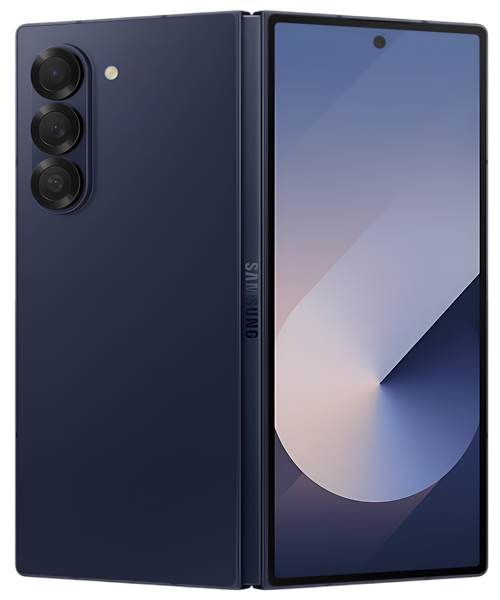
Common Repairs We Handle Daily


Maintain Your Samsung Galaxy Z Fold6: Samsung Galaxy Z Fold6 Repair Best Practices
Why does your brand-new Galaxy Z Fold6, a device that feels like it’s straight out of a sci-fi movie, suddenly feel… fragile? Maybe you’ve noticed a tiny bubble forming under that inner screen protector, or the hinge doesn’t feel quite as smooth as it did on day one. It’s a nerve-wracking experience, isn’t it? You’ve invested in a cutting-edge piece of technology, and the last thing you want is for something to go wrong.
Here’s the thing: foldable phones are different. They have moving parts and unique materials that require a different level of care. But don’t worry—most issues are either preventable or totally fixable. A professional Samsung Galaxy Z Fold6 repair is a highly specialized service, but understanding your device is the first step to avoiding one. We know you want to keep your innovative phone in perfect condition.
This guide is designed to be your owner’s manual for longevity. We’ll walk through a quick diagnostic quiz, a step-by-step troubleshooting tree for common issues, and explain how expert Samsung Galaxy Z Fold6 repair services can keep your device running flawlessly. Let’s get you back to enjoying your futuristic phone without the anxiety.
"Is This You?" Quick Diagnostic Quiz
Before we dive deep, let’s see which of these common foldable concerns match what you're experiencing. Answer honestly!
Inner Screen & Hinge:
- Is there a bubble, lift, or peel starting on your inner screen protector?
- Does the hinge make a "crunchy" or grinding sound when you open or close it?
- Does the phone not open completely flat to 180 degrees anymore?
- Is there a black line or "crease of death" appearing down the middle of the inner screen?
Outer (Cover) Screen & General Use:
5. Is the front cover screen unresponsive to touch?
6. Does the battery seem to die way faster than you expected?
7. Does the phone get unusually warm near the hinge area?
Your Score:
- 1 "Yes" (especially #1): This is a common, addressable issue. Time to look at preventative care.
- 2-3 "Yeses": You're experiencing signs of wear that need attention soon.
- 4+ "Yeses" (especially #4): Your device needs a professional diagnostic assessment right away.
Let's Talk About Your Samsung Galaxy Z Fold6 for a Second
Let's talk about your Galaxy Z Fold6 for a second. When this device launched in mid-2024, it wasn't just another phone; it was a statement about the future of mobile productivity. Its reliability reputation is built on years of Samsung refining their foldable technology. They made the hinge stronger, the inner screen more durable, and the software smarter at handling the transition between the cover screen and the main display.
You didn't choose the Fold6 just to have a phone. You chose it because you wanted a tablet that fits in your pocket. It’s for power users, multitaskers, and people who want to do more on the go—watching videos on that massive inner screen, running two apps side-by-side, or using the S Pen for notes and sketches. It's an incredibly capable device, but that capability comes from complex, moving parts. And moving parts, as we know, require mindful care.
Troubleshooting Tree: Let's Diagnose the Problem
Okay, let's work through your issues like a technician would, starting with the most common and moving to the more serious. Find your starting point and follow the path.
Path 1: The Inner Screen Protector is Bubbling or Peeling
Starting Point: You see a bubble or the edge of the screen protector lifting, usually near the crease.
- Step 1: Is it just the protector? Look closely. Is the screen underneath the bubble perfectly fine? No black spots or lines?
- Yes, the screen underneath looks perfect: Great! This is the most common and least severe issue. The pre-installed protector is a consumable item designed to take wear and tear.
- No, there's a black line or dead pixels under the bubble: Stop here. This is not a protector issue; it's a display failure. Jump to Path 4.
- Step 2: Resist the Urge to Peel! It's tempting to just rip the protector off, but don't. Peeling it off yourself can put stress on the ultra-thin glass layer underneath and potentially cause damage.
- Step 3: What's the real solution? The screen protector is designed to be professionally replaced. It’s a routine service.
- Honest Assessment: If this is your only issue, a simple screen protector replacement is an affordable and fast fix. It is a type of Samsung Galaxy Z Fold6 repair, but it's a minor one that restores the perfect look of your inner display.
Path 2: The Hinge Feels "Crunchy" or Stiff
Starting Point: You hear or feel a grinding/crunching sound when opening and closing the phone.
- Step 1: The Debris Check. Look closely at the hinge area when the phone is partially folded. Do you see any visible debris, sand, or pocket lint caught in the mechanism? The Fold6 has internal brushes to sweep debris out, but they aren't perfect.
- Step 2: Do NOT Use Compressed Air. It's tempting to try and blast debris out, but you can actually force it deeper into the hinge mechanism, making the problem worse.
- Step 3: The Gentle Brush. Power the phone off. Use a very soft, dry toothbrush or an anti-static brush to gently whisk away any visible debris from the outside of the hinge.
- Step 4: Did it help?
- Yes, it feels smoother: You likely just had some surface debris. Keep an eye on it.
- No, it still feels crunchy: The debris is likely inside the complex gearing of the hinge. This is not a DIY fix.
- Honest Assessment: A crunchy hinge is an early warning sign. Continuing to use it can cause the debris to damage the internal gears, leading to a complete hinge failure. This requires a professional Samsung Galaxy Z Fold6 repair to disassemble and either clean or replace the hinge mechanism.
Path 3: The Phone Won't Open Completely Flat
Starting Point: You unfold your phone, but it's stuck at a slight angle, maybe 175-179 degrees instead of a perfect 180.
- Step 1: Repeat the Debris Check. Look at the hinge area. Is there anything physically blocking it from opening all the way?
- Step 2: Is the frame bent? Lay the phone on a perfectly flat table, both open and closed. Does it wobble? A slight bend in the frame, often from being sat on or dropped, is a common cause.
- Step 3: Is it getting worse over time? A hinge that is slowly losing its ability to open flat is a sign of internal wear or damage to the hinge mechanism.
- Honest Assessment: This is a hardware problem. It's either debris in the hinge or the hinge itself is damaged. There is no software fix for this. It requires professional service to diagnose and fix the physical mechanism.
Path 4: There's a Black Line or Dead Pixels in the Crease
Starting Point: A vertical line of black or colored pixels has appeared in the center of your inner screen, right along the fold.
- Step 1: Does touch still work? Gently run your finger over the black line. Does the screen still respond on either side?
- Step 2: Is it spreading? A single line of dead pixels can sometimes stay stable, but if it's growing or turning into a black "blob," the damage is progressing.
- Step 3: Power the phone off and on. This is just to confirm it's not a bizarre software glitch (it almost never is).
- Honest Assessment: This is the most feared foldable phone issue, and it's a critical hardware failure. It means the delicate OLED panel and its underlying circuitry have cracked along the crease. This is not fixable. The entire inner display assembly needs to be replaced. This is the most complex and significant Samsung Galaxy Z Fold6 repair, but it's absolutely doable and restores the phone to perfect condition.
Warning Signs Checklist: When to Stop and Seek Professional Help Immediately
If you see any of these, don't wait. Stop troubleshooting and bring it in.
- [ ] A black line or blob appearing in the middle of the inner screen.
- [ ] The phone makes a loud "pop" or "snap" sound when opening or closing.
- [ ] The inner screen flickers or goes black when you open the phone past a certain angle.
- [ ] The two halves of the phone feel loose or wobbly at the hinge.
- [ ] You can see visible damage or a gap in the hinge mechanism itself.
Continuing to use a Fold6 with these symptoms can cause catastrophic failure.
Why Modern Phones Have These Issues (It's Not Just Yours)
Look, every smartphone deals with certain problems. It's not that your device is defective—it's just physics and chemistry doing their thing. Foldables just have a few extra, unique challenges. That amazing folding screen is a marvel of material science, but it's also inherently more delicate than a solid piece of glass. The hinge is a brilliant piece of mechanical engineering, but any machine with moving parts is subject to wear and tear. Your battery is working extra hard to power two displays. These aren't failures of design; they're the realities of pushing technology to its limits.
How We'll Get Your Galaxy Z Fold6 Back to Normal
Look, we get it—handing over a complex and expensive device like a Fold6 can be nerve-wracking. You're not sure if the technician has ever even worked on one before. Let's walk you through exactly what happens at The Fix, so there are zero surprises.
- Free Foldable-Specific Diagnostic. We don't just "look at it." We have a specific checklist for foldables. We'll test the full range of motion of the hinge, inspect the inner screen protector and the display underneath with magnification, and run diagnostics on both screens. This diagnostic is always free, and we'll tell you straight up what we find.
- A Clear, Honest Explanation. We'll explain the issue in plain English. "Your inner screen protector is just starting to lift; we can replace that easily," or "The crunching sound is a sign of debris in the hinge; here's what it takes to fix that." You'll get a clear quote and an honest assessment of whether a repair makes sense.
- The Actual, Specialized Repair. Our technicians are trained specifically on foldable devices. We have the proper heating plates, suction tools, and jigs required to safely open a Fold6 without damaging the delicate screens or frame. We use high-quality parts and follow precise procedures, especially for inner screen replacements, which are among the most complex repairs in the industry.
- Multi-Point Testing. We don't just hand it back. After a repair, we test everything: hinge smoothness, full 180-degree opening, inner and outer screen touch response, camera function on both screens, and wireless charging. We make sure your foldable is back to full working condition.
Avoid These Common Mistakes (They're Even More Costly on a Foldable)
- Don't Rip Off the Inner Screen Protector. It's not like a normal screen protector. It's an integral part of the display structure. Peeling it off can damage the screen. Let a professional replace it.
- Don't Use Unofficial S Pens. Only use the S Pen designed for the Z Fold series. A regular S Pen from a Note or Tab has a hard tip that will permanently damage the soft inner screen.
- Don't Put It in a Pocket with Keys or Coins. The inner screen is soft. Even when closed, a grain of sand or debris that gets between the screens can cause pixel damage when you press the phone shut. Keep it in a clean pocket.
- Don't Ignore Hinge Sounds. A "crunchy" hinge is an early warning. Ignoring it can lead to a seized hinge or a damaged display. Get it checked out.
Here's What to Do Next
Your Samsung Galaxy Z Fold6 is a cutting-edge device. Most of the "scary" problems you hear about are either preventable with proper care or totally fixable by a skilled technician. You don't have to live with a bubbling screen protector or a crunchy hinge. You've now got a clear troubleshooting path to figure out what's going on.
If you've gone through this guide and you're still stuck, or if you've identified a hardware issue that needs an expert, that's what we're here for. The team at The Fix has the specialized tools and experience to handle a Samsung Galaxy Z Fold6 repair correctly. Bring your device by for a free, no-pressure diagnostic, and let's get your futuristic phone back to feeling perfect.


Trusted repair solution for mobile phones, tablets, gaming consoles, and computer systems. We provide fast, reliable, and affordable repair services to get your devices back in perfect working condition.
The Fix is an independent repair service provider and is not affiliated with, sponsored by, or endorsed by Apple Inc., Samsung Electronics, Google LLC, or any other device manufacturer. We use high-quality compatible replacement parts unless explicitly stated. All trademarks are property of their respective owners.


© Copyright The Fix Solutions All rights reserved 2026.
Design by Deepcoder