






Samsung Galaxy Z Fold5 Repair Services
Get fast, reliable, and professional Samsung Galaxy Z Fold5 repair services at The Fix — your trusted destination for expert device care.
Common Repairs We Handle Daily


An Expert Analysis of Samsung Galaxy Z Fold5 Repair: Causes & Solutions
Here's a wild stat: nearly 40% of Z Fold5 owners experience some kind of issue with their screen protector, hinge, or battery within the first two years of ownership. That's not because the Fold5 is poorly made—it's because foldable phones are fundamentally more complex than traditional smartphones, with more moving parts and more things that can need attention over time.
Your Z Fold5 represents Samsung's fourth-generation foldable technology, and while it's significantly more refined than earlier Fold models, it's still a device with a sophisticated hinge mechanism, dual displays, and a flexible screen that bends thousands of times. When something goes wrong, professional Samsung Galaxy Z Fold5 repair can usually address it effectively. The key is understanding what's normal wear versus what's an actual problem, and knowing when to seek Samsung Galaxy Z Fold5 repair before minor issues become major headaches. In this guide, we'll break down the most common Fold5 issues, explain their root causes, and provide clear solutions for each problem.
What Makes the Z Fold5 Tick
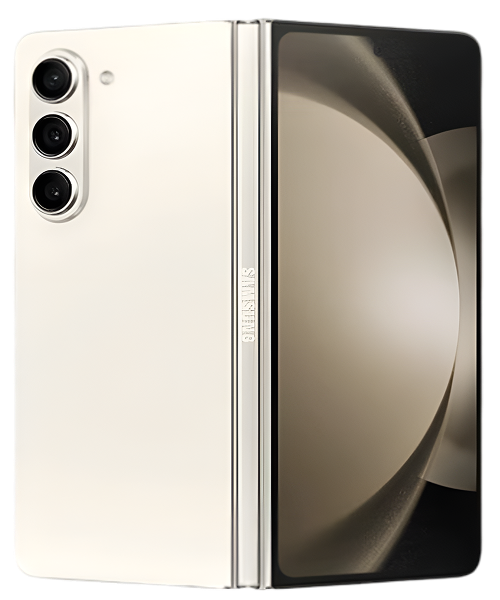
The Z Fold5 hit stores in mid-2023, and it's honestly Samsung's most polished book-style foldable yet. That redesigned hinge sits completely flat when closed—no gap like the Fold4 had—which immediately makes it feel more premium and protects the inner display better. The 7.6-inch inner screen is stunning for productivity and media, while the 6.2-inch cover display handles daily tasks perfectly. Samsung's Snapdragon 8 Gen 2 processor delivers flagship performance without the thermal issues that plagued some earlier Fold models.
What makes owning a Fold5 different is that you're managing two screens, a mechanical hinge system, and a form factor that transforms based on what you're doing. The inner display uses Ultra Thin Glass with a protective film applied at the factory. That hinge contains dozens of precision components working together to give you that satisfying snap when opening and closing. These engineering marvels create an incredible user experience—but they also mean there are more components that need occasional maintenance or repair compared to traditional smartphones.
The Science Behind Device Aging
Your Z Fold5 is like a high-end road bike—incredible performance, sophisticated engineering, but it needs more attention than a basic cruiser would. Let's talk about what happens to foldable devices over time.
Every time you fold and unfold your Fold5, you're flexing that Ultra Thin Glass display and working every component in that hinge mechanism. Do that 50 times a day, and you're looking at 18,000+ folds per year. The materials are engineered for hundreds of thousands of folds, but physics is physics—repeated stress causes gradual wear on any mechanical system.
The battery in your Fold5 is actually two separate batteries, one on each side of the hinge. They work in tandem to power dual displays, a powerful processor, and all your apps. Each charge cycle causes chemical changes inside those cells. After a year of daily charging, you've gone through 300-400 cycles, and battery capacity typically drops to 90-95% of original. After two years, you're looking at 85-90% capacity. That's not a defect—it's just how lithium-ion chemistry works.
The screen protector on the inner display takes constant abuse from your fingers, the S Pen if you use one, and the physical act of folding. It's not meant to last forever—Samsung knows this, which is why authorized repair centers can replace it as part of normal maintenance. The protector develops micro-scratches, the adhesive weakens over time, and eventually it starts to lift or bubble.
Temperature affects foldables more than traditional phones. When you fold your Fold5, both displays are close together with limited airflow between them. Heat generated by the processor, displays, and battery has less space to dissipate. If you're using intensive apps on the inner display while it's unfolded, heat builds up along the hinge area where components are densest.
Software complexity multiplies the challenge. Your Fold5 runs specialized Android code that has to seamlessly handle app continuity between two different screen sizes and aspect ratios, manage different refresh rates, coordinate between dual batteries, and optimize performance across wildly different use cases. Over months of updates and app installations, system complexity grows and performance can degrade without proper maintenance.
Tech Myth Debunked
Myth: "The crease in the middle of the screen means the display is defective and will eventually fail."
Reality: Every single Z Fold5 has a visible and tactile crease down the middle of the inner display—it's an inherent characteristic of current foldable display technology, not a defect. The crease exists because you're literally folding glass and plastic layers thousands of times. Samsung engineers the display so the crease is cosmetic rather than functional.
Here's what actually matters: if your crease is just visible and slightly tactile but the display works perfectly in that area—no discoloration, no dead pixels, no touch response issues—that's completely normal. The crease will become slightly more pronounced over thousands of folds, and that's also normal wear.
What's NOT normal: if you see lines, discoloration, dead pixels, or touch problems specifically along the crease, that indicates actual display damage or degradation that needs professional attention. At The Fix, we've examined hundreds of Fold5 devices, and we can tell the difference between normal crease wear and problematic display issues. Don't panic about the crease itself—worry about functionality, not cosmetics.
Most Common Z Fold5 Problems
Screen Protector Lifting or Bubbling
What you're experiencing: That factory-applied screen protector on your inner display is developing bubbles, usually starting near the crease or edges. It might be lifting enough that you can catch your fingernail under it. You see it every time you open your phone, and it drives you crazy.
Root cause analysis: Samsung applies a thin protective film over the flexible OLED display at the factory. This protector experiences stress every single time you fold the phone. The adhesive weakens over time, especially along the crease where stress is highest. Heat, humidity, and oils from your fingers accelerate adhesive degradation. Once the protector starts separating, it usually gets progressively worse.
The protector typically lasts 12-18 months with normal use. Heavy users or people in humid environments often see it fail sooner. S Pen users put more stress on the protector, which can lead to faster wear. This isn't a defect—it's normal wear on a consumable component.
Solution path: Don't attempt DIY removal—the inner display is extremely delicate, and improper removal can damage the actual screen underneath. Professional Samsung Galaxy Z Fold5 repair involves carefully removing the old protector in a controlled environment, thoroughly cleaning the display, and applying a new protector specifically designed for foldable screens. The process takes about 30-45 minutes and restores that "like new" feel to your inner display.
Hinge Mechanism Feeling Different
What you're noticing: Your Fold5's hinge doesn't feel as smooth as it used to. Maybe there's slight resistance or a faint grinding sensation when opening or closing. You might hear subtle clicking sounds that weren't there when the phone was new. The hinge might feel stiffer or, conversely, slightly looser than you remember.
Root cause analysis: The Z Fold5's hinge is a marvel of engineering with multiple cams, springs, and friction elements working together. Despite improved dust resistance compared to earlier Fold models, microscopic debris still works its way into the mechanism over time. Lint, dust, and tiny particles act like sandpaper on those precision components.
The hinge's resistance is calibrated to a specific feel—firm enough to stay at any angle, but smooth enough to open easily. After thousands of folds, the lubrication inside can shift or degrade slightly, changing how the hinge feels. Springs can settle, friction elements can wear, and tight tolerances can become slightly loose.
Solution path: Minor hinge stiffness often responds well to cleaning. Use a soft-bristled brush to gently remove visible debris from the hinge area. For more significant changes in hinge feel—pronounced roughness, significant looseness, or difficulty opening—professional inspection at The Fix can determine if you need cleaning, lubrication service, or component replacement. Catching hinge issues early prevents more serious problems down the line.
Battery Life Not Meeting Expectations
What you're dealing with: Your Fold5 doesn't last through a full day anymore. You're charging twice daily, the battery percentage seems to drop faster during certain activities, and you're constantly aware of remaining battery life. Using the inner display drains power noticeably faster than the cover screen.
Root cause analysis: The Fold5 has dual batteries totaling 4,400mAh, but they're powering two displays (one of them 7.6 inches at 120Hz), a flagship processor, 5G connectivity, and all your apps. That large inner display is particularly power-hungry—unfolding your phone and switching to that bigger screen significantly increases power consumption.
After a year of daily charging, your batteries have been through 300-400 cycles. Each cycle causes slight capacity loss. If you frequently fast-charge, use your phone in hot environments, or regularly drain to zero, degradation accelerates. By 18-24 months, you're typically looking at 80-85% of original capacity, which means noticeably shorter battery life.
Background processes also accumulate over time. Apps you installed months ago might be running in the background constantly. 5G searching in areas with weak signal kills batteries fast. Always-on display, high screen brightness, and location services all contribute to drain.
Solution path: Start with software optimization—identify battery-hogging apps and restrict their background activity. Disable 5G if signal is weak. Reduce screen brightness and refresh rate when you don't need them maxed out. If optimization doesn't help and battery health is below 80%, replacement makes sense. Fresh batteries in a Fold5 restore that all-day battery life you remember from when the device was new.
Inner Display Issues
What's happening: You're seeing lines across the inner display, dead pixels appearing, discoloration along the crease, or areas where touch isn't responsive. In worst cases, portions of the display are dark or completely non-functional. This is the nightmare scenario for foldable owners.
Root cause analysis: The flexible OLED panel in your Fold5 is incredibly sophisticated but vulnerable to damage. If something gets between the displays when you fold the phone—even a grain of sand or small debris—it can create a pressure point that damages the screen. Dropping the phone while unfolded can crack the display internally even if there's no visible external damage.
Sometimes it's progressive rather than catastrophic. That crease we talked about? If it develops into actual display failure rather than just cosmetic wear, you'll see discoloration, lines, or dead pixels spreading from the crease area. Manufacturing variations mean some displays develop issues sooner than others.
Water damage is another culprit. The Fold5 has IPX8 water resistance, but that hinge area is a potential entry point. If water gets inside and reaches the display connectors, you can end up with display malfunction even after the phone dries out.
Solution path: Display issues require immediate professional attention. Back up your data if the device is still functional. Stop folding the phone if possible to prevent worsening the damage. At The Fix, we can diagnose whether you're dealing with display failure, connector issues, or potentially just software glitches that mimic display problems. Even major display repairs cost significantly less than replacing the entire device, and we'll give you honest guidance on whether repair makes economic sense for your specific situation.
Charging Port Reliability Issues
What you're experiencing: Your USB-C port feels loose, the cable doesn't stay in firmly, or you have to position the cable at specific angles to get charging to work. Sometimes the phone doesn't recognize it's plugged in at all. Wireless charging works fine, but wired charging is frustratingly unreliable.
Root cause analysis: The Fold5's charging port gets used multiple times daily—possibly more than once daily since battery life on foldables encourages frequent top-ups. Each insertion creates microscopic wear on the internal pins. More significantly, every time you plug in a cable, you push lint, dust, and debris deeper into the port. After months of use, there's often a compacted layer of material preventing proper electrical contact.
The port's retention mechanism—the little clips that hold the cable firmly—weakens over time. Aggressive cable insertion, yanking cables out at angles, or using poor-quality cables that don't fit properly accelerates wear. The result is that loose, wiggly feeling where cables fall out or don't make consistent contact.
Solution path: Inspect your port with a flashlight—you might be surprised how much debris is packed in there. Carefully clean it with a wooden toothpick, gently scraping the bottom and sides. Use compressed air from a distance to blow out loosened material. If cleaning doesn't restore proper function, the port likely needs replacement. Port replacement on the Fold5 is straightforward—we replace the entire USB-C flex cable assembly, and your phone charges like new again. Most people are shocked at the difference a fresh port makes.
S Pen Performance Problems
What's going on: Your S Pen input feels laggy or imprecise. Sometimes it doesn't register at all, other times input appears in the wrong location. There's noticeable delay between pen movement and on-screen response. Drawing or writing feels "off" compared to how it used to work.
Root cause analysis: The Fold5's inner display generates an electromagnetic field that the S Pen senses for position detection. When the screen protector lifts or bubbles, it creates tiny gaps that interfere with this field. Oils, moisture, or debris on the display surface affect electromagnetic sensing. Even slight battery bulging can press on the display from behind, throwing off calibration.
Software issues contribute too—corrupted S Pen service files, cached data from the Notes app, or conflicts with third-party apps can cause input problems. Samsung's S Pen drivers occasionally have bugs that updates need to fix.
Solution path: Test with a different S Pen if possible to isolate whether it's the pen or phone. Clean your display thoroughly—even slight oils affect electromagnetic sensing. Check if your screen protector is lifting in areas where you're experiencing S Pen issues. Clear cache for Samsung Notes and any other S Pen-dependent apps. Update your system software. If problems persist after software troubleshooting, professional Samsung Galaxy Z Fold5 repair can diagnose whether you need screen protector replacement, display recalibration, or other hardware service.
Our Honest Approach to Samsung Galaxy Z Fold5 Repair
We know repair shops can feel intimidating, especially when you're dealing with a premium foldable device that cost over $1,800. Let's walk through exactly what happens at The Fix so there are zero surprises.
Comprehensive Free Diagnostic
When you bring your Fold5 to The Fix, we start with detailed diagnostics specific to foldable devices. We test hinge operation through full range of motion, checking for roughness, looseness, or resistance. We inspect both displays with calibrated equipment, looking for damage, burn-in, or calibration issues. We run battery health tests that give actual capacity measurements for both cells. We examine the screen protector condition under magnification. We test S Pen response if you use one.
For the Fold5 specifically, we check that water resistance seals are intact, verify the hinge sits completely flat when closed, and test the complex software that manages app continuity between displays. This diagnostic takes 20-30 minutes and gives us a complete picture of your device's condition.
Transparent Communication
After diagnostics, we sit down and explain what we found in plain language. If your crease is just normal wear and everything's functioning fine, we'll tell you that—no upselling, no creating problems that don't exist. If there's an issue that needs attention, we explain what's wrong, why it happened, and what fixing it involves.
We discuss all your options. Sometimes there's a quick fix and a comprehensive fix—we explain the pros and cons of each. We're honest about when repair makes sense and when it might not. Our goal is giving you the information you need to make the best decision for your situation.
Quality Foldable Repair
If you proceed with repair, we use high-quality parts and techniques specific to Samsung foldables. Screen protector replacement happens in a controlled environment with protectors designed for the Fold5's specific dimensions and curvature. Hinge service involves careful disassembly, cleaning, and proper reassembly with attention to the precision tolerances these mechanisms require.
Battery replacement involves dealing with dual batteries in a complex internal layout—this isn't like replacing a battery in a traditional phone. We handle it with the care and expertise foldables demand. Most repairs are same-day service, though we'll give you realistic timelines based on parts availability and repair complexity.
Rigorous Testing
Before you get your Fold5 back, we test everything extensively. We fold and unfold the device multiple times verifying smooth hinge operation. We test both displays thoroughly—touch response, color accuracy, brightness, refresh rate. We verify battery charging and health. We test cameras, connectivity, and all sensors. At The Fix, we don't hand back a foldable until we're confident it works exactly as Samsung intended.
Keep Your Fold5 Running Great
Hinge care: Clean the hinge area weekly with a soft brush, removing visible lint and debris before it works into the mechanism. Avoid using your Fold5 in extremely dusty or sandy environments. When folding, ensure nothing's between the displays—even tiny debris can cause pressure damage.
Display protection: Keep both screens clean with a microfiber cloth. Don't press hard on the inner display—it's more delicate than traditional screens. If you use the S Pen, replace the tip when worn. Monitor your screen protector condition and plan for replacement when lifting becomes significant.
Battery optimization: Enable "Protect Battery" to cap charging at 85%. Avoid extreme temperatures—don't leave your Fold5 in hot cars. Consider slower charging overnight rather than always fast-charging. Keep your battery between 20-80% most of the time for optimal longevity.
Temperature management: Remove your case during extended intensive use to help heat dissipate. Don't use intensive apps while fast-charging. Give your phone breaks during long gaming or video sessions. Monitor which apps generate excessive heat and restrict them if needed.
Professional Repair Makes More Sense Than Replacement
Your Z Fold5 represents a significant investment in cutting-edge mobile technology. Most issues you'll encounter—screen protector wear, hinge maintenance, battery optimization, or even display problems—are repairable at a fraction of what you'd pay for a replacement device.
Expert care extends your device's lifespan significantly. Bring your Fold5 to The Fix for a free diagnostic. Our technicians specialize in Samsung foldables—we understand these devices inside and out, we have the right tools and parts, and we'll treat your phone with the care a premium foldable deserves. Whether you need screen protector replacement, hinge service, battery work, or just peace of mind that everything's functioning properly, The Fix delivers the expertise your Fold5 requires.


Trusted repair solution for mobile phones, tablets, gaming consoles, and computer systems. We provide fast, reliable, and affordable repair services to get your devices back in perfect working condition.
The Fix is an independent repair service provider and is not affiliated with, sponsored by, or endorsed by Apple Inc., Samsung Electronics, Google LLC, or any other device manufacturer. We use high-quality compatible replacement parts unless explicitly stated. All trademarks are property of their respective owners.


© Copyright The Fix Solutions All rights reserved 2026.
Design by Deepcoder