






Samsung Galaxy Z Fold4 Repair Services
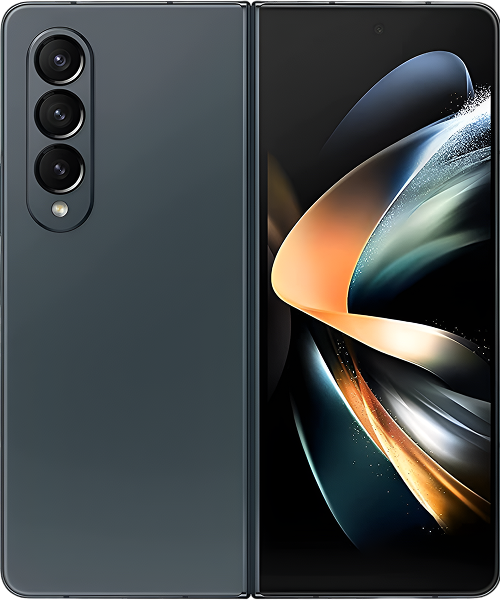
Get fast, reliable, and professional Samsung Galaxy Z Fold4 repair services at The Fix — your trusted destination for expert device care.
Common Repairs We Handle Daily


Why Does Your Samsung Galaxy Z Fold4 Keep Failing? Samsung Galaxy Z Fold4 Repair Guide
Why does your Fold4's screen protector keep bubbling up when you paid over $1,800 for this thing? Or maybe your hinge doesn't feel as smooth as it used to, and now you're worried every time you fold it. The battery that used to last all day now needs charging by mid-afternoon. That crease down the middle seems more pronounced than when the phone was new. These problems are incredibly frustrating on a premium foldable device.
Here's what's actually happening—your Galaxy Z Fold4 launched in August 2022, making it over two years old at this point. Foldable phones age differently than traditional smartphones because they have moving parts, flexible displays, and complex mechanisms that experience unique wear. Professional Samsung Galaxy Z Fold4 repair addresses these issues, but understanding why foldables develop problems helps you recognize what's normal aging versus actual failure. This guide explains exactly why these problems occur and provides clear solutions for each Samsung Galaxy Z Fold4 repair need you might encounter.
Understanding Why All Smartphones Age
Your Fold4 is like a high-end convertible sports car—incredible engineering, amazing capability, but more maintenance-intensive than a regular sedan. That folding mechanism, flexible display, and dual-screen design create experiences traditional phones can't match, but they also introduce complexity that requires more attention.
Think about folding and unfolding your Fold4 fifty times a day. That's over 36,000 folds in two years. Every fold stresses the hinge mechanism, flexes the display, and works dozens of precision components. The materials are engineered for hundreds of thousands of folds, but wear accumulates. After two years, components show age.
Your battery has been through roughly 730 charge cycles. Each cycle causes chemical changes inside those lithium-ion cells. At two years, you're typically looking at 80-85% of original capacity—less if you've charged frequently or exposed the device to heat. The Fold4 has dual batteries (one on each side of the hinge) working in tandem, and if they degrade at slightly different rates, you get unpredictable battery behavior.
The screen protector on the inner display takes constant abuse. Every swipe, every fold, every touch creates wear on that protective film Samsung applied at the factory. It's not meant to last forever—Samsung knows this, which is why they offer protector replacement as maintenance. After two years of daily use, bubbling and lifting are completely normal.
Your hinge contains dozens of precision-engineered parts—cams, springs, friction elements, bushings—all working together thousands of times daily. Despite improved dust resistance compared to earlier Fold models, microscopic debris still infiltrates over time. Lubrication shifts or degrades slightly. Tight tolerances become slightly less tight. The hinge that felt perfect when new develops subtle changes after two years.
Display components age too. That flexible OLED panel bends thousands of times at the crease point. The Ultra Thin Glass and protective layers experience stress with every fold. The crease becomes more visible over time—not because the display is failing, but because materials show fatigue from repeated flexing. This is normal physics, not a defect.
Software complexity accumulates through two years of updates. Your Fold4 launched with Android 12L and has received updates. System files have bloated. App caches have accumulated. Background processes have multiplied. Everything compounds to create the occasional lag or glitch you're experiencing.
Understanding these aging mechanisms helps you recognize when problems are normal wear requiring maintenance versus actual failures needing repair.
Screen Protector Lifting
What you're experiencing: That factory-applied screen protector on your inner display is developing bubbles, usually starting near the crease or edges. It's lifting enough that you can catch your fingernail under it. Sometimes there are visible wear lines from repeated folding. You see it every time you open your phone, and it's incredibly annoying.
Why this happens: Samsung applies a thin protective film over the flexible OLED display at the factory. This protector experiences enormous stress—every fold, every swipe, every touch. After two years and 36,000+ folds, the adhesive weakens dramatically, especially along the crease where stress is highest. Heat, humidity, and oils from your fingers accelerate adhesive degradation.
The protector typically lasts 12-18 months with normal use. At two years, lifting is expected, not unusual. If you've used your Fold4 heavily, in humid environments, or with sweaty hands frequently, protector life is even shorter. This isn't Samsung making a bad product—it's a consumable component reaching end of life.
What you can try: Don't attempt DIY removal—seriously, don't. The inner display is incredibly delicate. Improper removal can damage the actual OLED underneath, turning a simple protector replacement into a full display repair. Don't try to smooth bubbles down—that just spreads the separation.
If lifting is minimal and not affecting usability, you can continue using the device carefully. Avoid pressing on bubbled areas. But plan for professional replacement soon—once lifting starts, it typically gets worse progressively.
What we tell customers who come in: Screen protector replacement is the most common Fold4 maintenance we perform. It's not a repair—it's scheduled maintenance like changing oil in a car. We carefully remove the old protector in a controlled environment, thoroughly clean the display, and apply a fresh protector designed specifically for foldable screens. Your Fold4 feels brand new again. Most people are shocked at the difference a fresh protector makes.
Hinge Feeling Different
What you're noticing: Your Fold4's hinge doesn't feel quite as smooth as it used to. Maybe there's slight resistance or a faint grinding sensation when opening or closing. You might hear subtle clicking or creaking sounds that weren't there when new. The hinge might feel stiffer in certain positions, or conversely, slightly looser than you remember.
Why this happens: The Fold4's hinge is mechanical precision engineering with multiple moving parts working in harmony. After 36,000+ folds, mechanical components show wear. Microscopic debris—lint, dust, tiny particles—infiltrates despite improved dust resistance. This debris acts like sandpaper on precision surfaces.
Lubrication inside the hinge shifts or degrades over two years. Springs settle into new positions. Friction elements wear slightly. Tight tolerances that made the hinge feel perfect when new become slightly different. Temperature changes affect metal components—expansion and contraction over seasons can subtly alter how parts fit together.
If you've dropped your Fold4 while open or closed, internal components might have shifted microscopically. Even drops that seem fine externally can affect hinge alignment internally. Using the phone at extreme temperatures—very hot or very cold—stresses hinge materials.
What you can try: Clean around the hinge area carefully with a soft-bristled brush. Remove visible debris gently. Don't use compressed air directly into the hinge—you might push debris deeper. Open and close your phone slowly several times to see if feel improves as components settle.
Don't force the hinge if it feels stiffer than usual—you could cause damage. Avoid folding the phone in sandy, dusty, or dirty environments. Keep the hinge area clean with weekly maintenance.
In our experience with hundreds of these: Minor hinge stiffness or sound changes are often normal settling after two years of use. Significant roughness, pronounced clicking, or difficulty opening/closing indicates issues needing professional attention. At The Fix, we can inspect the hinge mechanism, determine if cleaning helps, or assess whether component wear requires service.
Battery Not Meeting Expectations
What you're dealing with: Your Fold4 doesn't last through a full day anymore despite dual batteries totaling 4,400mAh. You're charging midday or even twice daily. Using the large inner display drains battery noticeably faster than the cover screen. The battery percentage seems to drop faster during certain activities. You're constantly aware of remaining battery life.
Why this happens: Two years and ~730 charge cycles mean both battery cells have degraded. You're probably at 80-85% of original capacity—that 4,400mAh total is closer to 3,500-3,700mAh in reality now. The Fold4's dual batteries can degrade at slightly different rates, causing unpredictable behavior.
That large 7.6-inch inner display at 120Hz is power-hungry. Unfolding your phone and switching to that bigger screen dramatically increases power consumption compared to using the cover display. The Snapdragon 8+ Gen 1 is efficient, but intensive tasks still draw substantial current.
Background processes accumulate over two years. Apps run constantly without your knowledge. 5G searching in weak signal areas kills battery. Always-on display on the cover screen, high brightness, and location services all contribute. After two years of app installations and updates, background activity is significantly higher than when the device was new.
What you can try: Check battery health in Settings > Battery and device care. If capacity is below 80%, replacement makes sense. Identify battery-hogging apps and restrict their background activity aggressively. Disable 5G if signal is weak. Reduce screen brightness and use 60Hz refresh when you don't need 120Hz smoothness.
Enable "Protect Battery" to cap charging at 85% if you plan to keep the device longer—this slows further degradation. Close apps you're not using. Use the cover screen more and the inner display less when you don't need the larger screen.
After years of fixing these devices: Battery replacement on two-year-old Fold4 devices is common and effective. Fresh batteries restore that all-day battery life. But it's more complex than traditional phone battery replacement—dual batteries in a folding form factor require specialized service. At The Fix, we handle Fold4 battery replacements carefully, and the difference in daily usability is dramatic.
The Crease Getting More Noticeable
What you're seeing: That line down the middle of your inner display is more visible and tactile than when the phone was new. You can feel it more when swiping across. It's noticeable when light hits at certain angles. This concerns you because you worry the display is failing.
Why this happens: Every single Fold4 has a crease—it's an inherent characteristic of current foldable technology. Over 36,000+ folds, the crease becomes slightly more pronounced. The Ultra Thin Glass, OLED layers, and protective films all experience stress at the folding point. Materials show fatigue from repeated flexing.
This is normal wear, not failure—unless you see discoloration, dead pixels, or touch responsiveness issues specifically at the crease. A visible and tactile crease with fully functional display is completely normal at two years. Samsung engineers the display so the crease is cosmetic rather than functional.
Temperature affects crease visibility. Folding your phone when it's cold makes the crease more prominent temporarily. Heat can do the same. If you fold with maximum force every time, you're creating more stress than gentle folding does.
What you can try: Nothing, honestly—the crease is normal. Don't try to "fix" it by applying pressure or using heat. Don't fold the phone all the way back (beyond 180 degrees). Be gentle when folding and unfolding. Avoid folding in extreme temperatures.
Accept that the crease is part of owning a foldable. If it bothers you cosmetically but the display works perfectly, that's normal aging. If you see weird colors, lines, or dead spots along the crease, that's when you need professional assessment.
The pattern that emerges from repairs: Crease anxiety is incredibly common among Fold4 owners. Most creases we examine are completely normal wear with no functional issues. Actual crease-related display failures are relatively rare. At The Fix, we can distinguish between normal crease wear and problematic display issues. Most people just need reassurance that their crease is normal.
Charging Port Issues
What's happening: Your charging cable doesn't fit snugly in the USB-C port. It wiggles, falls out, or only charges at specific angles. Sometimes the phone doesn't detect it's plugged in. You might see "moisture detected" warnings despite the phone being dry. Wireless charging works fine, but wired charging is unreliable.
Why this happens: Two years and 730+ cable insertions create wear. There's compressed debris from two years of pocket lint and dust. Retention clips holding cables firmly have weakened. Internal pins show wear from constant connection cycles.
On foldable devices, charging port issues develop similarly to traditional phones but are more annoying because you're charging more frequently due to higher power demands. If you charge while using the phone unfolded, you put lateral stress on the port, accelerating wear.
What you can try: Inspect the port with a flashlight—you'll probably see debris buildup. Clean carefully with a wooden toothpick. Use compressed air from a distance to blow out material. Try multiple cables to confirm it's the port, not accessories.
What really happens in most cases: Charging port failure on two-year-old Fold4 devices is common. Port replacement restores normal charging function. At The Fix, we replace the entire USB-C flex cable assembly. Your Fold4 charges like new—cables stay firmly in place, no angle adjustments needed.
Inner Display Issues
What you're experiencing: Lines across the inner display, dead pixels appearing, discoloration along the crease, or areas where touch doesn't respond. In worst cases, portions of the display are dark or non-functional.
Why this happens: The flexible OLED panel is sophisticated but vulnerable. If something got between displays when you folded the phone—even tiny debris—it can create pressure damage. Drops while unfolded can crack the display internally. Sometimes it's progressive failure starting at the crease.
Water damage is another cause despite IPX8 rating—the hinge area is a potential entry point. Accumulated stress over two years can cause the display to develop issues even without specific incidents.
What you can try: Back up data immediately if the phone still functions. Stop folding if possible to prevent worsening damage. Don't attempt any DIY fixes. Seek professional diagnosis quickly.
What the data shows from our repairs: Display failures on Fold4 devices require serious repair investment. We diagnose whether it's display failure, connector issues, or software problems mimicking display failure. Display replacement is expensive—we're honest about costs versus device value at two years old.
Performance Slowdowns
What's going on: Apps take longer to open. There's lag switching between apps. Occasional stutters and freezes. Your Fold4 feels slower than it did new.
Why this happens: Two years of updates, installations, and digital clutter accumulate. System files bloat. App caches consume storage. Background processes multiply. Storage is probably 75%+ full, which degrades performance.
What you can try: Clear system cache from recovery. Uninstall unused apps. Clear app caches. Free up storage to 20%+ available. Disable bloatware. Restart weekly. Factory reset as last resort (backup first).
Samsung Galaxy Z Fold4 Repair Made Simple: Your Action Plan
Here's what happens when you bring your two-year-old Fold4 to The Fix.
Comprehensive Foldable Assessment
We evaluate all foldable-specific components: hinge operation through full range of motion, both displays for damage or burn-in, screen protector condition, battery health for both cells, charging port condition. For Fold4 devices specifically, we check water resistance seal integrity, hinge alignment, and display calibration.
This takes 25-30 minutes and gives complete understanding of your foldable's condition.
Honest Guidance
We explain findings plainly. Screen protector replacement? That's maintenance, not repair. Hinge roughness from debris? Cleaning might help. Battery degraded to 75%? Replacement dramatically improves usability. Display damage? We discuss repair costs versus device value at two years old.
We don't pressure you. We give information so you decide what's right.
Specialized Foldable Repair
If repair makes sense, we use high-quality parts and foldable-specific techniques. Screen protector replacement happens in controlled environments. Hinge service involves careful disassembly and reassembly with attention to precision tolerances these mechanisms require.
Battery replacement handles dual batteries in complex internal layout. Most repairs are same-day.
Thorough Testing
Before you leave, we test extensively. Fold and unfold multiple times verifying smooth operation. Test both displays thoroughly. Verify battery charging and health. Test cameras, connectivity, sensors. At The Fix, Fold4 repairs aren't complete until we're confident everything works as Samsung intended.
Solve Your Samsung Galaxy Z Fold4 Problems: Samsung Galaxy Z Fold4 Repair Solutions
Your Galaxy Z Fold4 is over two years old—screen protector wear, hinge settling, battery degradation, and crease prominence are normal. Most issues are addressable through professional Samsung Galaxy Z Fold4 repair.
Bring your Fold4 to The Fix and let our experienced techs take a look. We've seen every problem these devices develop, we know exactly how to fix them, and we'll treat your phone like it's our own. Free diagnostic, honest pricing, quality work—that's what we deliver for your foldable device.


Trusted repair solution for mobile phones, tablets, gaming consoles, and computer systems. We provide fast, reliable, and affordable repair services to get your devices back in perfect working condition.
The Fix is an independent repair service provider and is not affiliated with, sponsored by, or endorsed by Apple Inc., Samsung Electronics, Google LLC, or any other device manufacturer. We use high-quality compatible replacement parts unless explicitly stated. All trademarks are property of their respective owners.


© Copyright The Fix Solutions All rights reserved 2026.
Design by Deepcoder