






Samsung Galaxy Z Flip4 Repair Services
Get fast, reliable, and professional Samsung Galaxy Z Flip4 repair services at The Fix — your trusted destination for expert device care.
Common Repairs We Handle Daily


Extend Your Samsung Galaxy Z Flip4 Lifespan: Essential Samsung Galaxy Z Flip4 Repair Strategies
Your Galaxy Z Flip4 launched in August 2022, making it over two years old now. You've probably noticed changes—battery doesn't last as long, the screen protector is starting to bubble, maybe the hinge doesn't feel as smooth as it used to. These aren't random problems. They're predictable wear patterns on a flip-style foldable that's experienced over 40,000 folds in two years of daily use.
Professional Samsung Galaxy Z Flip4 repair addresses these issues when they develop, but preventing problems through smart maintenance extends your device's life significantly. The Flip4 is Samsung's most mainstream foldable—compact, stylish, practical. With proper care and timely Samsung Galaxy Z Flip4 repair when needed, it can keep flipping smoothly for years. This guide shows you exactly how to maintain your Flip4, recognize warning signs early, and know when professional intervention makes sense versus continued preventive care.
The Flip4's Reliability Reputation
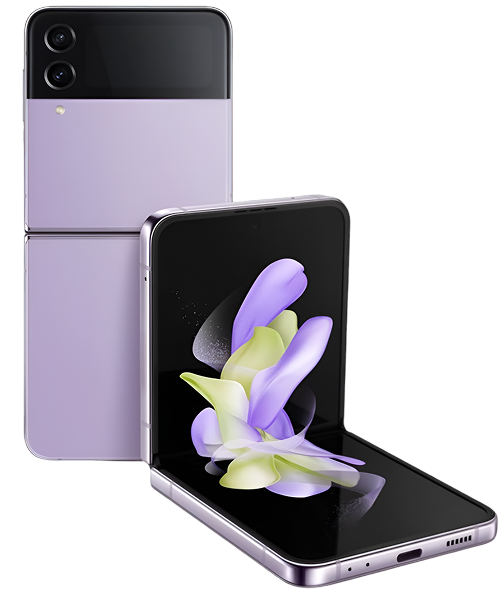
Samsung released the Galaxy Z Flip4 in August 2022 as their fourth-generation flip phone. That 6.7-inch foldable display when unfolded, improved hinge mechanism, and larger cover screen made it more practical than earlier Flip models. The Snapdragon 8+ Gen 1 delivered good performance and efficiency. Samsung improved the hinge durability and screen protector adhesion compared to Flip3.
What makes the Flip4 interesting from a maintenance perspective is that it's a mature flip design—Samsung figured out most durability issues by the fourth generation. Components are more robust than earlier Flip models. But it's still a foldable with moving parts and a flexible display that folds 50+ times daily. After two years, components show predictable wear patterns that maintenance addresses before they become failures.
Why Every Samsung Galaxy Z Flip4 Eventually Shows Wear
Your Flip4 is like a laptop that's been opened and closed 40,000 times—hinges show wear, components have stress, everything's been worked constantly. Except your Flip4 is far more complex and precise than any laptop hinge.
Folding and unfolding 50-60 times daily for two years means roughly 40,000-45,000 folds. Every fold stresses the hinge mechanism, flexes the display at the crease, and works the protective layers. The engineering is impressive—the Flip4 hinge is significantly improved over Flip3. But 40,000+ cycles of any mechanical system creates wear.
Your battery has been through approximately 730 charge cycles. Each cycle causes chemical changes inside the lithium-ion cell. At two years, you're typically at 80-85% of original capacity. The Flip4's 3,700mAh battery is relatively small for a flagship, so degradation to 85% capacity becomes noticeable quickly in daily use.
The screen protector experiences enormous stress—every fold, every swipe, every touch. After two years and 40,000+ folds, adhesive weakens, especially along the crease where stress is highest. The Flip4's protector is better than Flip3's, but it's still not designed to last forever. Bubbling and lifting after 18-24 months is normal maintenance, not defective.
Your hinge contains dozens of precision components working together thousands of times daily. The Flip4's hinge is water-resistant and more debris-resistant than earlier models, but microscopic particles still infiltrate over time. Lubrication shifts slightly. Springs settle. Friction elements show minor wear. The hinge that felt perfect when new has two years of accumulated use.
The display's crease becomes more visible over time—not failure, just material fatigue from 40,000 flexing cycles. The display materials are designed for hundreds of thousands of folds, but visibility of the crease increases gradually. This is normal aging on all flip-style foldables.
Understanding these aging mechanisms helps you maintain your Flip4 proactively and recognize when intervention makes sense.
Screen Protector Maintenance
Current Condition Assessment
Inspect your screen protector carefully. Look for bubbling, particularly near the crease or edges. Check for lifting corners. Run your finger across—do you feel rough areas or raised edges? Are there visible wear lines from repeated folding?
At two years, minor bubbling or edge lifting is expected. Significant bubbling, large lifted areas, or protector peeling require attention soon. The longer you wait, the higher the risk of debris getting underneath and damaging the actual display.
Preventive Care
Clean your display daily with a microfiber cloth to remove oils that degrade adhesive. Avoid pressing hard on the screen when cleaning—the display underneath is delicate. Don't use harsh chemicals or excessive moisture.
Avoid folding with debris on the screen. Even tiny particles between displays when you fold can damage the protector or display. Make it a habit to quickly wipe the screen before folding.
Use gentle folding technique—don't slam the phone shut. Smooth, controlled folding reduces stress on the protector. Avoid folding in extreme temperatures (very hot or cold) which affects adhesive and materials.
When Replacement Needed
If you see significant bubbling, lifting, or the protector is peeling, schedule replacement soon. Don't attempt DIY removal—the display underneath is incredibly delicate. At The Fix, we carefully remove degraded protectors and apply fresh ones designed for the Flip4. This is normal maintenance every 18-24 months, not a repair.
Hinge Health Management
Monitoring Hinge Performance
Pay attention to how your hinge feels. It should open and close smoothly with consistent resistance. Listen for sounds—minor clicking might be normal, but grinding, creaking, or popping indicates issues. Test whether the phone stays at different angles when partially opened (Flex Mode).
After two years, subtle changes in hinge feel are normal as components settle. Significant changes—rough operation, difficulty opening/closing, or loud sounds—indicate problems needing attention.
Keeping the Hinge Clean
Clean around the hinge area weekly with a soft-bristled brush. Remove visible lint and debris before it works into the mechanism. Be gentle—you're removing surface material, not scrubbing.
Don't use compressed air directly into the hinge—you might push debris deeper or damage seals. Don't use liquids around the hinge despite water resistance—you don't want moisture working into the mechanism.
Avoid using your Flip4 in extremely dusty, sandy, or dirty environments. The hinge is dust-resistant but not dust-proof. Beach sand, construction sites, or very dusty conditions accelerate hinge wear.
When Professional Service Needed
If your hinge feels rough, makes concerning sounds, or has difficulty opening/closing, professional assessment makes sense. At The Fix, we can inspect the hinge mechanism, determine if cleaning helps, or assess whether component wear requires service. Early intervention prevents more serious hinge problems.
Battery Optimization
Current Battery Performance
Check battery health in Settings > Battery and device care > Battery. At two years, 80-85% capacity is normal. Below 80% means you'll notice significantly reduced battery life. Above 85% is impressive for a two-year-old device.
Monitor your actual usage patterns. Are you making it through full days? How many times do you charge daily? Has this changed significantly from when the device was new?
Extending Remaining Life
Enable "Protect Battery" to cap charging at 85%—at two years, preserving remaining capacity matters more than maximizing it. Use standard charging overnight instead of fast charging constantly—heat from fast charging damages aging batteries.
Avoid extreme temperatures. Don't leave your Flip4 in hot cars or direct sunlight. Don't use it in extreme cold. Temperature extremes stress batteries, especially older ones.
Close apps you're not using. Background processes drain battery constantly. Check battery usage regularly to identify apps consuming excessive power and restrict them.
Use the cover screen more when you can—it consumes far less power than unfolding and using the main display. Simple tasks like checking messages or notifications work fine on the cover screen.
When Replacement Makes Sense
If battery health is below 75-80% and you want to keep your Flip4 another year, replacement makes sense. At The Fix, battery replacement on two-year-old Flip4 devices dramatically improves daily usability. You go from constant charging anxiety to making it through full days again.
Preventing Display Damage
Daily Protection Habits
Always close your Flip4 before putting it in pockets or bags. Never put it in pockets with keys, coins, or other hard objects. The folded Flip4 is compact, making it tempting to pocket-share, but don't—you'll damage the displays.
Wipe the main display before folding every time. Make it automatic—swipe with your shirt or cloth to remove any debris before closing. This one habit prevents most display damage.
Use a case designed specifically for the Flip4. Generic cases or cases for other devices can interfere with folding or fail to protect adequately. Quality Flip4-specific cases protect without compromising function.
Avoiding Crease Stress
Don't fold the phone beyond 180 degrees. The hinge allows it, but excessive folding angles stress the crease unnecessarily. Keep folds between 0-180 degrees.
Avoid folding in extreme temperatures. Cold makes materials brittle; heat makes them more prone to permanent deformation. Let your phone acclimate to room temperature if you've been outside in extreme weather.
Don't press or poke the crease. Concentrated pressure on the crease area can damage underlying display layers. Touch gently across the entire display, avoiding pressure points.
Recognizing Warning Signs
The crease becoming more visible over time is normal. If you see discoloration, dead pixels, or lines specifically at the crease, that indicates actual damage needing assessment. If touch response fails at the crease, seek professional evaluation.
Charging Port Care
Weekly Maintenance
Inspect your charging port with a flashlight weekly. Look for lint, dust, or debris accumulation. Clean gently with a wooden toothpick if you see buildup. This simple weekly habit prevents 90% of charging port failures.
Test cable fit regularly. It should click firmly into place and stay put. If you notice the cable feeling loose or wobbly, address it immediately through thorough cleaning. Catching port issues early prevents complete failure.
Smart Charging Practices
Don't yank cables out at angles. Pull straight out, supporting the phone with your other hand. Angled removal stresses the port's internal structure.
Use quality cables that fit properly. Cheap cables often don't meet USB-C specifications, causing excessive port wear. Samsung cables or certified third-party options maintain proper fit.
Avoid charging while using the phone heavily. This puts lateral force on the port from the cable weight plus your hand movements. If you need to use your phone, either unplug it or support the cable so it doesn't stress the port.
Software Maintenance
Monthly Cleanup Routine
Clear cache for frequently-used apps monthly. Settings > Apps > [App Name] > Storage > Clear Cache removes accumulated temporary files without affecting settings. Focus on Camera, browser, social media apps, and any apps you use daily.
Review installed apps and uninstall anything unused in the past 30 days. Every installed app consumes resources even when not actively used. Fewer apps means better performance and battery life.
Check storage usage and keep at least 15-20% free. Full storage degrades performance significantly. Delete old photos you've backed up, clear downloads, remove cached files.
Keeping Software Current
Update your Flip4 regularly. Samsung releases performance improvements, battery optimizations, and bug fixes. Don't delay updates—the fixes you need are in those updates.
Update all apps from Play Store monthly. Developers optimize apps for current Android versions. Running outdated apps on updated system software creates compatibility issues.
Restart your phone weekly minimum. This clears memory, terminates stuck processes, and refreshes system resources. Pick a consistent day and make it routine.
Performance Optimization
Preventing Slowdowns
Disable apps and features you don't use. Samsung pre-installs many apps most people never use. Settings > Apps > find bloatware > Disable frees resources immediately.
Reduce animations if performance is struggling. Settings > Developer options (enable by tapping Build number 7 times) > Window animation scale, Transition animation scale, Animator duration scale—set all to 0.5x or Off.
Use 60Hz refresh instead of 120Hz if you need better battery life or performance. The Flip4's display at 60Hz is still smooth for most tasks and reduces processor load.
When Reset Helps
If performance degrades significantly despite optimization, factory reset might help. Backup everything first. Reset removes two years of accumulated digital clutter, often improving performance noticeably.
Preventive Professional Check-Ups
Annual Inspection Value
Even with perfect maintenance, annual professional inspection at The Fix catches developing issues before they become failures. We check things you can't easily assess—internal connector integrity, hinge mechanism condition, detailed battery analysis, hidden moisture damage.
Think of it like annual physicals with a doctor. You're not sick, but professional assessment catches problems early. An annual inspection costs far less than major repairs later.
What We Check
We test hinge operation through full range of motion. Inspect screen protector condition under magnification. Run comprehensive battery diagnostics. Check charging port with specialized tools. Test display quality and touch response. Verify water resistance seals.
For Flip4 devices specifically, we assess crease condition, cover screen health, and folding mechanism alignment. This comprehensive evaluation takes 20-30 minutes and gives complete picture of your device's health.
Early Problem Detection
Professional inspection often reveals developing issues you haven't noticed yet. Slight battery degradation before it becomes problematic. Minor hinge wear before it causes roughness. Screen protector adhesive weakening before it bubbles extensively. Catching these early prevents bigger problems.
Maintenance Schedule That Works
Daily (2 minutes total):
- Wipe main display before folding
- Wipe both displays and cover screen
- Check that folding feels normal
Weekly (10 minutes):
- Clean hinge area with soft brush
- Inspect and clean charging port
- Check screen protector condition
- Restart phone
Monthly (30 minutes):
- Clear app caches for heavy-use apps
- Review and uninstall unused apps
- Check storage—keep 15-20% free
- Update all apps and system software
- Thorough charging port cleaning
Annually:
- Professional inspection at The Fix
- Assess whether battery replacement needed
- Evaluate screen protector condition
- Check if maintenance routine is working
Smart Maintenance Strategies
Recognizing Normal vs. Problem
Crease becoming more visible over two years: Normal aging. Crease with discoloration or dead pixels: Problem needing assessment. Hinge feeling slightly different: Probably normal settling. Hinge grinding or difficult to operate: Problem needing service.
Learning to distinguish normal aging from actual problems prevents unnecessary worry and ensures you get help when truly needed.
When DIY vs. Professional
Clean charging port yourself: Safe with wooden toothpick. Remove screen protector yourself: Don't—too risky. Clean hinge exterior yourself: Safe with soft brush. Service hinge interior yourself: Don't—requires specialized tools and knowledge.
Know your limits. Simple maintenance is safe. Component-level work needs professionals.
Economic Decisions
At two years old, the Flip4 has good remaining value. Maintenance and reasonable repairs make sense. Screen protector replacement: Always worth it. Battery replacement: Usually worth it if below 80% capacity. Display replacement: Expensive—evaluate carefully versus device value.
Maintain Your Samsung Galaxy Z Flip4: Samsung Galaxy Z Flip4 Repair Best Practices
Your Galaxy Z Flip4 is two years old—screen protector wear, minor hinge settling, battery degradation to 80-85%, and visible crease are normal. Smart maintenance prevents most problems. Professional Samsung Galaxy Z Flip4 repair addresses issues when they exceed what maintenance can handle.
Schedule a free diagnostic at The Fix. We'll assess your two-year-old Flip4 honestly, explain what maintenance or repairs make sense, and give you realistic guidance on extending your device's life. We specialize in keeping flip phones flipping smoothly—that's exactly what we'll help you achieve.


Trusted repair solution for mobile phones, tablets, gaming consoles, and computer systems. We provide fast, reliable, and affordable repair services to get your devices back in perfect working condition.
The Fix is an independent repair service provider and is not affiliated with, sponsored by, or endorsed by Apple Inc., Samsung Electronics, Google LLC, or any other device manufacturer. We use high-quality compatible replacement parts unless explicitly stated. All trademarks are property of their respective owners.


© Copyright The Fix Solutions All rights reserved 2026.
Design by Deepcoder