






Samsung Galaxy S25 Ultra Repair Services
Get fast, reliable, and professional Samsung Galaxy S25 Ultra repair services at The Fix — your trusted destination for expert device care.
Common Repairs We Handle Daily


The Truth About Samsung Galaxy S25 Ultra Repair: Professional Guidance
Introduction
According to repair industry data, Samsung Galaxy Ultra devices consistently rank among the most technically sophisticated smartphones to repair properly. The S25 Ultra specifically presents unique challenges: that massive 6.8-inch curved display with embedded S Pen digitizer, the advanced quad-camera system with periscope zoom, the integrated stylus requiring precise calibration, and the premium materials throughout. When Ultra owners need repairs, they're dealing with the absolute pinnacle of smartphone complexity.
Here's what you need to understand: your Samsung Galaxy S25 Ultra isn't just another flagship—it's Samsung's statement device, packed with technology that requires specialized expertise to repair correctly. That stunning anti-reflective display? It's one of the most advanced smartphone screens ever made. Those cameras? They include cutting-edge sensor technology and computational photography that needs proper calibration. The S Pen? It's electromagnetically resonant technology integrated into the display stack.
Samsung Galaxy S25 Ultra repair demands a different level of expertise than standard phones. Components are premium and expensive, but they're also what make this device exceptional. Repairs require proper tools, clean environments, genuine expertise with Ultra-specific technology, and thorough testing. In this guide, we'll walk through what commonly goes wrong with the S25 Ultra, what proper repair entails, and why choosing experienced technicians matters more for Ultra devices than any other phone. Let's get into the technical realities.
The Galaxy S25 Ultra: Samsung's Ultimate Flagship
The Samsung Galaxy S25 Ultra represents the absolute pinnacle of Samsung's smartphone engineering. That 6.8-inch Dynamic AMOLED 2X display with anti-reflective coating delivers the best smartphone screen experience available—incredible brightness for outdoor use, perfect blacks, stunning color accuracy, and reduced glare. The 120Hz adaptive refresh rate makes everything smooth. The slight curve at edges feels premium while the flattened design compared to previous Ultras improves S Pen precision.
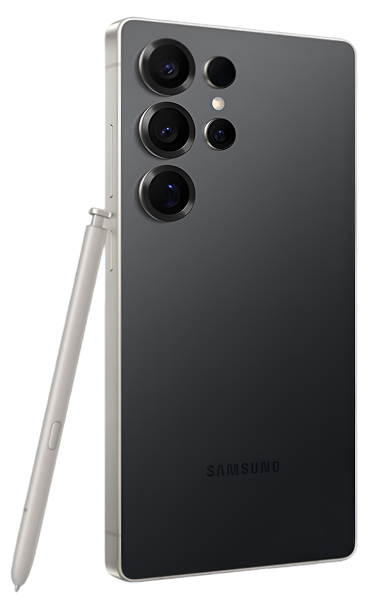
The camera system is extraordinary: a high-resolution main sensor, ultra-wide for expansive shots, multiple telephoto lenses including periscope zoom reaching 100x Space Zoom, and computational photography that rivals dedicated cameras. The S Pen integration lets you write, draw, and control the phone with precision that no other smartphone offers. The Snapdragon 8 Gen 3 (or Exynos variant) delivers desktop-class performance. The 5,000 mAh battery powers through intensive use.
But here's what makes Ultra repair unique: every component is premium. The display assembly alone represents significant value—that's the largest, most advanced smartphone screen available. The camera modules use expensive sensors and precision optics. The S Pen digitizer layer is embedded in the display stack, not a separate component. The titanium frame and Gorilla Glass Armor require careful handling.
When something goes wrong with an Ultra, it's not like repairing a mid-range phone. The components cost more, the repair complexity is higher, and the stakes are bigger—this is likely a phone someone paid premium pricing for and relies on for photography, productivity, and daily use. Proper Samsung Galaxy S25 Ultra repair requires technicians who understand this complexity and have experience specifically with Ultra devices.
Why Ultra Devices Face Unique Challenges
Understanding the technical realities helps you appreciate why Ultra repair differs from other phones.
The Display Stack Is Incredibly Complex
The S25 Ultra's display isn't just glass and OLED. It's a complex assembly:
- Anti-reflective Gorilla Glass Armor outer layer
- OLED panel with exceptional brightness and color
- Digitizer for touch input
- S Pen electromagnetic resonance layer (Wacom technology)
- Ultrasonic fingerprint sensor embedded beneath
- Slight curve at edges requiring precise installation
Damage to any layer can require complete display assembly replacement. But replacement isn't simple—the S Pen digitizer must be calibrated correctly, the fingerprint sensor needs proper alignment, and the curve must seat perfectly in the frame.
The Quad-Camera System Uses Cutting-Edge Technology
The S25 Ultra's cameras represent the best smartphone photography available:
- Main sensor with large pixels and advanced processing
- Ultra-wide with distortion correction
- Multiple telephoto lenses for optical zoom
- Periscope telephoto for extreme zoom with folded optics
- Sophisticated OIS (optical image stabilization) systems
- Laser autofocus and advanced computational photography
Each camera module is a precision instrument. The periscope telephoto uses a folded lens assembly with mirrors and prisms—it's mechanically complex. OIS systems have tiny motors that move lens elements. When cameras fail or get damaged, repair requires expertise with these sophisticated systems and proper calibration afterward.
S Pen Technology Is Integrated, Not Optional
Unlike phones with styluses that are afterthoughts, the S Pen is fundamental to the Ultra experience. The digitizer layer uses electromagnetic resonance technology (Wacom EMR) that detects the S Pen's position and pressure without the pen needing a battery.
This digitizer is embedded in the display assembly. Display replacement means ensuring the new assembly's S Pen digitizer is properly calibrated. Pressure sensitivity, palm rejection, and hover detection all need to work perfectly. This requires specialized testing equipment and expertise.
Premium Materials Require Careful Handling
The titanium frame is stronger than aluminum but requires different tools and techniques for disassembly. The Gorilla Glass Armor on front and back is tougher than previous glass but also more expensive to replace. Every component reflects premium positioning, which means repairs require appropriate care and quality replacement parts.
Critical Issues Requiring Immediate Attention
Display Damage on That Massive 6.8-Inch Screen
What's happening: Your S25 Ultra's display is cracked, shattered, or showing damage. Maybe touch works, maybe it doesn't. The damage might be small or extensive. You're wondering if you can live with it or if it needs immediate repair.
Why this is so critical: The S25 Ultra's display is the most expensive smartphone screen to replace—it's massive at 6.8 inches, uses premium OLED technology, includes anti-reflective coating, has the S Pen digitizer integrated, and features the ultrasonic fingerprint sensor. Any damage compromises this sophisticated assembly.
Even small cracks can propagate across that large display surface from temperature changes or pocket pressure. More critically, cracks can progress from the outer glass into the OLED panel and digitizer layers, requiring complete assembly replacement even if touch currently works.
What you should do immediately:
- Test everything thoroughly. Check touch response everywhere. Test S Pen functionality—does it write, does hover work, is pressure sensitivity accurate? Test the fingerprint sensor. Document what works and what doesn't.
- Protect from further damage. Apply a screen protector if you haven't already—it won't fix cracks but prevents propagation. Avoid putting pressure on the damaged area.
- Don't delay if touch is affected. If touch is becoming unreliable, if S Pen functionality is compromised, or if you see display artifacts, schedule repair immediately. These symptoms indicate damage progressing into internal layers.
The repair reality: Display replacement for the Galaxy S25 Ultra is the most complex screen repair in the smartphone industry. The assembly includes all the components mentioned—glass, OLED, digitizer, S Pen layer, fingerprint sensor. Replacement requires:
- Complete disassembly following Samsung's Ultra-specific procedures
- Careful removal of damaged assembly without damaging frame
- Installation of new assembly with precise alignment
- S Pen digitizer calibration using specialized equipment
- Fingerprint sensor testing and verification
- Thorough quality control checking all display functions
This isn't a repair you want done by inexperienced technicians using budget components. The display represents significant value, and improper installation compromises the entire Ultra experience.
Did You Know? The S25 Ultra's anti-reflective glass coating (Gorilla Glass Armor) reduces glare by approximately 75% compared to standard smartphone glass. This coating is etched into the glass itself, not applied as a film, making it permanent and scratch-resistant. However, this also means replacement glass must have the same anti-reflective properties to maintain the viewing experience Samsung engineered. Budget replacement screens often lack this coating, resulting in a noticeably worse display experience despite functioning correctly. When we perform Samsung Galaxy S25 Ultra repair for screens, we use assemblies that maintain this anti-reflective technology.
What we've seen in thousands of Ultra repairs: Display damage is the most common repair we perform on Ultra devices because of that large screen surface area. The good news? When done properly with quality components, display replacement fully restores the incredible viewing experience. We test S Pen extensively after replacement—pressure sensitivity, hover detection, button functions—everything must work perfectly. The ultrasonic fingerprint sensor requires proper alignment during installation and testing afterward. We don't rush Ultra display repairs because precision matters more than speed for devices at this level.
S Pen Not Working or Responding Incorrectly
What's happening: Your S Pen isn't registering on screen, writes with incorrect pressure sensitivity, hovers detection is spotty, or the button doesn't work. Maybe it works intermittently. The precision tool you rely on for notes and creativity isn't functioning properly.
Why S Pen issues are serious: The S Pen is fundamental to the Ultra experience—it's not an accessory, it's a core feature. The electromagnetic resonance technology requires the display's digitizer layer to function correctly. S Pen problems indicate either pen hardware failure or display digitizer issues.
What you should try first:
- Test the S Pen systematically:
- Does hover work (pen detected above screen)?
- Does writing work with proper pressure sensitivity?
- Does the pen button function?
- Are there dead zones where it doesn't register?
- Try a different S Pen if possible. Borrow one from another Ultra owner. If a different pen works perfectly, your pen is damaged. If the problem persists, it's the phone's digitizer.
- Check for software issues. Settings > Advanced features > S Pen. Make sure S Pen features are enabled. Try removing and reinserting the S Pen (this re-pairs it). Restart the phone.
- Remove any thick screen protectors. Some protectors interfere with S Pen detection. If you recently applied a new protector and the S Pen stopped working well, that's likely your problem.
The diagnostic pathway:
- Different S Pen works perfectly: Your original S Pen is damaged—replacement needed
- Problem persists with different pen: Display digitizer issue—requires professional diagnosis
- Works after removing screen protector: Protector was interfering—use thinner or S Pen-compatible protector
- Works in some areas but not others: Display digitizer has failed zones—likely requires display replacement
The repair complexity: If the issue is digitizer-related (in the display), repair means display assembly replacement since the digitizer is integrated. If it's the S Pen itself, replacement is straightforward. The challenge is accurate diagnosis—we use testing equipment to determine whether the pen or digitizer is at fault.
Battery Draining Significantly Faster Than Expected
What's happening: Your S25 Ultra's 5,000 mAh battery used to easily last all day with heavy use. Now you're hitting 20% by dinner. The phone feels warm during normal activities. You're constantly looking for chargers or limiting use to preserve battery.
Why battery degradation happens: Even Samsung's excellent battery management can't stop lithium polymer chemistry from aging. Every charge cycle causes electrochemical changes that reduce capacity. After 500-800 full cycles (18-30 months of daily charging), expect capacity around 80% of original.
The S25 Ultra's powerful processor, bright display, 5G connectivity, and sophisticated cameras all demand significant power. As the battery ages, it struggles to meet these demands, especially during intensive tasks like photography, video recording, or gaming.
What you should try:
- Check battery usage details. Settings > Battery and device care > Battery. Review which apps and features consume the most power. Unexpected app draining heavily? That's your culprit, not necessarily battery health.
- Optimize settings. Enable Adaptive battery (learns your patterns). Use Power saving mode when needed. Reduce screen brightness slightly—that massive bright display consumes significant power.
- Monitor for software issues. Sometimes Android updates introduce bugs causing battery drain. Check if recent update correlates with sudden battery problems. Samsung usually fixes these quickly in subsequent updates.
- Assess realistic degradation. The Ultra should handle full work day with heavy use when new. If you can't make it through moderate use, battery's likely degraded significantly.
The value of battery replacement: Battery replacement on the S25 Ultra restores that excellent all-day performance the device is known for. The 5,000 mAh capacity is generous—even with the power-hungry components, a fresh battery delivers impressive runtime.
Replacement requires careful disassembly due to adhesive and tight component integration. The battery's positioned beneath other components, making access more involved than simpler phones. This is precision work requiring expertise with Ultra internals.
From our repair experience: Battery issues on Ultras are less common than budget phones (better quality components, superior thermal management), but they absolutely happen with time. When we replace Ultra batteries, customers are consistently impressed by how much better the phone performs—not just battery life, but also responsiveness since the phone isn't constantly throttling to manage degraded battery voltage. This is one of the most worthwhile repairs you can do for an aging Ultra.
Moderate Issues Worth Addressing
Camera Glass Shattered But Lenses Seem Okay
What's happening: You dropped your S25 Ultra and the camera glass covering those four rear cameras is shattered. The phone's screen might be fine, but the camera glass is cracked. Photos might look hazy or show lens flare, especially in bright conditions.
Why this happens so frequently: The S25 Ultra's camera array protrudes significantly for better lens quality and sensor size—that "camera bump" is substantial. When dropped, the phone often lands on this bump, absorbing impact that shatters the protective sapphire crystal covering the lenses.
The actual camera lenses underneath are usually fine—they're recessed behind the protective glass. But the broken glass causes light scatter, hazing, and reduced image quality.
What you need to do:
- Test all four cameras. Check main, ultra-wide, both telephotos (standard and periscope). Take test photos with each. Often the cameras function perfectly, just with compromised image quality from broken glass.
- Avoid exposing lenses. Broken glass lets dust and moisture reach the actual lenses. Don't delay repair too long or you risk dust getting onto lens elements, which is much harder to address.
- Don't attempt DIY fixes. Some people try tape or adhesive solutions—don't. This complicates professional repair and doesn't actually protect the lenses properly.
The repair process: Camera glass replacement involves carefully removing the shattered protective glass, thoroughly cleaning the camera area and lens surfaces, and installing new precisely-cut sapphire crystal glass aligned perfectly over all four cameras.
This is skilled work requiring steady hands and proper tools. The glass must seal properly to maintain weather resistance. All cameras must be tested after replacement to ensure image quality is fully restored.
What really happens in our shop: Camera glass damage is extremely common on Ultra devices because of that prominent camera array. The repair's affordable relative to the phone's value and completely restores photo quality. We test all cameras extensively after glass replacement—focus, color accuracy, zoom functionality. The before/after difference in image quality is dramatic when broken glass is replaced. This repair is absolutely worth doing if you use your Ultra for photography, which most Ultra owners do.
Charging Port Not Gripping Cables Securely
What's happening: Your USB-C cable doesn't click securely into the port anymore. It feels loose or wobbles. Sometimes it charges, sometimes it doesn't. You've tried multiple cables with the same result.
Why this develops: The S25 Ultra's USB-C port endures constant use—daily charging, data transfer, sometimes multiple times per day. Over time, the internal connector can wear from repeated insertion and removal. Pocket lint accumulates and compresses inside the port. The securing mechanism can weaken.
What you should try:
- Inspect the port with bright light. Look for compacted lint, debris, or visible damage. The USB-C port is deeper than older ports and lint really accumulates.
- Clean extremely carefully. Power off the phone completely. Use a wooden toothpick (never metal—USB-C pins are delicate) and very gently try to remove visible lint from the port's bottom and sides. Be incredibly careful.
- Test with certified cables. Use Samsung's cable or high-quality certified USB-C cables. Some cheap cables don't meet spec and won't fit properly even in good ports.
- Try wireless charging temporarily. The Ultra supports fast wireless charging, which works while you arrange port repair.
The repair considerations: If the port's genuinely damaged (worn connector, bent pins, physical damage), it needs replacement. USB-C port replacement on the Ultra is precise work—the port's on the logic board with other components nearby. Improper replacement can damage the board.
This repair requires expertise with flagship internals and proper micro-soldering skills if necessary. The port must be installed perfectly to maintain fast charging capabilities and data transfer speeds.
Back Glass Shattered (Wireless Charging Integrated)
What's happening: Your Ultra's back glass is shattered from a drop. The phone functions perfectly, but it looks awful and you're concerned about further damage. Glass shards might be falling out, exposing internals.
Why back glass repair is complex on the Ultra: The S25 Ultra's back glass isn't purely cosmetic—it's integrated with the wireless charging coil and provides structural support. Samsung bonds the glass to the titanium frame with strong adhesive, and the wireless charging system is positioned precisely beneath the glass.
Broken back glass can expose internals to dust and moisture, potentially damaging components over time. It also compromises the phone's structural integrity—that glass contributes to overall rigidity.
What you should do:
- Apply temporary protection. Use a skin or case to cover the damage and prevent glass from falling out. This protects your hand from cuts and keeps debris from entering the phone.
- Test wireless charging. Verify it still works. If the charging coil was damaged in the fall, wireless charging will be inconsistent or dead.
- Don't delay significantly. Exposed internals are vulnerable. While the phone might work fine now, leaving it exposed risks progressive damage.
The repair expertise required: Back glass replacement on the Ultra demands precision:
- Careful removal of shattered glass and adhesive
- Cleaning the titanium frame without damaging it
- Installing new glass with integrated wireless charging coil
- Precise positioning to ensure wireless charging works optimally
- Proper adhesive application for weather resistance and structural integrity
This is labor-intensive work requiring experience specifically with Ultra back glass. The wireless charging must be tested thoroughly after replacement at various power levels and with different chargers.
Based on thousands of Ultra back glass repairs: This is one of the more challenging repairs we perform on Ultras because of the wireless charging integration and titanium frame. But the result is a phone that looks and functions like new. We always test wireless charging extensively—15W, 25W, different Qi chargers. The glass must align perfectly with the camera array and sit flush with the frame. Done correctly, back glass replacement completely restores the Ultra's premium appearance and maintains full functionality.
What to Expect From Professional Samsung Galaxy S25 Ultra Repair
Ultra repair requires a different approach than standard phones.
Specialized Diagnostic Equipment
We use Samsung-specific diagnostic tools that regular repair shops don't have:
- S Pen digitizer testing equipment
- Display calibration tools for OLED and touch
- Camera alignment and focus calibration systems
- Ultrasonic fingerprint sensor diagnostic tools
This equipment lets us diagnose issues accurately and verify repairs properly. You can't properly repair Ultras without this specialized gear.
Technicians With Ultra Experience
Not every phone tech can work on Ultras competently. We ensure our technicians have specific training and experience with Ultra devices—they understand the complexity, have worked on dozens or hundreds of Ultras, and know the common failure modes and proper repair techniques.
The Ultra's not a phone where you learn on the job. Experience matters.
Premium Quality Components
When we perform Samsung Galaxy S25 Ultra repair, we use components that match Samsung's specifications:
- Display assemblies with anti-reflective glass and S Pen digitizer
- Batteries rated for proper capacity and Samsung's charging protocols
- Camera components from reliable suppliers with proper calibration
- Back glass with integrated wireless charging coils positioned correctly
Using budget components on an Ultra is false economy—you compromise the premium experience.
Comprehensive Testing Protocols
Every Ultra repair includes extensive testing:
- Display: touch everywhere, S Pen pressure sensitivity, hover detection, fingerprint sensor, color accuracy, refresh rate
- Battery: charging speeds (wired and wireless), temperature monitoring, capacity verification
- Cameras: all four cameras tested for focus, zoom, image quality, OIS functionality
- Build: wireless charging positioning, button function, port integrity, weather sealing
We don't hand back an Ultra until every system functions perfectly.
The Ultra Repair Difference
Repairing an Ultra correctly costs more than repairing mid-range phones—components are expensive, time required is longer, equipment is specialized, and expertise is critical. But that's appropriate for a device at this level. You invested significantly in an Ultra—repair should reflect that premium positioning.
Your Galaxy S25 Ultra Deserves Expert Care
Your Samsung Galaxy S25 Ultra represents the pinnacle of smartphone technology—the best display, most sophisticated cameras, integrated S Pen, premium build quality. When issues arise, professional Samsung Galaxy S25 Ultra repair performed by experienced technicians with proper equipment protects your investment.
Quality Ultra repair restores that exceptional experience Samsung engineered into the device. Whether it's display damage, battery degradation, camera issues, or other problems, proper repair means using appropriate components, following correct procedures, and testing thoroughly.
The Ultra's not a phone where you cut corners on repair quality. The complexity and component value demand expertise and precision. Done right, repairs extend your Ultra's life significantly while maintaining the premium experience you expect.
Visit The Fix for professional Samsung Galaxy S25 Ultra repair. We understand Ultra-specific technology, have the specialized equipment, and employ techs with extensive Ultra experience. Your flagship deserves flagship-level repair expertise. Let's restore your S25 Ultra to perfect working condition.


Trusted repair solution for mobile phones, tablets, gaming consoles, and computer systems. We provide fast, reliable, and affordable repair services to get your devices back in perfect working condition.
The Fix is an independent repair service provider and is not affiliated with, sponsored by, or endorsed by Apple Inc., Samsung Electronics, Google LLC, or any other device manufacturer. We use high-quality compatible replacement parts unless explicitly stated. All trademarks are property of their respective owners.


© Copyright The Fix Solutions All rights reserved 2026.
Design by Deepcoder