






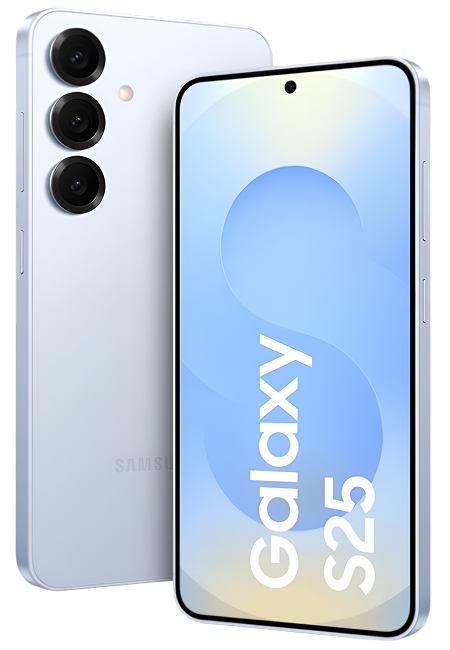
Samsung Galaxy S25 Repair Services
Get fast, reliable, and professional Samsung Galaxy S25 repair services at The Fix — your trusted destination for expert device care.
Common Repairs We Handle Daily


Fix Your Samsung Galaxy S25 Fast: Complete Repair Roadmap
Introduction
Picture this: you're about to capture an amazing moment with your Galaxy S25's impressive camera system, but the screen's not responding where you need to tap. Or maybe you've noticed the battery isn't lasting quite as long as when the phone was new. Perhaps you dropped it and now there's a crack across that gorgeous Dynamic AMOLED display. Your flagship Samsung—the one you probably paid top dollar for—is acting up, and you're wondering what to do about it.
Here's what you need to understand: the Samsung Galaxy S25 is a premium flagship device with cutting-edge technology, which means repairs require proper expertise and quality components. But here's the good news—Samsung Galaxy S25 repair is absolutely viable, often more cost-effective than replacement, and when done right, restores your phone to perfect working condition. The S25's modular design actually makes many repairs straightforward for experienced technicians.
Whether you're dealing with screen damage, battery degradation, camera issues, or charging port problems, professional Samsung Galaxy S25 repair can address these issues properly. In this guide, we'll walk you through what commonly goes wrong with the S25, which problems you can troubleshoot yourself, when you need professional help, and what to expect from the repair process. Let's get your flagship Samsung working perfectly again.
Quick Problem Checklist: What's Actually Happening?
Before we dive deep, let's identify your specific issue:
Display Problems:
- [ ] Screen cracked or shattered
- [ ] Touch not responding in certain areas
- [ ] Display flickering or showing lines
- [ ] Dead pixels or dark spots appearing
- [ ] Screen protector interfering with touch sensitivity
Battery & Charging:
- [ ] Battery draining faster than expected
- [ ] Phone heating up during normal use
- [ ] Charging slowly or intermittently
- [ ] Wireless charging not working properly
- [ ] Battery percentage jumping around
Camera Issues:
- [ ] Camera glass cracked or scratched
- [ ] Photos coming out blurry
- [ ] Camera app crashing or freezing
- [ ] One of the multiple cameras not working
- [ ] Focus problems or lens fog
Physical Damage:
- [ ] Back glass shattered
- [ ] Frame dented or bent
- [ ] Water damage symptoms
- [ ] Charging port damaged or loose
- [ ] Buttons sticking or not clicking
Performance:
- [ ] Phone overheating frequently
- [ ] Apps crashing more than usual
- [ ] System lagging or freezing
- [ ] Connectivity issues (WiFi, 5G, Bluetooth)
Your Assessment:
- 1-2 issues: Single repair likely needed
- 3-4 issues: Multiple problems—evaluate total investment
- 5+ issues: Comprehensive assessment required
The Galaxy S25: Samsung's Latest Flagship
The Samsung Galaxy S25 represents the cutting edge of smartphone technology. Samsung packed this flagship with their latest innovations: a powerful processor (likely Snapdragon 8 Gen 3 or Exynos variant depending on region), stunning Dynamic AMOLED 2X display with 120Hz refresh rate, advanced camera system with improved low-light performance, and refined One UI software experience.
What makes the S25 special is Samsung's attention to build quality and features. That glass-and-metal construction feels premium in hand. The display's brightness and color accuracy are industry-leading. The camera system competes with the best from any manufacturer. Fast charging, wireless charging, and reverse wireless charging give you flexibility. And Samsung's commitment to software updates means this phone will stay current for years.
But here's the reality with flagship devices: premium components mean repairs require proper expertise. That Dynamic AMOLED display isn't cheap to replace, but it's also what makes the phone stunning to use. The multi-camera system is sophisticated, which means camera repairs need precision. The wireless charging coil integrated with the back glass makes back glass replacement more complex than older phones.
The good news? The S25's modular design means individual components can be replaced without affecting others. Screen damage doesn't mean replacing the whole phone. Battery degradation is addressable. Camera issues are fixable. When you've invested in a flagship device, Samsung Galaxy S25 repair protects that investment and extends your phone's life significantly.
Why Flagship Devices Develop These Specific Issues
Understanding the technical side helps you make informed decisions about repair.
Dynamic AMOLED Displays Are Stunning But Vulnerable
The Galaxy S25's Dynamic AMOLED 2X display uses organic light-emitting diodes—each pixel produces its own light. This creates incredible contrast, deep blacks, and vibrant colors. But it also means the display's more susceptible to damage than traditional LCDs.
The display assembly includes the OLED panel, digitizer for touch, protective glass, and in-display fingerprint sensor. Drops can crack the outer glass without damaging the OLED underneath, or they can damage everything. The complexity means screen replacement requires careful work to maintain all functionality including that ultrasonic fingerprint sensor.
Lithium Polymer Batteries Degrade Predictably
Even flagship batteries degrade with use. Every charge cycle causes tiny chemical changes. After 500-800 cycles (roughly 18-30 months of daily charging), capacity drops to around 80% of original. The S25's battery management is sophisticated and slows degradation, but it can't stop chemistry.
Heat accelerates battery aging. If you use your S25 for gaming, video recording, or other intensive tasks frequently, your battery ages faster. Wireless charging generates more heat than wired, which also impacts longevity over time.
Multi-Camera Systems Have More Potential Failure Points
The Galaxy S25's camera system includes multiple lenses—wide, ultra-wide, telephoto, possibly a periscope zoom. Each has its own sensor, lens assembly, and in some cases, optical image stabilization motors. More cameras mean more components that can potentially fail.
Camera glass is exposed and vulnerable. A drop onto a hard surface can shatter the protective sapphire crystal covering the lenses without damaging the phone's screen. This is extremely common and one of the most frequent repairs we see on flagship Samsungs.
Wireless Charging Coils Are Integrated With Back Glass
Unlike older phones where the back glass was purely cosmetic, the S25's wireless charging coil is bonded to the back glass assembly. This means back glass replacement is more involved—you're replacing a functional component, not just decorative glass.
The good news is that this integration makes the phone thinner and more elegant. The challenge is that back glass repair requires proper technique to ensure wireless charging continues working perfectly after replacement.
The Issues Everyone Deals With
Screen Damage From Drops
What's happening: You dropped your S25 and now there's a crack across the display. Maybe it's a small corner crack, maybe it's shattered. Touch might work perfectly, or it might be getting glitchy in the damaged area. You're wondering if you can live with it or if it needs immediate attention.
Why this is the most common issue: Glass breaks when dropped—that's physics. The Galaxy S25's display curves slightly at the edges for aesthetic reasons, but curved glass is more vulnerable to damage than flat glass. When the phone lands on a corner or edge, the glass absorbs the impact and cracks.
The good news is that even significant cracks often don't damage the underlying OLED panel or digitizer immediately. The bad news is that cracks can propagate—small cracks become big cracks from pocket pressure, temperature changes, or additional minor drops.
What you can try first:
- Assess the damage honestly. Is touch working everywhere? Test thoroughly by opening a note-taking app and scribbling all over the screen. If touch works perfectly despite cracks, the digitizer's intact.
- Apply a screen protector immediately. A tempered glass screen protector won't fix the crack, but it'll prevent it from spreading and keep glass shards contained. This buys you time while you arrange repair.
- Avoid pocket pressure. Don't keep the phone in tight pockets where the screen flexes against your leg. This can propagate cracks or damage the digitizer that's currently still working.
When you need professional repair: If touch is becoming unreliable, if the crack's spreading, or if you're seeing display issues (lines, dead pixels, flickering), don't wait. These symptoms mean damage is progressing from the glass into the underlying OLED and digitizer layers.
Screen replacement for the Galaxy S25 involves replacing the entire display assembly—glass, OLED panel, digitizer, and fingerprint sensor integration. This is precision work that requires proper tools, clean environment, and expertise with Samsung's latest flagship hardware.
💡 Expert Insight: We see Galaxy S flagship devices daily with screen damage. Here's what most people don't realize: even small cracks compromise structural integrity. The glass is designed as a single piece—once that integrity's broken, the display is weaker everywhere, not just at the crack. Temperature swings (like going from air-conditioned building to hot summer day) cause glass to expand and contract, which propagates cracks rapidly in compromised screens.
The S25's display is expensive compared to mid-range phones, but it's what makes the phone premium. When we perform Samsung Galaxy S25 repair for screens, we use high-quality replacement assemblies that maintain the 120Hz refresh rate, color accuracy, and touch sensitivity. The ultrasonic fingerprint sensor requires proper calibration during installation—this isn't something you want done by inexperienced techs. Proper screen replacement restores your S25 to factory condition, and when you consider the phone's value and capabilities, it's absolutely worth doing right.
Battery Life Not What It Used to Be
What's happening: Your S25's battery used to easily last all day. Now you're hitting 20% by late afternoon. The phone feels warm during normal use. You're constantly looking for chargers or carrying a power bank everywhere.
Why this develops: Battery degradation is normal and predictable. Even with Samsung's advanced battery management, lithium polymer cells lose capacity with charge cycles. If you charge daily, you're accumulating 365 cycles per year. After 18-24 months, you'll notice reduced capacity.
The S25's powerful processor, bright display, and 5G connectivity all demand power. As the battery ages, it struggles to meet these demands, especially during intensive tasks.
What you can try first:
- Check battery usage. Settings > Battery and device care > Battery. Look at which apps consume the most power. If something unexpected is draining heavily, that's your problem, not the battery itself.
- Optimize settings. Enable Adaptive battery (Settings > Battery > Adaptive battery). This learns your usage patterns and optimizes background activity. Turn on Power saving mode when you need extra runtime.
- Monitor temperature. If your S25 gets hot during normal use, that's accelerating battery degradation. Remove thick cases during charging, don't use it intensively while charging, and avoid leaving it in hot cars.
- Check for software issues. Sometimes Android updates introduce bugs that cause battery drain. Make sure you're on the latest One UI version—Samsung typically fixes battery issues quickly in updates.
When you need battery replacement: If your battery's genuinely degraded (capacity below 80%), no amount of optimization helps. You need physical battery replacement. The S25's battery is glued inside, which means replacement requires proper technique to avoid damaging other components.
What we've learned: Battery complaints are common across all smartphones, but flagship users often have higher expectations. The S25's battery is rated for excellent all-day performance when new—when that diminishes, people notice immediately. The good news is that battery replacement is one of the most straightforward repairs we do, and the results are dramatic. People are genuinely surprised how much better the phone feels with fresh battery capacity. If you're planning to keep your S25 for another 1-2 years, battery replacement makes excellent sense financially.
Camera Glass Shattered
What's happening: You dropped your S25 and the camera glass shattered—that protective sapphire crystal covering the lenses is cracked. The phone's screen might be fine, but the camera glass is broken. Photos might look hazy or show artifacts, especially in bright light.
Why this happens so frequently: The camera module protrudes slightly from the back of the phone—it's a "camera bump" for better lens quality. When you drop the phone, it often lands on this bump, absorbing impact that shatters the protective glass. The camera lenses themselves are usually fine, but the protective cover is cracked.
What you should do:
- Test the cameras. Open the camera app and test all cameras—wide, ultra-wide, telephoto. Take test photos. Often the cameras still work perfectly, just with reduced image quality from the broken glass causing light scatter.
- Avoid dust and moisture. The broken glass exposes the camera lenses to dust and humidity. Don't delay repair too long or you risk dust getting onto the actual lenses, which is harder to clean.
- Don't attempt DIY fixes. Some people try applying clear tape or screen protectors over broken camera glass—don't. This makes professional repair harder and doesn't really protect the lenses.
The repair process: Camera glass replacement is relatively straightforward compared to screen or battery work. The protective glass is a replaceable component. Experienced techs can remove the broken glass, clean the lens area, and install new protective glass properly aligned and sealed.
What really happens: Camera glass damage is one of the most common repairs we see on Galaxy S flagships because of that camera bump design. The repair's affordable compared to the phone's value and completely restores camera quality. We test all cameras after replacement to ensure perfect functionality. This is one of those repairs where people are relieved it's fixable and not expensive—they often expect worse when they come in with shattered camera glass.
Occasional But Serious Problems
Charging Port Damaged or Not Working Properly
What you're experiencing: Your charging cable doesn't click into the port securely. The phone only charges at specific angles. You've tried multiple cables and they all do the same thing. Or the port looks visibly damaged—maybe bent pins or debris inside.
Why this develops: The USB-C port on the S25 endures constant use—plugging and unplugging daily, sometimes multiple times. Over time, the internal connector pins can bend from careless insertion. Pocket lint accumulates and compresses deep inside the port. Liquid exposure can corrode the pins.
What you should try:
- Inspect the port carefully. Shine a bright light inside. Do you see compacted lint at the bottom? Bent or corroded pins? Visible damage?
- Clean gently if needed. Power off the phone. Use a wooden toothpick (never metal) and very gently try to remove visible lint. Be extremely careful—USB-C pins are delicate. If you're not confident, have a professional clean it.
- Test with known-good cables. Use a certified Samsung cable or high-quality USB-C cable. Some cheap cables don't meet spec and won't fit properly even in undamaged ports.
- Try wireless charging. If you have a wireless charger, use that while you arrange port repair. The S25 supports fast wireless charging, which works as a temporary solution.
The repair reality: If the port's genuinely damaged (bent pins, physical damage), it needs replacement. USB-C port replacement on the S25 involves careful disassembly, removing the damaged port, and installing a new one with proper soldering if necessary.
This is precision work that requires expertise with Samsung flagship internals. Don't trust this to inexperienced techs—poor port replacement can damage the logic board and cause bigger problems.
From our repair experience: Charging port issues on flagships are less common than on budget phones (better build quality), but they do happen. We see ports damaged from careless charging (forcing the cable in at wrong angles), liquid damage (submerged phones or drinks spilled), or just years of use. Port replacement restores full functionality including fast charging and data transfer. We always test thoroughly after replacement to ensure everything works perfectly including Samsung's fast charging protocols.
Back Glass Shattered
What's happening: Your S25's back glass is shattered from a drop. The phone works perfectly, but it looks terrible and you're worried about further damage. Glass pieces might be falling out, exposing internals.
Why this matters: The Galaxy S25's back glass isn't just cosmetic—it's integrated with the wireless charging coil and provides structural rigidity to the phone. Broken back glass can let dust and moisture into the phone, potentially damaging internals over time.
What you should do:
- Apply a skin or case immediately. A dbrand skin or protective case can cover the damage temporarily and prevent glass shards from falling out or cutting your hand.
- Test wireless charging. Make sure it still works. If the wireless charging coil was damaged in the drop, you'll know because wireless charging will be inconsistent or non-functional.
- Plan for repair. Don't delay too long if glass is missing—exposed internals are vulnerable to damage.
The repair complexity: Back glass replacement on the S25 is more involved than screen replacement because of how the phone's constructed. The back glass is adhesive-bonded to the frame and includes the wireless charging coil. Replacement requires careful removal of broken glass, cleaning adhesive, and installing new glass with new wireless charging coil assembly.
This is specialized work that requires proper tools, technique, and experience with Samsung flagship construction. Done correctly, back glass replacement restores the phone's appearance and maintains full wireless charging functionality.
What we see in the shop: Back glass damage is extremely common on glass-backed phones because most people don't use cases (they want to show off that premium finish). When they drop the phone, there's a 50/50 chance whether the screen or back breaks—sometimes both. Back glass replacement is more labor-intensive than screen work, but the result is a phone that looks brand new. We always test wireless charging thoroughly after back glass replacement to ensure the coil's positioned and functioning perfectly.
What to Expect From Professional Samsung Galaxy S25 Repair
We treat Samsung flagships with the expertise they deserve.
Comprehensive Diagnostic
We'll test everything—display functionality, touch sensitivity, fingerprint sensor, all cameras, charging (wired and wireless), buttons, connectivity, battery performance. This comprehensive check identifies not just the obvious problem but any underlying issues you might not have noticed.
You get a clear explanation of what's wrong and what repair entails.
Quality Components and Proper Technique
When we perform Samsung Galaxy S25 repair, we use high-quality replacement parts that match Samsung's specifications. Display assemblies maintain the 120Hz refresh rate and color accuracy. Batteries are properly rated for capacity and safety. Camera glass is precision-cut sapphire crystal.
We use proper tools, clean-room procedures for internal work, and follow Samsung's service guidelines. This isn't a phone you want repaired by amateurs with cheap parts.
Functionality Testing After Repair
Every repair includes thorough post-repair testing:
- Display repairs: full touch testing, fingerprint sensor verification, color and refresh rate checks
- Battery replacements: charging speed testing, capacity verification
- Camera repairs: all lenses tested, focus and stabilization checked
- Port repairs: charging speed verified, data transfer tested
You leave knowing everything works perfectly.
The Flagship Difference
We understand you invested significantly in a Galaxy S25. Our repair approach reflects that—careful handling, quality components, proper technique. We don't treat flagship repairs the same as budget phone repairs because they're not the same.
Maintaining Your Galaxy S25
Prevention's worth it for a flagship device:
Use a quality case. Get one with raised edges to protect the camera bump and screen. The S25's premium materials are beautiful but vulnerable—protection's smart.
Apply a screen protector. Tempered glass or film protector adds a protective layer. It won't prevent all damage, but it helps with minor impacts and scratches.
Avoid extreme temperatures. Don't leave your S25 in hot cars or direct sunlight. Heat accelerates battery aging and can damage internal components.
Use Samsung's fast charging wisely. Fast charging is convenient but generates heat. If you're not in a rush, use standard charging—it's gentler on the battery long-term.
Keep the USB-C port clean. Periodically check for lint buildup. Gentle cleaning prevents connection issues.
Update One UI regularly. Samsung releases updates that optimize performance and fix bugs. Stay current for best experience.
Monitor battery health. Settings > Battery and device care shows battery condition. When capacity drops significantly, plan for replacement before it affects daily use.
Your Galaxy S25 Is Worth Proper Repair
Your Samsung Galaxy S25 represents a significant investment in premium smartphone technology. When issues arise—whether it's screen damage, battery degradation, camera problems, or other concerns—professional Samsung Galaxy S25 repair protects that investment.
Quality repairs restore your S25 to full functionality, often at a fraction of replacement cost. You keep your data, settings, and apps exactly as they are. You maintain that premium experience Samsung engineered into the device.
The key is choosing experienced technicians who understand flagship Samsung devices, use quality components, and perform repairs properly. This isn't a phone where you want to cut corners on repair quality.
Stop by The Fix for professional Samsung Galaxy S25 repair. We'll diagnose issues accurately, explain repair options clearly, and perform work to the highest standards. Your flagship deserves nothing less. Let's get your Galaxy S25 working perfectly again.


Trusted repair solution for mobile phones, tablets, gaming consoles, and computer systems. We provide fast, reliable, and affordable repair services to get your devices back in perfect working condition.
The Fix is an independent repair service provider and is not affiliated with, sponsored by, or endorsed by Apple Inc., Samsung Electronics, Google LLC, or any other device manufacturer. We use high-quality compatible replacement parts unless explicitly stated. All trademarks are property of their respective owners.


© Copyright The Fix Solutions All rights reserved 2026.
Design by Deepcoder