






Samsung Galaxy S24 Ultra Repair Services
Get fast, reliable, and professional Samsung Galaxy S24 Ultra repair services at The Fix — your trusted destination for expert device care.
Common Repairs We Handle Daily


Having Galaxy S24 Ultra Problems? Here's Your Repair Roadmap
Introduction
Remember when your Galaxy S24 Ultra was fresh out of the box? That titanium frame felt indestructible, the 200MP camera took jaw-dropping photos, the S Pen glided effortlessly across that gorgeous anti-glare display, and battery life lasted through your longest days. Fast forward to now—maybe you've got a crack across that massive screen, the battery's not making it through the day like it used to, or the S Pen's acting finicky. Your premium Samsung flagship isn't quite living up to that "Ultra" experience anymore.
Here's what's important: the Galaxy S24 Ultra is one of Samsung's most repairable flagship devices despite its complexity. That titanium frame makes it structurally robust, the display assembly is modular, the cameras are serviceable, and battery replacement is doable with proper expertise. But—and this is critical—Samsung Galaxy S24 Ultra repair requires technicians who understand Ultra-specific technology and have experience with these sophisticated devices.
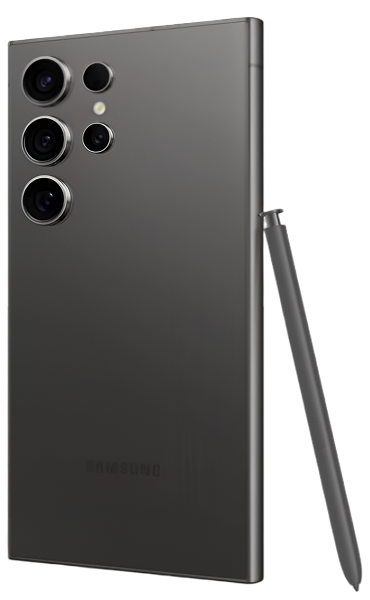
The S24 Ultra isn't your average phone. It's got an integrated S Pen digitizer, a 200MP main camera with advanced OIS, a periscope telephoto with 5x optical zoom, titanium construction, and Gorilla Glass Armor with anti-reflection coating. When something goes wrong, proper Samsung Galaxy S24 Ultra repair means using quality components, following correct procedures, and testing thoroughly. In this guide, we'll walk you through what to watch for, how to prevent issues, what commonly fails, and when professional repair makes sense. Let's keep your Ultra working at its peak.
The Galaxy S24 Ultra: Samsung's 2024 Statement Device
The Samsung Galaxy S24 Ultra launched in early 2024 as Samsung's response to Apple's iPhone 15 Pro Max and their own statement about what a flagship should be. The switch to titanium frame brought durability and premium feel while reducing weight. The 200MP main camera with improved processing delivers exceptional detail. The new anti-reflection display coating makes outdoor use genuinely better. The upgraded Snapdragon 8 Gen 3 handles everything without breaking a sweat.
What makes the S24 Ultra special is how Samsung refined the Ultra formula. The flatter display compared to S23 Ultra improves S Pen precision and reduces accidental edge touches. The brighter display (up to 2,600 nits peak) makes it usable in direct sunlight. The camera processing got smarter with AI enhancements. Battery life improved despite the powerful components. One UI 6.1 feels polished and responsive.
But here's what you need to understand about maintaining this device: premium components mean repairs require appropriate expertise. That anti-reflective display coating is part of the glass itself—replacement screens need this coating to maintain the viewing experience. The titanium frame requires different tools and techniques than aluminum. The 200MP camera needs proper calibration after any service. The S Pen digitizer must function perfectly or the whole Ultra experience suffers.
The good news? With proper care and timely repairs when needed, the S24 Ultra will serve you excellently for years. This isn't a phone that becomes obsolete quickly—the components are high-quality, Samsung commits to lengthy software support, and the build quality is exceptional.
How to Keep Your Galaxy S24 Ultra Running Perfectly
Prevention beats repair every time. Here's what actually protects your investment.
Display Care for That Anti-Reflective Screen
Your S24 Ultra's display with Gorilla Glass Armor and anti-reflection coating is revolutionary—but it's still glass that can crack.
Apply a quality screen protector immediately. Get tempered glass designed specifically for the S24 Ultra that accommodates the slightly curved edges and doesn't interfere with the fingerprint sensor. The anti-reflective glass is tough but not indestructible—a protector adds another layer of protection.
Use a case with adequate raised edges. The bezel around the display is minimal—get a case where the lip extends above the screen surface. When you set the phone face-down, the case should contact the surface, not the screen.
Be mindful of the S Pen. Don't drag it across the screen with excessive force. The S Pen tip is harder than your finger—while the display's durable, unnecessary pressure can cause micro-scratches over time.
Avoid temperature extremes. Rapid temperature changes can stress glass. Don't take your phone from a freezing car directly into a hot building repeatedly—thermal shock can weaken glass structure.
Battery Health Management
The S24 Ultra's 5,000 mAh battery is excellent, but you can extend its lifespan significantly with smart habits.
Use the 85% charge limit feature. One UI lets you cap charging at 85% (Settings > Battery > More battery settings > Protect battery). This extends battery longevity dramatically by avoiding the stress of constant 100% charges. Enable this if you charge overnight.
Avoid extreme heat during charging. Don't use your phone intensively while fast charging—the combination of heat from charging and heat from processing accelerates battery aging. If it feels hot, stop using it until charging completes.
Use adaptive charging features. Let the phone learn your patterns. One UI's adaptive charging reduces how long the battery sits at 100%, which extends life.
Don't let it fully discharge regularly. Lithium batteries prefer partial discharge cycles. Charge when you hit 20-30% rather than waiting for near-zero.
Remove thick cases during charging. Cases trap heat, and heat is battery's enemy. For overnight charging, consider removing the case to improve heat dissipation.
S Pen Maintenance
The S Pen is integral to the Ultra experience—take care of it.
Check the tip regularly. The S Pen tip is replaceable. If it's worn down or damaged, replace it (Samsung includes extras). A worn tip reduces precision and can scratch the display.
Keep the slot clean. The S Pen slot can accumulate pocket lint. Periodically check and gently clean it with compressed air. A clean slot ensures proper charging of the S Pen's Bluetooth features.
Don't force insertion. Insert the S Pen gently with correct orientation. Forcing it can damage the slot mechanism or the pen itself.
Test functionality monthly. Occasionally test S Pen features—Air Actions, pressure sensitivity, hover detection. If something's not working, address it early before it becomes a bigger issue.
Camera System Protection
Those impressive cameras are also exposed and vulnerable.
The camera bump is a vulnerability. The S24 Ultra's camera array protrudes significantly. Use a case that raises the back surface to protect the cameras when you set the phone down. This prevents scratches on camera glass and reduces drop impact on the camera array.
Keep camera glass clean properly. Use a microfiber cloth designed for lenses. Don't use rough materials or clothing that might have debris that could scratch the sapphire crystal.
Avoid extreme temperature changes. Taking the phone from cold to hot environments can cause lens fog (condensation inside). While this usually clears, repeated cycles aren't great for the sensitive camera modules.
Port and Button Care
Physical components need attention to stay functional.
Clean the USB-C port monthly. Pocket lint accumulates. Power off the phone and use a wooden toothpick to gently remove debris from the port's bottom and sides. Don't use metal—you could damage pins.
Insert cables carefully. USB-C is symmetrical but still needs gentle insertion. Don't force cables—if it doesn't go in easily, flip it or check for debris.
Don't press buttons aggressively. The power and volume buttons are solid but repeated aggressive pressing can wear mechanisms over time. Deliberate, normal-pressure presses are all you need.
Software Maintenance
Keep the software side optimized.
Install One UI updates promptly. Samsung releases updates that optimize performance, fix bugs, and improve battery management. Don't delay—updates generally make things better.
Manage storage wisely. Keep at least 10-15% storage free. When storage fills completely, performance suffers. Use Samsung's "Storage booster" to clean unnecessary files.
Review app permissions periodically. Go through installed apps and revoke unnecessary permissions. Apps running in background with location access drain battery significantly.
Restart weekly. A simple restart clears memory, stops lingering processes, and keeps the phone running smoothly.
Why Flagships Develop These Specific Problems
Understanding the technical side helps you make informed decisions.
OLED Display Technology Ages Predictably
The S24 Ultra's Dynamic AMOLED 2X display is stunning but uses organic materials that degrade over time. After thousands of hours of use, you might notice slight brightness reduction or very subtle burn-in where static elements leave faint marks.
This is normal OLED aging, not a defect. It takes years of heavy use to become noticeable. The display's still excellent—just slightly less perfect than when brand new.
More immediately, OLED displays are vulnerable to physical damage. The multi-layer construction means drops can damage any layer—protective glass, OLED panel, or digitizer—often requiring complete assembly replacement.
Battery Chemistry Is Unavoidable Science
Lithium polymer batteries degrade with every charge cycle through irreversible electrochemical changes. Samsung's battery management is excellent and slows degradation, but it can't stop chemistry.
After 500-800 full charge cycles (roughly 18-30 months of daily charging), expect capacity around 80% of new. The S24 Ultra's 5,000 mAh battery means this 20% loss is less noticeable than smaller batteries, but it still happens.
Heat accelerates aging. Fast charging, wireless charging, intensive gaming, and hot environments all generate heat that speeds battery degradation.
Advanced Camera Systems Have More Components
The S24 Ultra's camera system is sophisticated: 200MP main sensor with OIS, ultra-wide, 3x telephoto, and 5x periscope telephoto with folded optics. Each camera module has sensors, lenses, and mechanical components like OIS motors.
More complexity means more potential failure points. OIS motors can fail after years of use. Lens elements can develop issues. The periscope telephoto's folded lens assembly with mirrors and prisms is mechanically intricate—drops can misalign it.
Camera glass (the sapphire crystal protecting lenses) is exposed on that prominent bump. Drops often impact the camera array, shattering protective glass. This is extremely common and one of the most frequent repairs we see.
Titanium Requires Different Repair Approaches
The S24 Ultra's titanium frame is stronger and lighter than aluminum but requires different tools and expertise for disassembly and reassembly. Technicians familiar with aluminum Samsung phones need specific training for titanium models.
Titanium doesn't bend as easily as aluminum (good for durability) but also doesn't forgive improper tool use (can damage if incorrect pressure applied). Repairs require appropriate equipment and experience.
The Screen Situation
What's happening: Your S24 Ultra's display is cracked, shattered, or damaged. Maybe it's a small corner crack, maybe it's extensively broken. Touch might work perfectly or might be getting unreliable. You're trying to figure out if you can wait or if immediate repair's needed.
Why screen damage is so common: That massive 6.8-inch display is a large target. Despite Gorilla Glass Armor being tougher than previous glass, it's still glass—drop it on concrete or stone and it'll crack. The minimal bezels look great but offer little impact protection.
Even small cracks can propagate across that large surface from pocket pressure or temperature swings. Cracks can also progress from outer glass into the OLED panel and digitizer layers.
What you should do:
- Test everything immediately. Check touch response everywhere. Test the S Pen—does it write correctly, is pressure sensitivity accurate, does hover work? Test the fingerprint sensor. Document what works now.
- Assess crack severity. Small contained cracks are lower urgency. Cracks across the center or near edges spread faster from flex stress. Shattering across large areas needs immediate attention.
- Protect from worsening. Apply a screen protector if you haven't already—won't fix the crack but prevents propagation. Avoid putting pressure on damaged areas.
- Don't delay if functionality's affected. If touch is becoming unreliable, S Pen's not working right, or you see display artifacts, schedule repair promptly. These symptoms mean damage is progressing internally.
The repair complexity: Screen replacement on the S24 Ultra is sophisticated. The display assembly includes:
- Gorilla Glass Armor with anti-reflection coating
- Dynamic AMOLED 2X panel
- Touch digitizer
- S Pen EMR digitizer layer
- Ultrasonic fingerprint sensor
Replacement requires complete disassembly, careful removal of damaged assembly, installation of new assembly with precise alignment, S Pen digitizer calibration, and fingerprint sensor verification.
This isn't a repair for inexperienced techs. The display represents significant value, and improper installation compromises the entire Ultra experience.
The Battery Drain Dilemma
What's happening: Your S24 Ultra's battery used to last all day with room to spare. Now you're hitting 20% by evening or earlier. The phone feels warm during regular use. You're constantly managing battery or limiting activities to preserve charge.
Why this develops: Battery degradation is normal chemistry. Every charge cycle causes tiny electrochemical changes. After 500-800 cycles, capacity drops to around 80%. If you've had your S24 Ultra for 18-24 months with daily charging, you're in this range.
The S24 Ultra's powerful Snapdragon 8 Gen 3, bright display, 5G connectivity, and advanced cameras all demand power. As the battery ages, meeting these demands becomes harder, especially during intensive tasks.
What you should try:
- Check battery usage details. Settings > Battery and device care > Battery. Review what's consuming power. Unexpected app draining heavily? That's your issue, not battery health necessarily.
- Optimize aggressively. Enable Adaptive battery. Use Power saving mode when needed. Reduce screen brightness slightly—that bright display consumes significant power.
- Monitor for software bugs. Sometimes One UI updates introduce battery drain bugs. If sudden battery problems correlate with recent updates, check Samsung forums—fixes usually come quickly.
- Assess realistic expectations. The Ultra should handle full day with heavy use when new. If you can't make it through moderate use, battery's likely degraded significantly.
The value of replacement: Battery replacement restores that excellent all-day performance. The 5,000 mAh capacity is generous—even with intensive use, a fresh battery delivers impressive runtime.
Replacement on the S24 Ultra requires careful disassembly due to adhesive and component integration. The battery's positioned beneath other components, making access more involved than simpler phones.
From our perspective: Battery complaints on S24 Ultras are relatively uncommon (excellent battery management, quality cells), but they happen with time. When we replace batteries, customers consistently comment on how much better everything feels—not just battery life, but responsiveness since the phone isn't throttling to manage degraded battery voltage. This is one of the best-value repairs for aging Ultras.
The Camera Complications
What's happening: Your camera glass is shattered from a drop, or one of your cameras isn't working right—maybe the 200MP main is blurry, the periscope telephoto won't focus, or photos show artifacts. The camera system that rivals professional equipment isn't performing as it should.
Why camera issues appear: The camera array protrudes significantly—when dropped, it often takes the impact. Camera glass shattering is extremely common. The actual lenses underneath are usually fine, but broken glass causes light scatter and image degradation.
Beyond physical damage, the OIS systems have tiny motors that can fail over time. The periscope telephoto's folded lens assembly is mechanically complex—drops can misalign mirrors and prisms.
What you should do:
- Test all cameras systematically. Check the 200MP main, ultra-wide, 3x telephoto, 5x periscope, and front camera. Take test photos with each. Identify which specific camera has issues.
- If camera glass is broken: Test image quality. Broken glass causes haze, flare, and reduced sharpness but cameras often still function. Schedule glass replacement to restore quality and protect actual lenses from dust.
- If cameras won't focus: Try cleaning lens surfaces gently. Force restart the phone. Clear camera app cache. If issues persist, camera module may need service.
- If one camera completely fails: That specific module likely needs replacement or repair.
The repair pathways:
- Camera glass only: Straightforward replacement, restores image quality
- Camera module issues: Requires diagnosis, potentially module replacement
- OIS failure: Motor replacement or module replacement needed
- Periscope misalignment: Complex repair requiring precise calibration
What really happens: Camera glass damage is incredibly common on Ultras. The repair's affordable and dramatic—image quality goes from compromised to perfect. For module issues, we diagnose which camera's problematic and address specifically. The 200MP sensor and periscope telephoto are expensive components, but when you consider the phone's photography capabilities and value, proper repair makes sense. We test all cameras post-repair—autofocus, zoom, image quality, OIS functionality.
What to Expect From Professional Samsung Galaxy S24 Ultra Repair
Ultra devices demand Ultra-level expertise.
Specialized Diagnostic Equipment
We use Samsung-specific tools that standard repair shops don't have:
- S Pen digitizer testing for full functionality
- Display calibration equipment for OLED and touch
- Camera focusing and alignment systems
- Ultrasonic fingerprint diagnostic tools
Without this equipment, proper Ultra repair isn't possible. Diagnostics are guesswork, and verification is incomplete.
Technicians With Ultra Experience
Not every smartphone tech can work on Ultras competently. Our technicians have specific Ultra training and experience—they understand titanium frame disassembly, have worked on dozens or hundreds of Ultras, and know common issues and proper solutions.
Ultra's not where you learn on the job. Experience matters critically.
Quality Components That Maintain The Ultra Experience
When we perform Samsung Galaxy S24 Ultra repair, components must match Samsung's standards:
- Display assemblies with anti-reflection glass and full S Pen support
- Batteries rated for capacity and Samsung's charging protocols
- Camera components with proper calibration
Budget parts compromise the Ultra experience you paid premium pricing for.
Comprehensive Testing
Every Ultra repair includes extensive verification:
- Display: touch zones, S Pen pressure/hover, fingerprint, colors, refresh
- Battery: charging speeds, temperature, capacity
- Cameras: all lenses for focus, quality, zoom, OIS
- Build: wireless charging, buttons, ports, sealing
We don't return an Ultra until every system functions perfectly.
Your Galaxy S24 Ultra Deserves Expert Care
Your Samsung Galaxy S24 Ultra represents your investment in cutting-edge smartphone technology. That titanium frame, anti-reflective display, 200MP camera, integrated S Pen—it's Samsung's best.
When issues arise, professional Samsung Galaxy S24 Ultra repair performed by experienced technicians protects that investment. Quality repairs restore the exceptional experience Samsung engineered while extending your phone's life significantly.
The Ultra demands expertise and precision. Component quality matters. Testing thoroughness matters. This isn't a device for corner-cutting on repairs.
Visit The Fix for expert Samsung Galaxy S24 Ultra repair. We understand Ultra technology, have specialized equipment, and employ techs with extensive Ultra experience. Your flagship deserves flagship-level repair. Let's restore your S24 Ultra to perfect condition.


Trusted repair solution for mobile phones, tablets, gaming consoles, and computer systems. We provide fast, reliable, and affordable repair services to get your devices back in perfect working condition.
The Fix is an independent repair service provider and is not affiliated with, sponsored by, or endorsed by Apple Inc., Samsung Electronics, Google LLC, or any other device manufacturer. We use high-quality compatible replacement parts unless explicitly stated. All trademarks are property of their respective owners.


© Copyright The Fix Solutions All rights reserved 2026.
Design by Deepcoder